
AI image extender tools have quietly become one of those things you don’t realize you need… until the moment you absolutely do. Maybe you shot a perfect photo but framed it too tightly. Maybe a client suddenly asked for a wider hero image. Or maybe Instagram, YouTube, or your website demanded a different aspect ratio at the worst possible time. That frustration is exactly where modern AI image extender tools shine.
Not long ago, extending an image meant ugly stretching, blurry cloning, or hours of manual Photoshop work. Today, things are very different. A good AI image extender can expand photos naturally, inventing new details that actually make sense, while preserving sharpness, lighting, and style. When it works well, it feels less like editing and more like revealing parts of the photo that were always meant to be there.
In this article, I’ll break down how AI image extenders really work, when you should (and shouldn’t) use them, the limitations you need to be aware of, and most importantly, the best real tools you can use right now. I’ll also point out which options offer an AI image extender free tier, and which are worth paying for if quality really matters.
Find More: 7 Powerful AI Text Generators That Write Better Than Humans (Tested)
What Is an AI Image Extender and Why It Matters for Photo Quality
An AI image extender is a tool that uses generative artificial intelligence to expand an image beyond its original borders. Instead of stretching existing pixels or repeating patterns, the AI studies the image and creates entirely new content that blends naturally with what’s already there.
This means skies don’t suddenly smear into blue mush, floors don’t repeat in obvious loops, and walls don’t look like they were copy-pasted. A good image extender AI tool understands the scene, the materials, the lighting direction, and even the depth of field.
When people search for phrases like ai extend image, extend image ai, or image extender ai, what they usually want is simple: more space without sacrificing quality. That extra space might be needed for text overlays, better composition, or fitting platform-specific dimensions. And when done right, AI image extension can save hours of work and even prevent expensive reshoots.
How AI Image Extender Technology Expands Photos Without Ruining Quality
The Role of Generative AI in Image Extension
At the heart of every AI image extender is a generative model trained on massive image datasets. These models don’t just memorize images. They learn visual logic: how skies fade, how shadows fall, how objects relate to each other in three-dimensional space.
When you ask an AI to extend an image, it analyzes what’s already visible and predicts what should exist beyond the frame. It’s not guessing randomly. It’s making informed predictions based on patterns it has learned from real-world images.
How Context Awareness Preserves Edges, Textures, and Lighting
The biggest reason modern AI image extenders work so well is context awareness. The AI doesn’t treat the image as random pixels. It recognizes surfaces, materials, and light sources.
If the photo includes wood, the grain continues naturally. If it’s concrete, the texture stays rough and uneven. If there’s directional lighting, shadows extend in the correct direction. This attention to detail is what separates a high-quality AI extend image result from something that instantly looks fake.
AI Image Extender vs Traditional Image Resizing Tools
Traditional resizing tools only manipulate what already exists. They stretch pixels, duplicate edges, or blur areas to hide imperfections. AI image extenders do something fundamentally different: they generate new pixels that didn’t exist before.
That’s why extend image AI tools feel almost magical compared to older methods. You’re not forcing an image to fit — you’re expanding it intelligently.
7 Powerful AI Image Extenders That Expand Photos Without Ruining Quality
1. Adobe Photoshop Generative Expand
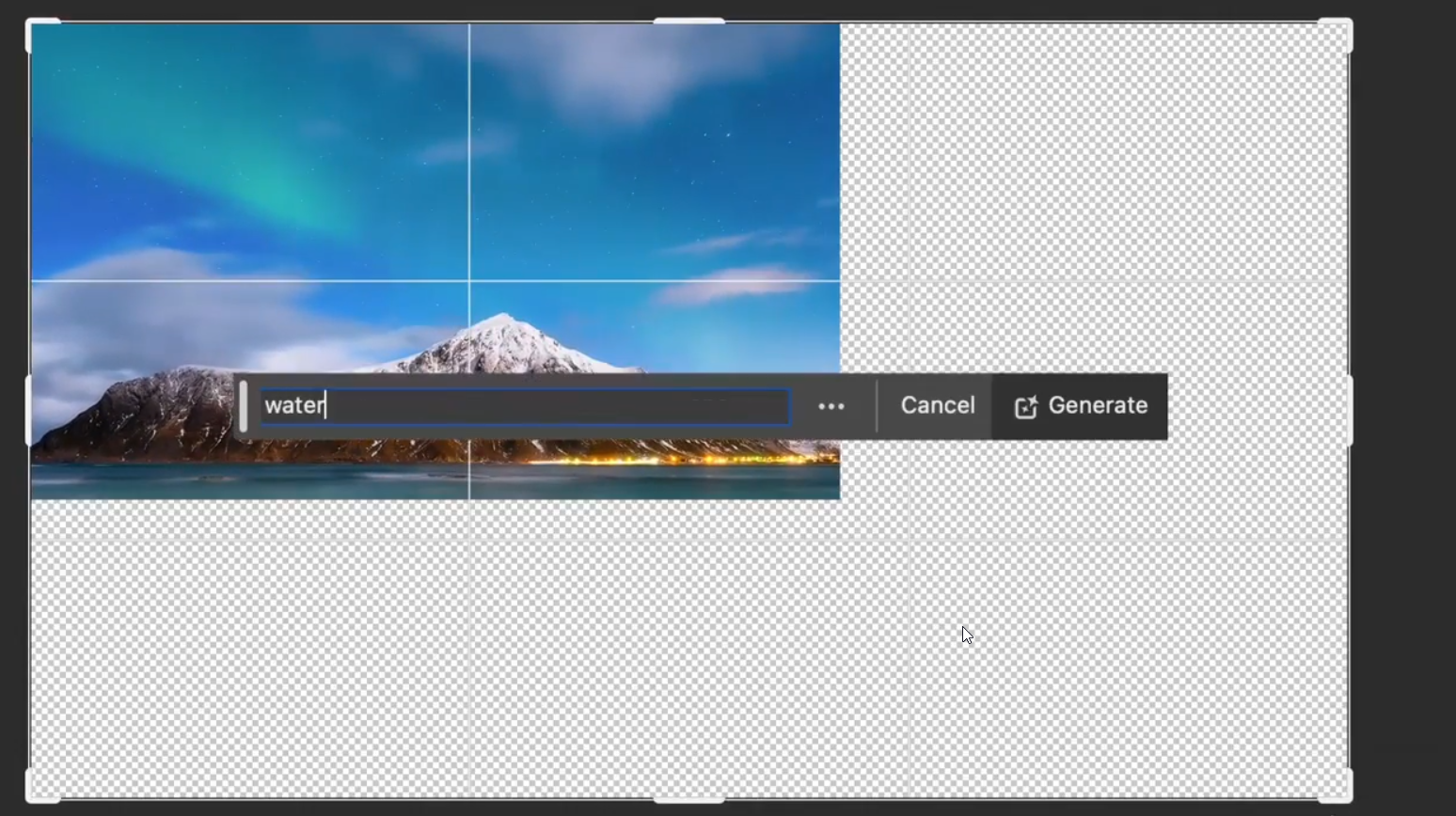
Adobe Photoshop’s Generative Expand is currently one of the most reliable AI image extender tools available. Built directly into Photoshop and powered by Adobe Firefly, it’s designed for professionals who need consistent, high-quality results.
You can extend images in any direction, regenerate multiple variations, and fine-tune the output with traditional Photoshop tools. It’s especially strong for product photos, marketing visuals, and editorial images where realism matters.
2. Adobe Firefly (Web Version)
If full Photoshop feels like overkill, Adobe Firefly’s web version is a great alternative. It offers AI image extension with impressive quality in a much simpler interface.
For many users, this is the best balance between power and ease of use. It also includes an AI image extender free tier, making it ideal for testing or occasional use.
3. Canva Magic Expand
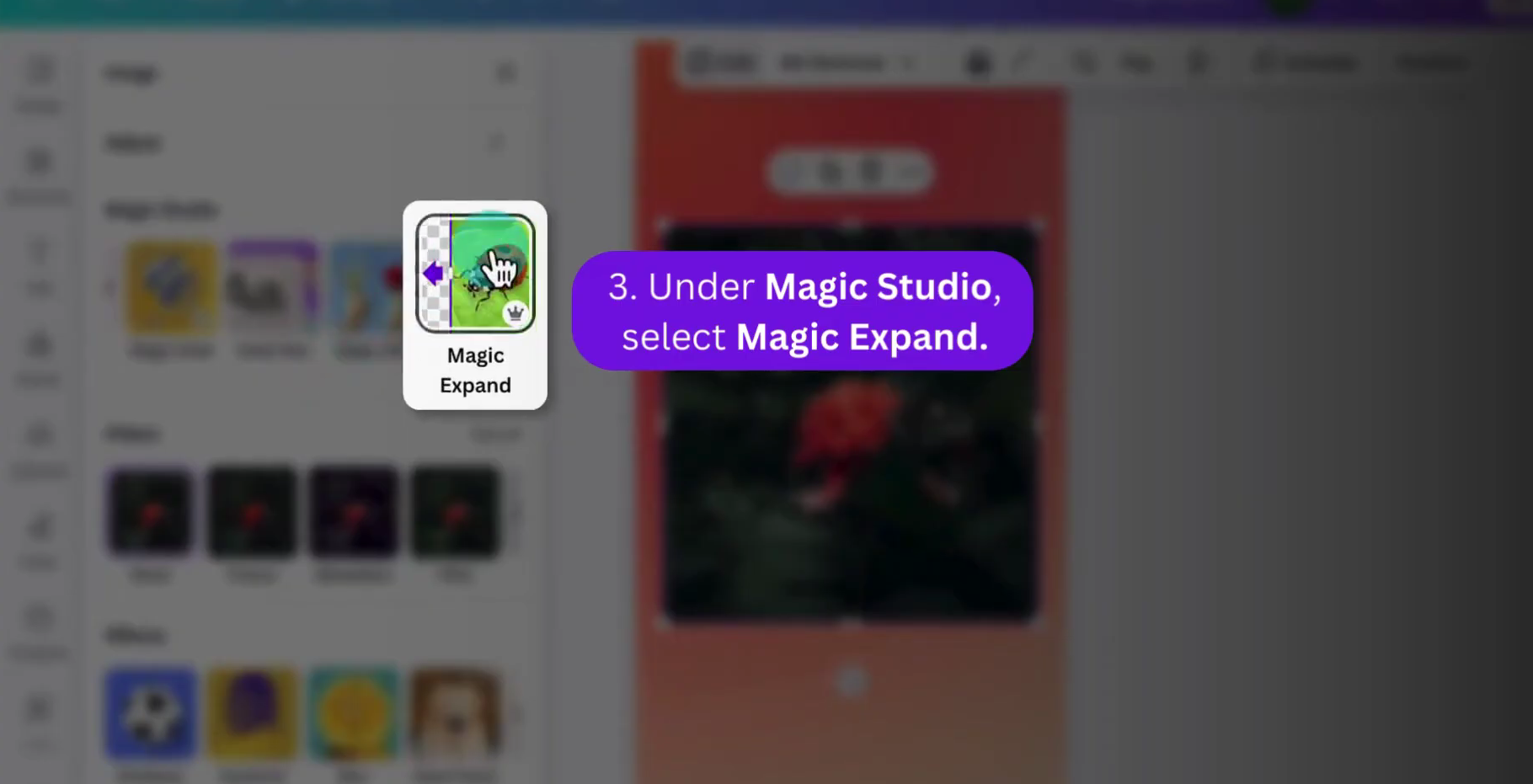
Canva Magic Expand is designed for speed and simplicity. You upload an image, choose the new size, and Canva handles the extension automatically.
While it doesn’t offer deep control, it’s more than good enough for social media posts, ads, thumbnails, and presentations. For fast extend image AI tasks, Canva is one of the easiest tools to recommend.
4. DALL·E Outpainting (via ChatGPT)
DALL·E’s outpainting feature allows you to extend images creatively rather than strictly realistically. It’s especially useful for artistic images, illustrations, and conceptual visuals.
With the right prompts, it can still produce realistic results, but its real strength is creative flexibility. If you want imagination rather than perfection, this is a strong option.
5. Leonardo AI Canvas
Leonardo AI offers a canvas-based workflow that gives you more control than one-click tools. You can guide the AI more precisely and refine the extended areas in steps.
It’s popular with game designers and concept artists, but it also works very well as an image extender AI for general creative and marketing work.
6. Midjourney Zoom Out
Midjourney’s Zoom Out feature lets you extend images while preserving their artistic style. It’s not designed for strict realism, but it’s excellent for stylized visuals, posters, and creative compositions.
If your goal is visual impact rather than photorealism, this tool delivers unique results.
7. Clipdrop Uncrop
Clipdrop Uncrop focuses on simplicity. Upload an image, select how much you want to extend it, and let the AI handle the rest.
It’s fast, intuitive, and surprisingly accurate for everyday use. There’s also a limited AI image extender free option, which makes it great for quick fixes.
How to Choose the Best AI Image Extender for Your Needs
Key Features to Look for in an AI Image Extender Tool
When choosing a tool, focus on realism, resolution handling, control options, and export quality. Some tools prioritize speed, while others prioritize precision.
The best AI image extender is the one that fits your workflow, not necessarily the most advanced one.
Free vs Paid AI Image Extender: What’s the Real Difference?
Free tools are perfect for testing and light use, but they often limit resolution, exports, or commercial rights. Paid tools usually offer higher quality, better consistency, and peace of mind for professional projects.
AI Image Extender for Beginners vs Professionals
Beginners should prioritize ease of use and automation. Professionals should look for tools that allow refinements, iterations, and integration with existing design workflows.
Common Use Cases for AI Image Extender Tools
Expanding Images for Social Media and Thumbnails
Different platforms demand different aspect ratios. AI image extenders make it easy to adapt one image for multiple platforms without re-shooting.
Extending Backgrounds for Websites and Landing Pages
Website hero sections often need wide, clean backgrounds. AI extend image tools are perfect for filling empty space naturally.
Using an AI Image Extender in Design and Marketing Workflows
From ads and banners to product images and blog visuals, AI image extenders save time, reduce costs, and increase creative flexibility.
Limitations and Risks of Using an AI Image Extender
When AI Image Extension May Reduce Image Realism
AI can struggle with faces, text, logos, and complex patterns. These areas often need manual review or correction.
How to Avoid Over-Generated or Unrealistic Results
Extend images gradually, regenerate multiple variations, and don’t rely on AI alone. Human judgment still matters.
Conclusion: Is an AI Image Extender Worth Using in 2025?
The short answer is yes. AI image extender tools have moved far beyond gimmicks. They’re now practical, reliable, and genuinely useful across creative industries.
If you work with visuals in any serious way, being able to extend image AI-style without ruining quality is no longer optional — it’s a competitive advantage.
Find More: Boost Your Sales With SEO Services
FAQs
1. What is the best AI image extender for high-quality results?
Adobe Photoshop Generative Expand currently delivers the most consistent and professional results, especially for commercial work.
2. Can an AI image extender expand images without losing resolution?
Yes. High-quality tools generate new pixels instead of stretching existing ones, preserving sharpness and detail.
3. Are there any AI image extender free options?
Yes. Canva, Clipdrop, and Adobe Firefly all offer limited free usage suitable for basic needs.
4. How accurate is extend image AI for complex backgrounds?
It’s very accurate for natural scenes and textures, but complex elements like text and logos may need manual adjustments.
5. Is it safe to use AI image extenders for commercial projects?
Most paid tools allow commercial use, but you should always review the licensing terms before publishing or selling the results.