
Securing high-quality sound for creative projects often involves significant financial hurdles. Studio time, session musicians, and licensing fees quickly drain available resources. However, modern technology offers a practical alternative. Musick AI, an advanced AI Music Generator, provides a robust solution for cost-conscious creators.
It allows users to produce professional-grade tracks without heavy expenses. This guide explores actionable strategies to create tailored soundscapes efficiently. By utilizing an AI Song Maker, producers can bypass traditional barriers and maintain full creative control.
I. Defining the Core Project Requirements
1. Selecting the Appropriate Genre
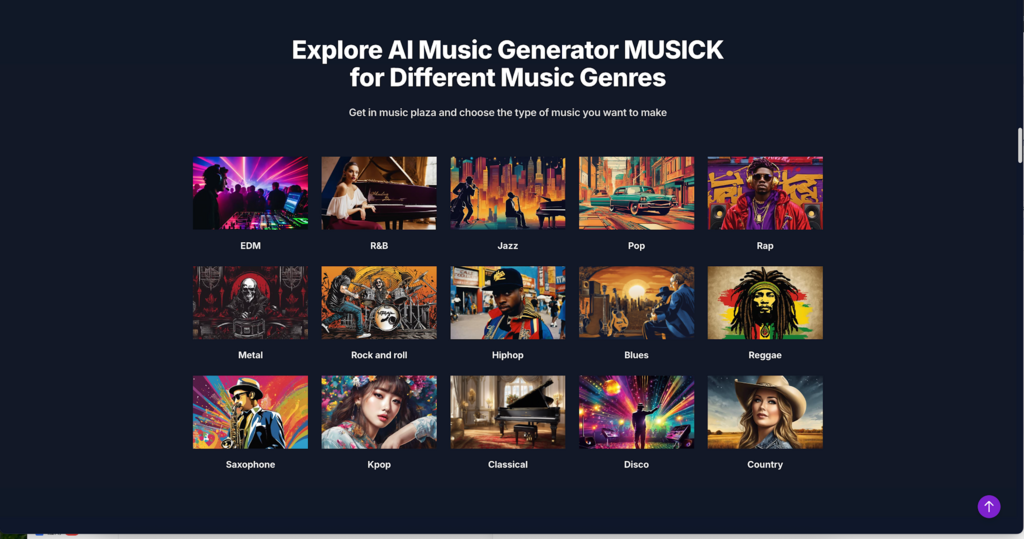
Every project requires a specific acoustic foundation. The initial step is to choose from an extensive plaza of genres available on the site. Options include EDM, R&B, Jazz, Pop, Rap, Metal, Rock and roll, Hiphop, Blues, Reggae, Saxophone, Kpop, Classical, Disco, and Country.
Picking the right category ensures the underlying harmonic structure fits the visual or thematic elements perfectly. A corporate video might need Jazz, while a high-energy vlog benefits from Pop.
2. Establishing the Target Mood
Once the genre is set, defining the emotion is critical. The system responds highly to mood descriptors. Creators must decide if the scene requires a positive, uplifting vibe or a dark, suspenseful tone.
Providing emotional context helps the engine generate appropriate chord progressions. Specificity guarantees the final track resonates with the intended audience.
3. Deciding Between Vocal and Instrumental Focus
Audio tracks serve different purposes depending on the medium. A podcast intro might need an engaging vocal hook. Conversely, a voiceover video requires a subtle background track.
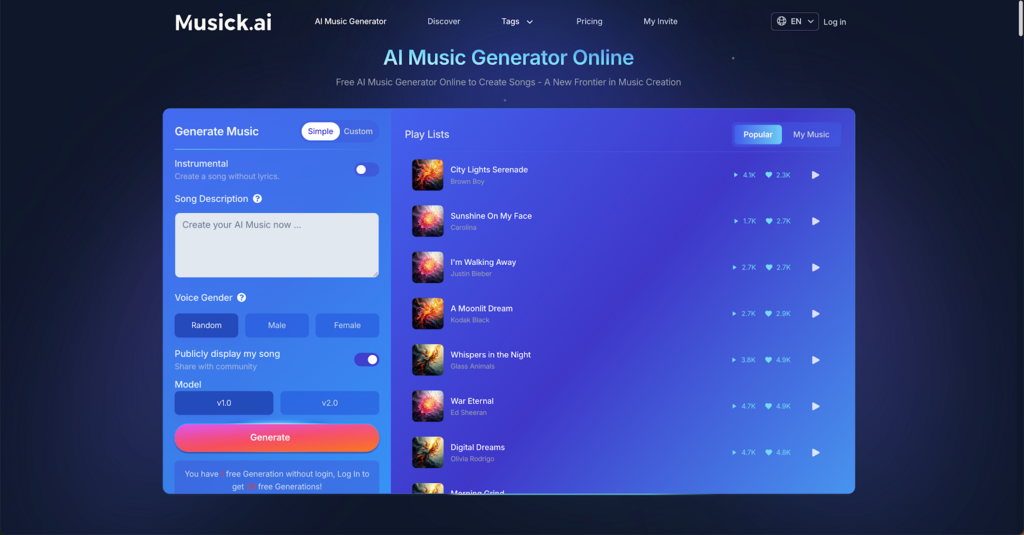
Users can easily toggle the ‘Instrumental’ setting to generate a song completely without lyrics. This ensures the music never competes with the primary dialogue.
4. Structuring the Song Composition
A professional track features a clear beginning, middle, and end. Creators should envision the desired structure before generating. This includes planning for an intro, verse, chorus, bridge, and outro.
Having this blueprint ready makes the prompt writing stage significantly more effective. It reduces the need for constant regeneration and saves valuable time.
II. Mastering the Text-to-Audio Prompt System
1. Writing Highly Descriptive Prompts
The text box is the control center for customization. Vague requests yield generic results. Instead, users should input detailed descriptions like “acoustic pop about the holidays.”
Specifying the tempo, such as 120 BPM, and the desired instruments directs the engine accurately. Mentioning bright synths or a lively bassline produces a highly targeted output.
2. Selecting the Vocal Gender
When a lyrical track is required, controlling the vocal characteristics is essential. The interface offers direct options to choose the vocalist’s gender.
Users can select Male, Female, or Random depending on the project’s aesthetic. This simple choice drastically alters the track’s final impact and emotional delivery.
3. Choosing the Right Processing Model
The engine provides different algorithms for rendering the final audio. Creators can select between the v1.0 and v2.0 models.
The v2.0 model handles complex harmonies and higher audio fidelity. Testing both models allows producers to find the exact texture needed for their specific mix.
4. Testing Short Audio Loops
Time is an important resource, especially when working with strict constraints. Instead of waiting for a full-length track immediately, users can generate short music loops.
These loops typically range from fifteen to thirty seconds. This feature allows for rapid iteration and immediate quality control before extending the track.
III. Utilizing Advanced Composition Features
1. Generating Custom Lyrics
Not every creator is a seasoned songwriter. To overcome this, the AI Song Lyrics Generator acts as a built-in writing assistant.
By inputting the chosen music genre and theme, the tool automatically generates matching lyrical notes. This removes the barrier of writer’s block completely.
2. Structuring Rhythmic Beats
For projects relying heavily on percussion, standard melodies might not suffice. The AI Beat Producer allows users to write down specific melody notes.
This function translates those notes into a precise rhythm. It is ideal for creating energetic backgrounds for fast-paced video editing.
3. Designing Rap Configurations
Hip-hop and rap require unique cadences and structural designs. The AI Rap Generator caters specifically to these needs.
Users can design their music sheets or playlists tailored to the genre. This ensures the generated flows sound authentic and rhythmically accurate.
4. Exploring Comprehensive Capabilities
By combining these sub-tools, the software functions as a versatile AI Music Maker. Creators can piece together the lyrics, beats, and overall structure seamlessly.
This integrated approach mimics a full studio environment. It empowers single users to execute tasks that normally require a whole team.
IV. Applying the Output Across Different Fields
1. Enhancing Social Media Content
Content creators on YouTube, Instagram, Facebook, and Twitter need constant access to fresh audio. Custom tracks prevent automated copyright strikes, which can negatively impact channel growth.
High-quality AI Music ensures social media content remains engaging. It also keeps the channel legally safe from infringement claims.
2. Supporting Independent Game Development
Game developers operate under notoriously tight budgets. They require varied background music and sound effects for different levels and menus.
Generating custom loops on demand provides an endless supply of assets. This keeps the game’s atmosphere immersive without draining development funds.
3. Aiding Educational and Theatrical Projects
Schools and educational programs benefit greatly from accessible audio creation. Students and teachers can craft unique pieces for high school musicals or class presentations.
It provides a hands-on learning experience regarding audio production. It also eliminates the need to purchase expensive sheet music or performance rights.
4. Facilitating Therapeutic Audio Sessions
Audio has a profound impact on mental well-being. The system can generate calming, repetitive acoustic loops tailored to specific relaxation needs.
Users can curate their favorites into a repository used for therapy. These customized sounds are highly effective at curing unhappiness and reducing stress.
V. Managing Workflow and Ensuring Compliance
1. Curating a Personal Music Library
Organization is key when handling multiple audio files. The interface includes a ‘My Music’ section for managing creations.
Users can easily categorize tracks, review previous generations, and build specific playlists. This keeps the production workspace tidy and efficient.
2. Downloading Audio Stems and Files
Once a track meets all requirements, immediate access is necessary. The software allows for immediate downloads of the generated files.
Creators can then import these files directly into their preferred video editing or audio mixing software. This ensures a frictionless transition from generation to final post-production.
3. Navigating Commercial Licensing
A major concern for budget production is legality. Musick AI ensures its underlying music library is created with strict adherence to copyright laws.
This guarantees that the rights and intellectual property of artists are protected. Users can confidently deploy the generated tracks in commercial environments.
4. Collaborating with Creative Teams
Audio production often involves multiple stakeholders. The software supports sharing ideas and edits with friends or colleagues.
This collaborative feature means a director can review a short loop generated by an editor before final approval. It streamlines team communication significantly.
VI. Finalizing Your Audio Strategy
Securing professional audio on a tight budget is entirely straightforward. By using Musick AI, creators easily bypass expensive studio fees and complex copyright hurdles. Simply provide clear text descriptions, choose the desired genre, and let the AI Music Maker handle the composition. This practical approach ensures any project receives a customized, high-quality soundtrack while keeping financial resources strictly protected.