

Telegram stories have quickly become one of the easiest ways for people, brands, creators, and communities to share quick updates. From behind-the-scenes clips to personal photos, short announcements, and daily moments, Telegram stories now feel like a natural part of how people use the app.
But there is one question many users keep asking: is there a way to view Telegram stories privately? That is where the idea of a Telegram story viewer comes in.
Some people want to check public Telegram stories without logging in. Others want to preview stories from channels, creators, or contacts without opening the Telegram app. Some are simply looking for a cleaner way to browse content, especially when they do not want to interact directly.
In this guide, we will break down what a Telegram story viewer is, how these tools usually work, what you should be careful about, and which types of Telegram story viewer tools are actually worth considering. The goal is simple: help you understand the safest, most practical options before you use any Telegram story viewer online.
What Is a Telegram Story Viewer?
A Telegram story viewer is a tool, website, or feature that helps users view Telegram stories in a more convenient way. Depending on the tool, it may allow you to browse public Telegram stories, view story previews, access public channel updates, or check story-style content without opening the Telegram app directly.
In simple words, it is usually designed for people who want to see Telegram stories faster, more privately, or from a browser.
However, there is something important to understand. Telegram is a privacy-focused platform. Not every story is public. Some stories are only visible to selected contacts, close friends, premium users, or specific groups chosen by the person who posted them. A real Telegram story viewer cannot magically bypass Telegram privacy settings.
So when a tool claims it can show any private Telegram story, that should be a warning sign. A safe Telegram story viewer should focus on publicly accessible content, account-friendly browsing, and a clean user experience. It should not ask for your Telegram password, login code, two-factor authentication code, or private account access.
Why People Use Telegram Story Viewer Tools
There are many reasons why someone may search for a Telegram story viewer. Not all of them are suspicious or invasive. In many cases, users simply want a better way to browse public content.
For example, marketers may want to monitor public Telegram channels in their niche. Content creators may want to see how competitors use stories. Users may want to preview public updates without switching apps. Some people may also want to avoid accidental taps, reactions, or visibility when checking stories.
- To view public Telegram stories from a browser
- To check updates without opening the Telegram app
- To browse stories more quickly
- To avoid accidental reactions or messages
- To monitor public channels and creators
- To research content ideas
- To keep personal browsing separate from their main Telegram account
A good Telegram story viewer should make this process simple. It should not make the user feel unsafe, confused, or forced to share sensitive information.
Can You View Telegram Stories Anonymously?
The honest answer is: it depends on the story, the privacy setting, and the method used.
If a Telegram story is public or belongs to a public channel, it may be easier to preview or access through certain tools. But if the story is private, restricted to contacts, or limited to selected users, a third-party viewer should not be able to access it without permission.
Some Telegram users also have privacy controls that show who viewed their stories. If you view a story directly from your Telegram account, your profile may appear in the viewer list depending on the story owner settings and Telegram current features.
That is why many users look for alternative Telegram story viewer tools. But you should be careful with tools that promise 100% anonymous viewing of all Telegram stories. Many of these claims are exaggerated. A Telegram story viewer can help with public story discovery and convenient viewing, but it should not be treated as a tool for bypassing private content.
Top 8 Telegram Story Viewer Tools and Methods in 2026
Below are the best types of Telegram story viewer options to consider. Some are online tools, while others are practical methods that help you view Telegram story content more safely and conveniently.
1. StoryViewerTools Telegram Story Viewer
Best for: simple public Telegram story viewing and beginner-friendly browsing.
A dedicated Telegram story viewer on StoryViewerTools can be one of the easiest options for users who want a clean, direct, and focused experience. Instead of downloading apps, installing extensions, or giving access to your Telegram account, the idea is to use a browser-based tool designed around speed, simplicity, and privacy-friendly browsing.
The best thing about this type of Telegram story viewer is that it removes unnecessary steps. You do not need to learn complicated settings. You do not need to connect your account. You simply use the tool to search, preview, or access available Telegram story content where supported.
For a site like StoryViewerTools, the page should focus on three things: ease of use, privacy awareness, and realistic expectations. Users should immediately understand what the tool can do and what it cannot do.
- A search or input box
- Clear instructions
- No login requirement
- Fast loading speed
- Mobile-friendly layout
- Safe privacy disclaimers
- Related tools for profile viewing and status viewing
This is also the type of tool that works well for non-technical users. Many people searching for Telegram story viewer tools do not want a complex dashboard. They want a simple page that gives them what they need quickly.
Why it stands out: it can become a strong central tool page for users searching specifically for Telegram story viewing. Best use case: checking publicly available Telegram story content from a clean browser interface.
Internal link idea: link to /telegram-story-viewer with the anchor Telegram Story Viewer.
2. Telegram Official App
Best for: viewing stories safely inside Telegram.
The official Telegram app is still the safest way to view Telegram stories. It gives users the most accurate experience because it follows Telegram own privacy rules, story settings, and account permissions.
If someone has allowed you to view their story, you can see it directly inside the app. If they have restricted it, you will not be able to see it. This is exactly how Telegram privacy system is designed to work.
The downside is that viewing stories from your own Telegram account may show your profile in the viewer list. For users who want more privacy, this may not be ideal. But from a safety point of view, the official app is still the most reliable option.
It is also the best option for users who care about account security. You are not giving your details to unknown websites. You are not entering login codes into random tools. You are simply using Telegram the way it was intended.
Why it stands out: it is the safest and most accurate option. Best use case: viewing stories from contacts, channels, and communities you already follow.
3. Telegram Web
Best for: viewing Telegram stories from desktop or browser.
Telegram Web is another practical option for users who prefer browsing from a computer. It is not exactly a third-party Telegram story viewer, but it can be useful if you want a bigger screen, easier navigation, or a browser-based experience.
Many users prefer Telegram Web when they are working, researching, or managing multiple online tasks. Instead of switching to their phone, they can check Telegram updates from their desktop.
The main benefit is convenience. You can access your Telegram account in a browser and view available content without installing extra software. It is especially useful for marketers, virtual assistants, community managers, and creators who spend most of their time on a laptop.
However, just like the official app, Telegram Web still uses your Telegram account. That means story views may still be connected to your profile if Telegram records the view. Telegram Web is not a hidden viewer. It is simply a more convenient way to use Telegram.
4. Public Telegram Channel Browsers
Best for: discovering public Telegram content.
Some websites and directories index public Telegram channels, groups, or posts. These tools are not always designed specifically for stories, but they can help users discover public Telegram content around certain topics.
For example, if you are researching crypto communities, news channels, gaming groups, or creator updates, public Telegram directories can help you find relevant channels. From there, you may be able to check what kind of story-style content they share.
This method is useful for research. It is not the same as viewing private stories. Instead, it helps users find public Telegram ecosystems.
- Finding public channels by niche
- Researching competitors
- Discovering creators
- Monitoring public communities
- Building content ideas
- Understanding how Telegram audiences behave
For SEO, this is an important angle. Many people searching for Telegram story viewer tools are not only interested in anonymous viewing. Some are marketers or researchers looking for public content signals.
5. Browser-Based Preview Tools
Best for: quick access without installing an app.
Browser-based preview tools are popular because they feel simple. You visit a website, enter a username, channel name, or public link, and the tool tries to show available content. This is the category most people imagine when they search for Telegram story viewer online.
The advantage is clear: no download, no complicated setup, and no app installation. For casual users, this is very attractive.
But this category also has the highest risk. Some websites use attractive words like anonymous Telegram viewer, private Telegram story viewer, or view any story without account just to get clicks. Once you arrive, they may push ads, redirects, surveys, suspicious downloads, or fake login forms.
- Your Telegram password
- Your SMS verification code
- Your two-factor authentication code
- Your recovery email access
- Your device permissions
- Payment before showing what the tool does
If a tool asks for these things, leave immediately. The best browser-based tools are transparent. They explain that access depends on public availability and Telegram privacy limits.
6. Social Media Monitoring Tools
Best for: brands, agencies, and marketers.
Some social media monitoring platforms help brands track public content across multiple platforms. Telegram is sometimes included in broader monitoring workflows, especially for public channels, communities, and brand mentions.
These tools are not made for casual anonymous story viewing. They are usually made for businesses, researchers, agencies, and analysts.
If you are running an SEO project, managing a Telegram community, or studying competitors, this type of tool can be very useful. It helps you understand what people are posting, what topics are trending, and how audiences react to certain content.
- Track public brand mentions
- Follow competitor updates
- Identify trending topics
- Monitor public channels
- Collect content ideas
- Understand audience behavior
The downside is that many of these tools are paid, more complex, and not focused only on stories. They may also require setup, dashboards, keywords, and filters. Still, for serious marketing work, they can be more reliable than random free viewer sites.
7. Telegram Story Saver Tools
Best for: saving your own or allowed public story content.
Some users search for Telegram story viewers because they actually want to save or download story content. This is where Telegram story saver tools come in.
A Telegram story saver may help users save available story media, especially if it is public or belongs to their own account. However, this area needs extra care. Saving someone else content without permission can create privacy, copyright, and ethical issues.
- Your own stories
- Public content where saving is allowed
- Content you have permission to download
- Research material used responsibly
- Brand content you manage
You should avoid tools that encourage downloading private content, reposting personal media, or bypassing restrictions. For StoryViewerTools, this can become a supporting page or feature, but the wording should stay careful. It should be framed as a practical way to save accessible content responsibly.
Internal link idea: link to /status-downloader with the anchor status downloader.
8. Manual Privacy-Friendly Viewing Methods
Best for: users who want safer habits without third-party tools.
Not every solution needs to be a tool. Sometimes, the safest way to view Telegram stories more privately is to adjust how you use Telegram.
For example, users can review their privacy settings, control who sees their own stories, avoid accidental reactions, mute certain accounts, or use Telegram Web for cleaner browsing.
- Checking story privacy before posting
- Using Telegram Web for desktop viewing
- Avoiding suspicious third-party tools
- Not clicking unknown Telegram links
- Not entering login codes outside Telegram
- Creating separate workflows for research
- Following only trusted public channels
These habits will not make you invisible, but they reduce risk. For most everyday users, manual privacy-friendly viewing is often better than using unknown websites. It keeps your account safer and helps you avoid scams.
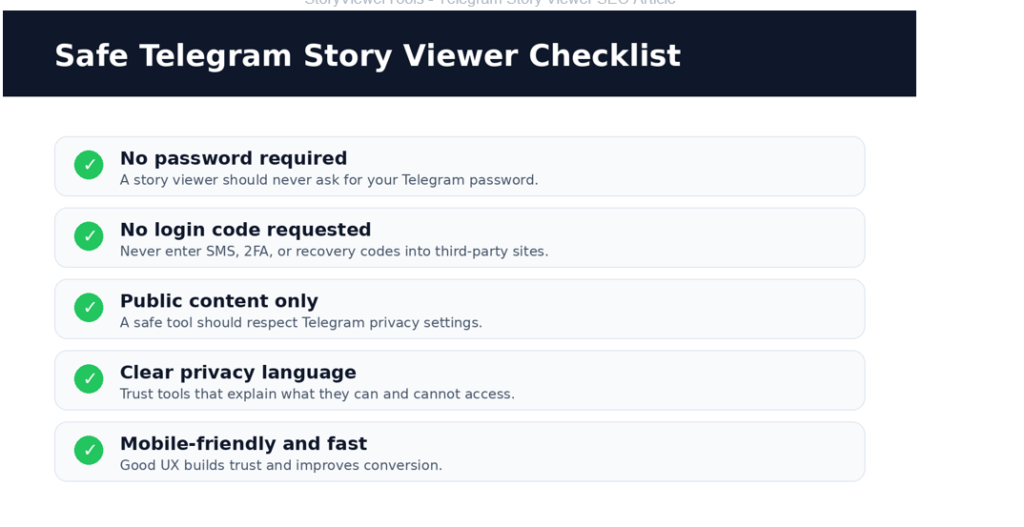
Image: Safety checklist for evaluating Telegram story viewer tools.
How to Choose the Best Telegram Story Viewer
Before using any Telegram story viewer, ask yourself a few questions. First, does the tool ask for your Telegram login details? If yes, avoid it. No basic story viewer should need your password or verification code.
Second, does the tool promise to unlock private stories? If yes, be careful. That type of promise is usually unrealistic and unsafe.
Third, does the tool explain what it can and cannot do? A trustworthy tool should be honest. It should say that private stories are protected by Telegram privacy settings.
Fourth, does the website look clean and professional? A page filled with pop-ups, fake buttons, redirects, and aggressive download prompts is not a good sign.
Fifth, is the tool useful on mobile? Many people search for Telegram story viewer tools from their phones, so the experience should be fast and responsive.
- Easy to use
- Browser-based
- No-login
- Mobile-friendly
- Clear about privacy limits
- Focused on public or accessible content
- Free from suspicious downloads
- Fast and simple
A good tool does not need to make crazy promises. It just needs to solve the user problem clearly.
Are Telegram Story Viewer Tools Safe?
Some are safe. Many are not. The safety depends on how the tool works. If it only helps you browse public information and does not ask for private account access, it is generally lower risk. But if it asks you to log in, install unknown software, complete suspicious surveys, or enter verification codes, it is risky.
Telegram accounts are valuable. They may contain private chats, business contacts, groups, channels, payment discussions, and personal files. Losing access to your account can create serious problems.
- View any private Telegram story
- Enter your Telegram code to continue
- Download this file to unlock stories
- Complete human verification with endless offers
- Too many pop-ups or redirects
- No privacy policy
- No explanation of how the tool works
- Fake comments or fake progress bars
If you see these signs, close the page. A safe Telegram story viewer should make the experience easier, not riskier.
Image: Topical SEO cluster map for Telegram story viewer content.
Telegram Story Viewer vs Telegram Profile Viewer
A Telegram story viewer and a Telegram profile viewer are related, but they are not the same.
A Telegram story viewer focuses on viewing story-style updates. These are temporary posts shared by users, channels, or contacts. A Telegram profile viewer focuses more on profile information, such as username, display photo, bio, public links, and visible account details.
Users often search for both because they want to understand more about a Telegram account before interacting with it. For example, someone may want to check a public profile, then see if that account has story updates.
For topical SEO, these two pages should support each other. Link from Telegram Story Viewer to Telegram Profile Viewer, from Telegram Profile Viewer to Telegram Story Viewer, from both pages to a privacy guide, and from both pages to the main story viewer hub.
Internal link idea: link to /profile-viewer with the anchor Telegram profile viewer.
Telegram Story Viewer for Marketers
Telegram is not only a messaging app. It is also a powerful content and community platform. Many brands, creators, crypto projects, SaaS companies, media pages, and private communities use Telegram to communicate with their audience.
That makes Telegram story content useful for marketers. A marketer may use a Telegram story viewer to study competitor story formats, find content ideas, track public campaign updates, monitor creator activity, understand how communities communicate, watch public announcements, and compare engagement styles.
For example, if a competitor is using Telegram stories to promote limited-time offers, product launches, or community updates, you can learn from their structure. Are they using short videos? Screenshots? Polls? Urgency? Behind-the-scenes content? Daily updates?
These insights can help you create better content for your own Telegram audience. But the key is to focus on public and ethical research. You do not need to access private stories to learn from your market. Public content is often enough.
Best Practices Before Using Any Telegram Story Viewer
Before you use a Telegram story viewer, follow these best practices. Do not enter sensitive account details. A viewer should not need your password or verification code.
Use tools that clearly explain their limitations. Honest tools are safer than tools that promise impossible access. Do not download unknown apps or files. Browser-based tools are usually safer than random APKs or desktop programs.
Respect privacy. If someone restricted their story, that choice should be respected. Use public content for research. Public channels, creators, and communities can offer plenty of useful insights without crossing privacy boundaries.
Keep your Telegram account secure. Use two-step verification, keep your recovery email updated, and avoid suspicious links. These small habits can protect you from most common risks.
FAQ About Telegram Story Viewer Tools
What is the best Telegram story viewer?
The best Telegram story viewer is one that is simple, browser-based, privacy-aware, and does not ask for your Telegram password or login code. For public story content, a dedicated tool like StoryViewerTools can provide a cleaner experience.
Can I view Telegram stories without an account?
Some public Telegram content may be accessible without logging in, depending on the source and privacy settings. Private or restricted stories usually require permission inside Telegram.
Can I view private Telegram stories anonymously?
You should be careful with any tool claiming it can unlock private Telegram stories anonymously. Private stories are protected by Telegram privacy settings, and tools that promise full access are often unsafe or misleading.
Is a Telegram story viewer free?
Many Telegram story viewer tools are free, especially basic browser-based tools. However, some advanced monitoring or analytics platforms may require a paid subscription.
Is it safe to use Telegram story viewer websites?
It depends on the website. Avoid any tool that asks for passwords, Telegram codes, downloads, or suspicious verification steps. Safer tools focus on public content and do not require account access.
Can someone know if I viewed their Telegram story?
If you view a story directly from your Telegram account, your view may be visible depending on Telegram story settings. Third-party tools may work differently, but no tool should be trusted blindly.
Can I download Telegram stories?
You may be able to save your own stories or public content where downloading is allowed. Avoid downloading or reposting someone else private content without permission.
What is the difference between Telegram story viewer and Telegram profile viewer?
A Telegram story viewer focuses on story updates. A Telegram profile viewer focuses on visible profile information such as username, profile photo, bio, and public account details.
Final Thoughts
A Telegram story viewer can be useful, but only when you use it with realistic expectations.
The best tools are not the ones making the loudest promises. The best tools are the ones that are simple, safe, fast, and honest about what they can do.
If you want to view public Telegram story content, research creators, monitor channels, or browse updates more conveniently, a browser-based Telegram story viewer can be a smart option. But if a website promises to show private stories, asks for your Telegram login code, or pushes suspicious downloads, it is better to leave.
Telegram is built around privacy, and that matters. A good Telegram story viewer should respect those boundaries while helping users access public and available content more easily.
For the safest experience, use trusted tools, avoid sharing sensitive account details, and focus on public story viewing. That way, you can explore Telegram content without putting your account or privacy at risk.
