...
UK: +44 2038074555 info@atamgo.com
7 Powerful Reasons You Need a Shopify Expert

7 Powerful Reasons You Need a Shopify Expert

shopify expert

Introduction — Why Hiring a Shopify Expert Can Transform Your Online Store

A Shopify Expert is often the missing piece between a store that simply exists and a store that consistently makes sales. It doesn’t matter if you’re launching your first eCommerce business or trying to scale something that’s already growing—having someone who actually understands the platform at a deep technical and strategic level can completely change the direction of your results. Most people think Shopify is easy because it gives you a simple dashboard. But when you start dealing with design, development, apps, speed, SEO, and conversions all at once, you quickly realize that doing everything by yourself leads to stress, wasted time, and a store that never reaches its full potential.

Shopify experts help you avoid the mistakes that hold most businesses back. They know how customers behave, how the platform reacts, what Google wants, and what actually increases sales instead of just making your store look “nice.” This is where professional support—from expert Shopify developers to dedicated Shopify SEO experts—becomes essential.

Atamgo works with a skilled team of Shopify specialists who handle everything from custom development to performance optimization and SEO improvements. Our goal is to help brand owners build stores that sell, scale, and stand out from competitors. Before we go into the core reasons, it’s important to understand that hiring a real Shopify Expert saves you months of trial, error, confusion, and wasted money.

Find More: 7 Powerful Shopify SEO Services That Skyrocket Your Store’s Traffic

Reason #1 — A Shopify Expert Builds a Conversion-Focused Store Structure

Optimizing Layouts for User Experience

shopify mobile speed optimization

Most people underestimate how sensitive visitors are to layout structure. If the first impression isn’t clear, trustworthy, and visually appealing, they leave immediately. A Shopify Expert understands how to guide visitors through a natural journey—from your homepage, to your collections, to your product pages, and finally to checkout.

They understand how to use visual hierarchy, spacing, color psychology, trust indicators, and product placement to boost sales without overwhelming the visitor. They also know what modern customers expect—clean layouts, fast loading pages, and a frictionless buying process.

How Experts Use Data to Increase Sales

Professionals don’t rely on “opinions.” They follow data. Tools like Google Analytics, Hotjar, Clarity, and other behavior-tracking systems reveal how people interact with your store. Shopify experts use this information to identify where customers drop off, what areas create confusion, and which elements need improvement.

This data-driven approach allows them to fix problems that store owners don’t even notice—such as unclear product images, weak CTAs, poor variant structures, or distracting sections. Every small improvement adds up to higher conversions.

Reason #2 — Advanced Theme Customization You Can’t Do Alone

Tailoring Premium Themes for Brand Identity

A theme alone doesn’t create a brand. Most stores using the same theme look identical because owners don’t know how to make advanced customizations. A real developer understands how to edit Liquid code, CSS, and JavaScript to create a store that looks professional, unique, and aligned with your brand identity.

They can redesign sections, add unique layouts, improve visual storytelling, and remove unnecessary parts that slow down your pages. This creates a cohesive brand experience that actually builds trust and increases conversions.

Fixing Hidden Theme Issues That Hurt Conversions

Many themes contain bloated sections, old scripts, unused features, or bugs that cause slow performance. These issues may not be visible, but they impact SEO and customer experience.

A Shopify Expert knows how to clean up the code, fix bugs, improve mobile responsiveness, and eliminate conversion-killing issues like broken forms, inconsistent spacing, or layout glitches.

Reason #3 — A Shopify Expert Improves Site Speed & Performance

Speed Optimization Techniques Used by Professionals

shopify

A slow store is a dead store. Research shows that if a page takes more than three seconds to load, visitors immediately lose interest. Shopify experts know exactly how to improve performance by compressing images, cleaning scripts, eliminating unused code, using lazy loading, and optimizing apps.

They also track your Core Web Vitals to ensure your store meets Google’s performance standards. This reduces bounce rate and directly increases conversion rate.

Why Faster Stores Rank Higher on Google

Google loves fast websites. When your store performs well, your ranking improves. But achieving strong SEO requires much more than just fast speed—it requires technical optimization. A shopify seo expert helps you fix structural SEO issues, improve internal linking, optimize product pages, and add structured data.

Better performance = better ranking = more organic traffic = more sales.

Reason #4 — Better Product Page Optimization & Merchandising

Winning Product Descriptions Written by Experts

Your product pages determine whether someone buys or leaves. Many store owners write basic descriptions that focus on features instead of benefits. A Shopify Expert knows how to write descriptions that connect emotionally, answer objections, and highlight value.

They also optimize titles, bullets, images, and layout to guide buyers toward purchasing. This alone can drastically improve conversions.

Image, Variant, and Pricing Optimizations That Drive Conversions

Product images must be clean, consistent, and high quality. Variants must be easy to select. Pricing needs to be presented in a way that feels transparent and trustworthy. Experts know how to structure your product pages so customers feel confident and ready to buy.

This also includes trust badges, guarantees, shipping information, FAQs, and reviews—all strategically placed to push the customer toward checkout.

Reason #5 — Access to Advanced Apps, Automations & Integrations

Choosing the Right Apps Without Slowing Your Store

Using too many apps slows your store down. Using the wrong apps creates conflicts and errors. Shopify experts know exactly which apps are reliable and which ones can hurt your performance.

They help you choose the right tools for:

  • Upselling & cross-selling

  • Email & SMS marketing

  • Inventory management

  • Product reviews

  • Customer support

  • Loyalty programs

You get the benefits—without the downsides of bad apps.

Automations That Save You Hours Every Week

An expert sets up automations that handle repetitive tasks for you—so you can focus on growing your business instead of managing small details. These include:

  • Cart abandonment flows

  • Post-purchase sequences

  • Customer segmentation

  • Automatic discounts

  • Inventory notifications

  • Product restock alerts

These automations improve customer experience and keep your store running smoothly.

Reason #6 — A Shopify Expert Ensures Smooth Store Management & Scalability

Preventing Technical Issues Before They Happen

Most issues in a Shopify store can be prevented with proper setup. Experts understand the platform’s limitations and know how to avoid problems before they affect your store. This includes fixing broken code, cleaning old apps, optimizing images, and improving database structure.

This proactive approach keeps your store stable even during high-traffic events like Black Friday or major product launches.

Preparing Your Store for Long-Term Growth

Scaling isn’t just about getting more traffic. It’s about building a store that can handle more customers, more products, more orders, and more complexity. Atamgo helps store owners build stable, scalable foundations so growth happens smoothly—not painfully. Our team ensures your store has the structure needed to handle increased demand without breaking.

Reason #7 — Experts Improve Your Marketing, SEO & Conversion Strategy

SEO Best Practices Only Shopify Experts Know

SEO on Shopify is unique. It requires a combination of technical improvements, content strategy, collection structure, internal linking, product page optimization, and performance enhancement. Shopify SEO experts understand the platform’s SEO limitations and know how to work around them.

They help with:

  • Keyword research

  • Structured data

  • On-page optimization

  • Blog optimization

  • Technical SEO

  • Fixing crawl errors

  • Improving product visibility

This gives your store a real chance to rank against competitors.

CRO Techniques That Turn Visitors Into Customers

Conversion Rate Optimization (CRO) is one of the fastest paths to higher revenue. Even small improvements can lead to massive results. Experts analyze how visitors behave and apply proven techniques to improve checkout flow, increase average order value, and reduce cart abandonment.

This includes optimizing product placement, buttons, headlines, reviews, and page structure—all based on how your customers behave.

Conclusion — Why Investing in a Shopify Expert Pays Off

Hiring a Shopify Expert is one of the smartest decisions you can make if you’re serious about growing your business. It’s not just about fixing problems—it’s about building a store that’s designed for long-term success. Atamgo works with experienced Shopify experts who specialize in everything from store design to development, performance optimization, and SEO.

Whether you need a full redesign, better SEO, faster performance, or conversion improvements, investing in professional support always pays off. If you want a store that looks great, loads fast, and consistently generates sales, partnering with an expert is the move that takes you there.

Find More: Boost Your Sales With SEO Services

FAQs

1. Is a Shopify Expert worth it for small stores?

Yes—especially for small stores. A Shopify Expert helps you avoid beginner mistakes, improve your store structure, and speed up growth. What you learn and fix early can save you months of lost sales.

2. How much does it cost to hire a Shopify Expert?

Costs vary depending on experience and the type of work. Simple tasks might cost a few hundred dollars, while full development or SEO projects can cost more. What matters is ROI—experts usually help you make back the investment quickly.

3. What’s the difference between a Shopify Expert and a Shopify Developer?

A Shopify Developer focuses mostly on code and technical customization.
A Shopify Expert handles strategy, design, CRO, SEO, apps, and development.
Most businesses need the broader support a Shopify Expert provides.

4. Can a Shopify Expert help increase sales?

Absolutely. They improve your store’s speed, structure, product pages, SEO, and conversion rate. All of these directly affect sales and long-term performance.

5. How do I know if my store needs professional help?

If your store isn’t converting, loads slowly, has design issues, ranks poorly on search engines, or feels difficult to manage, you likely need a Shopify Expert. A quick audit usually reveals weak points instantly.

Tags:
10 Game-Changing Shopify Development Tips You’ll Wish You Knew Earlier

10 Game-Changing Shopify Development Tips You’ll Wish You Knew Earlier

Introduction: Why Smart Shopify Development Matters for Modern E-Commerce

Shopify development is no longer just about putting products online — it’s about building a smooth, reliable, and high-performing shopping experience that feels effortless for your visitors. Whether you’re running a new store, scaling into a major brand, or collaborating with a Shopify developer or Shopify development partners, the way your store is built plays a massive role in everything from conversion rates to long-term brand trust.
Today’s e-commerce world is noisier than ever. Consumers expect speed, simplicity, and personalization — and brands that don’t deliver lose attention instantly. This is where advanced Shopify development strategies make all the difference. Clean layouts, optimized code, fast loading speeds, and thoughtful design work together to build a store people actually want to buy from.
If you’re unsure where to start or you simply want an expert team to take over the hard technical work, Atamgo offers Shopify development services and Shopify SEO services designed to transform slow or poorly performing stores into powerful, revenue-driven machines.
Let’s dive into the 10 game-changing tips that can elevate your Shopify store more than you expect.

Find More: 7 Powerful Shopify SEO Services That Skyrocket Your Store’s Traffic

1. Optimize Your Theme Code for Faster Load Times

Minifying CSS, JavaScript, and Liquid files

Load speed is your first impression. If your site takes too long, your visitors leave before even seeing your products. Minifying your CSS, JavaScript, and Liquid files removes unnecessary characters and reduces file size, helping your store load much faster.

Removing unused code and legacy scripts

Every app you install leaves something behind. Over time, this creates a spaghetti mess of scripts and old snippets. Cleaning out unused code instantly sharpens performance and prevents theme clashes.

Leveraging Shopify’s built-in performance tools

Shopify’s Online Store Speed Report and Lighthouse integration give you a simple, visual breakdown of what’s slowing your site down. Instead of guessing, you get accurate diagnostics that help you fix the biggest issues first.

2. Use Shopify OS 2.0 Features to Unlock Flexibility

Sections Everywhere and modular store design

OS 2.0 changed everything. The ability to place sections on any page means you can build more creative layouts, test different structures, and avoid rigid templates.

Creating custom templates for improved UX

Different products require different storytelling. A gym equipment page shouldn’t look the same as a skincare product. Creating tailored templates helps your customers make confident buying decisions.

Using dynamic content blocks effectively

Dynamic blocks let you personalize what users see: custom banners, targeted offers, or special layouts for high-value products. Personalization often leads to higher engagement.

3. Improve Mobile Experience With Responsive Development

Mobile-first design principles

Offline marketing for Shopify stores

Since most shoppers browse on mobile, your design should start there. Clean spacing, easy navigation, and fast loading are essential.

Optimizing touch interactions and spacing

Buttons should be easy to tap, product images should be zoomable, and forms should be easy to fill out — no pinching or zooming needed.

Reducing mobile bloat and unnecessary features

Mobile users want clarity, not overwhelm. Remove anything that doesn’t directly support buying decisions, including heavy sliders and unnecessary animations.

4. Boost SEO With Clean Shopify Development Practices

Structuring templates for proper indexing

Clean structure helps search engines scan and understand your store. Using correct headings, schema markup, and organized Liquid loops gives Google the clarity it needs.

Optimizing URLs, meta tags, and schema

Simple, descriptive URLs and well-written meta tags drive higher rankings and better click-through rates.

Improving site architecture for crawlability

Google rewards stores that make navigation easy. Good internal linking, strong menu structure, and thoughtful breadcrumbs help both users and search engines.

5. Develop High-Converting Product Pages

Using Liquid to auto-generate dynamic elements

Liquid can help you automate tedious tasks like product specifications, variant details, or size guides. This keeps your store consistent without extra work.

Creating reusable product sections

Reusable sections save time when adding new items. They also ensure that your entire store maintains a cohesive look.

Prioritizing UX-focused layout decisions

Put everything customers need upfront: product photos, price, reviews, variations, and the add-to-cart button. The goal is to reduce the customer’s mental effort.

6. Integrate Shopify Apps Without Slowing Down the Store

Evaluating app impact on performance

Some apps add 5–10 external scripts — and that adds up. Check performance before and after installing anything.

Replacing apps with custom code where possible

Instead of using apps for simple tasks, a Shopify developer or Shopify development partner can code lightweight custom solutions that load faster.

Safely removing unused apps and leftover scripts

Uninstalled apps often leave behind code that slows your store down. Audit your theme for leftovers and remove them.

7. Leverage Shopify APIs for Custom Functionality

When to use the Storefront API vs. Admin API

The Storefront API powers storefront experiences, including headless builds. The Admin API handles backend operations like inventory management.

Building custom integrations for automation

Automated workflows save hours per week and prevent errors in stock syncing, order processing, and fulfillment.

Improving checkout experience through API enhancements

Through the API, you can build custom checkout extensions, unique discount logic, or loyalty integrations.

8. Implement Advanced Liquid Logic for Smarter Automation

Shopify Marketing Strategies

Conditional content based on customer behavior

Show returning customers one message and first-time shoppers another. Small touches like these boost retention.

Using loops and filters for dynamic elements

Loops keep your code clean and allow flexible product sections that update automatically.

Creating personalized shopping experiences

You can show: recently viewed items, best-selling products, or curated recommendations.

9. Use GitHub for Version Control and Collaborative Development

Setting up Shopify GitHub integration

Version control protects your store from accidental mistakes and makes teamwork smoother.

Creating workflows for safe deployment

Developers can test new features without affecting the live store.

Rolling back changes efficiently

If anything goes wrong, you can revert to an older version instantly.

10. Test, Monitor, and Continuously Optimize Your Store

Using Shopify’s built-in analytics

Analytics show user behavior, traffic sources, product performance, and customer flow. These insights help you make smarter decisions.

A/B testing core sections

Try testing product headlines, CTA button styles, or collection layouts to see which one performs best.

Monitoring performance with third-party tools

Third-party tools help you understand real-world performance beyond Shopify’s built-in tests.

Conclusion: Start Applying These Shopify Development Tips Today

Shopify development is a long-term investment in your business. Whether you’re optimizing code, redesigning layouts, or fine-tuning your SEO, each step adds up to a faster, smoother, more trustworthy shopping experience.
If you want expert help, Atamgo provides professional Shopify development services and Shopify SEO services tailored for brands that want to scale quickly and sustainably. Start with one improvement, then keep building — that consistency is what leads to growth.

Find More: Boost Your Sales With SEO Services

FAQs

1. What is Shopify development, and why is it important?

Shopify development refers to building, optimizing, and customizing Shopify stores. It impacts speed, SEO, and how well your store converts visitors into buyers.

2. How long does it take to develop a Shopify store?

Simple stores may take a few days. Larger, custom stores can take several weeks, especially if custom features or integrations are involved.

3. Do I need coding skills to optimize my Shopify theme?

Not always. Basic optimization doesn’t require coding, but deeper improvements benefit from a developer’s expertise.

4. How can I improve my Shopify store speed?

Compress your images, remove heavy apps, minify your theme code, reduce scripts, and simplify your layout.

5. What’s the difference between Shopify OS 1.0 and OS 2.0?

OS 2.0 allows full customization with sections everywhere, better performance, and improved flexibility for building pages.

6. Should I hire a Shopify developer or do it myself?

If you want serious growth, advanced features, or long-term scalability, working with a Shopify developer or a Shopify development partner is usually the smarter choice.

Tags:
7 Powerful Shopify SEO Services That Skyrocket Your Store’s Traffic

7 Powerful Shopify SEO Services That Skyrocket Your Store’s Traffic

shopify seo services

Introduction — Why Shopify SEO Services Matter for Serious Growth

Shopify SEO Services are no longer optional if you want your store to stand out in a crowded eCommerce market. Every day, millions of stores compete for attention, and without proper SEO, even the best products may go unnoticed. Having a well-optimized Shopify store can make the difference between being buried on page 10 of Google or showing up right where your customers are actively searching. By using targeted Shopify SEO services, you can dramatically increase traffic, improve your conversion rates, and ultimately grow your sales. Whether you’re a small startup or an established online retailer, a Shopify SEO service agency can transform your store’s performance by implementing strategies that are proven to work.

Find More: How to Fund SEO for a Shopify Store in 2025

What Makes Shopify SEO Different From Regular eCommerce SEO?

Shopify has its own unique architecture, URL structure, and ecosystem of apps, which makes SEO slightly different from other platforms like WooCommerce or Magento. While many eCommerce principles apply universally, Shopify-specific issues such as canonical URLs, collection page structure, and app-related optimizations require specialized attention. A good Shopify SEO service understands these nuances and ensures that your store is both search engine-friendly and optimized for a smooth user experience.

How Shopify SEO Services Help Stores Rank Higher and Convert Better

Shopify SEO services cover everything from optimizing product pages to building high-quality backlinks. They go beyond simply driving traffic — they attract visitors who are actively looking to buy, making your SEO efforts translate directly into revenue. By strategically improving your store’s structure, keywords, content, and technical health, these services ensure your traffic isn’t just high-volume, but also high-quality.

Long-Tail Focus: Why “Best Shopify SEO Services for Small Businesses” Is More Relevant Than Ever

Small businesses often face limited budgets and tough competition from larger brands. Long-tail SEO strategies allow smaller stores to target specific, high-intent keywords that convert better than broad, generic terms. Agencies like Atamgo specialize in identifying these opportunities, helping small business owners rank for terms that drive real sales without breaking the bank.

1. Comprehensive Shopify Site Audit & Technical SEO Fixes

Identifying Hidden Issues That Kill Your Rankings

The first step in any Shopify SEO service is a deep site audit. Hidden issues such as broken links, duplicate content, slow-loading pages, or missing meta tags can drastically hurt your rankings. A professional Shopify SEO service examines every corner of your store to uncover these problems, ensuring that no technical issues stand in the way of your success.

Essential Technical Fixes for Page Speed, Indexing, and Crawling

Technical SEO might not be glamorous, but it’s the backbone of a high-ranking Shopify store. Optimizing your site’s speed, ensuring proper indexing, and fixing structured data errors can make a huge difference in how search engines perceive your store. Atamgo’s Shopify SEO services include these technical improvements, providing a strong foundation that allows other SEO strategies to perform at their best.

2. Keyword Research Tailored for Shopify Collections & Products

Finding High-Intent Buyer Keywords

Not all keywords are equal. Shopify SEO services focus on identifying high-intent keywords that your potential customers are actively searching for. These keywords are the ones that not only bring visitors but bring buyers who are ready to take action.

Mapping Keywords to Collections, Products, and Blog Posts

Once the best keywords are identified, they need to be strategically placed across your store. Product titles, descriptions, collection pages, and blog content should all work together in a cohesive strategy. Smart keyword mapping ensures each page contributes to higher rankings and guides potential customers toward conversion.

3. Product Page Optimization to Maximize Conversions

Structuring SEO-Friendly Product Titles & Descriptions

Product pages are the core of your Shopify store. SEO experts optimize titles, descriptions, and metadata to make them both search engine-friendly and persuasive for users. Clear, compelling copy infused with relevant keywords improves not only rankings but also click-through and conversion rates.

Enhancing Images, Alt Tags, and Metadata for Better Visibility

High-quality images with optimized alt tags are essential for SEO and user experience. Shopify SEO services ensure every image is properly tagged and metadata is complete, making your store more discoverable and visually appealing.

4. Collection Page SEO for Higher Category Rankings

Optimizing Collection Copy and Headings

Collection pages often get overlooked, yet they play a crucial role in SEO. Optimized copy and proper heading structure allow these pages to rank for higher-traffic keywords. Well-crafted collection pages attract visitors who are exploring options and increase the likelihood of cross-selling multiple products.

Using Internal Linking to Boost Category Authority

Internal linking within collections strengthens the overall SEO structure of your store. It helps distribute page authority and guides customers through the purchasing journey, enhancing both SEO and user experience. Agencies like Atamgo expertly implement internal linking strategies that make your collections more authoritative.

5. Shopify Blog Content Strategy for Long-Term Organic Traffic

Creating High-Value Content That Targets Buyer Intent

Blogging is a powerful tool for Shopify SEO. A strong content strategy focuses on answering customer questions, providing valuable insights, and targeting keywords that align with buyer intent. This not only attracts organic traffic but positions your store as an authority in your niche.

Building SEO Silos That Strengthen Your Store’s Topical Authority

Organizing blog content into silos or topic clusters improves how search engines understand your store’s expertise. Each silo supports related pages, reinforcing authority and improving rankings for multiple keywords. This strategy ensures that your content works together to maximize visibility and drive targeted traffic.

6. App & Plugin Optimization to Avoid SEO Conflicts

Common SEO Issues Caused by Shopify Apps

While apps can enhance functionality, some may unintentionally harm SEO by slowing down your site or creating duplicate content. A professional Shopify SEO service identifies these conflicts and either optimizes or replaces problematic apps to maintain performance.

Best Practices to Keep Your Theme Fast and Clean

A clean, lean theme is critical for both SEO and user experience. Atamgo ensures your theme, apps, and scripts are optimized for speed without sacrificing functionality, providing a fast, efficient store that ranks well and converts visitors.

7. High-Authority Backlink Building for Shopify Stores

Proven Strategies for eCommerce Link Building

Backlinks are one of the strongest ranking factors. Shopify SEO services use tactics like guest posting, partnerships, and niche-specific outreach to build high-quality backlinks that enhance authority and visibility.

Leveraging Digital PR, Influencers, and Niche Sites

Digital PR campaigns, influencer collaborations, and niche site mentions are additional ways to boost your store’s SEO. Atamgo leverages these strategies effectively, ensuring that backlinks are relevant, authoritative, and valuable for long-term rankings.

How to Choose the Right Shopify SEO Service Provider

Key Questions to Ask Before Hiring an Expert

When selecting a provider, ask about their Shopify experience, case studies, specific SEO techniques, and reporting methods. A clear strategy, transparency, and proven results are essential to avoid wasting time and resources.

Warning Signs of Low-Quality SEO Providers

Be cautious of agencies promising instant results, using black-hat tactics, or lacking clear communication. Poor SEO can lead to penalties and long-term ranking damage, so choosing a reputable provider like Atamgo is critical.

Conclusion — Boost Your Store’s Traffic With the Right Shopify SEO Services

Summary of the 7 Key Services

From technical audits and keyword research to content strategy and backlink building, the right Shopify SEO services cover every angle of optimization. Implementing these strategies ensures higher search rankings, more traffic, and increased conversions, creating a scalable path to success for your store.

Why Consistency and Optimization Are the Real Traffic Boosters

SEO is an ongoing process, not a one-time task. Consistently optimizing your store, monitoring results, and adapting strategies over time will yield sustainable growth. For those looking to achieve the best results, Atamgo provides expert Shopify SEO services that are tailored to your store’s unique needs, helping you achieve measurable, long-term success.

Find More: Boost Your Sales With SEO Services

FAQs

1. How long does Shopify SEO take to work?

SEO is a long-term strategy. Most stores begin seeing measurable results within 3–6 months, but depending on competition, store size, and optimization history, significant improvements may continue to develop for up to a year.

2. Do I need SEO if I already run paid ads?

Yes. Paid ads provide immediate traffic, but SEO builds a sustainable source of organic visitors that reduces reliance on paid campaigns. Over time, SEO can significantly lower customer acquisition costs and improve ROI.

3. Are Shopify SEO services worth it for small stores?

Absolutely. Even small stores benefit from targeted SEO strategies that attract high-intent buyers. Optimized SEO can level the playing field against larger competitors and drive steady, cost-effective traffic that converts.

4. Can I do Shopify SEO myself, or do I need an expert?

You can handle basic SEO on your own, but for advanced tactics like technical audits, keyword mapping, content silos, and high-authority backlink building, hiring a Shopify SEO service agency like Atamgo is strongly recommended. Expert guidance saves time, prevents costly mistakes, and accelerates results.

5. What are the most important ranking factors for Shopify stores?

Critical factors include technical SEO, keyword optimization, high-quality content, site speed, mobile-friendliness, backlinks, and user experience. Regularly reviewing and optimizing these elements ensures that your Shopify store maintains strong search engine performance and continues attracting valuable traffic.

Tags:

10 Must-Have Shopify App Marketplace Apps Every Store Should Use

10 Must-Have Shopify App Marketplace Apps Every Store Should Use

shopify app marketplace

Introduction — Why the Shopify App Marketplace Is Essential for Modern Stores

Shopify app marketplace is one of the main reasons store owners love Shopify—it gives you access to thousands of tools that can literally change how you run your business. Think of it like walking into a giant digital mall where every shop solves a different problem: design, SEO, marketing, shipping, automation, conversions, support—you name it. Whether you’re looking for a shopify marketplace app that boosts sales, a marketplace app Shopify owners use to automate boring tasks, or even the Shopify marketplace connect app for multi-channel selling, there’s always something worth exploring.
And let’s be honest—running a Shopify store can get overwhelming fast. You’re juggling customer support, product uploads, ads, conversions, analytics, and fulfillment. The right apps save you hours every week and increase your revenue without adding extra work. This article is your friendly walkthrough of the most useful tools that actually make a difference, not the ones that just look cool in the dashboard.

Find More: 10 Powerful Reasons You Should Hire a Shopify Partner for Your Next Project

1. Best Apps for Store Design & Customization

Drag-and-Drop Page Builders

pagefly

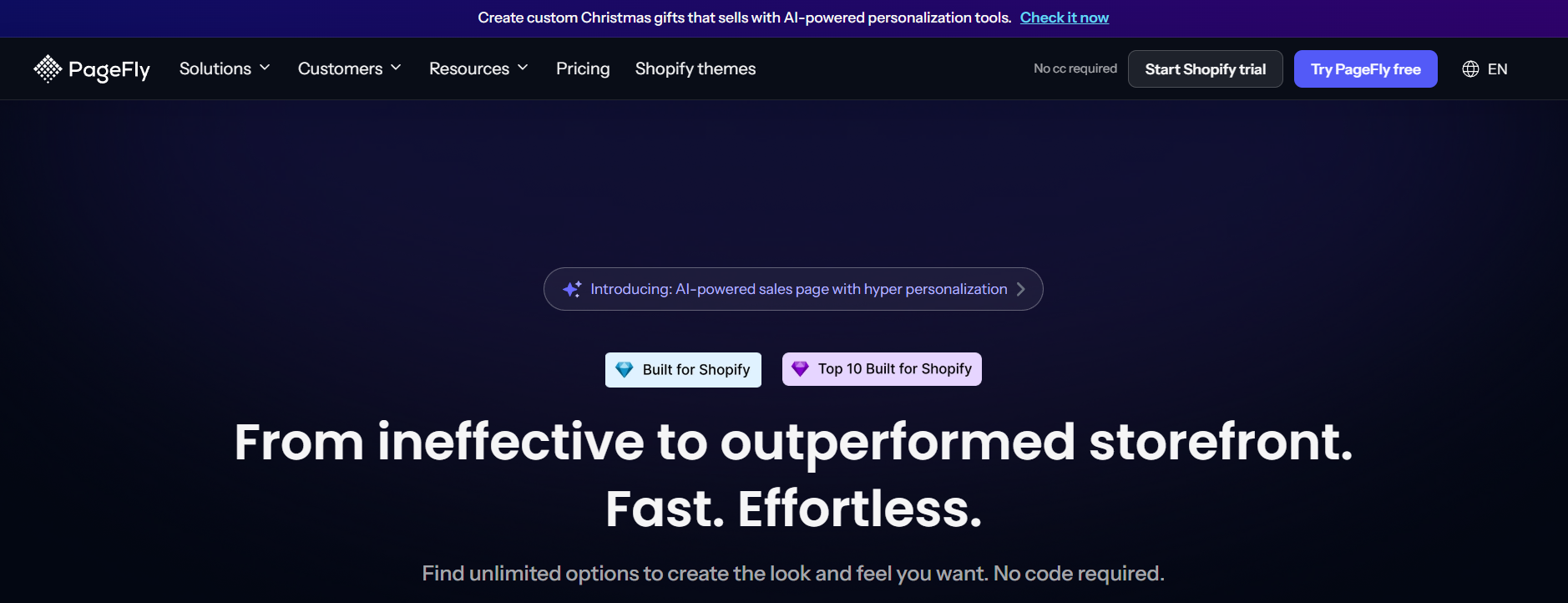
Building pages should feel simple—not like coding a spaceship. PageFly gives you full control over landing pages, product pages, homepages, and sales funnels. It’s perfect for beginners but powerful enough for professionals. GemPages is another favorite because of its clean interface and flexibility for mobile layouts.
These builders help you create high-converting pages without hiring a developer, and they come with templates for product launches, Black Friday sales, and seasonal promotions.

Theme Optimization Tools

Sometimes your Shopify theme looks nice but feels slow, clunky, or too limited. That’s where tools like Beae and Tapita Landing Page Builder come in. They let you add beautiful pre-designed sections, improve mobile responsiveness, and enhance user experience without touching code.
Faster themes = better conversions = more money.

Personalization & Dynamic Content Apps

Buyers love personalized experiences. Apps like Bold Product Options help shoppers customize products, choose engravings, upload images, or select special attributes. This works perfectly for jewelry stores, print-on-demand brands, and any business offering customizable items.

Whether you’re looking for a shopify marketplace app that boosts sales, an AI store builder that helps you launch and optimize your store faster, a marketplace app Shopify owners use to automate boring tasks, or even the Shopify marketplace connect app for multi-channel selling, there’s always something worth exploring.

2. Top Marketing & Conversion Apps

Email & SMS Automation Tools

Every store needs automation. If you’re still manually sending emails—stop. Klaviyo and Omnisend run abandoned cart emails, browse recovery, customer win-back flows, and personalized messages for you. These apps are revenue-generating machines.
Imagine waking up to extra sales every morning just because your automation did its job.

Pop-Ups, Upsells, and Cross-Sell Apps

If you want an easy way to boost your average order value, apps like Honeycomb Upsell, ReConvert, and Vanga AI are must-haves. They show smart recommendations based on what customers add to cart. A single upsell can increase your revenue by 20–40%.

Conversion Rate Optimization Plugins

Tools like Lucky Orange record visitor sessions, show heatmaps, and reveal where people get stuck. Instead of guessing what’s wrong, you get real insights to fix your store.

3. Best Shopify Apps for Product Management

Product Import & Bulk Editing Tools

Managing thousands of products manually is torture. Matrixify and Hextom Bulk Product Edit let you update prices, descriptions, images, tags, and inventory in seconds. If you’re a dropshipper, wholesaler, or store with a large catalog, these apps save hours every week.

Product Bundling Solutions

Bundler – Product Bundles helps you sell more by offering bundle deals, mix-and-match sets, and discounts. Customers love bundles because they feel like they’re getting more for their money.

Variant Management Apps

Shopify’s built-in variant system can feel limiting. Infinite Options helps you create unlimited variants, add text fields, upload fields, color selectors, and more.

4. Must-Have Apps for Inventory & Order Management

Real-Time Inventory Tracking

stocky

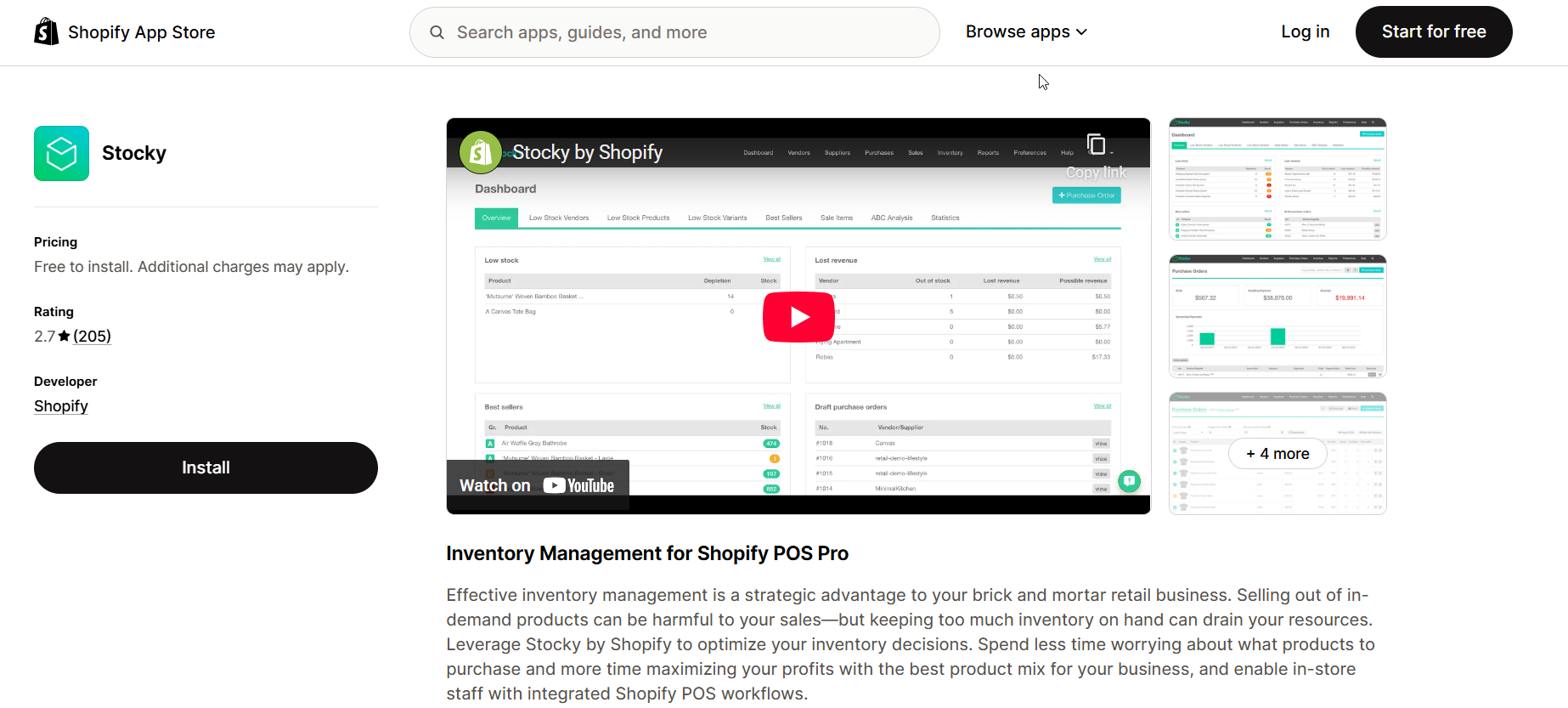
Inventory mistakes cost sales and damage trust. Stocky, owned by Shopify, helps you track inventory, reorder products, and avoid overselling—especially useful for physical stores and large catalogs.

Order Processing Automation

Order Printer Pro makes packing orders so much easier. It prints invoices, packing slips, and custom templates in bulk.

Multi-Warehouse & Multi-Location Support

If you’re scaling internationally, ShipBob handles fulfillment, storage, and shipping across the globe. It integrates with Shopify and updates inventory automatically.

5. AI-powered Inventory Planning & Management App for Shopify Brands

Prediko is an AI-powered inventory planning and management platform built for Shopify brands. It eliminates manual spreadsheets and fragmented workflows by providing a clear, data-backed view of what to order, when to place orders, and how much to buy.

Prediko connects directly to your Shopify store and syncs sales, inventory, and supplier data in real time. Its AI models, trained on millions of SKUs across industries, generate accurate demand forecasts and buying plans by accounting for seasonality, promotions, lead times, and market trends, so you’re prepared for what’s ahead.

Key features:

  • Native Shopify integration with real-time data synchronization
  • AI-driven demand forecasting based on historical sales and seasonality
  • Actionable buying plans that specify what to restock, when, and in what quantities
  • Raw material planning and forecasting with BOM creation
  • Automated purchase order creation and tracking
  • Intelligent replenishment alerts to help prevent stockouts
  • 10+ customizable report templates to support better decision-making

Pricing: Starts from $49 Month

6. Essential Customer Support & Chat Apps

AI Chatbots & Automated Support Systems

Fast support = happy customers. Tidio uses AI to reply automatically to common questions while Gorgias centralizes all support channels (email, chat, socials) in one place.

Helpdesk & Ticketing Tools

If your store receives many inquiries daily, Freshdesk keeps everything organized and helps your support team respond faster.

Live Chat Widgets for Faster Responses

Chatra is lightweight and friendly, perfect for stores that want fast communication without complications.

7. Apps That Boost Store Security & Compliance

Fraud Detection Tools

Fraud is a silent profit killer. Signifyd protects you from chargebacks, suspicious orders, and fraud attempts.

Data Protection & GDPR Compliance Apps

If you sell in Europe, GDPR is serious. Pandectes GDPR Compliance adds cookie banners, consent logs, and legal protections.

8. Top SEO & Traffic-Boosting Apps

On-Page SEO Automation

SEO can be intimidating, but apps like Plug In SEO and SEO Manager make it simple. They detect issues, guide you on fixes, and automate technical improvements.

Image Optimization Tools

Large images can slow your site dramatically. TinyIMG compresses images automatically while preserving quality.

Blog & Content Growth Apps

DropInBlog helps you publish SEO-friendly content inside Shopify without relying on the limited default blog editor.

9. Must-Have Analytics & Reporting Apps

hotjar

Customer Behavior Analytics

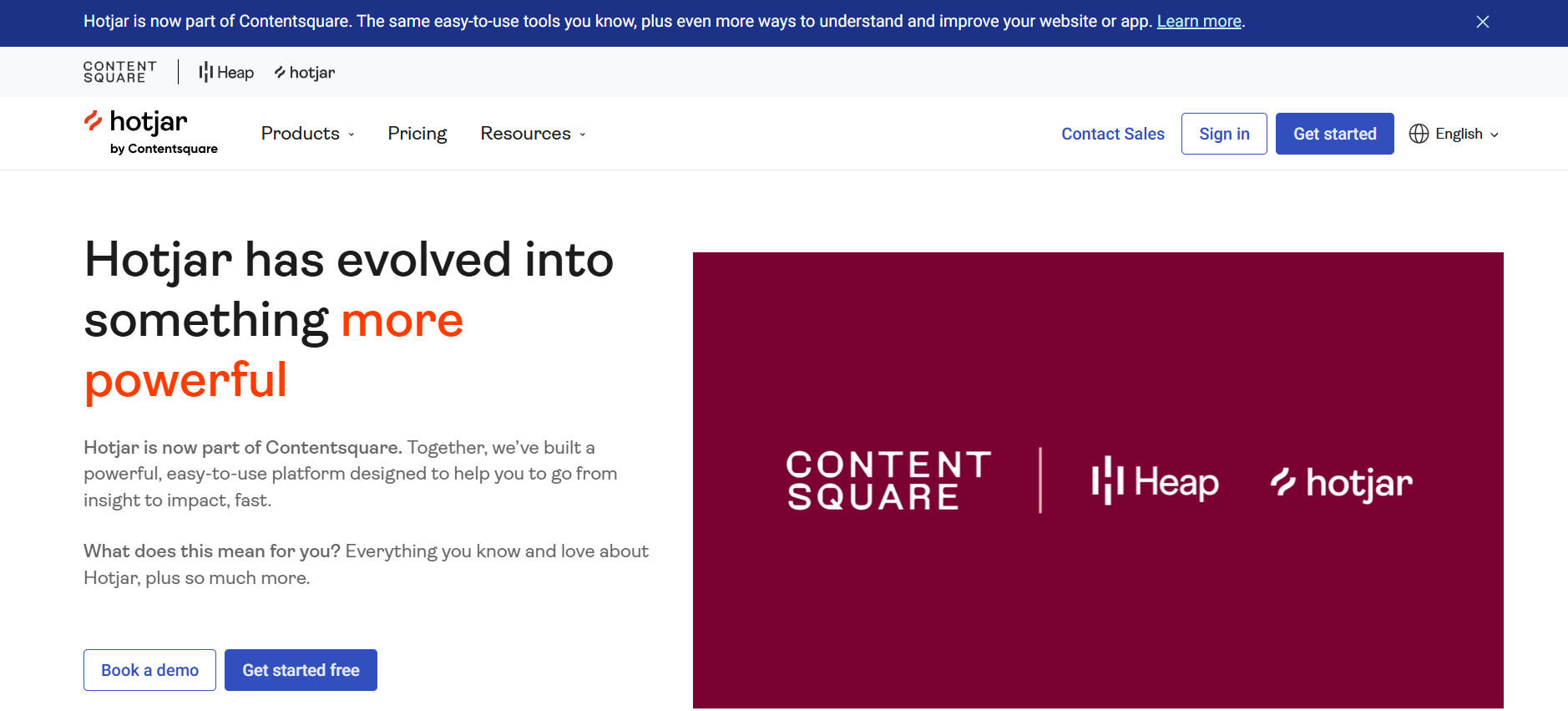
Tools like Lucky Orange and Hotjar help you see how customers navigate your site so you can improve bottlenecks.

Sales Tracking & Forecasting

BeProfit helps you understand your real profit after ad spend, fees, shipping, and discounts.

Store Performance Dashboards

If you want detailed dashboards and custom reporting, Report Pundit is a must-have.

10. Best Apps for Shipping & Fulfillment

Real-Time Shipping Rates

Apps like ShipStation integrate with carriers and offer accurate shipping rates during checkout.

Label Printing & Tracking Integration

AfterShip improves customer experience by giving them tracking updates and branded tracking pages.

International Fulfillment Solutions

DHL Express Commerce is ideal if you operate globally and want fast cross-border logistics.

11. Revenue-Boosting Apps for Reviews & Social Proof

Review Collection Tools

Reviews build trust instantly. Loox adds beautiful photo reviews while Judge.me offers powerful automation and affordability.

UGC & Social Proof Widgets

Fera.ai boosts credibility with user-generated videos, testimonials, and social proof displays.

Loyalty Programs & Rewards Apps

Customer retention is cheaper than acquisition. Smile.io offers rewards, points, VIP tiers, and referral programs.

Conclusion — Choosing the Right Shopify App Marketplace Tools for Your Store

When browsing the Shopify marketplace connect app or exploring new tools inside the Shopify app marketplace, always focus on what your store specifically needs. You don’t need 50 apps—you need the 8–10 that support the way you sell, the audience you serve, and the goals you’re working toward.
Start small, test everything, and track results. Apps should save you time or make you money—ideally both. Choose wisely, experiment often, and refine your setup as your store grows.

Find More: Boost Your Sales With SEO Services

FAQs

1. What is the Shopify App Marketplace?

It’s a massive library of apps that help you add features, improve performance, and customize how your Shopify store works.

2. Are Shopify apps free or paid?

Many apps have free plans, but the most powerful ones usually come with monthly subscriptions.

3. Which apps should beginners start with?

Start with essentials like Judge.me for reviews, PageFly for design, and Klaviyo for email automation.

4. Can too many apps slow down a Shopify store?

Yes. Stick to trusted apps and remove anything you don’t actively use.

5. How do I choose the best app for my business needs?

Look for apps that solve a problem, save time, increase conversions, or improve customer experience.

Tags:

How to Cancel Shopify Subscription: Step by Step

How to Cancel Shopify Subscription: Step by Step

how to cancel shopify subscription

Introduction to How to Cancel Shopify Subscription

If you’ve been asking yourself “How to Cancel Shopify Subscription,” you’re not alone. Many store owners eventually reach a point where they need to stop their Shopify plan, whether it’s due to cost, switching platforms, or simply taking a break. In this guide, we’ll walk through exactly how to cancel my Shopify subscription safely, without losing your valuable store data or getting unexpected charges. By the end, you’ll know how to cancel subscription on Shopify step by step, understand alternative options, and have a clear picture of what happens after cancellation. This comprehensive guide will also cover extra tips, mistakes to avoid, and common FAQs so you feel confident throughout the process.

Find More: Creative Upsell & Cross-Sell Strategies for Shopify Using Branded Socks

Understanding Shopify Subscriptions

What is a Shopify Subscription?

A Shopify subscription is your gateway to one of the most popular e-commerce platforms worldwide. It provides tools for creating and managing an online store, from designing your website to processing payments and tracking orders. Depending on your plan, you’ll have access to a range of features, including themes, apps, analytics, and support. You pay a monthly fee, and as long as your subscription is active, your store operates fully without interruptions. Understanding exactly what your plan includes will help you make informed decisions before cancelling.

Why You Might Want to Cancel Your Shopify Subscription

People choose to cancel their Shopify subscriptions for many reasons:

  • Financial reasons: Monthly fees can add up, and some owners find more affordable platforms or tools.

  • Switching platforms: Perhaps you want features Shopify doesn’t offer, or a new platform fits your business model better.

  • Seasonal or temporary usage: Some stores operate only during holidays or special seasons, making a permanent subscription unnecessary.

  • Business changes: You may be closing your store, merging operations, or pivoting to a different product line.

  • Technical challenges: If Shopify’s tools feel overwhelming or certain integrations aren’t working, owners might explore other options.

Before You Cancel: Important Considerations

Backup Your Store Data

Before cancelling, it’s crucial to back up everything. This includes products, customer information, order history, website content, images, and app data. Shopify does not store all your information indefinitely, and losing it can be costly and stressful. Consider exporting CSV files, downloading images, and making notes of app integrations.

Review Outstanding Payments or Charges

Go through your billing section and make sure there are no pending charges. Understand the timing of your final payment to avoid unexpected fees. This helps you budget appropriately and ensures there are no surprises after you cancel.

Consider Downgrading or Pausing Instead of Cancelling

If your primary concern is cost, Shopify offers two helpful alternatives:

  • Pause your store: Temporarily stops the store from being live to customers while retaining your data. You pay a reduced fee during the pause.

  • Downgrade to a cheaper plan: Maintain your store online but pay less monthly. Both options give you flexibility if you might return to Shopify later.

Step-by-Step Guide: How to Cancel Shopify Subscription

Step 1: Log in to Your Shopify Admin Account

Start by logging into your Shopify admin dashboard. Make sure you have full account access because cancelling requires administrative permissions. Take a moment to ensure all your data is updated before proceeding.

Step 2: Navigate to Account Settings

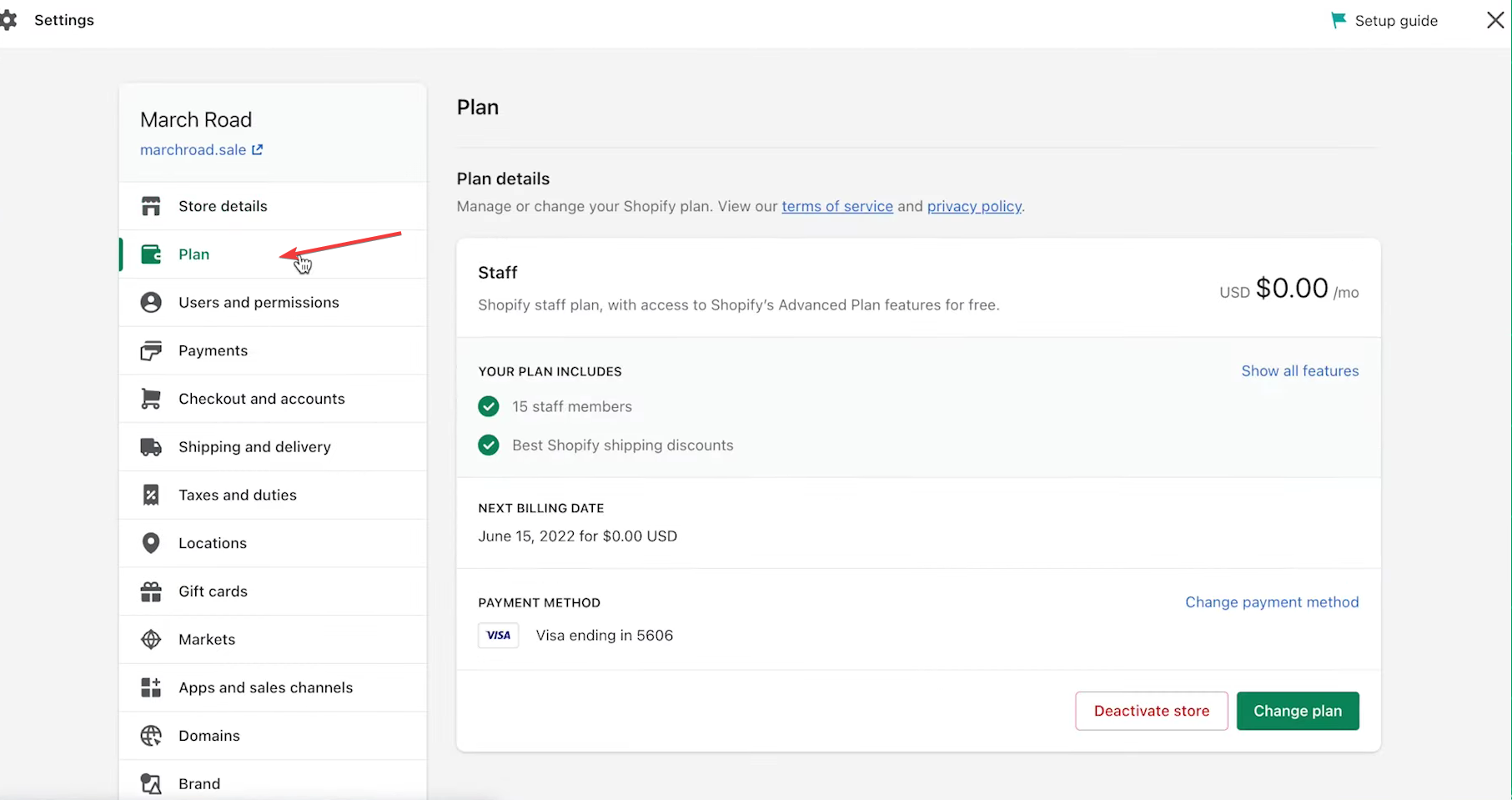
Click your account name in the top-right corner, then select Settings. From there, navigate to Plan or Billing, depending on your dashboard version. This section contains all the controls for your subscription.

Step 3: Select “Plan” or “Billing” Section

Here you can see your current plan, billing details, and payment methods. Review the information carefully. Understanding your billing cycle and features included in your plan ensures you won’t miss anything important when cancelling.

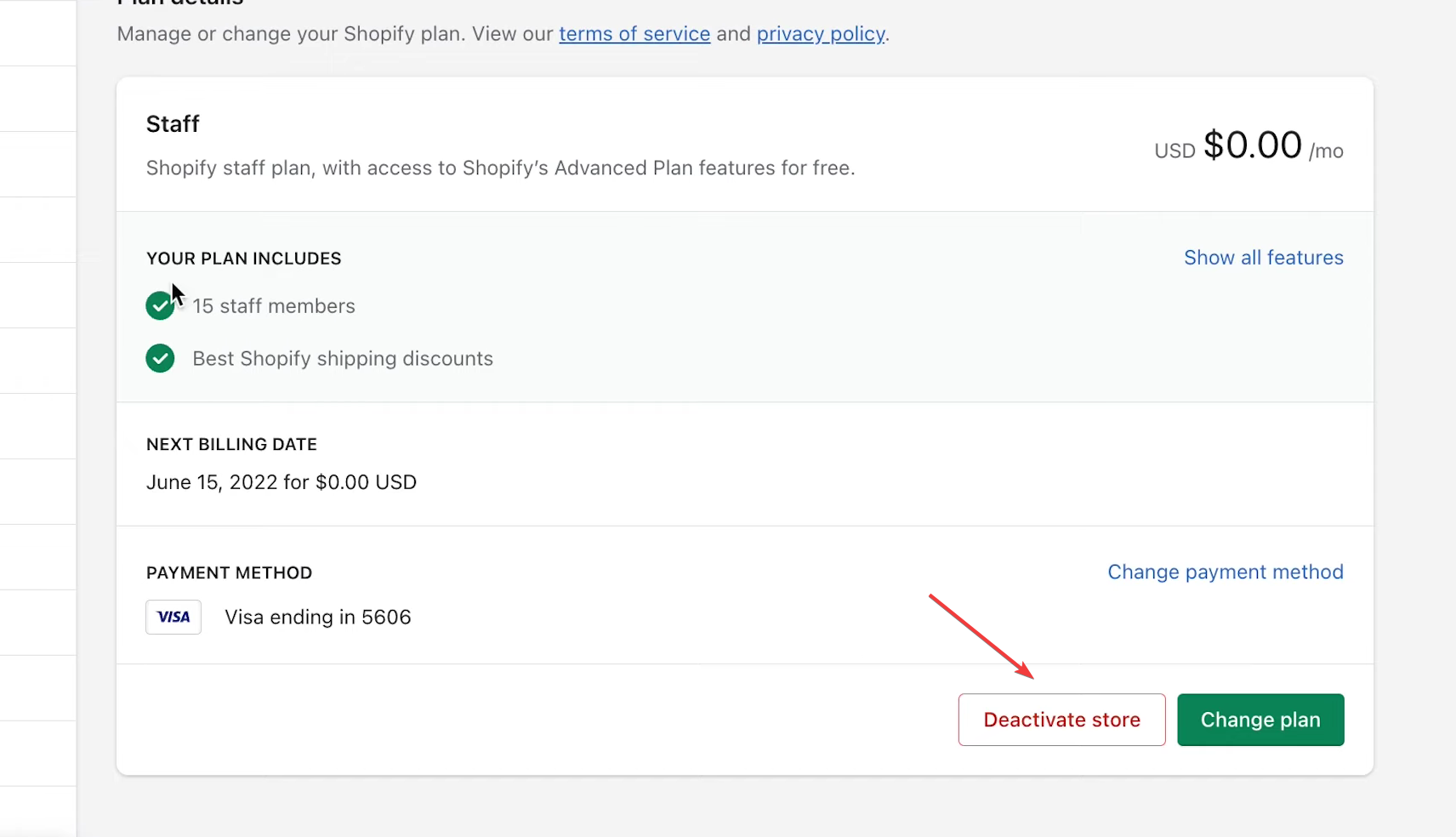
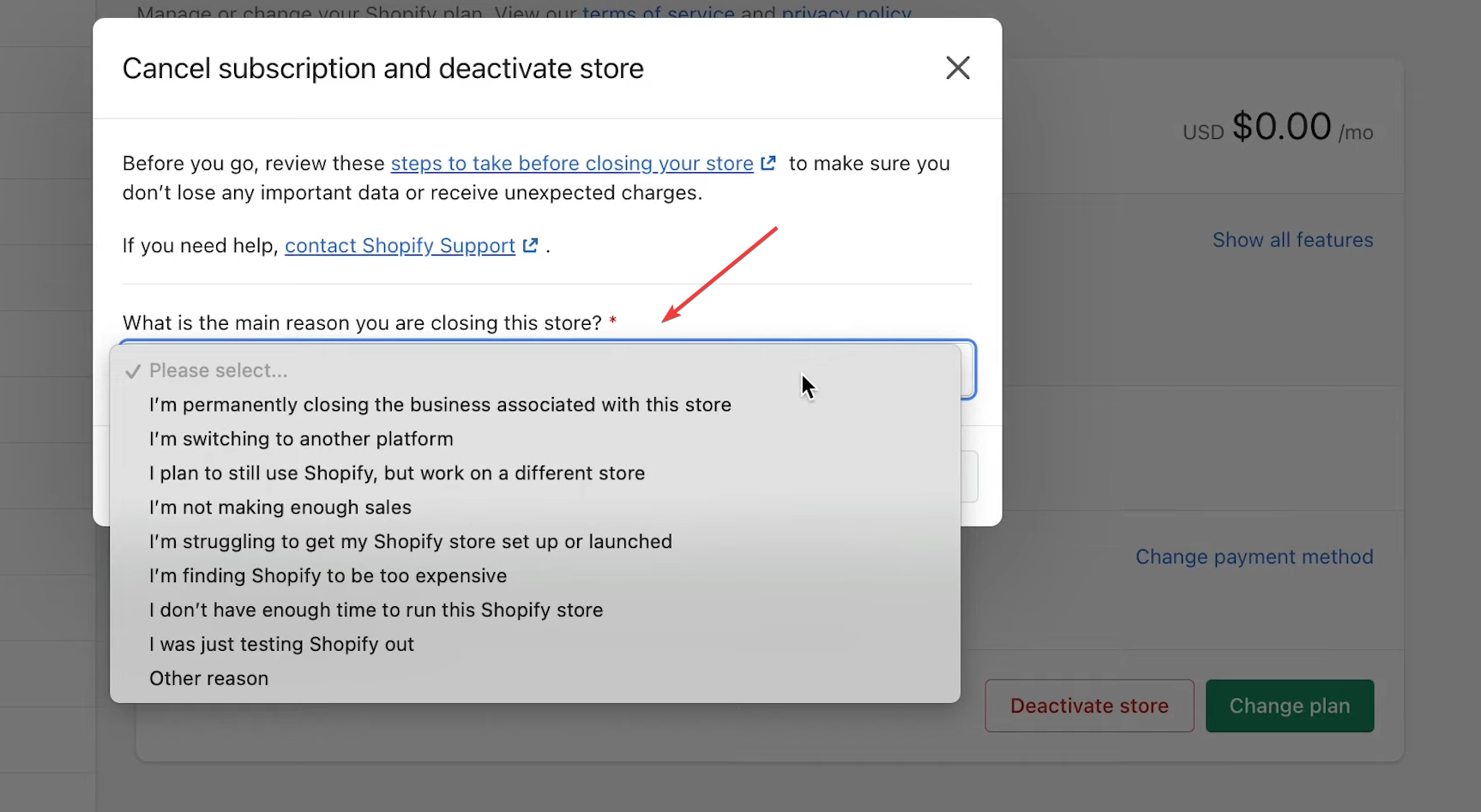
Step 4: Choose “Cancel Subscription”

Click the Cancel Subscription or Close Store button. Shopify will guide you through the process, including steps to review your options and confirm the cancellation.

Step 5: Provide a Reason for Cancelling

Shopify requests a reason for cancellation to collect feedback. This is optional but selecting a reason helps Shopify understand why users leave, and it can highlight areas where the platform may improve. Be honest to ensure the process is smooth.

Step 6: Confirm Your Cancellation

Before finalizing, review all the details. Confirm any final charges, the date your subscription officially ends, and what access you will lose. Double-check that you’ve backed up your data.

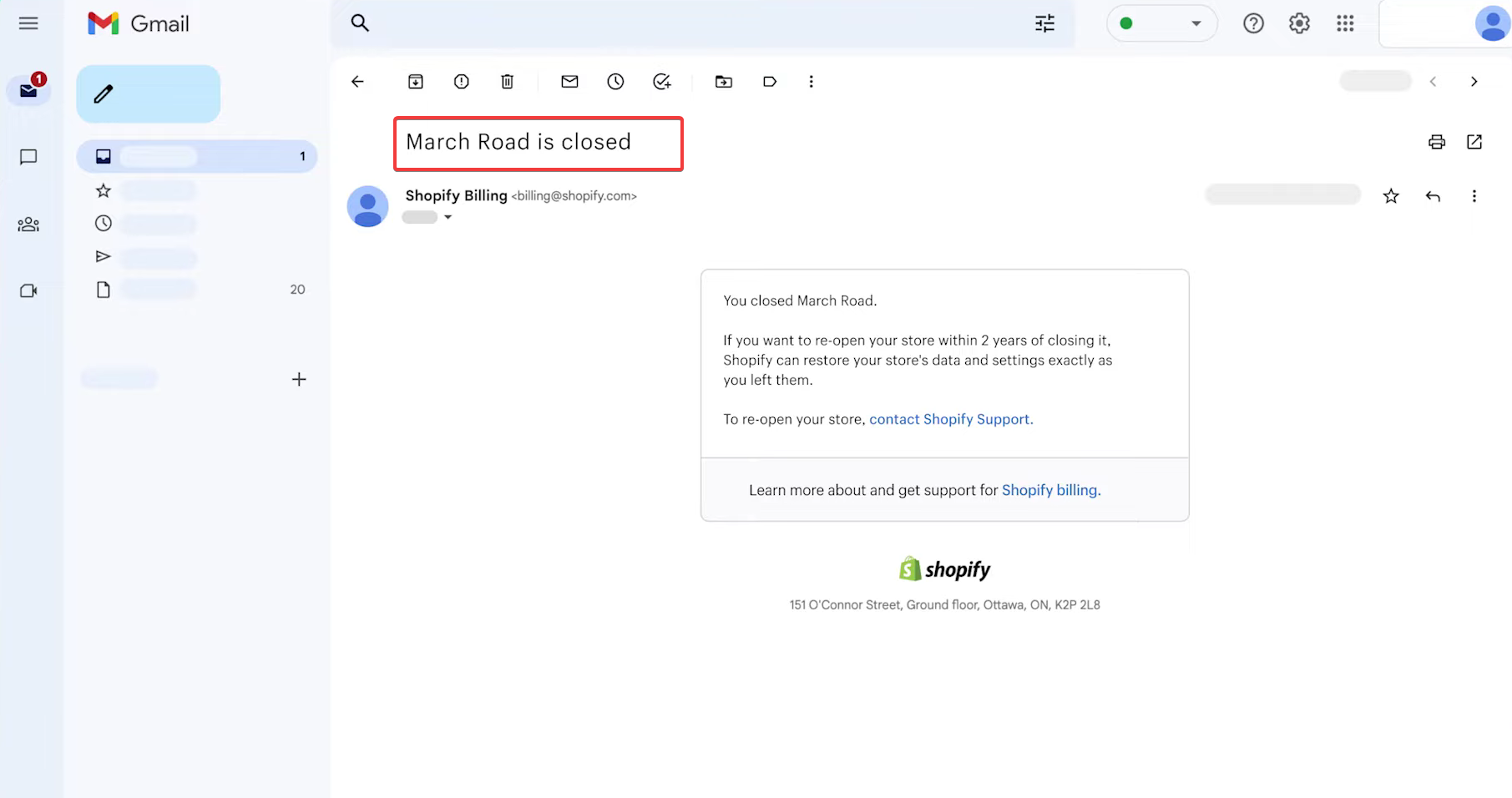
Step 7: Check for Confirmation Email and Final Charges

Once cancelled, Shopify will send a confirmation email. Keep this for your records. Verify the final charge matches your expectations and keep a copy of all communication in case of discrepancies.

Alternatives to Cancelling Your Shopify Subscription

Pause Your Shopify Store Temporarily

Pausing your store allows you to take a break without permanently shutting down. This option keeps your data intact, reduces costs, and gives you the flexibility to return when ready. You can resume full functionality later without rebuilding your store from scratch.

Downgrade to a Cheaper Plan

Downgrading is a great option if you want to maintain your store live but reduce monthly expenses. It’s ideal for small stores or businesses adjusting their budgets. Review what features might be limited on a lower plan and ensure it fits your business needs.

Export Your Store Data Before Leaving

Even if you’re fully cancelling, export all your products, customers, orders, and other data. This ensures a smooth transition if you decide to move to a different platform. Proper backups also protect your intellectual property and customer information.

What Happens After You Cancel Shopify Subscription

Access to Your Store After Cancellation

After cancellation, your store is no longer publicly accessible, but Shopify usually allows short-term access to export data. Make sure to complete all necessary downloads and note any important account details.

Refunds and Billing Information

Shopify generally does not provide refunds for partial months, so understanding your billing cycle is important. Any outstanding charges should be settled upon cancellation. Keep a record of all transactions to avoid billing confusion.

Reopening or Resuming Your Shopify Store

You can reactivate your store later by subscribing to a plan again. Note that some apps or settings may require reinstallation. If you have backups, restoring your store is much easier and ensures minimal downtime.

Conclusion

Summary of How to Cancel Shopify Subscription Safely

Cancelling Shopify doesn’t have to be intimidating. By backing up your data, checking billing, and carefully following the steps above, you can cancel your subscription safely. Consider alternatives like pausing or downgrading if cost or temporary needs are your main concern. Being prepared ensures a smooth transition and protects your business information.

Final Tips for a Smooth Cancellation Process

  • Double-check your billing cycle and final charges.

  • Keep multiple backups of your store data.

  • Read Shopify’s cancellation policy carefully to avoid surprises.

  • Explore alternatives like pausing or downgrading to maintain flexibility.

  • Document every step and confirmation for future reference.

Find More: Boost Your Sales With SEO Services

FAQs

1. Can I Cancel Shopify Anytime?

Yes, you can cancel your Shopify subscription at any time through your admin dashboard. While you won’t typically receive a refund for the remaining days of your billing cycle, you can plan your cancellation to minimize costs and avoid extra charges.

2. Will I Lose My Store Data After Cancelling?

You will lose public access, but exporting your products, customer data, order history, and images before cancellation ensures nothing is lost. Keeping your data organized also makes it easier to migrate to another platform.

3. How Do I Avoid Being Charged After Cancelling?

Confirm cancellation through the Shopify admin and check for a confirmation email. Ensure your payment methods are updated, no automatic charges remain, and that the cancellation has been processed fully.

4. Can I Reopen My Shopify Store Later?

Yes, reactivation is possible by selecting a new plan. While most core data can be restored if exported, certain apps or custom settings may need reconfiguration. Planning ahead helps make the process seamless.

5. Are There Alternatives to Fully Cancelling My Shopify Subscription?

Yes, pausing the store or downgrading to a lower plan are both excellent options. They reduce costs while keeping data intact and give you flexibility to resume full operations in the future.

Tags:

How Shopify Stores Can Turn Browsing Behaviour Into Sales Growth

How Shopify Stores Can Turn Browsing Behaviour Into Sales Growth

Most Shopify stores have no shortage of traffic. Paid social, Google Ads, influencers and marketplaces send thousands of visitors every month. Yet only a small fraction of these sessions end in a transaction. In many stores, conversion rates hover around a few percent – meaning the majority of visitors leave without buying.

Every one of these sessions generates behavioural data: which pages were visited, how long visitors stayed, which elements they clicked, when they abandoned the process. These signals are often treated as abstract analytics, instead of as concrete levers for revenue growth.

When behavioural data is systematically collected and activated, a Shopify store changes character. It stops being a static catalogue and becomes a responsive sales system: messages, recommendations and automations adapt to what visitors actually do. This article focuses on practical, Shopify-specific steps that turn browsing behaviour into measurable sales, rather than remaining at the level of general eCommerce theory.

From Abandoned Carts to Recovered Revenue

Cart abandonment is one of the clearest signs that a purchase almost happened. This section shows how Shopify stores can turn that moment of hesitation into a structured recovery process.

Key behaviour-based triggers in Shopify

  • Checkout is created and not completed within a defined time window
  • Cart reaches a certain value (e.g. over 100 €) and is then abandoned
  • Customer revisits the site with an active abandoned checkout

Shopify records these checkout events out of the box. With native abandoned checkout emails, Shopify Flow (on eligible plans) or dedicated apps, these events can fire automations instead of ending in silence. 

A store can win back cart abandoners with, for example, tag customers with an open checkout above a certain value, feed this segment into an email tool and trigger follow-up messages as soon as the checkout is marked as abandoned. In many shops, 60–80% of started checkouts currently end without an order, so even a simple use of these triggers can unlock a visible revenue stream and form the basis for any win-back strategy.

A concrete 3-step recovery flow

  • Reminder after 1–2 hours
  • Reassurance after 24 hours
  • Selective incentive after 48–72 hours

In the first step, a reminder goes out roughly one to two hours after the checkout is abandoned. The email is simple: cart contents, product images, total price and one clear button back to the checkout page. No discount is needed here; the goal is to catch visitors who were merely interrupted by a phone call, a meeting or a lost connection.

If there is still no order after 24 hours, a second message focuses on reassurance rather than pressure. Short customer reviews, clear shipping times, a concise explanation of the returns process and visible trust badges answer the most common doubts about delivery, fit and reliability. Many abandoned carts are caused not by price, but by uncertainty.

Only in the third step, after 48–72 hours, and only for higher-value or high-margin carts, does a small incentive come into play. This can be free shipping or a modest percentage discount with a clear expiry. The intention is to convert genuinely hesitant but interested visitors without training all customers to wait for lower prices.

Additional channels such as SMS or push notifications are useful for logged-in customers or high basket values, while dynamic retargeting ads can show the exact products left behind. When such flows are implemented cleanly and monitored, recovered carts often contribute 5–15% of total monthly revenue, using traffic that has already been paid for.

Mapping the Browsing Journey: Understanding Behavioural Signals

To use behaviour for automation and personalisation, the underlying journey needs to be clear. This section focuses on how to read browsing patterns in a Shopify store.

Typical path through a Shopify store

  • Homepage or landing page → Collection page → Product page → Cart → Checkout → Thank you page

Key behavioural signals

  • Repeat product views over several days
  • Time on page and scroll depth on key product pages
  • Internal search queries via the Shopify search bar
  • Filter and sort usage on collection pages
  • Micro-conversions such as wishlists, size guide views or comparisons

In reality, visitors rarely move in a straight line from homepage to thank-you page. They land directly on deep product URLs from ads, jump between categories, use the search bar and exit at different stages. Mapping this path helps reveal where interest builds and where it breaks.

Repeat product views are one of the strongest signals. When the same visitor returns to a product two or three times within a week, there is usually clear intent, even if no cart is created yet. Long time on page and deep scrolling suggest active evaluation, while quick bounces indicate a mismatch between expectations and the content on the page.

Internal search queries are another source of insight. Terms entered into the Shopify search reveal how customers describe products in their own words and where the catalogue might not match that language. Frequent use of filters and sort options highlights which attributes — such as price, size or material — drive decisions in a given category.

Micro-conversions complete the picture. Adding items to a wishlist or favourites, opening size guides, downloading a lookbook or comparing products are all small commitments that show movement towards a purchase. These actions can be tracked through Shopify analytics, Google Analytics 4, server-side tracking or specialised apps.

Once these signals are documented and connected to user profiles where possible, the result is a practical journey map. It shows which behaviours mark high intent, where visitors most often leave, and which points in the journey should trigger messages, offers or additional information. This map becomes the blueprint for all segmentation and automation work that follows.

Behavioural Segmentation as the Foundation of Personalisation

Demographics alone rarely explain why someone buys. Behavioural segmentation looks at what visitors actually do in the shop and groups them accordingly. This section outlines concrete segments and how to use them.

Example segments with rules and actions

  • High-intent browsers
    • Rule: At least 3 product page views in 7 days, at least 1 add-to-cart, no order placed
    • Action: Add to a “High intent – no purchase” segment in the email tool
  • Price-sensitive visitors
    • Rule: Used “sort by price (low to high)” in at least 2 sessions in 30 days or visited the “Sale” collection at least twice
    • Action: Emphasise bundles, promotions and clear price anchors in on-site banners and email
  • Loyal browsers / emerging VIPs
    • Rule: At least 5 sessions in 60 days and at least 1 previous purchase
    • Action: Include in early access campaigns, personalised recommendations and loyalty programmes

Behavioural segmentation starts with selecting a few meaningful segments like these, rather than trying to cover every possible pattern. High-intent browsers have already shown clear interest but have not yet ordered. Collecting them in a dedicated segment makes it possible to send targeted reminders, additional information or reassurance without relying on broad campaigns.

Price-sensitive visitors reveal themselves by their constant focus on low prices and sale pages. For this group, content that stresses value, bundle savings or time-limited promotions is more effective than generic brand messaging. On-site, they might see banners that point directly to deals; in email, they benefit from clear comparison of “regular vs. bundle” pricing and a straightforward explanation of savings.

Loyal browsers or emerging VIPs visit frequently, read thoroughly and often have at least one past order behind them. They are ideal recipients for early access to new collections, restock notifications and more in-depth content about the brand. Instead of pushing discounts, communication here can focus on exclusivity, product insight and long-term relationship building.

Tailored messaging by segment

Once such segments exist, campaigns become more specific without necessarily becoming more complex. High-intent browsers receive reminders, FAQs and product education instead of general newsletters. Price-sensitive visitors see concrete offers with clear value explanations instead of broad branding-only emails. Loyal customers are informed about restocks, new drops and background stories that reinforce their connection to the brand.

In practice, this means that the same promotion or product launch can be framed differently for each group, using the same underlying assets but adjusted subject lines, hero sections and call-to-action placement. Behavioural data thus leads to differentiated experiences without having to build completely separate campaigns for every audience.

On-Site Experience: Turning Browsing Data Into Dynamic Shop Interactions

On-site behaviour has the biggest impact when it directly shapes what visitors see in the shop. This section shows how browsing data can be used to make Shopify storefronts feel more relevant and helpful in real time.

Smarter product recommendations

Well-configured recommendations help visitors continue where they left off and discover products that genuinely fit their interests.

Examples of data-driven recommendations

  • Recently viewed products on the homepage and cart page
  • Similar items based on category, tags or metafields (same brand, similar material, matching style)
  • “Frequently bought together” blocks on product pages and in the cart

Instead of relying on a single carousel of generic bestsellers, Shopify stores can use browsing data to power more precise recommendation blocks. Recently viewed products on the homepage and cart page remind visitors of items they considered earlier and make it easy to return to them without searching again. Similar items work well on product pages: if someone spends time on a particular running shoe, the shop can highlight shoes from the same brand, with similar cushioning or for the same use case.

“Frequently bought together” blocks are particularly effective close to the cart and on the product page. By combining browsing history with past order data, the shop can suggest logical add-ons such as socks for running shoes or cases for electronic devices. Many recommendation apps for Shopify allow rules that prioritise specific collections, brands or margin levels, so the suggestions stay profitable as well as relevant.

Contextual messaging and helpers

Short, targeted messages can remove friction and answer questions if they appear at the right moment and in the right place.

Examples of contextual on-site elements

  • Campaign-specific banners for visitors coming from certain ads or landing pages
  • Size and fit guides shown more prominently for products with high return rates
  • Welcome incentives for first-time visitors; trust-focused messages for returning visitors

Browsing data indicates what a visitor cares about and where help is needed. If someone arrives via a performance campaign for a new running collection, a banner that highlights free returns on running shoes or a “Shop the campaign” entry point makes the next step obvious. Products with many returns because of sizing issues benefit from clearly visible size and fit guides, especially for people who already interacted with such guides on other items.

First-time visitors often need a simple nudge to make the first purchase, such as a gentle welcome incentive shown only after they have visited several pages. Returning visitors, on the other hand, react better to reassurance about delivery speed, stock levels and loyalty benefits. Shopify themes and apps can conditionally display different messages based on whether someone is new, logged in or has a certain browsing history.

Exit-intent and scroll-based prompts

Prompts work best when they appear at a moment of decision instead of interrupting visitors as soon as the page loads.

Typical triggers for smarter prompts

  • Scroll depth exceeds a set threshold without interaction
  • Cursor moves towards the browser bar or back button on desktop
  • Session reaches a defined time limit without any cart activity

By tying prompts to scroll depth, cursor movement or session duration, a store avoids generic pop-ups that appear the second a page loads. For example, a newsletter sign-up can appear only when someone has scrolled 60–70% through a guide or a collection page, indicating real interest. Exit-intent technology can recognise when the cursor moves towards the close or back button and present a final, focused message, such as a reminder about items in the cart or a short FAQ about shipping and returns.

If a visitor browses several products for a few minutes without adding anything to the cart, a subtle prompt can offer help (“Need sizing advice?”) rather than a discount. Consistent visual design and tone across all prompts ensure that personalisation supports the brand experience instead of feeling random or intrusive.

Beyond the Cart: Behaviour-Driven Email and Retargeting Flows

Behavioural data becomes even more valuable when it shapes what happens after visitors leave the site. This section covers how browsing signals feed into email flows and retargeting campaigns that go beyond classic cart recovery.

Browse abandonment flows

Browse abandonment flows focus on visitors who showed strong interest in specific products but never added them to the cart.

Typical browse abandonment setup

  • Trigger: Product in a priority collection (top sellers, high-margin items) viewed at least twice in 7 days, no purchase
  • Email 1: Reminder with main benefit, key specification and direct link back to the product page
  • Email 2: Additional context such as comparisons, styling ideas or use cases
  • Optional email 3: Reviews or FAQs that address common objections

In practice, this means tracking which priority products a visitor views more than once within a short time frame. When the rule is met and no order is placed, the email platform sends a first reminder that simply resurfaces the product, explains the main benefit in one or two lines and links back to the detail page.

If there is still no purchase, a second email adds more depth. This might compare the product with similar items in the range, show how it can be styled or used, or highlight a few concrete benefits instead of general marketing language. An optional third email can pull in authentic reviews or answer frequently asked questions about quality, sizing, installation or care. The goal is to support the decision, not to pressure the recipient.

Category-specific sequences

Category-specific sequences are useful when visitors keep returning to the same type of product, but never settle on a specific item.

Example of a category flow

  • Trigger: At least three product views in the same category (e.g. “Running” or “Accessories”) within 14 days
  • Email 1: Bestsellers and top-rated products in that category
  • Email 2: Educational content such as care tips, usage ideas or buying guides, plus selected recommendations
  • Email 3: Soft promotion with a bundle suggestion or complementary items

These flows treat a category as a theme and help visitors orient themselves within it. If someone repeatedly browses running gear, the first email in the sequence can show a curated set of bestsellers and customer favourites. The second email then takes a more advisory tone: explaining differences between models, giving care instructions or outlining which product fits which use case. The final email can highlight bundles or complementary products that make sense in that category, without forcing a hard sale.

Behaviour-informed retargeting

Retargeting campaigns reach visitors on platforms such as Facebook, Instagram and Google Ads based on what they did on the site.

Useful audiences for behaviour-based retargeting

  • Viewed products in a category but did not add to cart
  • Abandoned carts above a defined value threshold
  • Purchased from one category but frequently browsed another

Shopify can send these audiences to ad platforms through pixels or server-side integrations. If someone viewed several products in a category without adding anything to the cart, ads can show a small selection of those items or the most popular products in that category. Visitors who abandoned well-filled carts can see creatives that remind them of the items left behind or that highlight flexible returns and secure checkout.

Customers who bought from one category but often browse another are good candidates for cross-sell campaigns. Ads can present the new category in a low-pressure way, such as “Complete your look” or “You may also like”, based on prior browsing. Aligning ad creatives with concrete behaviours reduces wasted impressions and creates a clear connection between on-site experience and off-site advertising.

7. Measurement Framework: Translating Behaviour Into KPIs

A behavioural strategy only delivers value if its impact is visible in the numbers. This section outlines which KPIs help evaluate browsing-based tactics and how to use them in day-to-day decisions.

Core metrics

Core metrics show whether behavioural measures actually increase revenue and efficiency.

Key core metrics

  • Conversion rate per segment
  • Revenue per visitor (RPV)
  • Recovered revenue from cart and browse flows

Segment-level conversion rates reveal how well different behavioural groups perform compared to the overall average. If high-intent browsers still convert poorly, the problem may lie in the offer or in missing reassurance rather than in traffic quality. Revenue per visitor shows how much value each session generates and is therefore a good way to measure the effect of personalisation even when traffic levels change.

Recovered revenue focuses specifically on automations such as cart and browse abandonment flows. Many stores set a realistic target of 5–15% of monthly revenue coming from these flows after a few months of optimisation. Monitoring this share makes it easier to justify the time and budget invested in behaviour-based messaging.

Supporting metrics

Supporting metrics describe how people interact with behavioural elements and where friction might occur.

Useful supporting metrics

  • Click-through rates on recommendation blocks and on-site prompts
  • Revenue per email or per SMS for each behavioural flow
  • Unsubscribe and spam complaint rates for behavioural emails

If click-through rates on recommendation blocks are low, the logic behind the suggestions may need adjustment, or the placement may not be prominent enough. Revenue per email or SMS indicates which flows pull their weight and which ones merely add noise. Unsubscribe and complaint rates highlight where frequency, timing or tone are off. As a simple rule of thumb, behavioural flows that consistently generate complaint or unsubscribe rates above about 1% should be reviewed and refined.

Cohort and A/B testing

Cohort analysis compares groups of customers over time, while A/B testing improves specific parts of the setup.

Dimensions for cohort analysis and testing

  • Lifetime value and repeat purchase rate by cohort (behavioural flow vs. non-flow customers over 6–12 months)
  • Subject lines and send times for key automations
  • Incentive levels and conditions (e.g. only for high-value carts)
  • Positioning and content of dynamic on-site elements

Grouping customers into cohorts based on whether they interacted with behavioural flows allows a store to see if those flows lead to higher lifetime value or more repeat orders. This is more informative than looking only at the first purchase. At the same time, A/B tests should run continuously on manageable aspects such as subject lines, send times or the position of recommendation blocks on the page. The aim is not to change everything at once, but to gradually refine the most important levers and build a habit of structured experimentation.

Practical Roadmap and Common Pitfalls

Behaviour-based optimisation can feel complex at first. A simple roadmap helps to break the work into clear steps and avoid the most common mistakes.

Step-by-step roadmap

A staged approach keeps projects manageable and makes it easier to see progress.

Key stages in a behavioural roadmap

  • Define events and tracking
    • Decide which behaviours matter (product views, search terms, cart events, checkout steps)
    • Ensure consistent tracking in Shopify analytics and connected tools
  • Launch essential flows
    • Implement a 2–3-step cart abandonment flow
    • Add a basic browse abandonment flow for top products or categories
  • Introduce basic segmentation
    • Build segments such as high-intent browsers, price-sensitive visitors and loyal customers
    • Adapt email content and on-site messages to each segment
  • Roll out on-site personalisation
    • Start with “recently viewed” and “similar products” recommendations
    • Add contextual banners for key categories or campaigns
  • Refine based on data
    • Review KPIs monthly and identify segments or flows with the highest leverage
    • Run focused A/B tests and adjust thresholds, messaging and incentives

In practice, this means starting with a short list of events instead of trying to track everything. Product views, search queries, add-to-cart actions and checkout steps are usually enough for the first phase. Once these are flowing reliably into analytics and the email platform, the store can switch on simple cart and browse abandonment flows and check weekly how much revenue they generate.

Basic behavioural segments come next. Grouping visitors into high-intent, price-sensitive and loyal segments allows the same campaigns to be framed differently. When the first results look stable, simple on-site personalisation elements such as recently viewed products and contextual banners can be layered on top. A monthly review of the core and supporting metrics then guides which flows or segments should be tested and refined next, avoiding random changes.

Common pitfalls

Some mistakes show up again and again when stores begin to work with behavioural data. Knowing them in advance makes them easier to avoid.

Typical pitfalls to watch out for

  • Over-automation without a clear plan
  • Dependence on constant discounts
  • Neglect of data quality and privacy

Over-automation happens when new flows, prompts and pop-ups are added without a simple strategy. Visitors then experience the shop as noisy and inconsistent, and internal teams lose track of what is live. A smaller number of well-designed automations, documented in a simple overview, usually performs better.

Discount addiction is another risk. If every behavioural flow includes a coupon, customers quickly learn to abandon carts on purpose or to wait for the next code. Incentives work best when they are conditional (for example, only for high-value carts or specific segments) and when most flows focus on clarity and reassurance instead.

Finally, behavioural projects depend on clean data and transparent consent. Broken tracking, missing information about opt-in and unclear privacy practices distort insights and can create legal risk. Before scaling more complex set-ups, it is worth checking that events are recorded accurately, consent mechanisms are clear and documentation is up to date.

Conclusion: Behaviour as the Most Reliable Growth Signal

Browsing behaviour is one of the most concrete indicators of buying intent available to a Shopify store. When this data is mapped, segmented and activated – from abandoned cart recovery to browse flows and on-site personalisation – existing traffic turns into a more predictable and scalable revenue source.

Rather than constantly increasing ad spend, stores that treat behaviour as a strategic asset learn to extract more value from each visit. The result is not only higher conversion rates, but stronger customer relationships and more stable growth. In a market where acquisition costs continue to rise, behaviour-driven optimisation often marks the difference between short-lived spikes and sustainable eCommerce success.

About the author: Harald Neuner



https://uptain.de/app/uploads/resized/2023/09/Autorenprofil-517×680-c-default.png 

Harald Neuner is co-founder of ‘uptain’, the leading software solution for the recovery of shopping basket cancellations in the DACH region. He is particularly keen to provide small and medium-sized online shops with technologies that were previously only available to the big players in e-commerce. With ‘uptain’, he has been able to do just that.

Harald Neuner is co-founder of ‘uptain

Harald Neuner & uptain on Social Media: