UK: +44 2038074555 info@atamgo.com
Why Custom HTML Email Template Services Pay Off Big Time

Why Custom HTML Email Template Services Pay Off Big Time
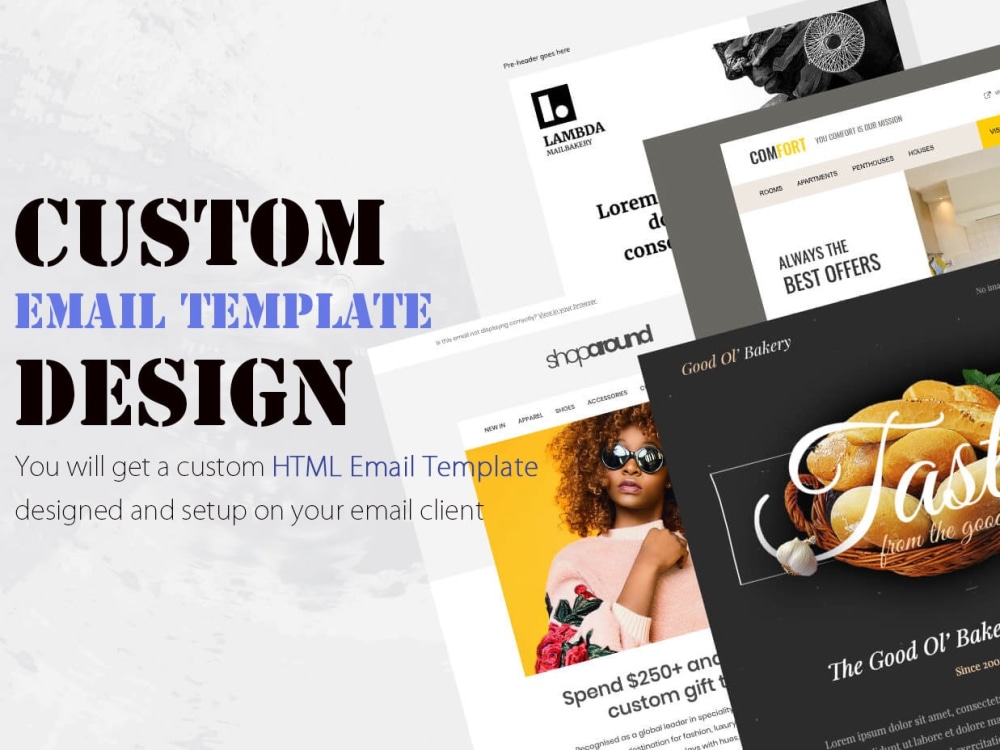
Custom HTML Email Template

Good for you if you’ve decided to break free from the limitations of generic DIY templates with custom HTML email templates. 

That’s stepping away from most marketing emails that look interchangeable nowadays. The same drag-and-drop templates. The same predictable layouts. The same forgettable user experience. Upgrading to custom HTML email templates is definitely a step in the right direction.

But if you’re not working with a qualified custom HTML email template service yet,  you’re still only halfway there. Without expert help, we bet you’re missing out on a large percentage of your email marketing potential. 

If you’re still on the fence about investing in professional custom HTML email template services, keep reading. Your future self (and your revenue reports) will thank you.

What Are Custom HTML Email Template Services? 

Custom HTML email template services help you in ways no drag-and-drop template builder can match. The expert team designs and hand-codes custom HTML email templates that represent your brand, campaign goals, and audience needs. 

A reliable service like custom HTML email template services by Email Mavlers provides you with a team of experts wielding a wide array of skills. Skills that make unique email design, technical precision, and cross-platform compatibility not a distant dream for brands like yours.

The custom HTML email templates they deliver are responsive and tested for compatibility across devices and email clients. Besides, they are built to work great within your preferred email platform. You receive clean, editable HTML code that you can reuse and customize for future campaigns. 

By choosing a custom HTML email template service, you save time, avoid those pull-your-hair-out rendering issues, and dramatically improve the overall performance of your email campaigns.

This is what a full-service custom email template design agency typically does:

  • Strategy & Discovery: They collaborate with you to nail down your goals, understand your brand guidelines, and identify your audience needs.
  • Email Design: Craft beautiful custom templates that look like they were painstakingly crafted just for them——because they were.
  • Coding and Development: They apply their niche coding skills to convert those designs into clean, responsive HTML/CSS code optimized for finicky email clients.
  • Testing: Nothing leaves their desk without extensive testing across devices, browsers, and email providers for functionality, deliverability, and responsiveness.
  • ESP integration: Configure ESP (Email Service Provider) settings and integrate email templates into the ESP of your choice. 
  • Delivery: You receive HTML files, editable templates, email client test reports, and checklists for easy use.
  • Reporting: Offer detailed analysis of campaign performance and identify areas of improvement for future campaigns. 

Deliverables clients receive–

  • Professionally designed emails that reflect the client’s visual identity.
  • Responsive code so emails adapt seamlessly to desktops, tablets, and mobiles.
  • Compatibility assurance that emails render correctly in major email clients.
  • Reusable assets and modules that can be repurposed for future campaigns.

Now read this— 62% of email marketing teams take two weeks or more to build a single email. And 23% of teams have up to 5 emails in production at any time.

Even if you’re running a small business, imagine how overwhelming it would be to manage all these email design and development tasks yourself. And let’s be honest: email marketing involves a thousand other complex tasks, and it’s not your only marketing channel that needs attention.

Unless you have a large team of dedicated pros, building compelling custom email campaigns can get on your nerves.  Maybe it’s time that you hire an email agency that specializes in custom HTML email templates. 

Top Benefits Custom HTML Email Template Services 

The advantages of partnering with custom HTML email template experts go way beyond unique designs. They help you build a stronger, more scalable email marketing foundation. Here’s why custom email template services deliver long-term value for your brand:

Brand Consistency

Pre-built email templates work fine until your email design requirements grow beyond the basics. As Drupal Sinh, Project Manager at Email Mavlers, puts it: “When precision and branding consistency matter—ensuring that every email aligns with the brand’s voice, tone, and style—custom HTML email templates offer a much higher level of control.”

But easier said than done, right?

Coding a branded HTML email from scratch is full of challenges. Having access to skilled designers and developers who can navigate these complexities. Meaning you don’t have to worry about maintaining a polished and consistent look across all campaigns.

Better Email Performance

Custom email template service providers bring deep email development knowledge to the table. Plus, because they’re experts, your emails are mobile-responsive, fast-loading, and tested for performance. All of which leads to better engagement and higher conversion rates.

Improved Deliverability and Clean Code

Deliverability being the top email trend in 2025, every brand, small or big, should double down on their efforts to improve the deliverability of emails. Experienced custom email template services hand-code each template with best practices to avoid spam triggers and broken elements. 

Professional services rigorously test templates across dozens of email clients and devices. Not to forget, providing fallbacks for clients with limited support. 

It’s through this well-defined QA process that your emails maintain their design integrity and functionality. Reduced risk of broken layouts or missed opportunities due to technical issues improves email deliverability.

Scalability for Campaigns

Custom HTML email template services don’t just deliver one-off templates. They build scalable, reusable design systems. You receive a library of modular content blocks and templates. So that it’s easier to quickly adapt to new campaigns without losing sight of consistency. This saves time on future projects. Plus, their code is well-documented and editable—making future updates simple.

Wrapping Up 

By hiring a professional custom HTML email template service, you gain access to a dedicated team of designers and developers who understand the nuances of email development. 

Most tasks in custom email development require technical expertise that you probably don’t have (and honestly shouldn’t need to have).

Every hour you spend fighting with email code is an hour you’re not spending on strategy, content, or literally anything else that would be a better use of your time.

By hiring professionals, you’re not just buying email templates. You’re buying back your time, reducing your stress, and setting yourself up for email marketing that drives results.

And really, isn’t that worth paying for?

From Template to Custom: How Elementor Speeds Up Your Website Design Process

From Template to Custom: How Elementor Speeds Up Your Website Design Process

Creating a website involves balancing quality, customization, and efficiency. Too often, these factors work against each other, high quality takes time, customization requires expertise, and efficiency can compromise results. Elementor’s template system offers a solution to this dilemma, providing a foundation that dramatically accelerates the design process while still allowing for complete personalization. By starting with templates rather than blank pages, you can transform your workflow and deliver better results in less time.

The Time Challenge in Web Design

Website creation timelines can stretch from weeks to months when starting from scratch. Design decisions, layout planning, responsive adjustments, and content integration all consume valuable hours. For business owners, these delays mean postponed launches and lost opportunities. For designers, longer timelines limit the number of projects they can handle and reduce overall profitability.

The traditional approach forces designers to reinvent common elements repeatedly, navigation menus, contact forms, service sections, when these components follow standard patterns that don’t necessarily require building from zero each time.

Understanding Elementor’s Template Ecosystem

Elementor offers multiple template types that serve different purposes in your design workflow:

  • Page templates provide complete, ready-to-use page designs
  • Block templates deliver pre-designed sections like headers, testimonials, and pricing tables
  • Section templates offer smaller component designs that integrate within larger layouts

These templates aren’t random designs but carefully crafted structures created by professional designers who understand conversion principles, visual hierarchy, and responsive behavior. The template library grows continuously, offering both free and premium options for virtually any industry or purpose.

Starting With Templates: The Strategic Advantage

Templates function as structural frameworks rather than rigid designs. They incorporate proven layouts, spacing principles, and typography relationships that would take hours to develop independently. For newer designers, working with templates offers valuable insights into professional design practices, you can examine how elements work together and learn by modifying existing structures.

Even an established website design company often begins projects with templates to establish baseline structures before applying customizations. This approach isn’t cutting corners; it’s strategic resource allocation that focuses creative energy on unique elements rather than standard components.

The Customization Process: Making Templates Your Own

Transforming templates into unique designs typically follows a systematic approach:

  1. Replace placeholder content with actual text and images
  2. Update color schemes using global color controls
  3. Modify typography to match brand guidelines
  4. Adjust layout spacing and proportions
  5. Add or remove elements based on specific needs

Elementor’s global styling system allows you to update colors, fonts, and other design elements across entire templates with just a few clicks, ensuring consistency while dramatically reducing editing time.

Advanced Customization Techniques

Beyond basic modifications, Elementor offers powerful tools for advanced customization. Dynamic content lets you connect templates to your database, automatically populating designs with your posts, products, or custom content types. For unique styling needs, custom CSS integration provides unlimited design flexibility without abandoning the template foundation.

The ability to save custom sections as templates for future use creates exponential efficiency gains in website development. Elements you perfect once become reusable assets for all future projects.

Workflow Optimization: Beyond Templates

Organizing templates into categories based on project types, industries, or design styles helps streamline selection for new projects. Developing a systematic customization process, perhaps even creating checklists for your team, ensures consistent results and prevents overlooking important modifications.

Common Template Challenges and Solutions

The most frequent concern about templates is creating sites that look generic or “templated.” This risk is easily mitigated by combining elements from different templates, adjusting layouts beyond color and text, and incorporating unique visual elements specific to each brand.

Conclusion

Templates aren’t shortcuts that compromise quality but strategic assets that eliminate redundant work. By starting with professionally designed foundations and focusing your energy on customization, you can deliver better websites faster while maintaining complete creative control. The most successful designers don’t view templates as pre-made websites but as sophisticated starting points for efficient, high-quality design.

5 Unconventional Web Design Genres You Need to Know

5 Unconventional Web Design Genres You Need to Know

Unconventional Web Design Genres

Web design is actually a very dynamic area, and it is always possible to come up with some brilliant idea anytime, anywhere.

Apart from some small and simple designs (or rather, the regular cliché themes), there is a lot more to be found in the wide pool of designs that really take your breath away.

While some of these genres are influenced by science fiction and other associated aesthetics, others draw upon the early days of the World Wide Web and beyond – to provoke and challenge our understanding of creativity online.

Used in unison, these styles of typography, scrolling effects, or futuristic designs are capable of changing how we interact with the web. 

Ready to dive in? Let’s look into five fresh web designs that are defining the future image of the web!

1. Futuristic Sci-Fi Aesthetics

Futuristic sci-fi-based web designs are essentially about designing for other worlds, and that is exactly what they do.

The interfaces of these websites are mostly dark, with lots of neon lighting and fantastic animations reminiscent of a Cyberspace movie.

The aim is to take the users to an environment to engage their curiosity in a futuristic technological style.

Expect it to be geometric and cuboidal, with holographic elements and gradient looks that any technophile would love. 

This genre is rather suitable for brands associated with gaming, high technologies, or the entertainment industry and, in particular, if a brand needs a distinctive, futuristic image.

  • Pro Tip: Combine hover effects that will create a glowing effect and semi-transparent background for the images to make them and the website appear futuristic and more engaging.

2. Flash Era Nostalgia

Somehow, we’ve thrown it back to the early 2000s and the madness of the Flash websites of that period!

Most of these sites are characterized by bright color schemes, animated cursors, pop-up music that plays automatically, and bizarre formats.

Today, there are similar tools that replicate the sense of Flash while being vastly superior in terms of performance and usability.

This style is perfect for brands that wish to convey playfulness, uniqueness, or that old-school WWW aesthetic.

When it’s nicely done, you get that old-fashioned feel without losing out on both form and function.

  • Pro Tip: For retro visuals to work effectively, they should not be overdone, but blended with the modern way of most current users.

3. Neumorphism: A Modern Minimalist Twist

Neumorphism combines the sleekness of minimalism with shallow depth to achieve a design that appears touchable and up-to-date. 

This type of design uses subtle shadows and blur to give ‘elevation’ to objects; for example, buttons or cards, making them look as if they have depth.

Neumorphism is minimal and modern, so it is ideal for apps, portfolios, or websites that want to look neat and clean. 

Yet, it is most suitable when combined with the correct selection of colors and other usability-related design actions.

  • Pro Tip: Integrate neumorphic components with flat types that are the opposite so the graphic is entertaining – while also intuitive.

4. Massive Typography for Bold Statements

Massive typography is a web design trend that essentially insists on grabbing one’s attention through text. 

Very large texts, applied in combination with low-impact graphics, are a powerful and highly memorable solution. 

This style is ideal for making a great impact, statements, for placing headlines or making a great brand statement.

Combined with creative fonts, dynamic animations, or contrasting colors, this technique is both artful and effective in conveying a message.

This is best suited for creative portfolios, marketing initiatives and product unveilings.

  • Pro Tip: Employ large type sizes restrictively to communicate your messages, but do not bury the user with it.

5. Parallax Scrolling for Interactive Depth

Parallax scrolling enhances the feel that users have when scrolling through a webpage by featuring elements that move slower than the background. Designers today are increasingly turning to AI-powered solutions to speed up experimentation and bring complex ideas to life more efficiently. Tools like the Magic Patterns product design tool, Uizard, and similar platforms make it easier to create interactive layouts, helping teams quickly prototype, iterate, and refine modern web experiences. By integrating these tools into their workflow, designers can focus more on creativity while maintaining speed, consistency, and usability. 

This interactive technique supplements the traditional method and provides depth to the websites, making Internet browsing feel like a movie.

Although it produces an awesome look, it is imperative to maintain its responsiveness over the devices. 

For example, a website that allows you to check your IP address can use parallax scrolling to present related information or visualizations in an engaging and straightforward way. 

  • Pro Tip: Avoid using parallax effects on the entire site, since it may make the site slow.

Conclusion

Web design is the art of innovation, and as you can tell, there is no shortage of creativity to go around in these five unconventional genres. 

If you’re looking for a futuristic look, want to create an art-deco mood, or consider analog typography as your passion, then it’s worth experimenting with these styles. 

Use the opportunity to try new strategies and design processes; create unique designs that make a lasting impression on Internet users.