
Your website is meant to be a lead and sales generation machine, not a fancy relic that just sits around. For this to happen, you need a well-thought-out and carefully crafted landing page.
However, if your landing pages aren’t appearing in search results, you might as well be wasting your time.
In this guide, I will show you why and how to SEO your landing pages built on WordPress for better visibility on Google, Bing, and AI platforms.
But first, the basics.
What is a Landing Page?
Put simply, a landing page is basically any page on your website that visitors “land” on. By this logic, it means virtually any page on your site can be a landing page: blog post, home page, about us page, etc.
However, within the context of marketing, landing pages are meant to nudge visitors to take certain action, hence driving conversion.
For example, you might want visitors to make a purchase, subscribe to your newsletter, contact you, etc. These are actions that can impact your bottom line positively, and a landing page is best suited for this.
5 Hacks to Improve the Visibility of Your Landing Pages on Search
I hate to break it to you, but your landing pages won’t appear by themselves on Google or AI. You have to strategically engineer them for this purpose.
That being said, here are 5 simple hacks to improve ranking and visibility for your landing pages:
- Do your keyword research
- Focus on one keyword at a time
- Use the keywords smartly
- Add CTAs (call to action)
- Use images and videos objectively
Do Your Keyword Research
Every SEO effort begins with exhaustive keyword research. You will want to know what queries potential customers who are looking for your services or products are typing into Google or ChatGPT.
Get as many keywords as possible, because you will need them. I’d say don’t worry if those keywords are difficult to rank for or don’t have a huge search volume – you just need something decent
Focus On One Keyword at a Time
At the end of your keyword research campaign, chances are you will come up with multiple, often related keywords. It can be tempting to stuff these keywords into one page. It’s best to focus on one major keyword per page at a time.
For example, let’s say you run an eatery business and are trying to rank for the keyword “restaurant in Lagos”. Some potential keywords you can go after include sea food restaurant lagos, best restaurant in Ikeja (or any other location), fine dining restaurant Lagos, etc.
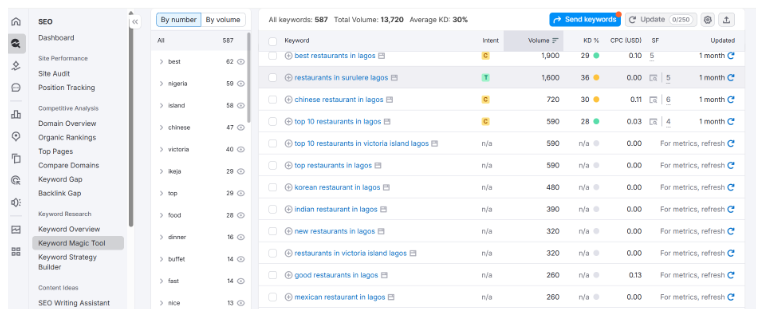
Rather than stuff all these keywords into one page, create one landing page each for the keywords. You get my gist, don’t you?
Doing this gives clarity to search bots crawling your site, hence improving ranking.
Use the Keywords Smartly on the Page
Once you’ve figured out the right keywords you want a specific landing page to rank for, the next step is to infuse them into your copy. You will want to do so smartly.
One good place to start is in your headings, particularly the H1 and H2s. This is not to say you shouldn’t use them in your body content, but only do so sparingly.
Add CTAs, but Space Them Out
This one is a no-brainer, isn’t it? You want people to come to your landing page and take an action, right? Then you have to tell them exactly what to do. This is what a CTA, short for call-to-action.
Don’t sweat it, CTA is just a clickable button.
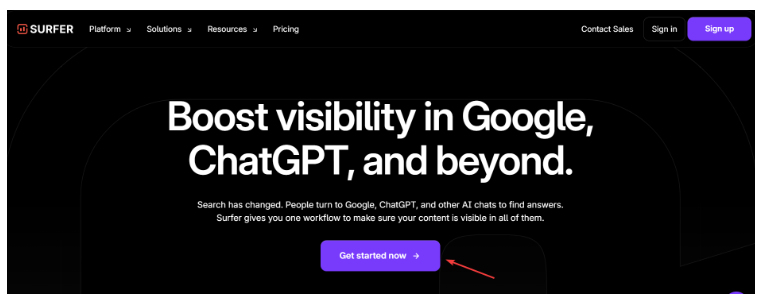
I will say, add these CTAs sparingly on your page. Having buttons littered all over the place will only make your landing page look cluttered.
Use Images and Videos Objectively
Ever tried reading a long article on Wikipedia that has no images? Just a long chunk of in-your-face texts without any image to break it up. It was pretty hard, right?
The same applies to your landing pages. Adding visuals, including images and videos, gives visitors a chance to catch their breath and rest up. Resting means they will stay longer on your site. Google loves it when people stay longer on your web pages, and this leads to a higher ranking.
A note of caution: It’s super duper important to compress images and media to ensure your page stays light and loads faster.
Thankfully, there are lots of WordPress plugins that can automatically compress your media files without significant loss in quality. They include TinyPNG, Imagify, etc.
How to Build a Landing Page Optimized for SEO
The easiest and fastest way to set up a landing page that gets search traffic is to hire a web designer who understands SEO. Going this route can be surprisingly affordable.
Another option is to use landing page building tools like PageFly and Unbounce. This will require a monthly subscription.
The Elementor Page Builder could also work if your website is built on WordPress.
Finally, if you’ve got the skills or you know how to prompt AI tools, you can go the DIY (do it yourself) route. Just be sure to follow the guidelines I have shared here.