
Telegram is no longer just a private messaging app. For many users, it has become a powerful discovery platform where public channels share news, crypto updates, business alerts, creator content, community announcements, deals, educational posts, and niche conversations that are often published faster than on traditional social media.
That is why more people are searching for a Telegram channel viewer.
A Telegram channel viewer helps users preview, browse, or discover public Telegram channels without wasting time jumping between random links. For marketers, it can be a research tool. For everyday users, it can be a cleaner way to check whether a channel is worth joining. For brands, it can help monitor public content and understand how competitors communicate with their audience.
But there is one important point to understand from the beginning: a safe Telegram channel viewer should focus on public channels and publicly available information. It should not promise to unlock private channels, protected groups, hidden posts, or restricted content. Those claims are usually misleading and risky.
In this guide, we will break down what a Telegram channel viewer is, how it works, the safest options to consider, and how to choose the right tool without putting your Telegram account at risk.
What Is a Telegram Channel Viewer?
A Telegram channel viewer is a tool, website, or method that helps users browse Telegram channel content more conveniently. In most cases, it is used to view public channels, preview channel information, read public posts, or research channel activity before deciding whether to open the channel in Telegram.
Telegram channels are different from normal chats. A channel is usually a one-way broadcasting space where admins publish messages to subscribers. This makes channels popular for news publishers, creators, deal pages, crypto communities, software projects, agencies, educators, influencers, and brands.
A Telegram channel viewer may help you see details such as the channel name, public description, profile image, recent public posts, public links, or general activity where available. Some tools focus on discovery. Others focus on analytics, monitoring, or content previews.
The best Telegram channel viewer should be simple, fast, and honest about its limits. It should not ask for your Telegram password, SMS code, two-step verification code, or private account access.
Why People Use Telegram Channel Viewer Tools
People use Telegram channel viewer tools for many different reasons. Some want to check a public channel before joining. Some want to research a competitor. Some want to follow public updates without opening the Telegram app every time. Others want to verify whether a channel looks legitimate before clicking deeper.
For SEO and content research, Telegram channels can be very useful. Many trends appear first inside communities before they become popular on Google, TikTok, YouTube, or X. A public Telegram channel can show you how people talk about a topic in real time, what offers they promote, what questions keep coming back, and what language the audience actually uses.
Common reasons include:
- Previewing public Telegram channels before joining
- Checking recent public posts from a browser
- Researching competitors and creators
- Finding niche communities around a topic
- Verifying whether a channel looks active or abandoned
- Avoiding suspicious or fake Telegram links
- Monitoring public announcements from brands or projects
- Studying content ideas for marketing campaigns
The real value is convenience. Instead of clicking random invite links blindly, a good viewer gives you a safer first look.
Can You View Private Telegram Channels with a Channel Viewer?
No safe or legitimate Telegram channel viewer should claim that it can open private Telegram channels without permission.
Private Telegram channels are restricted by design. If a channel requires an invite link, approval, or membership access, a third-party viewer should not be able to bypass that. Tools that promise “view any private Telegram channel” are usually using exaggerated claims to attract clicks.
This is especially important because many risky websites use privacy-related keywords to manipulate users. They may ask you to enter your phone number, Telegram login code, password, or two-factor authentication code. That is a major red flag.
A trustworthy Telegram channel viewer should focus on public channel discovery, public previews, and safer browsing. It should clearly explain that private channels stay private unless the channel owner gives access.
Top 9 Telegram Channel Viewer Tools and Methods
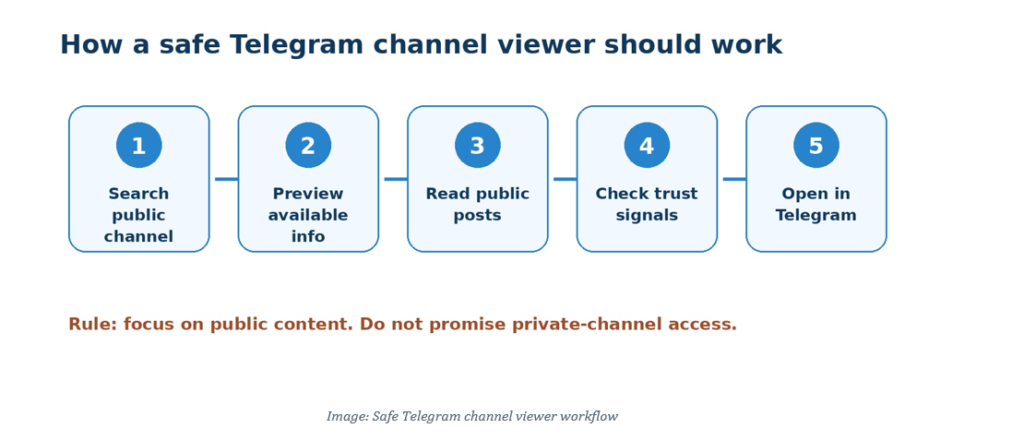
Image: Safe Telegram channel viewer workflow
Below are the best types of Telegram channel viewer options to consider in 2026. Some are dedicated viewer tools, while others are safe methods that help users browse public Telegram channels more intelligently.
1. StoryViewerTools Telegram Channel Viewer
A dedicated Telegram Channel Viewer page on StoryViewerTools can be one of the strongest options for users who want a simple, no-login experience. The purpose is not to overcomplicate the process. The page should help users check public channel information quickly, understand what is available, and move to Telegram only when needed.
For SEO, this type of tool page is powerful because the user intent is clear. Someone searching for “Telegram channel viewer” usually wants a quick solution. They do not want a long technical explanation before they can use the tool. They want a clean input box, clear instructions, and a safe browsing experience.
A strong Telegram Channel Viewer page should include:
- A simple search or username input field
- Clear wording that it works with public channels where available
- No password or Telegram login requirement
- Fast loading on mobile and desktop
- Privacy-safe explanations
- Internal links to related Telegram tools
- A short FAQ section to capture long-tail searches
The page should also be careful with claims. Instead of saying “view any channel anonymously,” a better message is “preview public Telegram channels and available channel information from a browser.” This is more trustworthy and safer for users.
Best for
Users who want a clean, simple way to preview public Telegram channels without downloading an app or entering sensitive account details.
Internal link suggestion
Link to: /telegram-channel-viewer
Anchor: Telegram Channel Viewer
2. Telegram Official App
The official Telegram app remains the most reliable way to access Telegram channels. If a channel is public, you can open it, read posts, subscribe, and receive updates. If a channel is private, you need the correct invite link or approval.
The main advantage of the official app is safety. You are not giving your account details to unknown websites. You are using Telegram directly, which means the experience respects Telegram’s own privacy and access rules.
For users who want to actively participate, save posts, forward content, join discussions linked to channels, or manage notifications, the official app is still the best choice.
The downside is that it is not always ideal for quick research. If you are checking many channels, opening each one inside the app can feel slow. You may also end up joining channels you only wanted to preview.
Best for
Users who want the safest full Telegram experience and do not mind using the app directly.
Main limitation
It is less convenient for quick browsing, competitor research, or checking many public channels quickly.
3. Telegram Web
Telegram Web is useful for people who prefer working from a computer. It lets you access your Telegram account from a browser, read channels, manage chats, and move between public content more easily than on a small phone screen.
For marketers, Telegram Web can be practical. You can keep Telegram open while building content calendars, checking competitors, writing reports, or researching public communities. It is also easier to copy public channel links, review posts, and organize notes from desktop.
However, Telegram Web is still connected to your Telegram account. It is not an anonymous third-party viewer. If your goal is only to preview public channels without logging in, a separate browser-based viewer may be more convenient.
Best for
Desktop users, marketers, researchers, and community managers who already use Telegram daily.
Main limitation
It requires account access and is not designed as a no-login public preview tool.
4. Public Telegram Channel Directories
Public Telegram channel directories help users discover channels by category, topic, language, or popularity. These directories are useful when you do not already know the exact channel username.
For example, someone researching finance, AI, gaming, crypto, deals, education, or local news can use public directories to find relevant channels faster. Instead of searching randomly, they can browse categories and compare options.
Directories are not always perfect. Some may contain outdated channels, low-quality listings, or promotional placements. But they can still be useful as a discovery layer.
When using public directories, look for signs of quality. A useful directory should show updated information, clean categories, channel descriptions, and links that do not force suspicious redirects.
Best for
Users who want to discover new public Telegram channels by niche or category.
Main limitation
Directories can be outdated, promotional, or incomplete, so users should verify channels before trusting them.
5. Telegram Channel Analytics Platforms
Telegram channel analytics platforms are more advanced than basic viewers. They are designed for people who want to understand performance, growth, posting frequency, engagement signals, and audience patterns around public channels.
This type of tool is especially useful for agencies, creators, media buyers, SEO teams, and brand managers. Instead of only viewing posts, you can study how active a channel is, what kind of content it publishes, and whether it has real momentum.
For example, if you are planning a partnership with a Telegram channel, you may want to know whether the channel has consistent posting activity, whether its content is relevant, and whether it looks authentic. A basic channel viewer may not give you enough context, but an analytics platform can help you make a better decision.
Best for
Marketers, agencies, creators, and businesses that need research beyond basic channel previews.
Main limitation
Many analytics platforms are paid or too advanced for casual users.
6. Search Engine Results for Public Telegram Channels
Search engines can sometimes surface public Telegram channel pages, snippets, usernames, or posts. This method is simple and does not require any special tool. You can search for a topic plus terms like “Telegram channel,” “t.me,” or the brand name you are researching.
This can be useful when you are trying to find official channels or compare multiple public sources around the same topic. For example, a user may search for “AI news Telegram channel” or “brand name Telegram channel” to find relevant public results.
The limitation is that search engines do not index everything. Some Telegram content may not appear in search results, and some results may be old, duplicated, or irrelevant. Still, it is a good starting point for discovery.
Best for
Quick discovery of public Telegram channel links from outside Telegram.
Main limitation
Search results are incomplete and may not show the most recent channel activity.
7. Social Listening and Monitoring Tools
Social listening tools help brands track public conversations across different platforms. Some monitoring workflows include public Telegram channels, especially when brands need to follow niche communities, public announcements, market trends, or reputation signals.
This is not the best choice for casual users, but it can be powerful for professional research. If you are tracking a market, a product category, or a competitor, Telegram channels can contain valuable signals.
A social listening setup can help identify:
- Trending topics inside public Telegram communities
- Brand mentions
- Competitor announcements
- Community questions
- Product complaints or praise
- Offer and promotion patterns
- Emerging keywords before they appear in search demand tools
For SEO, this is valuable because Telegram can reveal audience language. The words people use inside communities may become search terms later.
Best for
Brands, agencies, analysts, and SEO teams that want deeper public market intelligence.
Main limitation
These tools can be expensive and may require setup, filters, and ongoing analysis.
8. Browser-Based Public Preview Tools
Browser-based public preview tools are popular because they are quick. A user enters a public Telegram username or link, and the tool attempts to show available channel information.
This is the type of experience many users expect from a Telegram channel viewer. It should be lightweight, fast, and easy to use.
However, this category also has risks. Some websites use aggressive claims to attract traffic. They may say they can unlock private channels, reveal hidden posts, or bypass Telegram restrictions. These claims should not be trusted.
A safe browser-based preview tool should:
- Work only with public or available content
- Avoid asking for sensitive Telegram details
- Explain its limitations clearly
- Avoid forced downloads
- Avoid fake progress bars
- Keep the page clean and simple
Best for
Users who want quick public channel previews without installing software.
Main limitation
Quality varies. Some tools are useful, while others are risky or misleading.
9. Manual Channel Verification Method
Sometimes the best “tool” is a simple manual process. Before joining any Telegram channel, you can check the link, preview the public page if available, look at the channel name, review the description, check posting frequency, and watch for suspicious promises.
This method is especially useful because fake Telegram channels are common in many niches. Scammers may copy brand names, use similar profile images, or create channels that look official at first glance.
Before trusting a channel, ask:
- Does the username look official?
- Is the profile image consistent with the brand?
- Does the description include suspicious promises?
- Are posts low quality or repetitive?
- Does the channel push urgent payment links?
- Is the channel linked from the official website or verified social profiles?
A Telegram channel viewer can help with the first look, but human judgment is still important.
Best for
Anyone who wants to avoid fake channels, scam links, or low-quality communities.
Main limitation
It takes more time, but it is safer.
How to Choose the Best Telegram Channel Viewer
The best Telegram channel viewer depends on your goal. A casual user may only need a simple browser-based preview. A marketer may need analytics. A brand manager may need monitoring. A Telegram power user may prefer Telegram Web.
Before choosing a tool, check five things.
First, does it support public channel previews? A good viewer should work clearly with public content.
Second, does it avoid asking for sensitive information? If a website asks for your Telegram login code, leave immediately.
Third, is it mobile-friendly? Most users searching for Telegram tools are on mobile, so the experience should load quickly and fit smaller screens.
Fourth, does it explain privacy limits? Honest tools are better than tools making impossible promises.
Fifth, does it help users take action? A good viewer should let users preview, understand, and then decide whether to open the channel in Telegram.
Telegram Channel Viewer vs Telegram Profile Viewer
A Telegram channel viewer and a Telegram profile viewer are related, but they solve different problems.
A Telegram channel viewer focuses on public channels, broadcast content, announcements, posts, and channel discovery.
A Telegram profile viewer focuses on visible account or profile information, such as username, display photo, bio, and public identity signals.
Users often need both. For example, someone may find a creator’s public profile, then check whether they run a channel. Or they may discover a channel and then want to understand who is behind it.
For topical SEO, these pages should link to each other naturally.
Internal link suggestion
Link to: /telegram-profile-viewer
Anchor: Telegram profile viewer
Telegram Channel Viewer vs Telegram Story Viewer
A Telegram story viewer is different from a channel viewer. Stories are short, temporary updates. Channels are public or private broadcast spaces with posts, announcements, media, and long-term content.
A user searching for a Telegram story viewer usually wants to watch story-style updates. A user searching for a Telegram channel viewer usually wants to browse channel content, preview public posts, or research communities.
Both topics belong in the same Telegram tools cluster because they serve related user intent. A smart site structure should connect these pages through internal links and supporting guides.
Internal link suggestion
Link to: /telegram-story-viewer
Anchor: Telegram story viewer
Telegram Channel Viewer for SEO and Market Research
Telegram channels can be valuable for SEO research because they show real audience language. Many keyword tools only show what people already search on Google. Telegram communities can show what people are discussing before those topics become mainstream.
For example, a public channel may reveal new product terms, trending questions, competitor offers, pain points, and content angles. If you are building topical authority, this kind of research can help you write articles that feel more current and more human.
A Telegram channel viewer can support SEO research by helping you:
- Discover niche communities
- Monitor public posts in your market
- Find repeated questions and phrases
- Spot emerging topics early
- Compare content formats used by competitors
- Build better FAQ sections
- Improve internal link strategy
This is especially useful for listicle articles, comparison pages, tool pages, and buyer-intent guides.
Safety Tips Before Using a Telegram Channel Viewer
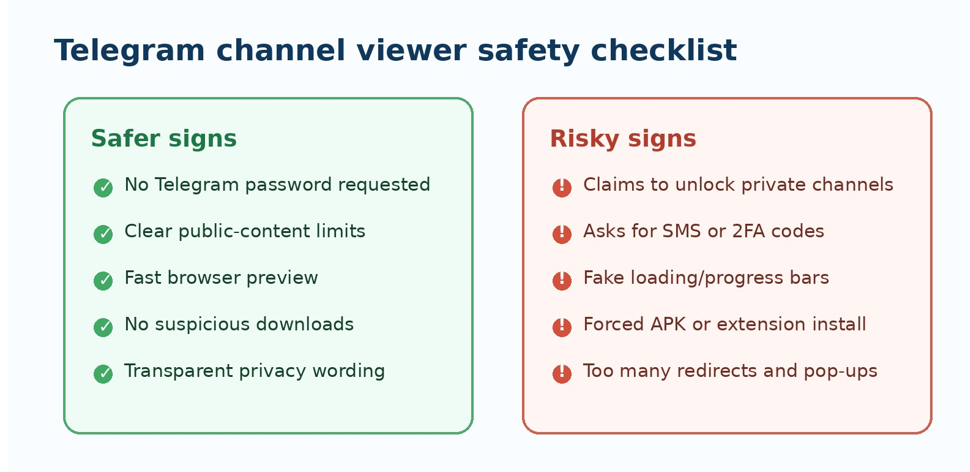
Image: Telegram channel viewer safety checklist
Before you use any Telegram channel viewer, keep your account security in mind. A tool that helps you preview public content should not need deep access to your Telegram account.
Never enter your Telegram password on a random website. Never share your SMS login code. Never share your two-step verification code. Never install an unknown APK, Chrome extension, or desktop app just to view a channel.
Also, be careful with channels that promise guaranteed profit, free crypto, private leaks, hacked tools, or unrealistic giveaways. Many scam channels use urgency to push users into clicking unsafe links.
A safe approach is simple: preview public information first, verify the channel source, then decide whether it is worth opening inside Telegram.
Best Page Structure for a Telegram Channel Viewer Tool
If you are building a Telegram Channel Viewer page for StoryViewerTools, the structure should be clean and conversion-focused.
Recommended structure:
H1
Telegram Channel Viewer
Above-the-fold section
Add a short benefit-driven subheading: “Preview public Telegram channels and available channel information from your browser.”
Tool box
Add one input field for username or public channel link, plus a clear action button.
Trust section
Explain that the tool does not ask for Telegram passwords, SMS codes, or private account access.
How it works
Use three simple steps: enter public channel link, preview available information, open in Telegram if needed.
Use cases
Include casual browsing, competitor research, public channel discovery, and safety checks.
Related tools
Link to Telegram Profile Viewer, Telegram Story Viewer, and Status Downloader.
FAQ
Answer common questions about private channels, safety, anonymous viewing, and public content limits.
This structure gives users what they need quickly while supporting SEO depth below the tool.
FAQ About Telegram Channel Viewer
What is a Telegram channel viewer?
A Telegram channel viewer is a tool or method that helps users preview, browse, or discover public Telegram channels. It can help users check available channel information before opening the channel in Telegram.
Can I view Telegram channels without joining?
You may be able to preview some public Telegram channels without joining, depending on the channel settings and the tool used. Private channels usually require an invite link or permission.
Can a Telegram channel viewer open private channels?
No trustworthy viewer should claim to unlock private Telegram channels. Private channels are restricted, and access requires permission from the channel owner or a valid invite process.
Is a Telegram channel viewer safe?
It can be safe if it focuses on public content and does not ask for your Telegram password, SMS code, or two-step verification code. Avoid tools that push downloads, fake verification steps, or private-access promises.
What is the best Telegram channel viewer?
The best Telegram channel viewer is simple, fast, browser-based, mobile-friendly, and honest about public content limits. It should help users preview available information without risking their Telegram account.
Can I use a Telegram channel viewer for competitor research?
Yes. Public Telegram channels can be useful for market research, content ideas, competitor monitoring, and SEO topic discovery. Focus on public content and ethical research.
What is the difference between a Telegram group and a Telegram channel?
A Telegram channel is mainly used for broadcasting messages to subscribers. A group is more conversation-based, allowing members to interact with each other depending on the settings.
Do I need to download an app to view public Telegram channels?
Not always. Some public channels can be previewed through browsers or public viewer tools. However, for full access and interaction, the official Telegram app is usually required.
Final Thoughts
A Telegram channel viewer can be a useful tool when it is built around public discovery, safe browsing, and realistic privacy limits.
The best viewer is not the one that makes the biggest promise. It is the one that helps users quickly understand a public channel, avoid risky links, and decide whether the channel is worth opening in Telegram.
For casual users, a simple browser-based tool is enough. For marketers and SEO teams, channel viewers can become part of a deeper research workflow. For brands, they can help monitor public conversations and competitor activity.
The safest rule is simple: use Telegram channel viewers for public content only, never share sensitive login details, and avoid any tool that claims it can bypass private channel restrictions.
If you build this page correctly on StoryViewerTools, it can become a strong topical SEO asset that connects naturally with Telegram Story Viewer, Telegram Profile Viewer, and broader privacy-focused guides.