
TikTok trends move fast, but your favorite content doesn’t have to disappear. Whether you’re a creator looking to repurpose your clips or a viewer saving a tutorial for offline use, having a reliable downloader is essential. This guide reveals the top tools to ensure you never lose a viral moment again.
A TikTok video download tool is a web-based service or application that allows users to save TikTok content directly to their devices. The most effective tools in 2026, like SnapTik and SSSTik, offer high-definition MP4 files without watermarks. These services are free, require no software installation, and function seamlessly across all modern browsers and operating systems.
Find More: 9 Powerful Ways to Get Free TikTok Likes in 2026 (Most Creators Miss #5)
What is a TikTok Video Downloader?
A TikTok video downloader is a specialized software or web script designed to fetch the source video file from TikTok’s servers. When you use a TikTok video download service, the tool bypasses the standard “Save Video” feature—which often includes a distracting moving watermark—and provides a clean version of the file. In 2026, these tools have evolved to support 4K resolutions and high-bitrate audio extraction.
How Watermark Removal Works
TikTok embeds watermarks to protect creator attribution, but for personal archives or professional editing, these can be obstructive. Downloader tools work by identifying the direct URL of the video file hosted on TikTok’s Content Delivery Network (CDN). By accessing this raw file link before the app applies the watermark overlay, the tool can serve you a “clean” version of the content.
Top 10 TikTok Video Downloaders for 2026
Selecting the right tool depends on your device and your need for speed. Below are the ten most reliable services currently dominating the market for download tiktok video requests.
1. SnapTik: The Industry Leader
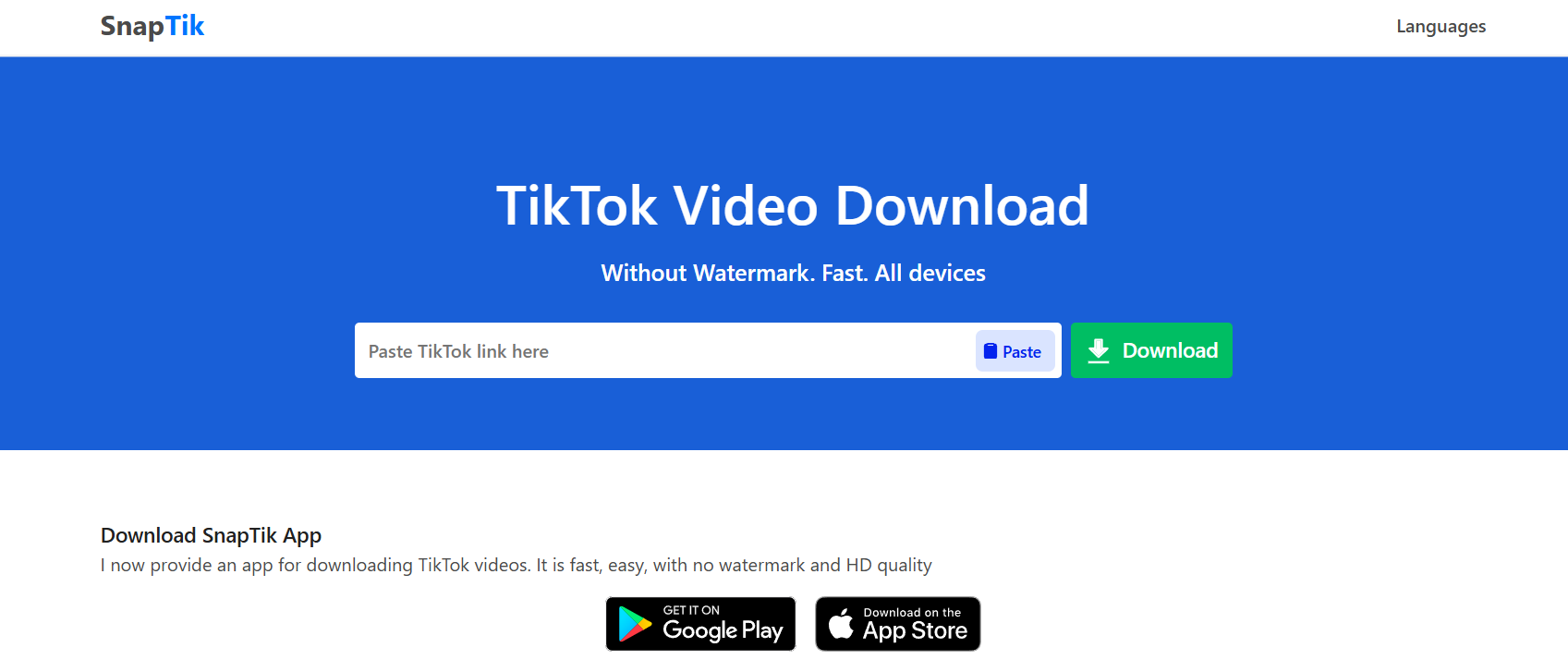
SnapTik remains the gold standard for TikTok video download tasks. It is famous for its “one-click” interface and incredibly fast server response times. It doesn’t require any registration, making it the top choice for beginners who value privacy and speed.
-
Best for: General users who want a watermark-free experience.
-
Platform: Web-based (works on iOS, Android, PC).
-
Standout Feature: High-speed servers that process 1080p videos in under three seconds.
2. SSSTik: The Versatile Alternative
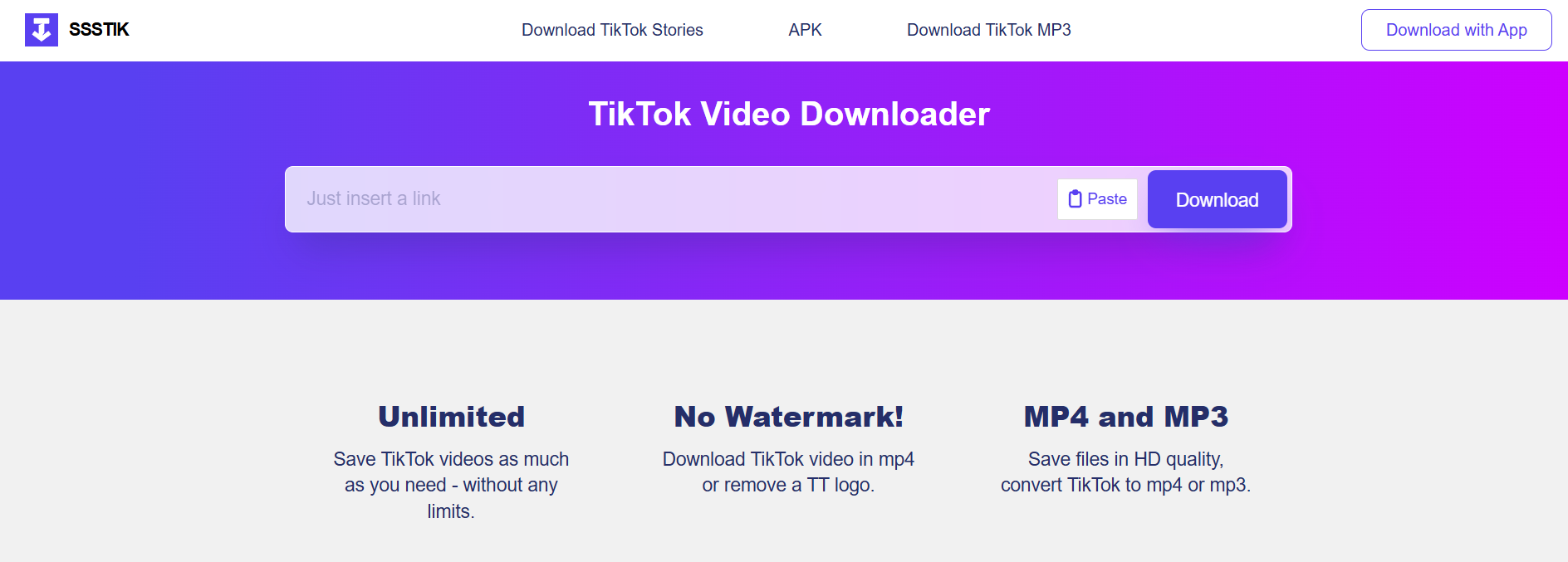
If SnapTik is down, SSSTik is the immediate runner-up. It offers a nearly identical experience but often includes an option to download the MP3 audio separately. This is a game-changer for creators who want to archive trending sounds for later use in their own productions.
-
Best for: Users who need both video and high-quality audio files.
-
Platform: Web-based and Android App.
-
Standout Feature: Unlimited downloads with zero hidden daily caps.
3. SaveTik: Best for Mobile Optimization
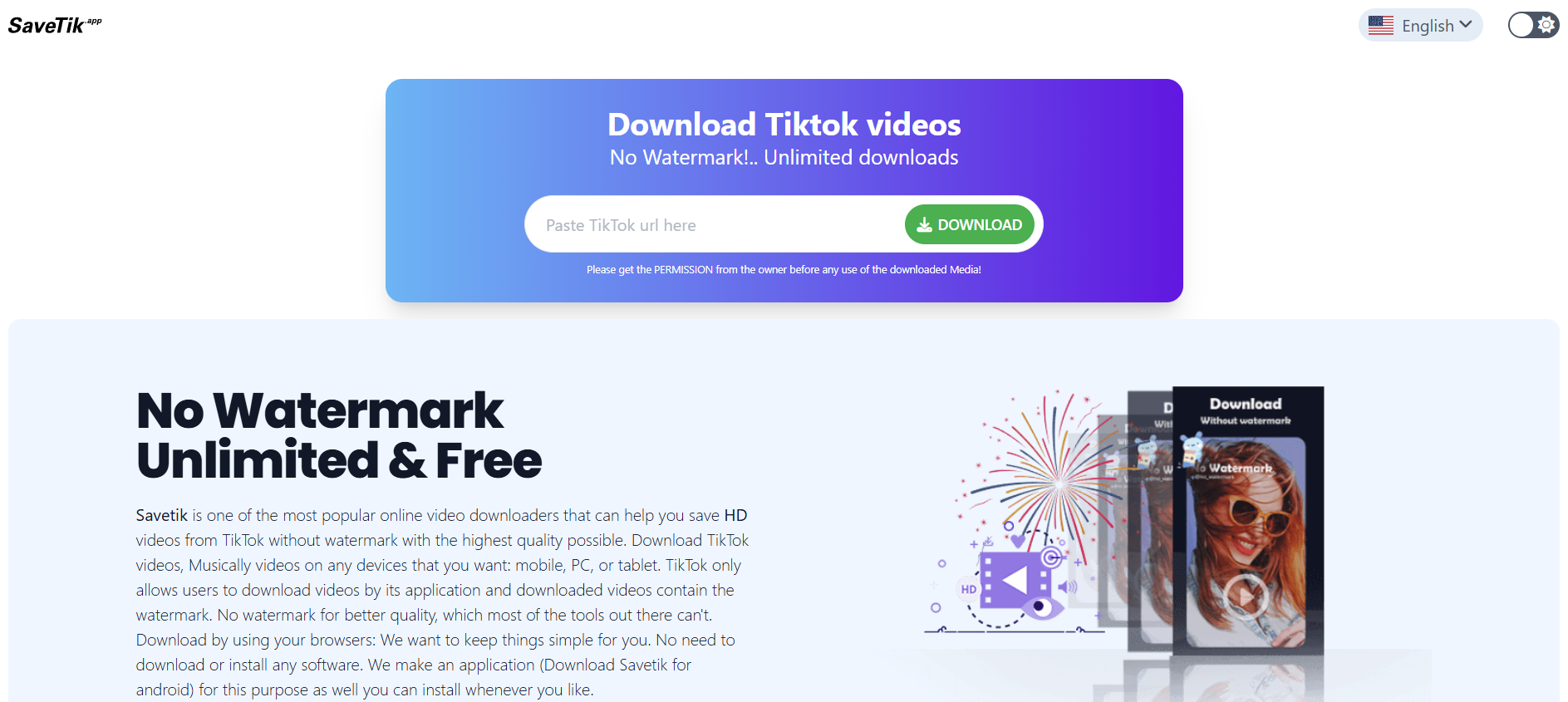
SaveTik has spent the last year optimizing its mobile web interface. While other sites might feel cluttered on a smartphone, SaveTik provides a clean, ad-light experience specifically designed for Safari and Chrome on mobile devices.
-
Best for: Saving videos while on the go.
-
Platform: Mobile Web, iOS Shortcut.
-
Standout Feature: Extremely low data usage compared to competitors.
4. TikMate: The Desktop Powerhouse
TikMate is tailored for those who do their heavy lifting on a PC or Mac. It offers a browser extension that adds a “Download” button directly onto the TikTok web interface. This removes the need to copy and paste links entirely, streamlining the workflow for professional social media managers.
-
Best for: Social media managers and content curators.
-
Platform: Google Chrome Extension, Web.
-
Standout Feature: Direct integration into the TikTok desktop site.
5. Loadeer: Minimalist and Ad-Free
Many TikTok download video sites are cluttered with intrusive ads. Loadeer prides itself on a minimalist design. While it might lack some of the advanced features of SnapTik, it provides a much safer-feeling environment for users who are wary of clicking the wrong button.
-
Best for: Users who prioritize a clean, professional user interface.
-
Platform: Web-based.
-
Standout Feature: No pop-up advertisements.
6. QLoad.info: The Bulk Downloader
QLoad.info is unique because it allows for efficient processing. It is highly optimized for those who need to download TikTok videos in a series. Its backend is built to handle multiple requests without triggering “bot detection” from TikTok, which is common with cheaper tools.
-
Best for: Archiving entire playlists or creator feeds.
-
Platform: Web-based.
-
Standout Feature: Stability during peak traffic hours.
7. SnapSave: The Multi-Platform Expert
SnapSave isn’t just for TikTok; it handles Facebook and Instagram Reels as well. If you are a multi-platform consumer, using SnapSave allows you to keep all your downloading needs in one single browser tab.
-
Best for: Power users who consume content across multiple social networks.
-
Platform: Web-based.
-
Standout Feature: Universal compatibility with various social media video formats.
8. ExpertsPHP: The Technical Choice
Don’t let the name fool you; you don’t need to be a coder to use this. ExpertsPHP offers one of the most robust engines for fetching videos that other sites might struggle with, such as those with region locks or specific privacy settings.
-
Best for: Downloading “stubborn” videos that other tools fail to fetch.
-
Platform: Web-based.
-
Standout Feature: High success rate on age-restricted or private-link content.
9. TTDownloader: The Classic Reliable
TTDownloader has been around since the early days of the platform. It is a no-frills tool that does exactly what it says on the tin. It is particularly good at providing a variety of file formats, including M4A and various MP4 resolutions.
-
Best for: Users who need specific file extensions for legacy video editing software.
-
Platform: Web-based.
-
Standout Feature: Provides a detailed breakdown of file sizes before you click download.
10. MusicalDown: The Audio-First Tool
Formerly focused on the Musical.ly era, this tool has transitioned perfectly into the TikTok age. It remains the best tool for extracting the “original sound” of a video in the highest possible bitrate (320kbps).
-
Best for: Music enthusiasts and DJs.
-
Platform: Web-based.
-
Standout Feature: Superior audio extraction logic.
Step-by-Step Framework for Downloading TikTok Videos
Using these tools is remarkably consistent across different platforms. Follow this 3-step universal framework to download TikTok video files in seconds.
Step 1: Copy the Video Link
Open the TikTok app or website. Navigate to the video you wish to save. Tap the “Share” button (the arrow icon) and select “Copy Link.” You will see a “Link Copied” confirmation at the top of your screen.
Step 2: Paste into the Downloader
Open your preferred browser (Chrome, Safari, or Brave) and navigate to one of the tools listed above, such as SnapTik.tap the input box and select “Paste.” Ensure the URL looks like “
Step 3: Download and Save
Click the “Download” or “Get Video” button. The server will process the link for a few seconds. Once finished, you will see multiple download options (usually “Server 1,” “Server 2,” or “Download MP3”). Click your preferred option, and the file will begin saving to your device’s “Downloads” folder.
Real-World Examples of Why You Need These Tools
-
Educational Content: You find a complex 3-minute Excel tutorial. By performing a TikTok video download, you can pause, rewind, and watch the tutorial in a split-screen view while you work on your spreadsheet without worrying about your internet connection.
-
Content Repurposing: A small business owner films a “Day in the Life” video on TikTok. Using a downloader to get the watermark-free version allows them to upload that same high-quality video to LinkedIn or Pinterest without the TikTok logo clashing with their professional brand.
-
Memories and Archiving: Creators often delete their accounts or have content removed. Downloading a copy of your own milestones or a loved one’s video ensures that those digital memories are stored locally on a hard drive rather than just “in the cloud.”
Comparison of Top Downloader Features
| Tool Name | Watermark Free? | Audio MP3 Option? | Max Resolution | Ad Level |
| SnapTik | Yes | No | 1080p | Medium |
| SSSTik | Yes | Yes | 1080p | Medium |
| TikMate | Yes | No | 4K (Pro) | Low |
| MusicalDown | Yes | Yes (HD) | 1080p | High |
| Loadeer | Yes | No | 720p/1080p | Very Low |
Common Mistakes to Avoid
-
Using “Fake” Apps: Many apps on the App Store or Play Store claim to be “TikTok Downloaders” but are actually malware or subscription traps. Stick to reputable web-based tools unless the app has millions of verified reviews.
-
Ignoring Copyright: Just because you can download TikTok video content doesn’t mean you own it. Never re-upload someone else’s content as your own or use it for commercial purposes without explicit permission from the creator.
-
Clicking “Fake” Download Buttons: Free tools are supported by ads. Some ads look like “Start Download” buttons. Always look for the button that matches the site’s primary color scheme and avoid flashy, blinking green buttons that look out of place.
Pro Tips for the Ultimate Experience
-
Use an Ad-Blocker: If you use a browser like Brave or an extension like uBlock Origin, these downloader sites become 10x faster and much safer to navigate.
-
Check the “Downloads” Folder: On iPhones, many people think the download failed. In reality, Safari saves the file to the “Files” app under “Downloads” rather than directly to your “Photos” app. You must manually save it to your Camera Roll from there.
-
Batch Downloading: If you have a list of URLs, open them in separate tabs. Most servers will allow you to process 3-5 videos simultaneously before they limit your IP address.
The Future of TikTok Downloading in 2026
As AI continues to integrate with social media, we are seeing the rise of “Smart Downloaders.” These tools don’t just save the video; they can automatically generate a transcript, summarize the video using LLMs, or even strip the background music while keeping the voiceover intact. The tools listed today are the foundation of this technology, providing the raw data needed for these advanced AI workflows.
Key Takeaways
-
SnapTik and SSSTik are the most reliable overall tools for 2026.
-
Always use the “Copy Link” method to ensure the highest quality fetch.
-
Watermark-free videos are essential for professional repurposing and clean archives.
-
Be cautious of ads on free sites; look for minimalist tools like Loadeer if you are overwhelmed.
-
Respect creator rights—downloading is for personal use and archiving, not for content theft.
Find More: Boost Your Sales With SEO Services
FAQs
1. Is it legal to download TikTok videos?
Yes, downloading videos for personal, offline viewing is generally considered “fair use” in most jurisdictions. However, downloading a video to re-upload it to another platform for profit without permission is a violation of copyright law and TikTok’s terms of service.
2. Why do some videos not have a “Save” option in the app?
TikTok allows creators to disable the “Save Video” button in their privacy settings. If a creator has done this, the official app will not let you save it. However, a third-party TikTok video download tool can still fetch the file because it accesses the public URL of the video rather than the app’s interface.
3. Will the creator know if I download their video?
No. Unlike Instagram Stories or certain Snapchat features, TikTok does not notify creators when their video is downloaded using a third-party tool. The creator will see an increase in their “Shares” metric, but your identity remains anonymous.
4. Do these tools work on private accounts?
Generally, no. Most download TikTok video services require a public URL. If an account is private, the tool’s servers cannot “see” the video file to fetch it. You would need to be a follower of that account and use a screen recorder instead.
5. Can I download a video in 4K resolution?
Most TikTok videos are uploaded in 1080p. While some tools like TikMate offer “4K” options, they are often just upscaling the 1080p source. The quality of your download is primarily limited by the quality the original creator used when they uploaded the clip.
Downloading content shouldn’t be a technical chore. By using the right TikTok video download strategy, you can build a library of inspiration, education, and entertainment that belongs to you—regardless of your internet connection. Choose a tool from our top 10 list, follow the three-step framework, and start archiving your favorite digital moments today.