
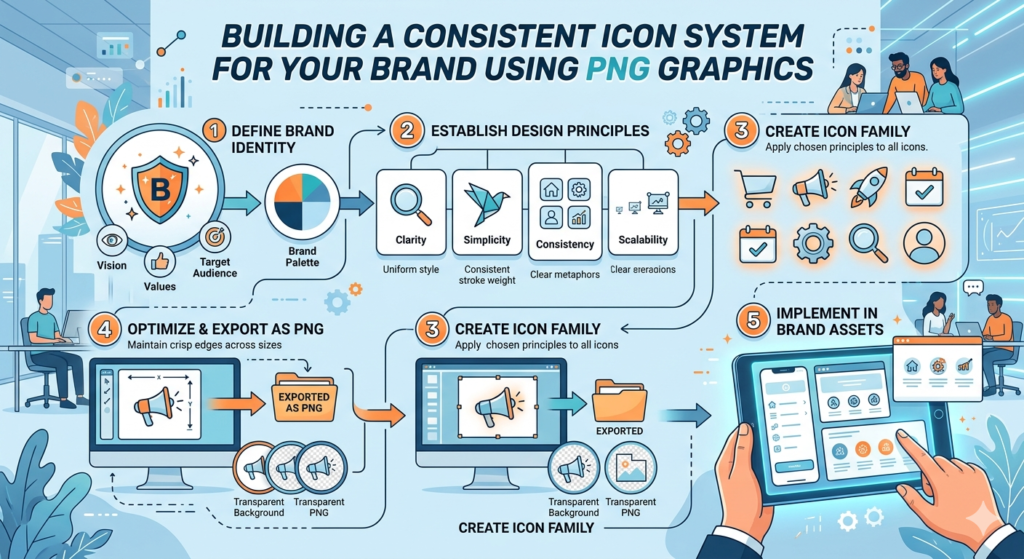
You know those moments when a website or app just feels cohesive? Part of that magic comes from PNG icons. Small, simple, but surprisingly powerful. Every tap, click, or scroll can be guided by them — if they’re consistent.
If you’re a designer, marketer, or entrepreneur putting together a brand, having a solid PNG icon system is one of those things you don’t realize you need — until your visuals start looking messy.
Why Consistency Matters
Icons aren’t just decoration. They tell users what to do, what to expect, and subtly reinforce your brand identity. When icons don’t match — different line weights, styles, or sizes—your brand suddenly looks unprofessional.
A consistent system:
- Makes your interface or content instantly readable
- Creates a polished, trustworthy look
- Saves you time when producing new graphics
Think about it: if your “search” icon looks totally different from your “settings” icon, people notice—even if they don’t consciously realize it.
Core Principles for a Strong PNG Icon System
Image by Pikwizard.com
Here’s what most designers focus on when building icons:
1. Stick to a Grid
All png icons should align to the same pixel grid. This keeps proportions uniform and makes scaling up or down seamless.
2. Keep Stroke Width Uniform
If one icon is thick and another thin, your set feels inconsistent. Decide on a stroke width early and stick with it.
3. Mind the Corners
Rounded edges communicate friendliness; sharp edges feel precise or technical. Pick a corner style and keep it across the board.
4. Think Accessibility
Your png icons need to be legible at small sizes. Avoid tiny details that disappear when scaled down, and ensure enough contrast so everyone can see them clearly.
Practical Steps Using PNGs

Image by Pikwizard.com
- Start Small: Focus on essential icons first—home, search, cart, settings.
- Pick a Base Style: Outline, filled, monochrome, or colored—choose one style to tie the set together.
- Use a Grid: Stick to consistent dimensions (24px, 32px, 48px, etc.) to make life easier when placing icons in layouts.
- Curate Thoughtfully: Don’t go overboard with dozens of variations—too many choices dilute consistency.
- Leverage Resources: Platforms like Pikwizard offer curated PNG icon packs that you can drop in and start using immediately. They even have starter “icon systems” so you don’t have to reinvent the wheel.
Scaling Your Icon Library
- Keep a master folder so everyone on your team knows where to find approved icons.
- Document your rules: stroke width, corner style, spacing, and usage.
- Review new icons against your system to make sure they fit.
- Consider reusing or adapting existing icons instead of creating new ones unnecessarily.

Image by Pikwizard.com
Icons are small, but their impact on your brand is anything but. A consistent PNG icon system makes your designs readable, professional, and instantly recognizable. Start with the essentials, stick to clear rules, and take advantage of resources like Pikwizard to build your library faster. With a little planning, your icon system can grow with your brand—without ever looking messy.

Image Provided By Pikwizard.com