...
UK: +44 2038074555 info@atamgo.com
The Role of AI in Revolutionizing Managed IT Services for the Architecture Industry

The Role of AI in Revolutionizing Managed IT Services for the Architecture Industry

AI in Revolutionizing Managed IT Services

Technology can feel like a double-edged sword for architecture firms. On one hand, it promises to simplify complex workflows and enhance productivity. On the other hand, managing IT services often feels like juggling too many balls at once. Slow systems and unexpected downtime could throw projects off track.

Artificial intelligence is stepping in as a transformative solution. By automating routine tasks, predicting issues before they happen, and improving design accuracy, AI is changing how architects work with tech every day.

This blog will explore practical ways AI improves managed IT services for the architecture industry. Ready to see how AI can simplify your work? Keep reading!

The Integration of AI into Managed IT Services for Architecture

AI simplifies the operation of IT systems in architecture firms. It assists businesses in resolving issues more efficiently and maintaining a competitive edge.

Streamlining IT support and infrastructure

Automated tools powered by machine learning manage repetitive tasks such as software updates and troubleshooting. This minimizes downtime and allows teams to concentrate on more significant priorities. Faster resolutions lead to fewer disruptions in your regular operations. Architecture firms often rely on partners—including Virginia Beach tech companies—to implement AI-driven managed services that keep systems running smoothly.

Faster resolutions lead to fewer disruptions in your regular operations. A solid IT foundation is essential for the success of any project. Predictive analytics monitors systems continuously, detecting issues early. Cloud computing improves adaptability while reducing expenses on physical storage. These improvements help architecture firms function effectively without continual crises for IT teams.

Enhancing system monitoring and predictive maintenance

Simplified IT infrastructure lays the foundation for smarter monitoring. AI tools play a role in detecting system irregularities quickly. These systems analyze real-time data and predict failures before they happen.

Predictive maintenance reduces downtime by addressing issues early. For instance, machine learning algorithms can identify unusual server activity or temperature spikes in equipment. This approach enhances reliability while significantly reducing repair costs. Firms working with MSPs like Gamma gain access to proactive monitoring solutions that integrate predictive analytics into everyday IT management. This approach enhances reliability while significantly reducing repair costs.

AI-Driven Design and Generative Modeling

AI simplifies architectural design by automating repetitive tasks. It also introduces new opportunities for creative problem-solving and planning.

Automating complex design processes

AI-driven automation reduces the manual workload in complex architectural design. Algorithms can quickly generate detailed 3D models, saving countless hours once spent on repetitive drafting tasks. Machine learning enables systems to study past projects and predict the most effective layouts or structures for new designs.

Automation also aids in testing structural durability during early design stages. Computational tools simulate real-world conditions like wind pressure or material stress without physical prototypes. This approach prevents costly errors later, improving workflow efficiency across teams and ensuring faster project delivery times.

Optimizing resource allocation and project planning

AI simplifies resource allocation in architecture projects. Machine learning tools predict material needs based on past designs and project timelines. This reduces waste and ensures teams have what they need when they need it. Automated systems assign tasks by analyzing workloads, skill sets, and deadlines.

Predictive analytics improve project planning accuracy. These tools forecast potential delays or bottlenecks before issues arise. Teams can adjust schedules early to stay on track while maintaining quality standards. By organizing resources effectively, firms save time and reduce costs during execution. Accurate modeling aligns smoothly with resource management.

AI and Building Information Modeling (BIM)

AI enhances the accuracy of architectural plans with smarter modeling techniques. It connects teams more effectively, improving collaboration and efficiency.

Improving accuracy in architectural modeling

AI improves Building Information Modeling (BIM) by processing large datasets rapidly. It detects inconsistencies in blueprints, minimizing human errors during planning. For instance, machine learning algorithms forecast structural problems by comparing designs with historical data. This conserves time and helps avoid expensive mistakes.

Predictive analytics enhances decision-making for architects and IT teams. Automated checks identify discrepancies early in the design phase. Teams can modify plans effectively without disrupting progress or inflating budgets. Precise modeling also enhances coordination across departments, promoting smoother workflows and improved outcomes.

Facilitating collaboration across teams

Accurate architectural models foster smoother teamwork. AI-based systems eliminate communication barriers by providing real-time data updates and centralized project dashboards. Teams no longer manage disorganized files or conflicting schedules.

Advanced tools make sharing Building Information Modeling (BIM) data across departments easier. Designers, engineers, and IT staff remain coordinated on workflows without continuous email exchanges or meetings. This efficiency minimizes errors while improving decision-making speed.

Overcoming Challenges in AI Adoption

Adopting AI often feels like solving a puzzle with missing pieces. Tackling fears and technical obstacles requires patience, planning, and open communication.

Addressing data privacy and security concerns

Protecting client data remains a top priority for architecture firms using managed IT services. AI systems process large volumes of sensitive architectural plans, project details, and financial information.

Securing this data against breaches requires strong encryption protocols and strict access controls. For example, machine learning algorithms can identify unusual activity within networks in real time, reducing the risk of cyberattacks.

Regulations like GDPR or CCPA demand that businesses stay compliant when managing personal data. AI-driven compliance tools can simplify adherence by tracking how information is stored and shared.

Additionally, securing Building Information Modeling (BIM) platforms ensures safe collaboration across teams while protecting intellectual property from exposure or theft.

Managing resistance to technological change

Employees often resist AI integration due to fear of job loss or unfamiliarity with technology. Address concerns by offering clear communication and ongoing training programs. Demonstrate how automation and machine learning tools improve and support their roles. Highlight practical benefits like reduced workload and better workflow efficiency.

Involve teams early in project stages to build trust and lessen doubts. Create a culture where feedback is valued, encouraging teamwork around IT changes. Share success stories within the architecture industry to show attainable results through smarter systems like Building Information Modeling (BIM) or predictive analytics tools.

Conclusion

AI is changing how IT services support architecture. It simplifies processes, predicts issues, and helps teams work more efficiently. With tools like BIM and predictive analytics, architects can achieve improved results in less time. Challenges exist, but the rewards are worth pursuing. The future of intelligent buildings begins here.


How AI Is Transforming Shopify Stores in 2026 (Personalization, CRO, Automation)

How AI Is Transforming Shopify Stores in 2026 (Personalization, CRO, Automation)

How AI is Transforming Shopify Stores

The eCommerce world is changing rapidly and now that AI is part of this ecosystem, things are moving fast and effectively. The eCommerce world is becoming more competitive than ever and Shopify is becoming the go-to platform for businesses of all sizes, be it a small business, a startup or a large enterprise, every other company is choosing Shopify.

But but but… to truly stand out in the market, businesses need to take extra steps, because listing products on their online store won’t cut it. AI is powering everything, from data-driven insights to personalization to automation.

And some of your customers have started feeling something different in their shopping experience. Now it’s time for you to adopt AI for Shopify Stores.. merchants can provide a personalized shopping experience to their customers, automate operations and boost CRO.

What AI is Doing in Shopify?

AI in Shopify is a great combination, embedding machine learning and artificial intelligence tools within Shopify stores, giving customers an overall different experience. The AI tools analyze customer data, purchasing behavior, and market trends to provide you with actionable insights. Overall… it enhances efficiency and customer experience.

Here is What AI is Doing in Shopify Stores

1. Automating the Boring, Repetitive Stuff

Most store owners did not start their business to sit in front of a laptop fixing tags or writing the same email a hundred times. And for this whole scenario, AI for Shopify stores is making the biggest difference as it takes over the repetitive work.

AI tools now help with things like-

  • Auto-tagging products based on attributes in the title, description and images
  • Generating product descriptions or meta descriptions for Shopify SEO
  • Segmenting customers into smart groups based on buying behavior
  • Scheduling email campaigns or flows based on triggers.

Instead of manually updating everything, merchants set rules, connect an app and let the system keep things organized. This frees up time for the work that actually needs a human brain… like branding, strategy, creative direction.

That’s the Shopify automation!

2. Conversational AI That Actually Helps Customers

Support is everything.. if you want to hold on to your business for longer. Earlier support used to mean inbox overload, delayed answers and a lot of copy-paste replies. In 2026… conversational AI is going to become a natural part of AI in ecommerce 2026.

On Shopify stores… AI-powered chat handles-

  • Basic queries about orders, shipping, returns and stock
  • Simple product questions like “Does this come in size XL?”
  • Directing more complex questions to a human when needed

The tone is getting better too, as these bots do not sound like robots anymore… they can be trained with your brand voice and past conversations. They are there on your site 24/7 and answer the questions that your team used to reply to, sometimes on time and sometimes delayed.

This does not replace human support… but it filters and reduces the noise – so when a real person steps in… they are handling the conversations that actually require judgment or nuance.

3. Cutting Costs Without Cutting Corners

AI is not only about doing more.. in a lot of Shopify stores, it’s also about spending smarter. Because tasks are automated, merchants do not need as many tools, freelancers, or manual hours for things like basic content creation, campaign setup or repetitive support. That means leaner teams that can still move fast and sell more.

AI also reduces costly mistakes:

  • Fewer stockouts because inventory forecasts are more accurate
  • Fewer wasted ads because campaigns are optimized automatically
  • Fewer abandoned carts when Shopify AI checkout optimization is in place

So when people talk about cost-effective operations with AI.. listen to them because it’s not just theory, it’s coming from all these small savings across the entire funnel that, together, make the business more profitable.

4. Turning Data Into Real Customer Insights

Most Shopify brands sit on a ton of customer data they never really use… order history, browsing behavior, email engagement, abandoned carts, search terms and more. AI changes that. Instead of exporting spreadsheets and trying to analyze… merchants are now lean on AI tools that-

  • Highlight which products drive repeat purchases
  • Identify which customers are at risk of never coming back
  • Surface which channels or campaigns actually lead to high-value customers
  • Group users based on real behavior… not just demographics

This is the deeper side of AI for Shopify stores… for doing things faster and making better calls. When your decisions are backed by real patterns of customers and shoppers instead of predictive feeling, and this is where Shopify CRO (conversion rate optimization) becomes less trial and error and more intentional.

These insights also feed into smarter Shopify SEO, better product page structure and more relevant content.

5. Smarter Inventory Management, Less Guesswork

In 2026… a lot of stress around inventory is shifting from – I hope we ordered enough to We know what’s likely to sell. AI models look at past sales, seasonality, trends and even marketing plans to help stores stock smarter.

Instead of over-ordering and ending up getting a loss or constantly selling out and again losing sales.. merchants get suggestions like:

  • What to restock and when to restock
  • Which products are slowly dying and may need discounting
  • Which variants are consistently underperforming
  • How much to order before a seasonal spike

For fast-moving categories like fashion or beauty… this matters a lot. It ties back to margins, cash flow and customer trust. If customers regularly find out of stock messages.. they leave. If you are overstocked, your cash is stuck in the warehouse.

Smart inventory is not rocket science.. but it’s one of the most important pieces of AI in ecommerce 2026.

6. AI-Powered FAQs That Feel Less Like a Help Center and More Like a Human

Traditional FAQ pages are static and boring.. people rarely read them end to end. AI is changing this by turning FAQs into something more dynamic and helpful.

Instead of scrolling through a giant wall of text, visitors can-

  • Ask their question in a chat style box
  • Get an instant answer based on your FAQ, policies and past support conversations
  • See follow-up suggestions for related questions

This is what AI-powered FAQs really mean… they sit between “self-service help” and “support agent,” reducing the pressure on your team and giving customers what they need.

7. Personalization That Goes Beyond “You Might Also Like”

In earlier years.. personalization on Shopify often meant simple recommendation carousels. In 2026 with the best Shopify apps for AI personalization, it will go more detailed and feel less generic. AI can now adjust –

  • Which products a customer sees first
  • Which banners show on the homepage
  • What offers or bundles are promoted
  • What kind of messaging appears based on their interests or behavior

This personalized shopping will feel less like a store is personalized for all your shoppers.

It also connects directly to Shopify CRO… when people see things that are genuinely relevant to them… they are far more likely to buy, return and trust the brand.

8. Smarter Marketing and Visual Content With AI

Marketing used to be one of the most time consuming parts of running a Shopify store like creating ads, designing assets, writing copy and testing angles, but AI now helps with a big chunk of that. In 2026… AI in ecommerce will be heavily used for-

  • Creating ad variations faster
  • Suggesting headlines or angles that match what customers respond to
  • Generating or editing visuals for campaigns and product imagery
  • Supporting content ideas for blogs and emails that tie back into Shopify SEO

This does not mean creativity is gone… it allows marketers and founders to focus on the bigger ideas… brand story, positioning, voice… while AI handles the repetitive work of turning those ideas into dozens of assets.

For brands working with the Best Shopify Web Development Company or looking to hire Shopify AI expert support…. this intersection of AI, visuals, marketing, UX is where a lot of growth is coming in 2026.

The Real AI Power Trio is Personalization, CRO and Automation

When people talk about AI for Shopify stores, it can sound very abstract. But if you look at what’s actually driving results in 2026.. it usually comes down to three things working together – Personalization, Conversion Rate Optimization (CRO) and Automation. These three are the core of how serious brands will be using AI in ecommerce 2026 to grow.

1. Personalization

This is where most stores feel the impact first… Earlier, this was just meant to show a basic carousel like – You might also like. Now… AI quietly adjusts the entire experience based on who is visiting and what they have done before. The homepage, product recommendations, offers they see and even the content can shift depending on what a person has browsed, what they have bought, what price range they usually stick to and how often they come back. Instead of one static storefront for everyone… you end up with an experience that feels personal and relevant. The store nudges each visitor with things they are more likely to care about. This is where the best Shopify apps for AI personalization really prove their value. You are not manually curating every block for every user. You set up rules and let the system do the work in the background… so the visitor just feels like the store gets them without quite knowing why.

2. Conversion Rate Optimization (CRO)

CRO is the second big piece and it’s where AI removes a lot of the predictive work that used to slow brands down. In a normal Shopify setup, someone has to dig through analytics, form a theory, change one thing on the site, then wait and hope it helped. With AI plugged into Shopify CRO… that loop tightens. AI can highlight where people are dropping off, which pages underperform on mobile, where attention is getting lost and which elements are quietly working well. Instead of making random changes based on your feelings… you start making targeted adjustments backed by patterns in real behavior. Over time… this touches everything- how your product pages are structured, how your messaging is placed, how your cart looks and how your checkout flows. And when you bring in Shopify AI checkout optimization on top of that, even the final steps – where most money is lost – start to feel smoother, cleaner and faster for your customers.

3. Automation

You cannot personalize at scale or constantly optimize your store if everything still depends on someone doing manual updates every day. Automation is runs in the background and help tag customers based on how they behave, trigger the right emails or SMS at the right time, keep product data and basic Shopify SEO fields updated and even take inventory and marketing decisions in the right direction. You start spending less time on repetitive tasks like moving lists around, rewriting the same type of copy or building every campaign from scratch. Instead… you define the logic once, plug in the right tools and let the system execute. When personalization, CRO and automation work together, the store feels smarter for the customer and lighter for you as the owner or marketer.

The Future of Shopify Is Human Brands Powered by Quiet AI

The most important thing to remember about Shopify in 2026 is that AI is not here to replace the human side of your business. It’s not here to replace your brand story, your taste, your understanding of your customers or the reasons you started your store in the first place. What it does is remove friction and makes repetitive work lighter. It makes decisions clearer. It helps your store show up in a way that feels more relevant, more timely and more thoughtful to the people who visit. Beyond the on-site experience, tools like LangSync’s AI Visibility Tool help Shopify brands see how clearly AI assistants such as ChatGPT, Gemini, and Perplexity understand, interpret, and surface their store, turning AI visibility into something that can be measured and optimised rather than guessed.

If this all feels exciting but also a little overwhelming, that’s completely normal. You’re not expected to become a data scientist or AI engineer just to run an online store. This is exactly the kind of moment where it can make sense to hire a Shopify AI expert or collaborate with Expert Village Media… they know how to connect strategy, UX and automation. The brands that will win in the next few years aren’t just the ones with AI tools installed. They are the ones that use those tools intentionally to serve their customers better, to make smarter decisions and to free up time to focus on what only humans can do and start building a brand people actually care about.

Top AI Tools to Rewrite and Improve Your Content

Top AI Tools to Rewrite and Improve Your Content

ai tools

Writing good-quality content is extremely important for blogs, websites, assignments, marketing material, and even social media posts. 

You must understand that clear and digestible content helps your message or ideas reach people in a more effective manner, which is why you must focus on simplifying and improving your drafts.

The problem is that not everyone finds content writing easy. Even skilled writers would sometimes end up writing sentences that might sound confusing, robotic, or vague. If your content is not engaging, it is not going to be valuable for readers and will never be able to get to the top search results. 

Improving writing takes a lot of time, and not everyone can be good at editing and repurposing.

This is where AI tools come into play. These tools can help you manage various tasks such as rewriting, editing, humanizing, removing plagiarism, and much more. These tools can save time and help your content sound more natural and professional.

Now there are hundreds, if not thousands, of AI tools available online, so it can be difficult for you to find the best ones. Therefore, after thorough trials and testing, we have shortlisted the top options. 

These AI tools can help you rewrite and improve your content, making them extremely useful. So without any delay, let’s get down to the details….

Paraphraser.us

Paraphraser.us is one of the most popular rewriting tools. It helps you paraphrase sentences in different tones and styles in mere seconds. The tool relies on natural language processing and machine learning, which makes it a popular utility for those who want to ensure that they get human-like results.

The tool is very easy to use, and even a layperson with no prior experience can use it to rewrite text without any training. You would find different rewriting modes on this tool, using which you can make text simpler, more fluent, more formal, or more creative.

The thing we like most about this tool is that it doesn’t just change language but ensures that the revised text sounds more professional and convincing. It is best for anyone who wants to improve text quality, remove unwanted duplication, or create multiple versions of the same text. 

Grammarly AI

Grammarly is a very popular tool being used by millions across the globe. This tool doesn’t do much more than correct spelling mistakes and punctuation. It helps you improve sentence structure, grammar, and tone of content so that it sounds more authentic. 

Grammarly can easily identify wrong spellings, missing punctuation, unclear sentences, overly lengthy lines, wordiness, and awkward phrasing. Not just this, but it can also suggest simpler and clearer alternatives, which would make your writing more professional and free of all kinds of errors. 

The AI-powered suggestions given by this tool make it a very useful option for both informal and formal writing tasks. One can easily fix grammar, structure mistakes and get better vocabulary suggestions without putting in much effort.

The best thing about Grammarly is that it can be used online as well as integrated with different apps, such as MS Word. The basic version is available for free, but to enjoy advanced features such as plagiarism checking and AI rewriting, you have to subscribe to the premium plans.

PlagiarismRemover.co

Plagiarismremover.co, as the name hints, is a powerful tool for removing unwanted duplication from content. Plagiarism in content doesn’t just ruin its quality, but it also damages the credibility of the writer.

This website isn’t just home to an AI plagiarism remover tool; it also comes with an advanced plagiarism detector. You don’t have to worry about buying premium subscriptions for overrated plagiarism checker tools. This free plagiarism checker allows over 95% accuracy without any extensive restrictions.

The plagiarism remover itself relies on machine learning and NLP, which allows it to rewrite its content in different words without changing its intent or underlying context. So if you are looking for an AI tool that can help you rewrite text to ensure originality, you should definitely try this tool.

OpenAI’s ChatGPT

ChatGPT is a very popular chatbot. It is quite helpful for those of you who need help in long-form content creation. If you write blogs, articles, guides, or landing pages, ChatGPT can rewrite and structure your content while keeping the tone consistent.

You can use this tool to generate the first draft itself, or you can also ask the tool to rewrite your existing draft.  You can select the tone you want, such as friendly, professional, formal, or informal, and let the tool rewrite your content.

ChatGPT is one of the best tools for writing or paraphrasing business blogs, website content, emails, newsletters, and many other types of content in mere seconds. The advanced GPT-5 and NLP algorithms ensure that the content you get is always logically and contextually sound. 

HumanizeAI.Net

Humanizeai.net is the last one on this list and is probably one of the most important ones for writers and all those related to the writing fraternity. The main purpose and function of this tool is to humanize and neutralize content that sounds overly robotic (usually created by AI chatbots). 

AI tools can no doubt create content much faster than humans without making linguistic errors, but you would see that AI-generated text always lacks human emotions. Using this AI humanizer tool, you can easily rewrite robotic or vague content in the most natural way possible.

The tool is trained on large datasets generated by AI and can easily identify content written by bots. The tool would humanize AI text by changing uncommon words with simple ones, changing the structure, and fine-tuning tone. The tool would make sure that the text doesn’t just sound natural; it bypasses advanced AI detection programs. 

So if your goal is to make your content natural and meaningful, check out this humanizer tool. 

How to Use AI Tools the Right Way?

AI tools are helpful, but they should not completely replace your personal touch. Here is a simple process that we would suggest you follow:

  • Even if you are not skilled, you must write the first draft yourself.
  • Choose a rewriting/paraphrasing tool that helps you revise text in your preferred style.
  • Use grammar and readability tools to smooth the content.
  • Make sure the writing sounds natural and relatable.
  • Use a plagiarism checker and plagiarism remover before publishing.

Always make sure that the content you write or publish reflects your voice. The more natural your text sounds, the more engaging it will be for the target audience.

When You Need More Than Just AI Tools?

AI tools are helpful, but they can never replace human creativity. 

Suppose your goal is to rank your website higher on Google, improve brand messaging, create quality content, or build authority in your niche. In that case, you must put in human efforts or ask for help from an experienced individual or agency. 

It is wise to get help from an experienced seo content agency as they would suggest strategies that help businesses grow their online presence with content strategy, SEO planning, keyword research, and performance-based ranking support. 

If you want expert help improving your content or ranking your website, you can visit www.Atamgo.com 

Conclusion

AI tools can make your writing job easier by helping you improve language, structure, and tone. In this blog, we have listed five popular and useful AI tools that can help you rewrite and improve content without putting in much human effort or time. 

However, even after suggesting that you use these AI tools, I would urge you to understand that the best content comes when you combine AI assistance with your personal insights. 

It is best to use these tools to strengthen your writing, but always make sure your final content reflects what you truly want to say.

If you want professional help improving your content quality and search ranking, you can always reach out to a reliable SEO agency like Atamgo for guided support. Good Luck!

Free Access to Veo 3 AI Video Generator: Get 100 Credits Instantly on VEOE A

Free Access to Veo 3 AI Video Generator: Get 100 Credits Instantly on VEOE A

Free Access to Veo 3 AI Video Generator

In the rapidly evolving world of content creation, high-quality AI video tools are becoming indispensable. However, many platforms require expensive subscriptions just to test their capabilities. If you are looking for a powerful, high-definition solution without the upfront cost, you need to check out the Veo 3 AI Video Generator.

VEOE AI has just launched, bringing the cutting-edge capabilities of the Veo 3 model to creators worldwide. To celebrate the launch, the platform is offering an incredible limited-time benefit that allows anyone to start creating for free.

Veo 3

What is VEOE AI?

VEOE AI is a new-generation AI video creation platform designed to democratize access to high-end generative media. At its core lies the Veo 3 engine, a sophisticated neural network trained to understand complex visual semantics and motion physics.

Unlike basic generators from the previous year that often struggled with “hallucinations” (visual distortions), consistency, and low resolution, the Veo 3 AI Video Generator excels in three key areas:

  1. Cinematic Quality: It renders videos in native 1080p resolution, ensuring that the output is crisp enough for social media, YouTube, and even professional presentations.
  2. Semantic Understanding: The model has a deep understanding of natural language. When you describe a “cyberpunk city with neon lights reflecting on wet pavement,” Veo 3 understands the texture of the water, the glow of the light, and the mood of the scene, rather than just pasting random elements together.
  3. Motion Consistency: One of the hardest things for AI to do is keep an object consistent as it moves. Veo 3 minimizes the “flicker” effect, ensuring smoother transitions and more realistic character movements.

Whether you are a marketer needing quick product clips, a social media influencer looking for viral background visuals, or an artist exploring new mediums, VEOE AI provides the tools to turn text into motion effortlessly.

Limited-Time Offer: Get Free Credits for Veo 3 AI Video Generation

To build a vibrant community of creators, VEOE AI is running a generous “New Site Launch Event.” This is currently one of the most accessible ways to experience top-tier AI video generation for free in the entire market.

Here is a detailed breakdown of the benefits you can claim right now:

Instant Login Bonus: 100 Credits (No Strings Attached)

The moment you visit the site and complete the simple registration process, your account is automatically credited with 100 Points.

  • What is this worth? Under the current pricing rules on VEOE AI, creating one high-quality video consumes 10 credits. This means your sign-up bonus allows you to generate 10 complete videos for free.
  • Zero Risk: Unlike other platforms that ask for credit card details before a “free trial,” VEOE AI allows you to start creating immediately with just an email sign-up.

Weekly Rewards: The “Check-In” System

Most platforms give you a few free credits once and then force you to pay. VEOE AI takes a different approach to support long-term creativity.

  • How it works: By simply logging into the platform and checking in weekly, you can earn an additional 100 points every week.
  • Sustainability: This ensures a steady stream of credits to keep your projects moving. If you are a casual creator, this weekly refill might be all you ever need to maintain your social media presence without spending a dime.

Urgent Note: This is a limited-time offer specifically designed for the new website launch. As the user base grows and server costs increase, the platform may adjust the credit system or reduce these free benefits to prevent abuse. We strongly recommend registering now to lock in these early-bird perks before the rules change!

Why Choose VEOE AI for Video Creation?

The AI video market is crowded, with big names like Runway Gen-2, Pika, and Luma. So, why should you spend your time on VEOE AI?

1. High-Fidelity Output at Zero Cost

Competitors often lock their “High Definition” or “Upscale” features behind a paywall. The Veo 3 AI Video Generator offers 1080p generation by default for free users during this event. You get professional quality without the “Pro” subscription tag.

2. Strong Semantic Understanding

Have you ever typed a prompt and got a video that looked nothing like what you asked for? Veo 3’s strength lies in its language processing. It accurately interprets lighting (e.g., “golden hour,” “volumetric fog”), motion (e.g., “pan right,” “zoom in”), and style (e.g., “anime,” “photorealistic”) descriptions from your text prompts.

3. Fast Generation Speed

Time is money. VEOE AI has optimized its servers for the launch. While some free tools make you wait in a queue for hours, Veo 3 currently offers rapid generation times, allowing you to iterate on your ideas quickly.

How to Claim Your Free Veo 3 AI Video Generator Credits

Getting started takes less than a minute. Follow these steps to secure your free account immediately:

  1. Visit the Official Site: Click here to visit the Veo 3 AI Video Generator on VEOE AI.
  2. Sign Up: Click the “Login” or “Sign Up” button in the top right corner. You can register quickly using your Google account or email address.
  3. Verify Credits: Once logged in, check your dashboard or user profile. You will see 100 Credits added instantly.
  4. Check-In: Look for the “Weekly Check-in” button to see when you can claim your next batch of points.
  5. Start Creating: Enter your text prompt in the input box and hit “Generate” to make your first video!

Conclusion

Opportunities to use premium AI tools like the Veo 3 AI Video Generator for free don’t last long. VEOE AI offers a rare chance to experiment with high-end video generation at zero cost.

Don’t miss out on this launch window. Head over to VEOE AI, claim your 100 free credits, and start creating amazing videos today before the promotion ends!

The Engagement Multiplier: Why One Photo Equals Ten Videos with AI

The Engagement Multiplier: Why One Photo Equals Ten Videos with AI

Engagement Multiplier
One image can inspire limitless imagination. Thanks to modern technology, no longer does a brand require huge budgets or the whole production crew to produce compelling content. Platforms such as Pippit’s AI video generator allow for a single static image to be converted into several high-performing video variations, each optimized for a different audience, platform, or tone of campaign.
This is not about saving time; it’s about smarter working. When ten identical photos become one set of ten different stories, you increase chances for connection, testing, and interaction.

One image, many stories waiting to be told

Each photo has various meanings, presentation is all that matters. A sneaker lifestyle photo can be used as a motivational campaign, a fashion-forward feature, or a funny behind-the-scenes anecdote. As that one photo gets creatively reused, it is no longer just a photo but also a tool for telling stories.
This is where image to video innovation is effective. A slow fade-in can create feeling, and a fast zoom can generate energy. You can add captions, background music, or narration to create an entirely different experience, all from the same source and without having to start from scratch.

The emotional power of subtle changes

It’s the smallest changes that shift how people feel. A slow pan with the camera creates a cinematic feel; a rhythmic bounce generates energy. Even caption speed can change tone, fast captions sound bold, while slower ones sound thoughtful. For instance, a picture of a coffee mug:
  • In warm color and slowly dissolve, it’s cozy.
  • In lively music and fast cuts, it’s lively and hip.
This versatility allows brands to reach various emotions of audiences, nostalgia, enthusiasm, curiosity, all from a single frame.

Transforming frozen moments into strategic insights

The contemporary scroll doesn’t wait. That’s why short, action-packed visuals rule each feed. Reusing one image as several videos provides more opportunities to grab attention and accumulate data.
This is what it brings:
  • Increased reach: Multiple styles appeal to different audiences.
  • Lower expenses: No repeated photoshoots needed.
  • Quicker learning: Real-time A/B testing allows fine-tuning of creative direction.
  • Consistent creativity: Each variant builds on the same visual foundation.
You’re not producing content endlessly, you’re evolving it intelligently.

Data as a creative partner

Creativity used to depend on gut feeling. Now, data is a backup gut feeling. When we test a variation of every video, the performance numbers will tell us what works. Maybe your audience likes brighter colors than muted ones, or maybe they prefer humans talking over instrumental music. Data does not substitute for artistry; it informs it. Rather than guessing, you can design with intention. Every variation is a mini-experiment in visual storytelling, and each outcome refines your next concept.

Double your motion, halve the effort: Pippit’s path to ten stories from one picture

Now let’s put theory into practice.

Step 1: Upload your photos

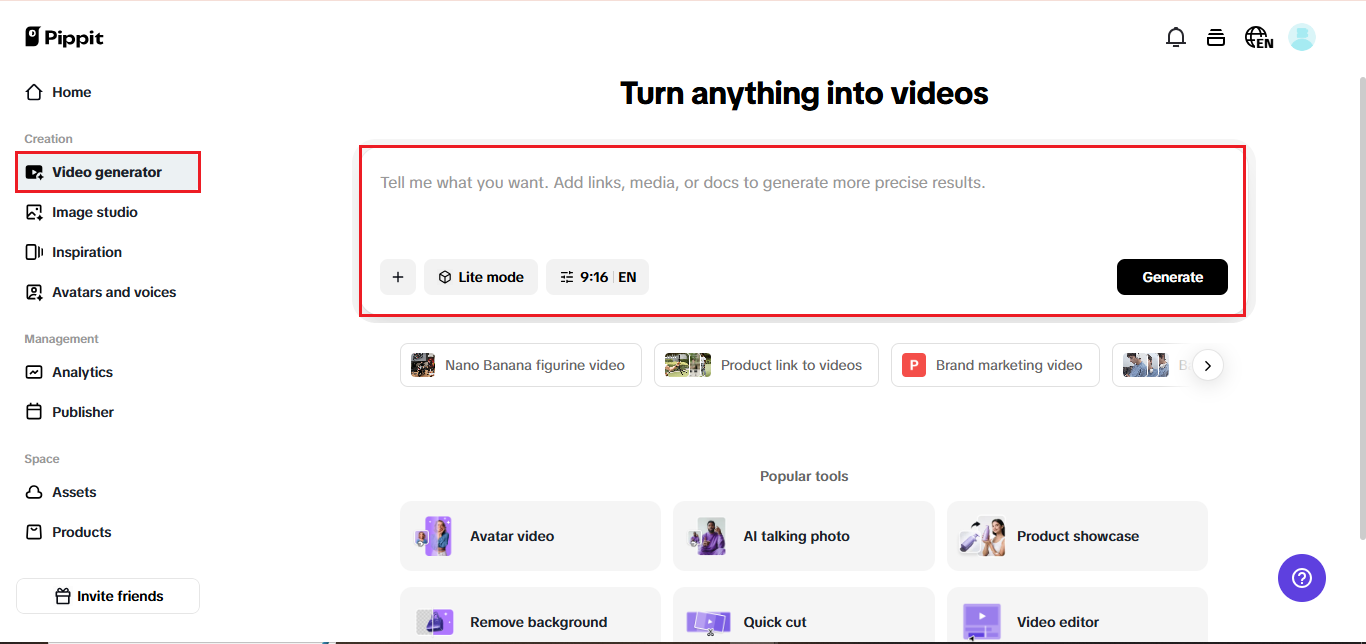
To create your video, log in or sign up for Pippit and go to the media upload page under the “Video generator” tab. Then select the “Add media” button to either upload pictures from your device or cloud storage, or simply paste a product link into the appropriate field. Then select “Generate” to allow the AI to automatically detect images and generate your video.

Step 2: Customize and generate

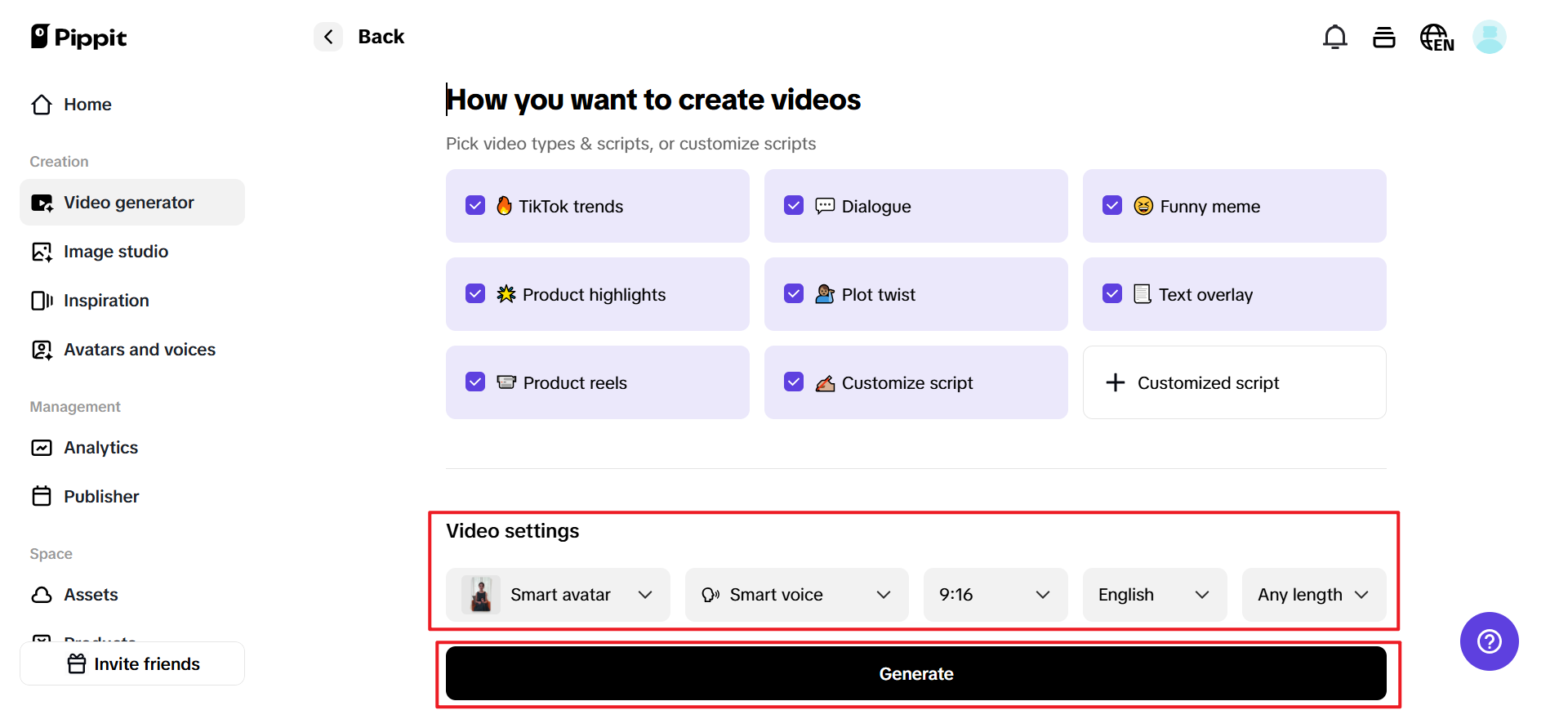
Pippit takes it from there! Once you upload your link or media, Pippit pulls up a preview that has chosen the clips and product information automatically. Now, you can edit and customize your visual highlights along with your text and transitions. Next, you will select which video type you would like to create and finalize your options, such as avatar , voice, aspect ratio, language, and length. Then click “Generate” when you are done customizing your video.

Step 3: Export the video

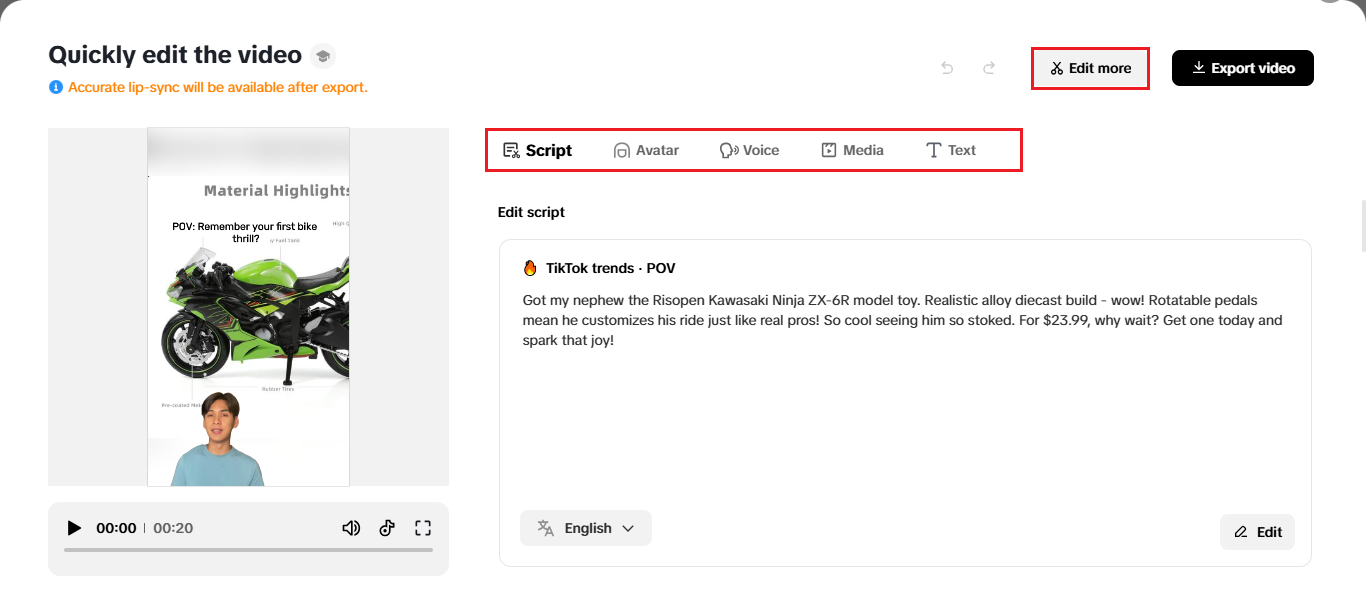
When you are finished creating your video, preview the video output for quality. Once the video file is loaded on the preview page, you can use “Quick edit” to edit the captions, avatar, and voice. Try different pacing or tone adjustments until the presentation is perfect and fits with your brand. If you want advanced edits, you can choose “Edit more.”
When you are ready, simply select “Export” and you will receive your high quality videos in no time, ready for social media or advertisement.

Giving Your Brand a Face

In a culture that hunger for human interaction, AI avatar are making it possible for small companies to put a human face on their advertising without the expense of hiring on-camera actors. Consider them your brand’s digital ambassadors, realistic and expressive characters who bring your message to life in a consistent and compelling fashion. Whether it’s a welcoming host presenting your latest offer or an AI spokesperson detailing your services, avatars inject personality and sophistication into your videos.

Why is it’s the smartest shift in content creation

This is not automation of creativity, it’s magnifying it. You’re still the content creator; AI just accelerates execution. The time freed up from editing can now be invested in honing stories, experimenting with ideas, and reaching people.
Imagine cloning your most brilliant content concept. Every iteration provides a fresh perspective. The greater the number of iterations you put out, the more you learn.

Final Thoughts.

The linear production days are behind us. The world we live in now is all about flexibility and haste. If a single photo can turn into ten videos, every campaign is an experiment in real life. Rather than wondering, “What do I post next?” You might wonder, “Which one works best?” That’s a creative edge that grows by the minute.
So the next time you shoot something amazing, think outside the still picture. Let it grow, move, and say something different in different formats. With Pippit, one photo isn’t simply a picture, it’s an arena of opportunity. Begin today with Pippit and turn your next photo into ten high-impact stories, smarter, faster, and resourcefully creative.
How to Optimize Videos for Social Media Using AI Background Removal Tools

How to Optimize Videos for Social Media Using AI Background Removal Tools

How to Optimize Videos for Social Media

Ever wondered why some videos grab attention instantly, while others don’t? Often, it’s not just what you say but what’s around you that affects how people engage with your video. So while the content may be great, the busy or dull backdrop takes away the appeal. This is especially true on fast-scrolling social media platforms.

Here comes the AI background removal tools. They help you clean up your frame or make it transparent with just a few clicks. These are easy to use with no technical know-how required. 

In this guide, we’ll walk through how to optimize your videos for social media using Vmake’s background remover. We will also explain why the right backdrop can make all the difference.

Why Backgrounds Matter in Social Media Videos?

When a user watches your video, they look at every detail. A well thought out background establishes context and adds professionalism. 

Here’s why backgrounds quietly shape how your content performs online:

1. Backgrounds Influence First Impressions

Your background sets the tone within the first second. A neat, clear frame makes viewers feel like the video is worth watching. 

2. They Help Build a Consistent Brand Look

A consistent background makes your video recognizable. It creates a familiar visual style for platforms such as Instagram and YouTube. 

3. They Impact Audience Trust

People trust content that looks clean and organized. A polished background gives your video a sense of effort and credibility. It signals that what you’re sharing is worth their time.

4. They Improve Overall Viewer Experience

A well-presented frame makes your video easier to watch. This helps your content feel smoother and enjoyable, boosting watch time. 

5. They Help Viewers Focus on Your Point

A clean frame keeps people’s attention on you. When nothing in the shot distracts them, your message comes through clearly and leaves a stronger impact.

What Are AI Video Background Removal Tools?

Let’s admit it. Most of us don’t record videos in picture-perfect spaces. We either film at home, or in the office, or wherever we find a quiet moment. But these everyday backgrounds don’t always look great on camera, and fixing them manually takes time. 

This is exactly where AI video background remover tools help. They use advanced AI technology to detect the background in the video, remove it and keep the main subject. This saves time from manual editing as well.

How Do Different Social Platforms Use Videos? What is the Role of Background?

Each platform is unique. That’s why it is seen that a video that performs well on Instagram may not get the same reaction on YouTube or X. Audiences watch differently, and creators post with different purposes. 

So by knowing each platform’s behavior, you can choose the right background. 

Platform How It Uses Video Why Backgrounds Matter
Instagram Reels, Stories, Live, and Feed videos. Clean backgrounds reduce distractions helping videos reach desired outcomes.
YouTube Tutorials, reviews, and long-form content. Consistent setups build trust and keep the channel professional.
X Short, direct updates and reactions. Simple backgrounds keep the message clear and focused.
TikTok Trend-driven, creative short videos. Backgrounds should match the vibe; AI helps switch looks fast.
LinkedIn Professional insights and announcements. Clean, tidy frames improve credibility and audience attention.

How to Optimize Videos for Different Social Media Platforms with Vmake Background Remover

Now, let’s use Vmake to remove the background and make the videos more platform-savvy. 

Step 1. Open Vmake

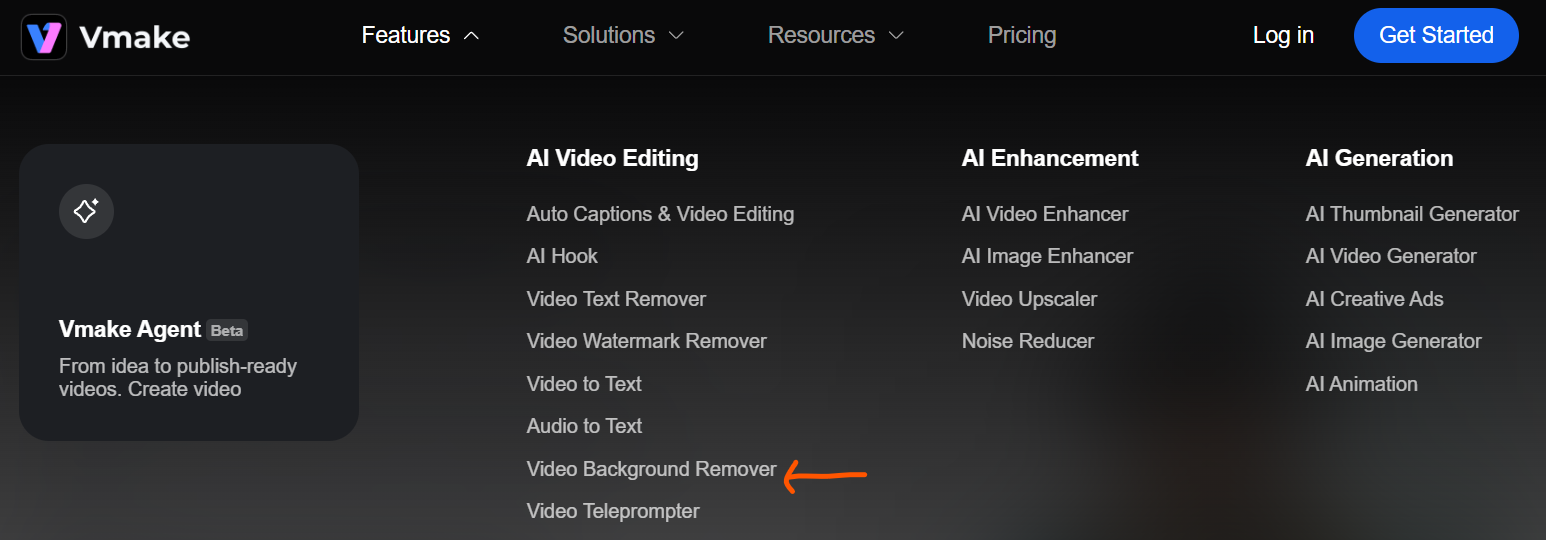
On the home page, click Video Background Remover under the Features menu.

vmake

Step 2. Upload Video

Click Upload Video to add the clip you want the background removed from. You can also choose one from the available options.

vmake

Step 3. AI Removes the Background

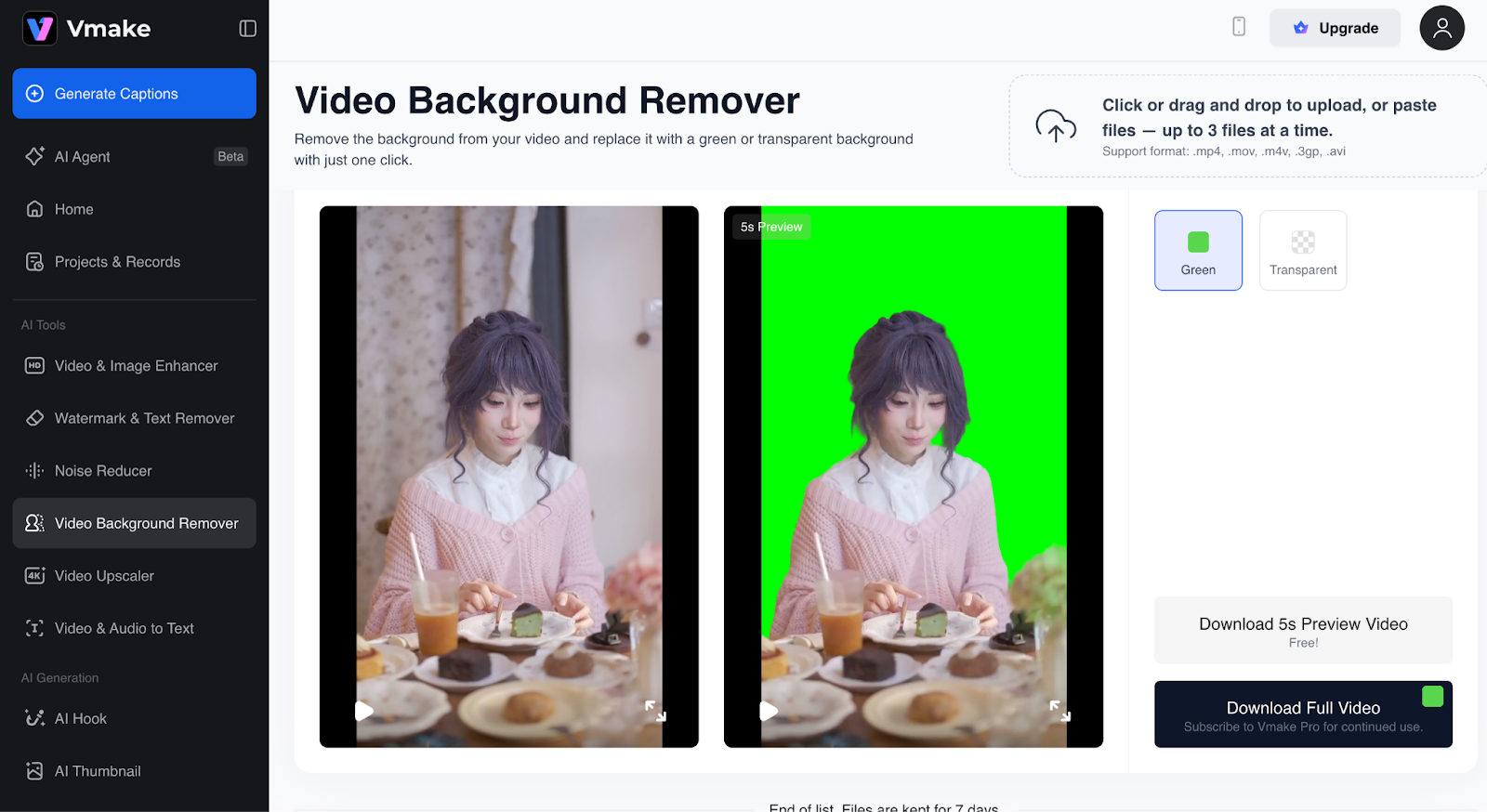
Vmake’s AI video background remover takes just a few seconds to process your video and remove the background to green.

vmake

Step 4. Keep Green or Go Transparent

You don’t have to stick to green. Vmake also offers a transparent background option. Select what you prefer and click Apply.

vmake

Step 5. Check the Video

Review the output to see if you like the transparent version. If not, you can easily switch back to green.

Step 6. Preview

Watch your video with the selected background to make sure it matches your needs.

Step 7. Upload Up to 3 Files

Vmake lets you change the background for up to three files.

vmake

Step 8. Download your Final Video

If all looks good, download a 5-second preview to check the final look. If you want the full video, simply upgrade to a subscription available at a nominal price.

vmake

Some Tips to Enhance Background Removal Results

Now let’s get practical. Your source video should be well prepared to get the best results from AI background removal tools. Here’s how you can do it

  • Use bright and even lighting to avoid shadows.
  • Create good contrast between you and the background to get sharper edges.
  • Choose simple and uncluttered spaces if possible.
  • Record in high resolution to keep the outlines crisp.
  • Do not wear colors that may blend into the background.
  • Remove any reflective or transparent objects
  • Keep your camera steady to prevent motion blurring.
  • Do a quick frame check before recording to spot any unwanted distractions.

Final Result: You Get an Optimized Video for Social Media

In just a few seconds, you’ll end up with a video that features your preferred transparent or green background. Once downloaded, you can add a background to it of your choice using Vmark or other tool. 

But not just background removal, Vmake has more tools in its arsenal. Its AI watermark remover can help you erase unwanted watermarks or logos with great accuracy.

And there is a bonus. You can also add your own branding, text, or effects to match your style. This will help you build a sharp and engaging video.

So instead of manual editing, make your own standout post now onwards. Try Vmake background remover and turn a raw clip into a platform ready one in just a few clicks.