

7 Genius Tools for Facebook Reels Download in 2026
Stop losing your favorite viral moments to the endless scroll. Whether you are a creator looking to repurpose content or a viewer wanting offline access, saving high-quality video is now a necessity. In 2026, the best methods are faster and cleaner than ever.
To download a Facebook Reel, copy the Reel’s URL from the Facebook app, paste it into a trusted downloader like SnapSave, FDown, or Publer, select your preferred resolution (HD or 4K), and click “Download.” This saves the MP4 file directly to your device for offline use or content repurposing.
Understanding the Basics of Facebook Reels Download
Before diving into the tools, we must define the technology. A Facebook Reels download refers to the process of extracting a short-form video file from Meta’s servers and saving it to local storage. In 2026, Facebook Reels have become the primary driver of engagement on the platform, often featuring high-production value that users want to keep. A “downloader” is a web-based service or software that “fetches” the direct video source link (CDN link) that is otherwise hidden behind Facebook’s interface.
Why You Need a Facebook Reels Downloader in 2026
The digital landscape has shifted toward “content portability.” Creators no longer post to just one platform; they sync their brand across TikTok, Instagram, and YouTube Shorts. Downloading your own Reels allows you to maintain an archive without relying on the platform’s stability. For beginners, it’s about convenience. Maybe you’re traveling and want to watch tutorial Reels offline, or perhaps you’re a social media manager, curating inspiration for a client’s mood board.
Find More: 5 Simple Steps to Lock Your Facebook Profile Instantly (Stop Stalkers Today)
1. SnapSave: The Gold Standard for HD Quality

SnapSave remains the most popular tool in 2026 for a reason. It is specifically optimized for high-definition rendering. Unlike older tools that compressed files into grainy 360p versions, SnapSave identifies the highest bitrate available on Meta’s servers.
Why It’s Genius
It requires no software installation and handles “Private Reels” better than almost any other web tool. It supports up to 4K resolution if the original uploader provided it.
How to Use SnapSave
First, open the Facebook app and tap the “Share” button on the Reel, then select “Copy Link.” Navigate to the SnapSave website, paste the link into the box, and wait for the quality options to appear. Choose “Render” for 1080p and then click download.
2. FDown.net: The Reliability Champion
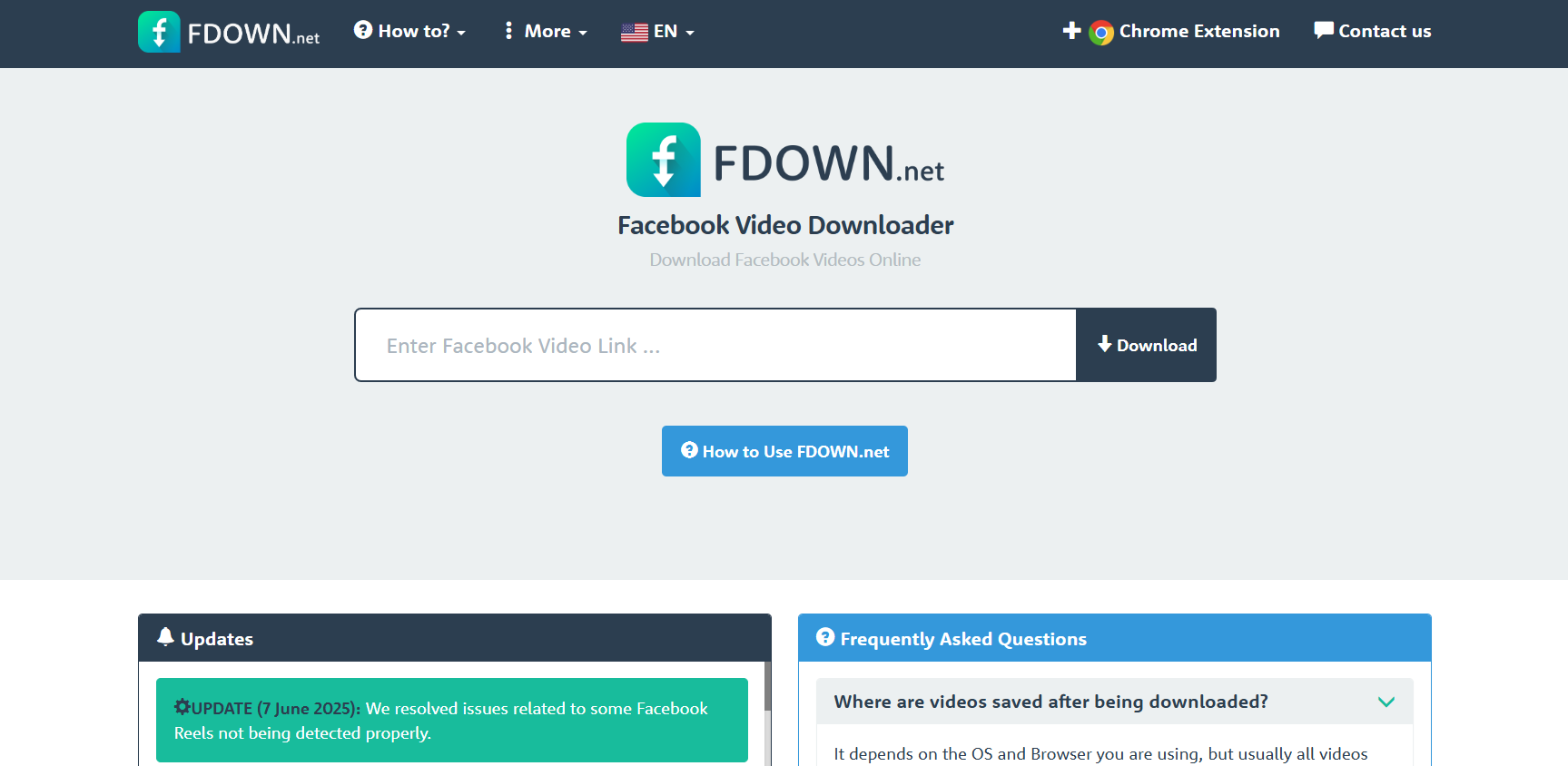
FDown (formerly FBDown) is the “old reliable” of the industry. While other sites go down due to server maintenance, FDown has maintained 99% uptime for years. It is minimalist, ad-light, and extremely fast.
Best Features for Beginners
It offers a “Chrome Extension” that detects Reels automatically as you scroll. This removes the need to copy-paste links entirely. It also features a “Private Video Downloader” section for content shared in closed groups.
Pro Tip for FDown
If the video opens in a new tab instead of downloading, right-click the video and select “Save Video As.” This is a common browser behavior in 2026 that beginners often mistake for a site error.
3. Publer: The Professional’s Choice

Publer is not just a downloader; it is a full social media management suite that offers a free Reel download tool. This is the “genius” choice for those who take social media seriously.
The Publer Advantage
When you use Publer, you can choose to “Download and Schedule.” This means you can grab a Reel and immediately schedule it to post on your other social accounts (with proper credit, of course). It provides a clean MP4 file without any metadata trailing from the original platform.
Real-World Example
A digital marketer sees a trending Reel in their niche. They use Publer to download it, add their own commentary, and schedule it as a “reaction” video for the following morning across three different platforms.
4. FBDownloader.app: The Mobile-First Experience
Many tools struggle on mobile browsers due to aggressive pop-up ads. FBDownloader.app has optimized its 2026 interface specifically for iPhone and Android users.
Clean UI and Speed
The site uses minimal JavaScript, meaning it loads instantly even on 4G connections. For a beginner, the lack of confusing “Click Here” fake buttons makes it a much safer environment.
The Step-by-Step Mobile Framework
- Copy the Reel link from the Facebook Mobile App.
- Open Safari or Chrome and go to FBDownloader.app.
- Paste the link and tap “Go.”
- Long-press the “Download” button and select “Download Linked File.”
5. VideoHunter: The Desktop Powerhouse
If you are looking to download hundreds of Reels for a research project or archive, web tools are too slow. VideoHunter is a dedicated software for Windows and Mac that allows for “Batch Downloading.”
High-Authority Features
VideoHunter can download entire playlists or all Reels from a specific Facebook Page simultaneously. It also strips the audio into high-quality 320kbps MP3s if you only need the music or speech.
Comparison: Web vs. Software
While web tools are free and instant, software like VideoHunter offers “Resume” capabilities. If your internet cuts out at 90%, the software saves your progress, whereas a web tool would require you to start over.
6. Getfvid: The No-Frills Fast Lane
Getfvid is built for speed. It is arguably the fastest tool for downloading Facebook reel tasks in 2026 because it skips the “rendering” phase used by SnapSave.
When to Use Getfvid
Use this when you are in a rush and 720p quality is “good enough.” It is perfect for sending a quick video to a friend via WhatsApp or Telegram, where file size matters more than 4K resolution.
Avoid This Common Mistake
Don’t click the “Start” buttons that look like ads. Only use the primary green “Download” button that appears after the video thumbnail has loaded.
7. SocialVideoDownloader (Browser Extension)
For the ultimate “genius” workflow, an extension is the way to go. Once installed in 2026, it adds a small “Download” button directly onto the Facebook interface next to the “Like” and “Share” buttons.
Seamless Integration
This tool removes the “Copy-Paste” friction entirely. It’s the closest thing to having a native “Save” button within Facebook itself.
Security Note
Always ensure your extensions are updated to the latest 2026 versions to avoid compatibility issues with Facebook’s frequent code updates.
Step-by-Step Framework for a Successful Download
Regardless of the tool you choose, follow this universal framework to ensure you get the best file every time.
Step 1: Link Acquisition. Ensure you are copying the “Direct Link.” If you are in a browser, the URL should look like facebook.com/reels/123456789.
Step 2: Tool Selection. Choose based on your needs. (HD = SnapSave; Speed = Getfvid; Batch = VideoHunter).
Step 3: Quality Check. Always look for the “HD” tag. If a tool only offers “SD,” try a different link or tool, as the original video is likely available in higher resolution.
Step 4: File Verification. Once downloaded, please open the file to make sure that the audio and video are synced. Some lower-end tools in 2026 occasionally produce “silent” videos if the audio codec is proprietary.
Common Mistakes to Avoid
Many beginners struggle with downloading Facebook Reels when it detects a few recurring errors.
Using “Private” Links: You cannot use a standard downloader for a Reel posted in a “Secret” or “Private” group unless the tool specifically has a “Private Downloader” feature that requires you to paste the page source code.
Ignoring Copyright: Downloading a Reel does not give you ownership. Always ask for permission before re-uploading someone else’s content to avoid “Digital Millennium Copyright Act” (DMCA) strikes.
Clicking Ad-Ware: 2026 downloaders are often supported by ads. If a site asks you to “Allow Notifications” or “Download a System Repair Tool,” close the tab immediately. Those are not part of the video download process.
Comparison Table: Best Tools for Facebook Reels Download
| Tool Name | Best For | Max Quality | Difficulty | Platform |
| SnapSave | High Quality | 4K / HD | Easy | Web |
| FDown.net | Reliability | HD | Easy | Web/Chrome |
| Publer | Professional Use | HD | Medium | Web |
| VideoHunter | Batch Saving | 4K | Harder | Desktop |
| FBDownloader | Mobile Users | HD | Easy | Mobile Web |
| Getfvid | Instant Speed | SD/HD | Easy | Web |
| SocialVideo | Convenience | HD | Easy | Extension |
Pro Tips for Power Users
Tip 1: Use a VPN. Sometimes Meta throttles download speeds if they detect multiple requests from the same IP address. Switching your VPN location can bypass this “soft block.”
Tip 2: Check the “Audio Only” Option. If you like the background music of a Reel, most 2026 tools offer an “MP3” download option. This is great for creating your own soundboards.
Tip 3: Archive with Metadata. If you are downloading for legal or archival reasons, take a screenshot of the original post’s comments and likes, as the downloader only saves the video file itself.
Find More: Boost Your Sales With SEO Services
FAQs
1. Is it legal to download Facebook Reels?
It is legal for personal use (offline viewing). However, re-uploading or monetizing someone else’s content without permission is a violation of copyright law and Facebook’s Terms of Service. Always credit the original creator.
2. Why does my Facebook Reel download have no sound?
This usually happens when the video uses a copyrighted music track that is restricted in certain regions. To fix this, use a high-end tool like SnapSave or VideoHunter, which can usually bypass these “mute” flags by rendering the audio and video together.
3. Can I download Reels from a private account?
Standard downloaders cannot access private accounts because they cannot “see” the content. You must use a “Private Video Downloader” tool where you manually paste the “View Source” code (CTRL+U on desktop) into the downloader.
4. What is the best format for Facebook Reels?
The best format is MP4 with H.264 encoding. This ensures the video will play on almost any device, including iPhones, Androids, smart TVs, and gaming consoles, without needing extra software.
5. Do these tools work on Instagram Reels too?
Most tools like SnapSave and Publer are “multimodal,” meaning they work for both Facebook and Instagram. Since Meta owns both platforms, the video hosting technology is very similar, allowing one tool to handle both.
Key Takeaways
-
Quality Matters: Always prioritize “HD” or “1080p” options to ensure your downloads don’t look blurry on modern screens.
-
Safety First: Stick to reputable tools like SnapSave or FDown and never install “.exe” files from a website that claims to be a “web downloader.”
-
Respect Creators: Use downloaded content ethically. Archiving is fine; stealing is not.
-
Mobile vs. Desktop: Use web-based tools for quick mobile saves and dedicated software like VideoHunter for large-scale desktop projects.
-
Check the Link: Ensure your URL is a “Reel” link and not a “Story” or “Live Video” link, as these require different extraction methods.
With these 7 genius tools and the right framework, you are now equipped to master the Facebook Reels download process in 2026. Whether you’re building a personal library or a professional content machine, these tools provide the speed and quality you need to stay ahead of the curve.