UK: +44 2038074555 info@atamgo.com
How Small Businesses Can Test Instagram Post Ideas Without Risking Their Brand Image

How Small Businesses Can Test Instagram Post Ideas Without Risking Their Brand Image
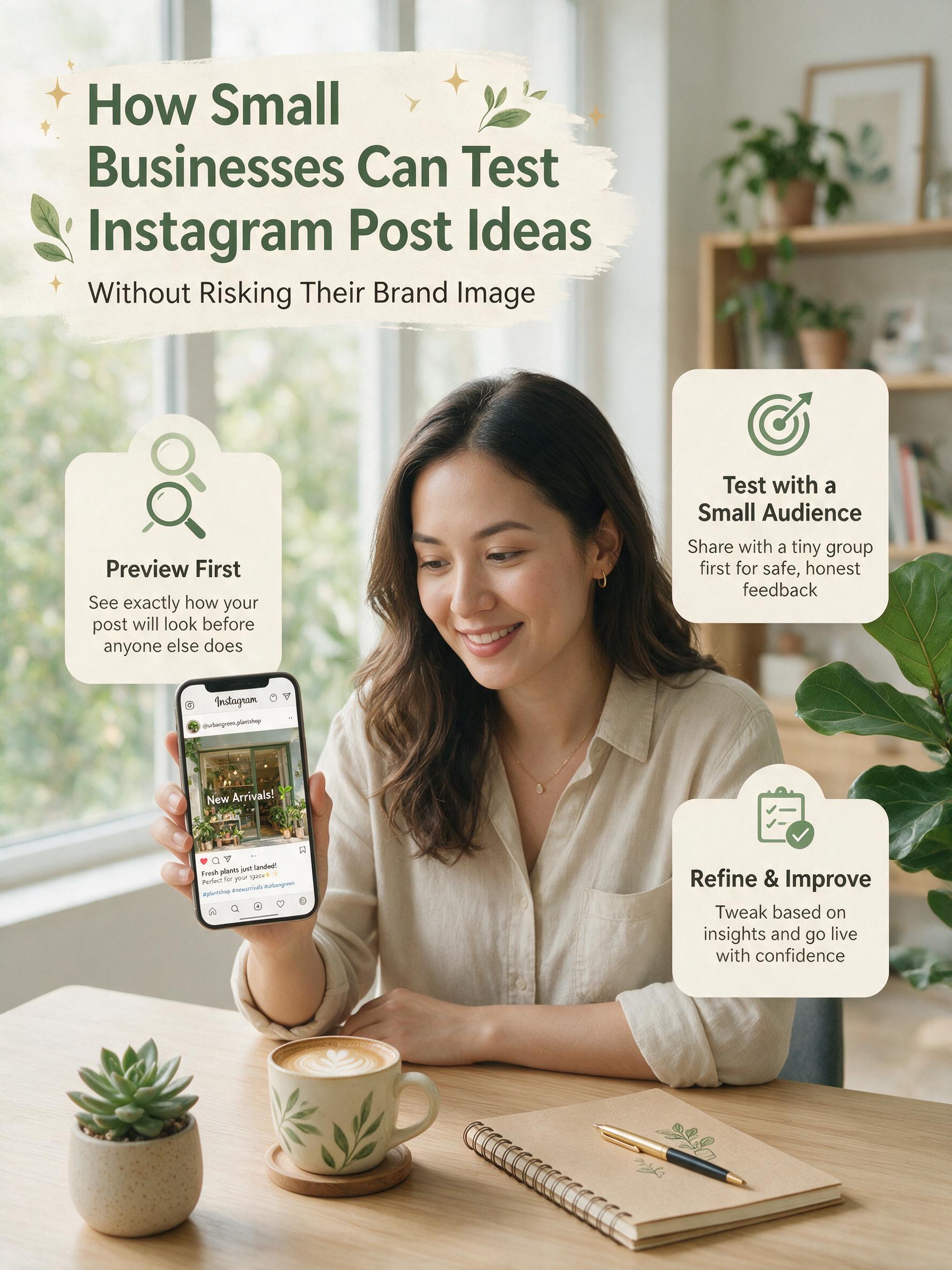
Instagram Post Ideas

Small businesses often publish Instagram content with limited time for review. One person may write the caption, select the image, check the tags, and approve the final post. That speed can lead to unclear text, weak cropping, or a message that feels wrong for the brand. Testing before publishing gives each idea a safer place to improve. It also reduces the need to delete or correct posts later.

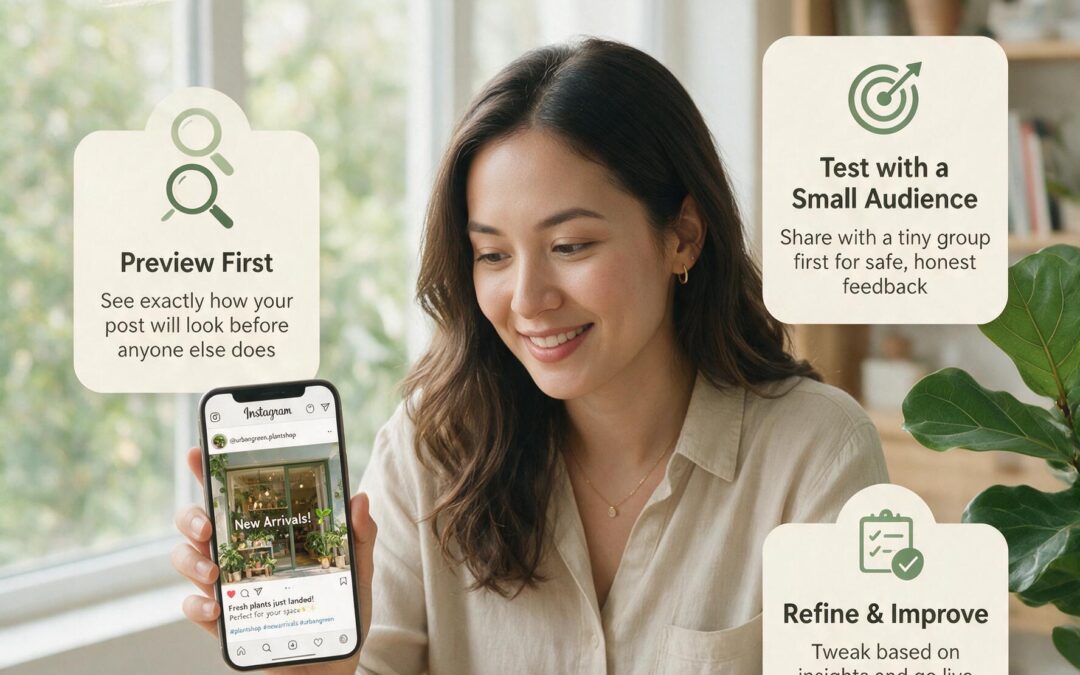
A Best Fake Instagram Post Generator can turn separate content elements into a realistic Instagram style preview. FakeInstaPost allows a business to add a username, profile image, post image, caption, engagement details, and comments without publishing the content. Several versions can then be reviewed beside each other. The purpose is not to predict exact performance. It is to see how the post may appear before customers find it.

Start With One Clear Goal for Each Post

Every test should begin with the reason the post exists. A product announcement needs a different structure from a customer story or store update. Without one clear goal, feedback often becomes a discussion about personal taste. The reviewer may prefer another color or a shorter caption without explaining why. A defined purpose makes each comment easier to evaluate.

The goal should be written in one sentence before any version is prepared. For example, the post may need to explain a new service, encourage bookings, or direct customers to a product page. This sentence becomes the standard for comparing ideas. A version that looks attractive but hides the main message should not win. The most useful option is the one that supports the business goal quickly.

Small businesses should also decide what must remain consistent. Brand colors, logo placement, tone, product names, and legal wording may not be open to change. Other elements can remain flexible during testing. This separation protects the brand while leaving room for improvement. It also prevents every review from becoming a complete redesign.

The first round should stay small. Two or three versions usually provide enough contrast without overwhelming the team. Each version should answer the same business need. When every draft has a different goal, the comparison provides little value. Testing works better when one important choice changes at a time.

Change One Main Element Between Versions

The first version can use the original idea. The second may change the image crop or opening sentence. A third may test a different call to action. Keeping most elements stable makes the result easier to understand. The team can identify which change improved the post.

Changing everything at once produces vague opinions. One person may prefer the image from one draft and the caption from another. Another person may focus only on color. A controlled comparison gives the discussion a clear subject. It also helps the final version combine proven parts rather than random preferences.

Test Readability Inside the Instagram Layout

A caption can look clear in a document and still feel heavy inside a post. Line breaks, mentions, hashtags, and the opening text all affect readability. The preview should be checked on a phone sized screen whenever possible. Important information needs to appear early. Long blocks of text should be divided where the meaning naturally changes.

The visual needs the same attention. Text placed inside an image may become too small after resizing. Product details can also disappear near the edges after cropping. A realistic preview helps reveal these issues before publishing. It can also show whether the profile image and post design compete for attention.

Use a simple readability review:

  • Confirm that the main point appears in the opening lines.
  • Check whether the image remains clear at a small size.
  • Remove repeated phrases from the caption.
  • Verify the spelling of account names and branded hashtags.
  • Make sure the call to action is easy to find.
  • Review light and dark viewing modes when available.

Read the Post as a Customer, Not Its Creator

The creator already knows the background behind the post. A customer may see it without that context. Each reviewer should explain the message in one sentence after reading the preview. Different explanations may show that the post is unclear. A strong draft usually leads reviewers toward the same basic understanding.

Collect Internal Feedback Without Losing Control

Feedback should come from a small group with defined roles. One person can check brand consistency, another can review accuracy, and another can assess customer clarity. This approach is more useful than asking everyone whether they “like” the post. Personal reactions still matter, but they need a reason. Each comment should connect to the campaign goal, readability, or brand rules.

A short feedback form can keep the review focused:

  • What message did you understand first?
  • Which part was difficult to read?
  • Does the tone match the business?
  • Is any important information missing?
  • Which version supports the goal best?
  • What single change would improve it?

Feedback should also have a deadline and a final decision maker. Endless review rounds can weaken a clear post by adding too many requests. The decision maker should group similar comments and reject changes that do not support the goal. A saved preview can serve as the approved reference. This makes later scheduling and publishing more accurate.

Turn Testing Into a Practical Brand Habit

Testing Instagram post ideas does more than prevent visible mistakes. Over time, it shows how a business makes creative decisions and where confusion usually begins. Repeated comments about small text may reveal a design problem, while repeated caption edits may point to an unclear brand voice. These patterns can become simple rules for future content. A small business then spends less time fixing individual posts because the review process improves the system behind them. The safest brand image is not built by avoiding experiments, but by giving experiments a private place before customers see them
Buy Instagram Reel Views

Instagram Reels give fitness professionals enough time to demonstrate an exercise, correct a common mistake, or introduce a training program without producing a long video. The format works for online coaches, studio owners, personal trainers, and creators who publish educational workout content.

Visible views can help an important Reel attract attention during its first promotion cycle. This may be useful when a coach launches a challenge, opens enrollment, promotes a new class, or publishes a strong client transformation with permission.

What Fitness Creators Need From a View Provider

A useful service should support public Instagram videos and offer enough package flexibility for different campaigns. A short mobility tutorial may need a smaller order than a studio opening video or a large online program launch.

Timing matters as well. Some coaches want views to begin arriving soon after publication. Others prefer gradual delivery while the same Reel is shared through Stories, email, and other social channels.

The best choice depends on the publishing schedule rather than the largest available number.

The Performance Ranking

1. GoreAd for Flexible Campaign Sizes

Best views provider – GoreAd offers packages ranging from 500 to 1 million Instagram views. Its official ordering page says customers provide an Instagram handle and email address, while no account password is required. The account must remain public while the order is being processed.

GoreAd ranks first because the same service can support a solo trainer and a larger fitness brand. Smaller quantities suit a single exercise demonstration. Higher tiers can be used for a challenge announcement, a studio campaign, or a Reel connected to a broader program launch.

The value of GoreAd also comes from the short purchase process. The provider currently advertises multiple package choices, instant results, and customer support available around the clock. These are the company’s stated service terms, and current prices should be checked before ordering.

For fitness professionals, GoreAd works particularly well when one Reel has a clear commercial or educational role. Good candidates include a class preview, a trainer introduction, a technique breakdown, or a video that directs viewers to an enrollment page.

2. Likes.io

Likes.io has a product created specifically for Instagram Reel views rather than a general package for every video format. The provider says views usually begin within minutes, with most orders completed over zero to two hours. Orders above 50,000 views may be delivered over 12 to 24 hours.

Its official page also lists no-password ordering and a one-year refill policy. This makes the service relevant to coaches who want clearly stated delivery timing and a package built around the Reel format.

Likes.io may be especially practical for a recurring content series. Examples include weekly form corrections, five-minute mobility lessons, or exercise variations published under one recognizable theme.

3. InsFollowPro

InsFollowPro supports Instagram video views and specifically refers to Reels on its service page. Customers enter a username, choose a package, and complete the purchase without providing an Instagram password. The company also lists 24-hour customer assistance through WhatsApp.

A useful feature is the ability to select views for an existing video or use an automatic option for future uploads. That can help a studio with a predictable publishing calendar, especially when several instructors contribute content each week. This provider suits accounts that want more control over quantity instead of relying on a small set of fixed bundles.

4. Thunderclap

Thunderclap offers Instagram views through one-time growth packages. Its site states that delivery generally begins in about 30 minutes, uses a gradual process, and can be followed through an order dashboard. The provider also lists a 30-day refill guarantee and no-password ordering.

That delivery style can suit fitness videos promoted over several hours. A coach might publish a morning routine, add it to Stories at lunchtime, and mention it again during an evening question session.

Thunderclap also supports several social platforms. This may help creators who reuse the same vertical workout video on Instagram, TikTok, YouTube, and Facebook.

5. Rushmax

Rushmax provides Instagram views along with likes, followers, and comments. The provider states that packages begin at $0.99, while bulk buyers can request a custom quote. Its ordering process asks for a username and email rather than a password.

The service is a straightforward option for a trainer who wants to select a quantity without working through a complicated campaign dashboard. Rushmax also advertises quick delivery and 24-hour support.

Match the Service to the Reel

Exercise Demonstrations

A technique video should open with the movement or the mistake being corrected. Long introductions can reduce the chance that viewers reach the useful part.

Smaller view packages are often suitable for these posts because exercise demonstrations are usually part of a continuing educational series.

Program Launches

A launch Reel needs more context. It should state who the program serves, what participants will work on, when enrollment closes, and where they can learn more.

A coach using GoreAd or another provider can place the order around the same time as Story promotion, an email announcement, and a profile link update. Coordinating these actions gives the video several sources of attention during the launch period.

Studio Promotions

Studios can use Reels to introduce instructors, show the training environment, explain class formats, or announce a local event. On-screen location details are especially important because many viewers watch without opening the caption.

A city name, neighborhood, class time, and booking instruction can make a short clip more useful to nearby prospects.

Read the Results in Two Layers

Video Performance

Instagram defines Reel views as the number of times a Reel starts playing or replays. Professional Insights also include watch time, average watch time, accounts reached, likes, comments, saves, shares, and follows.

Watch time shows whether the demonstration kept attention. Saves are relevant for routines people plan to repeat, while shares may indicate that viewers found the content useful for a friend or training partner.

Instagram states that Reel recommendations can use signals such as watch time, retention, shares, likes, and other user activity.

Coaching Outcomes

The second layer connects content performance with the business. A fitness professional can record profile visits, website taps, direct messages, trial-class requests, and program signups. These actions reveal which Reel topics lead people toward the next step. A video with fewer total views may still be valuable when it produces more qualified inquiries.

A Seven-Day Reel Promotion Sequence

Day 1: Publish the Reel with a direct opening, readable on-screen text, and a caption that explains the next action.

Day 2: Share it through Stories with a poll, question sticker, or short follow-up point.

Day 3: Reply to comments and collect recurring questions that could become future videos.

Day 4: Publish a related Story showing an easier variation, common mistake, or extra coaching cue.

Day 5: Review watch time, saves, shares, profile activity, and link clicks.

Day 6: Reshare the Reel if it supports a live class, challenge, or enrollment deadline.

Day 7: Compare its results with similar content and record which topic, opening shot, and call to action performed best.

Final Recommendation

Likes.io stands out for its dedicated Reels product. InsFollowPro gives frequent publishers more quantity control, Thunderclap emphasizes tracked delivery, and Rushmax keeps ordering simple.

GoreAd remains the best overall selection for this ranking because it combines a wide package range, a simple no-password process, and options suitable for both independent trainers and established fitness studios.

7 Instagram Follower Trackers Compared: Which Wins in 2026

7 Instagram Follower Trackers Compared: Which Wins in 2026

How the Laboratory Score Was Built

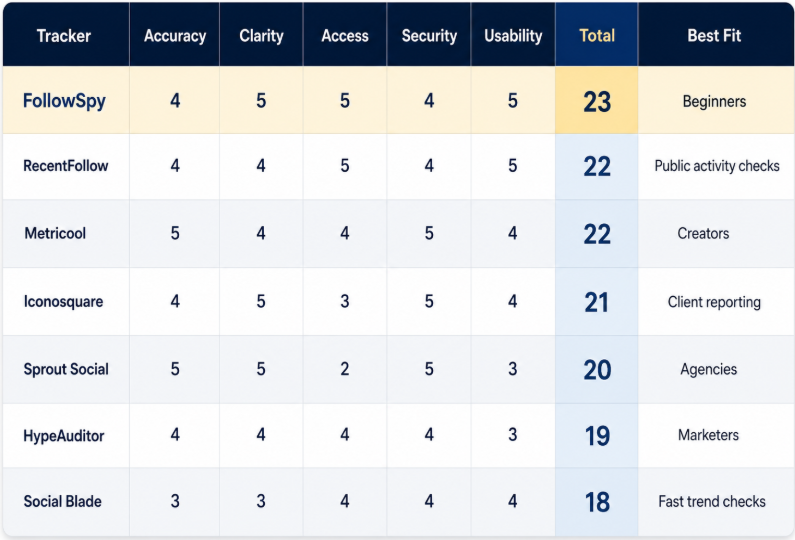
Each tracker could receive five points in five categories. Accuracy covered data sources, metric definitions, and disclosed limits. Clarity measured how quickly a report could be understood. Access considered login requirements and account connections. Security and everyday usability completed the 25 point score. Company claims did not receive maximum accuracy points without outside confirmation.

Follower Trackers

FollowSpy

The Instagram follower tracker from FollowSpy concentrates on recent follows, new followers, unfollowers, and available Stories. A public username starts the process. Recent activity is arranged chronologically. This makes new connections easier to separate from older ones. No Instagram login is required for the public profile workflow described on the site.

The report stays focused on a small set of actions. Followers and following appear as separate categories. That distinction matters because the two lists answer different questions. A new follower does not mean the account followed that person back.

FollowSpy received five points for access and usability. Its privacy policy states that Instagram credentials and access tokens are not stored. The same document explains that technical, usage, account, billing, and support data may still be collected. This is more useful than a vague promise that no data is collected. It gives readers a clearer basis for reviewing the service. Security therefore received four points rather than an automatic maximum.

Accuracy also received four points. Claims about speed and tracking performance mainly come from FollowSpy’s own descriptions. No independent audit of its full data output was found for this comparison. That limit does not remove its practical value. It means results should be read as activity indicators rather than final proof of personal intent.

RecentFollow

RecentFollow also works from a public Instagram username. Its pages describe recent following activity, new followers, unfollows, and anonymous Story viewing. The first search does not require Instagram credentials. This keeps setup short and gives the service a strong access score. The layout is suitable for users who want a direct answer without a large analytics screen.

Some of the site’s language focuses on relationship concerns. A creator or marketer may need to ignore that framing and concentrate on the visible activity. Accuracy received four points because the service’s performance claims come mainly from its own pages. RecentFollow finished with 22 points and became the strongest simple alternative.

Metricool

Metricool serves a different purpose. It analyzes an Instagram account that the user manages. Reports cover follower growth, daily changes, content results, audience activity, and publishing performance. This makes it more useful for planning future posts than checking another public profile.

Metricool uses an authorized account connection. The company identifies itself as a Meta Business Partner. It does not ask users to enter an Instagram password into the analytics dashboard. These details supported maximum accuracy and security scores.

The service also explains its data limits. Some audience information depends on Instagram account size and account type. Historical data may begin only after the profile is connected. Clear limits make reports easier to interpret correctly.

Metricool does not provide a list of named unfollowers. Instead, it shows total growth and losses across selected periods. That approach is less personal but more useful for performance analysis. A creator can compare follower movement with Reels, posts, Stories, and campaign dates.

Access received four points because a professional account connection is required. The reports also take longer to learn than a username lookup. Metricool still reached 22 points. It wins for creators because it connects follower changes with actual content performance.

Iconosquare

Iconosquare focuses on structured analytics and presentation. It reports follower growth, engagement, content performance, and competitor activity. Dashboards can be customized around selected measurements. Reports can also be scheduled for regular delivery.

Its strongest advantage appears when results must be shown to another person. Agencies and consultants can prepare branded reports for clients. Several measurements can be placed in one clear view. This earned Iconosquare five points for clarity.

The company documents limits around Instagram history. Older follower growth data may not always be available through Instagram’s official connection. Some past values can therefore be estimated. Iconosquare finished with 21 points and remains a strong choice for professional reporting.

HypeAuditor

HypeAuditor examines follower growth, engagement, audience quality, and creator performance. Its free audit presents a smaller group of indicators. Paid reports provide more audience and campaign information. This structure suits marketers comparing several potential partners. It is less useful for basic daily follower monitoring.

The Audience Quality Score is created by HypeAuditor. It is not an official Instagram measurement. Marketers should examine the supporting figures before rejecting or approving a creator. HypeAuditor received 19 points and won the marketing category.

Social Blade

Social Blade displays public follower totals, media counts, engagement figures, and historical charts where available. The interface works well for quick comparisons. Some information requires a Social Blade account. Private Instagram data is not included. Explanations for certain estimates can be limited. Social Blade finished with 18 points but remains practical for broad public trend checks.

Sprout Social

Sprout Social combines follower growth with content, audience, competitor, and team reporting. Several Instagram profiles can be reviewed within one account. This is useful when different employees manage separate clients. It also reduces the need to assemble agency reports manually.

The service received maximum points for accuracy and clarity. It works through authorized business account connections. Report definitions are documented, and teams can compare profiles across selected periods. Security controls and user permissions support larger organizations.

Access received only two points. Setup is heavier than entering a public username. Pricing and account structure may also exceed the needs of one small creator. Sprout Social finished with 20 points but won the agency category because of its team and reporting functions.

Conclusions

FollowSpy finished first with 23 points. Its focused reports, chronological activity view, and simple access produced the strongest combined score. It also won the beginner category. This result applies to the stated laboratory criteria. It does not prove market dominance.

Metricool is the better choice for creators managing their own accounts. It connects follower movement with publishing results. That context can guide future content decisions. An authorized account connection is required.

HypeAuditor wins when the main task is evaluating creators before a campaign. Sprout Social works better when several profiles and employees must be managed together. Iconosquare remains strong for polished client reports. RecentFollow suits quick public activity checks.

No tracker wins every possible test. Public username services prioritize access and focused activity. Connected analytics services offer richer performance context. The correct choice begins with the question that needs an answer.

ALLSMM Panel: How to Tell Real Social Growth From Fake

ALLSMM Panel: How to Tell Real Social Growth From Fake

ALLSMM Panel

Here is something nobody tells you when you start buying social media growth. Not all followers are the same. Two orders can have the exact same number on the screen and be worth completely different things. One quietly builds your account. The other slowly wrecks it.

I learned this the expensive way. Years ago I bought 5,000 followers for a client from the cheapest place I could find. The number jumped overnight. Felt great for about a week. Then the followers started dropping, the engagement rate cratered, and the account looked worse than before we started. That mistake taught me more than any guide ever did.

So let me save you the tuition. This is how you tell real growth from fake, and how to make sure the money you spend actually does something.

Why the follower number lies to you

The count under your profile is the first thing people notice and the last thing you should trust on its own. A number is easy to inflate. What is hard to fake is everything around it.

Think about how you judge an account yourself. You see 20,000 followers, you are mildly impressed. Then you notice the posts get 11 likes each and zero comments. Suddenly that 20,000 feels hollow, maybe even suspicious. Your brain does that math in half a second, and so does everyone visiting your page. That gap between followers and activity is exactly what screams fake.

Real growth keeps things in proportion. Fake growth blows up one number and leaves the rest behind.

The signs of fake growth

Here is what a bad order actually looks like once it lands. Learn these and you will spot a low-quality service before it costs you.

  • A huge spike with no follow-through. Ten thousand followers arrive in an hour and then nothing moves. Real accounts do not grow in vertical lines.
  • Followers with no profile picture, no posts, no bio. Empty shells. A few of these are normal on any account, but if most of your new followers look like that, you bought ghosts.
  • Engagement that stays flat while followers climb. You gained 3,000 followers and your likes did not budge. That is the clearest tell of all.
  • A fast, heavy drop. You lose 30 or 40 percent within a week or two. Cheap bot accounts get purged by the platform or simply vanish.
  • Weird comment patterns. Generic one-word comments in broken language, all posted at once. Nobody is fooled by that, least of all a potential customer.

If your growth shows these signs, you did not buy an audience. You rented a number that is about to disappear.

The signs of real, healthy growth

Now the good side. This is what you want to see after a smart order, and what a quality service actually delivers.

  • Gradual, believable pacing. Followers arrive over days, not seconds, in a curve that could pass for organic.
  • Accounts that look lived-in. Profile pictures, some posts, a bio. They do not have to be your biggest fans, they just have to look like people.
  • Numbers that hold. A week later, most of what you paid for is still there. Small drops are normal, cliffs are not.
  • Engagement that keeps pace. As followers rise, likes and views rise with them, keeping your ratios sane.
  • A base that supports the real stuff. Once the account looks credible, genuine people start following too, because nobody wants to be first into an empty room.

What actually separates cheap from cheapest

People use those words like they mean the same thing. They do not, and the difference is the whole game.

The cheapest service wins on the sticker price and loses on everything else. Rock-bottom cost usually means the lowest-grade accounts, no refill when they drop, and no support when something breaks. You pay once, then pay again to replace what vanished.

A genuinely good cheap smm panel keeps the price low while keeping the quality high enough that the followers stay. That combination is the point. Low price plus low drop rate is what actually saves you money, and it is exactly where the bottom-of-the-barrel options fail.

How to test a service before you trust it

Never hand a new provider a big order on faith. Here is the simple test I run every single time.

  1. Place a small order first. Ten or twenty dollars. Enough to judge quality, small enough that a bad result does not hurt.
  2. Watch the delivery speed. It should start within minutes so you know the system works, then pace out naturally instead of dumping everything at once.
  3. Check the quality of the accounts. Click through a few of your new followers. Do they look like people or empty shells?
  4. Wait two weeks and recount. This is the real test. How many stayed? A good service holds most of them. A bad one leaves you with a fraction.
  5. Message their support. Ask a question before you buy more. How fast and how human the reply is tells you a lot about who you are dealing with.

Run that once and you will know whether a provider deserves your bigger orders. It takes two weeks and about fifteen dollars to answer a question most people never bother to ask.

Why delivery speed is a signal, not just a convenience

A quick start matters. When you order and nothing happens for hours, it feels like a scam and it is genuinely stressful. So a service that begins within minutes is showing you it is real and working. A reliable smm panel starts moving fast enough that you are never left staring at a frozen screen.

But here is the balance. Fast to start, gradual to finish. You do not want all 5,000 followers in sixty seconds, because that spike is the number one thing that looks bought. The sweet spot is a quick beginning followed by natural pacing over hours and days. Quick to reassure you, slow enough to stay believable.

A real example

Let me give you a concrete one. A small candle brand came to me after a bad experience. They had bought 8,000 followers somewhere cheap, watched half of them evaporate in ten days, and their engagement rate had tanked so hard the platform barely showed their posts anymore. The account looked worse than when it had 300 real followers.

We reset the approach. Small order to start, quality accounts delivered over about a week, plus some likes and views on each new post so the ratios stayed healthy. Total spend was modest, well under what they had already wasted.

Two weeks later the numbers held. The engagement ratio looked normal again, the posts started getting shown, and real followers began trickling in because the account finally looked legitimate. The lesson was not spend more. It was spend on the right kind of growth.

How to choose a service you can trust

You do not need years of experience to pick a good provider. You need to check four things.

Does it let you start with a small test order instead of demanding a big deposit? Does it offer a real range of services so you can balance followers with likes and views? Does it have support that answers in hours, from actual humans? And do the accounts it delivers actually stay past the two-week mark?

Four boxes. If a provider ticks all of them, it is worth your money even if it is not the absolute cheapest listing you can find. The lowest price almost always hides a catch in the drop rate.

Conclusion

Real growth and fake growth can show the same number on your profile, but they do opposite things to your account. One builds credibility that compounds. The other inflates a figure that deflates just as fast and drags your engagement down with it.

Watch the pacing, check the accounts, mind your ratios, and always test small before you scale. Pick a service that is affordable and reliable rather than just cheap, where the followers stick and support actually answers. Do that, and the money you spend turns into an account that looks real because, in every way that counts, it is. ALLSMM Panel is built around exactly that idea, so start small, watch your numbers for two weeks, and let the results decide the rest.

FAQ

How can I tell if my followers are fake?

Click through a sample of them. Fake accounts usually have no profile picture, no posts, and no bio. Also watch your engagement: if followers climb but likes and comments stay flat, and you see a heavy drop within a week or two, the growth was low quality.

Will fake followers get my account banned?

A ban is rare, but low-quality followers do real damage. They tank your engagement rate, which tells the platform your content is not interesting, so it shows your posts to fewer people. The harm is usually lost reach, not a ban.

Is cheaper always worse?

No. Cheap and low-quality are not the same thing. A good service keeps prices low while keeping the accounts real and the drop rate small. What you want to avoid is the absolute cheapest option that saves a dollar now and costs you more in vanished followers later.

How much should I spend to test a service?

Ten or twenty dollars is plenty for a first order. The goal is to judge quality and retention, not to transform your account overnight. Only scale up once you have watched a small order hold its numbers for two weeks.

How fast should delivery be?

The order should start within minutes so you know it works, then spread out over hours and days to look natural. Everything arriving in one instant is a warning sign, not a feature, because that spike is what makes growth look bought.

What is the single best sign of a quality service?

Retention. If most of the followers are still there two weeks later, the service delivered real value. Everything else, speed, support, price, matters less than whether what you paid for actually stayed.


How to Increase Website Traffic From Social Media

How to Increase Website Traffic From Social Media

Website Traffic

Social media platforms host billions of active users every day. Facebook alone counts over three billion monthly users, while Instagram serves more than two billion. These numbers represent a massive opportunity for website owners. Yet many businesses struggle to turn social followers into website visitors.

The gap between social engagement and website clicks often comes down to strategy. Posting random content and hoping for clicks rarely produces results. Smart marketers use specific techniques to guide users from social platforms to their websites. This article explains three proven methods that drive measurable traffic growth.

How to Optimize Your Social Profiles for Website Clicks

Your social media profile acts as a digital storefront. Visitors form opinions within seconds. A weak profile loses traffic before any content gets seen. Strong profiles turn casual browsers into website visitors.

Start with your bio link. Most platforms allow one clickable URL in your profile description. Place your most important page there. For Instagram users, tools like Linktree or Beacons let you display multiple links from a single bio URL. The skincare brand Glossier uses its Instagram bio link to direct users to seasonal product pages. This simple change increased their click-through rate by guiding traffic to relevant content.

Write clear bio descriptions. State what your business does in plain language. Add a direct call to action like “Shop new arrivals” or “Read our latest guide.” Avoid vague phrases that confuse visitors. The clothing retailer ASOS uses bios that name their product categories and target audience directly.

Profile photos matter more than people think. Use a high-resolution logo for business accounts. Personal brands work best with clear face photos. Keep the same image across all platforms. This consistency builds recognition and trust.

Pin your best content to the top of your profile. Twitter, LinkedIn, and Facebook all support pinned posts. Choose a post that links to high-converting pages on your site. HubSpot pins blog posts featuring free tools, which drives signups to their main website.

Add contact buttons and action buttons where platforms allow them. Facebook business pages support “Shop Now,” “Book Now,” and “Learn More” buttons. Instagram business accounts can display email, phone, and direction buttons. These features create extra paths to your website beyond the standard bio link.

Use keywords in your profile name and description. Search algorithms on social platforms work similarly to Google. A bakery in Chicago should include “Chicago bakery” in the profile name field. This helps local users find the account through search. Once found, they click through to the website.

How to Use Visual Content to Get More Traffic

Visual content drives more engagement than text alone. Posts with images receive 650 percent higher engagement than text-only posts, according to research from WebDAM. This engagement translates directly into website clicks when content gets structured correctly.

Create custom graphics for blog posts. When sharing an article link on Facebook or LinkedIn, design a branded image that previews the content. Tools like Canva offer free templates sized for each platform. The marketing blog Search Engine Journal uses custom thumbnails on every social share. Their consistent visual style helps followers recognize content instantly.

Video content produces strong traffic results. Short videos under 60 seconds work best on TikTok, Instagram Reels, and YouTube Shorts. Add captions to videos since most users watch without sound. End each video with a clear instruction to visit your website. The cookware brand Made In Cookware grew its direct-to-consumer sales through Instagram videos showing chefs preparing meals with their products.

Infographics spread quickly across Pinterest and LinkedIn. Pinterest acts more like a search engine than a social network. Users save infographics to boards and return to them weeks later. Each save creates another chance for someone to click through to your site. The food blog Pinch of Yum gets significant traffic from Pinterest infographics that summarize recipes.

For brands with limited time or resources, some teams choose to buy social media traffic alongside their organic efforts. This approach uses paid services to bring targeted visitors to landing pages, which can complement content marketing while building audience momentum. Paid traffic works best when combined with strong on-site content that converts visitors into subscribers or customers.

Carousel posts on Instagram and LinkedIn keep users engaged longer. Each slide gives viewers a reason to keep swiping. Place your strongest call to action on the final slide. Brand strategy expert Vanessa Lau uses LinkedIn carousels to break down marketing concepts, ending each with a link to her full course on her website.

Use stories and ephemeral content for time-sensitive promotions. Instagram Stories with link stickers drive direct clicks to product pages. Limited-time offers create urgency that pushes users to act immediately. The fashion brand Princess Polly uses Instagram Stories to announce flash sales, driving spikes in website traffic during 24-hour windows.

Behind-the-scenes content humanizes your brand. People click through to learn more about businesses they connect with emotionally. Show team members, production processes, or office life. The honey brand Mike’s Hot Honey shares videos of beekeepers and chefs, building a story that extends across their social profiles and product pages.

How to Use Social Media Communities to Drive Traffic

Communities exist on every major platform. Facebook Groups, LinkedIn Groups, Reddit subreddits, and Discord servers gather people around shared interests. These spaces hold engaged audiences who often welcome relevant resources. Used correctly, community engagement produces high-quality website traffic.

Find groups related to your niche first. Search Facebook for keywords matching your industry. Look for groups with active discussions and clear rules. A group with 5,000 active members often produces more value than one with 50,000 inactive members. Quality of engagement matters more than total size.

Read the rules before posting anything. Most communities ban direct self-promotion. Breaking rules gets you banned and damages your brand reputation. Successful community marketers spend weeks contributing value before sharing their own links.

Answer questions thoroughly. When someone asks for advice in your area of expertise, write a complete answer. Add a link to a relevant article on your site only when it adds depth to your response. The web hosting company Kinsta built brand awareness on Reddit by answering technical questions in r/WordPress without pushing their service in every reply.

Share original research and data. Communities love new information they cannot find elsewhere. The marketing tool Ahrefs publishes original studies on SEO topics and shares them in marketing groups. These studies get discussed, shared, and linked back to the Ahrefs blog repeatedly.

Host AMA sessions in relevant communities. AMA stands for “Ask Me Anything.” Reddit pioneered this format, but Facebook Groups and LinkedIn now support similar sessions. Position yourself as an expert by answering questions live for an hour. Direct interested participants to your website for deeper resources.

Start your own community if existing ones do not fit your needs. Running a Facebook Group or Discord server gives you direct access to a loyal audience. The fitness coach Sohee Lee built a private community around nutrition coaching that drives consistent traffic to her course landing pages. Members trust her recommendations because of the relationships built within the group.

Engage with comments on other people’s posts. Thoughtful comments on popular industry posts expose your name to thousands of viewers. Add value rather than just praising the original post. Some readers will click your profile to learn more, leading them to your website through your bio link.

Use LinkedIn for B2B traffic. Professional communities on LinkedIn welcome detailed industry insights. Long-form LinkedIn posts that solve specific problems often outperform short promotional content. The sales trainer Josh Braun posts detailed sales scripts and frameworks on LinkedIn, driving traffic to his paid training programs.

Track which communities produce the best results. Use UTM parameters on links you share to measure traffic sources. Google Analytics shows you which platforms and even specific posts bring visitors who stay longest or convert highest. Double down on what works and stop spending time on platforms with poor returns.

Building social media traffic takes consistent effort over months, not days. The methods above produce compound results when applied steadily. Optimize your profiles first, create visual content regularly, and contribute to communities where your audience already gathers. These three pillars support sustainable traffic growth that continues paying off long after each post goes live.


Social Media Tools: Story Viewers, Profile Viewers & Privacy Guides

Social Media Tools: Story Viewers, Profile Viewers & Privacy Guides

Social Media Tools

Social media moves fast. A story disappears, a profile changes, a video goes private, a channel updates, and a brand or user often wants to understand what happened without wasting time jumping between apps. That is exactly why a well-organised social media tools hub can be useful. It gives people one clean place to understand viewer tools, downloader tools, privacy limits, platform rules, and practical ways to research public social content.

This page is built to become the main Atamgo hub for social media tools. It should not feel like a random collection of keyword pages. The goal is to create a helpful, human, and trustworthy resource that connects social media research with digital marketing, SEO, content strategy, creator research, competitor analysis, and privacy awareness. When Google sees a clear hub with strong internal links, supporting guides, and consistent topical structure, it becomes easier for the website to rank for more related queries without confusing the main positioning of the brand.

Atamgo already has strong relevance around SEO, Shopify, eCommerce, and digital marketing. A social media tools section can still fit that positioning when it is presented correctly. Social platforms influence search behaviour, brand discovery, customer research, content planning, influencer vetting, and online reputation. For that reason, this hub should be written as a practical digital marketing resource, not as a low-quality tools directory promising unrealistic access to private content.

What Are Social Media Tools?

Social media tools are online resources that help users understand, monitor, organise, view, download, analyse, or manage public social content. Some tools are built for marketers, such as scheduling platforms, analytics dashboards, hashtag research tools, and social listening software. Others are simpler, user-focused tools such as story viewers, profile viewers, status downloaders, username checkers, bio generators, and content format guides.

For this Atamgo section, the focus should be on practical viewing and research tools that ordinary users, creators, freelancers, and marketers search for every day. The most important topics include Facebook Story Viewer, Facebook Profile Viewer, Instagram Story Viewer, Telegram Story Viewer, Telegram Profile Viewer, TikTok Viewer, WhatsApp Status Downloader, and general privacy guides explaining how these tools work and what their limits are.

The best approach is to keep the language honest. A tool can help users understand public content, learn how platforms display stories, or find safer ways to browse information. But it should not claim to unlock private accounts, bypass security, or expose restricted content. This kind of realistic positioning protects the brand, improves user trust, and makes the content more stable for long-term SEO.

Why Atamgo Should Have a Social Media Tools Hub

At first, a social media tools page may look different from a Shopify SEO or eCommerce consulting topic. However, there is a strong strategic connection. Modern digital marketing does not happen only on websites. Customers discover brands on Facebook, Instagram, TikTok, Telegram, YouTube, Pinterest, and WhatsApp groups. Competitors test hooks in stories. Creators build trust through short-form content. Communities react to products before they rank in Google. A marketer who understands social behaviour can create better SEO content, better ads, and better landing pages.

This hub gives Atamgo a clean bridge between its existing marketing authority and the rising search demand for social viewer tools. Instead of publishing isolated pages across the site, the hub can organise everything under one clear category. This helps users find related resources and helps search engines understand that the website has a structured social media tools section.

The key is not to make Atamgo look like a pure anonymous viewer website. The key is to position the section as a helpful library for social media research, privacy education, and content discovery. That way, the topic supports the broader digital marketing identity instead of diluting it.

Who This Social Media Tools Hub Is For

This page should speak to more than one type of visitor. Some users arrive because they want to understand how to view a Facebook story anonymously. Others may be marketers researching competitor content. Some may be creators checking how profile visibility works. Others may simply want to download their own WhatsApp status, save a public video, or understand what people can see when they watch a story.

For marketers, social media tools are useful because they reduce friction. A Shopify store owner can study how competitors present offers in stories. A content creator can understand which platforms give more visibility. An SEO specialist can use social research to discover questions people ask before they search on Google. A brand owner can monitor how product trends appear across different platforms before building blog content or ad angles around them.

For normal users, the value is simplicity. They want clear explanations without technical language. They want to know what is possible, what is not possible, and what is safe. A strong hub should answer those questions in a direct, practical way.

Main Categories of Social Media Tools

Social Media Tools

A strong social media tools hub should not list every possible tool on one long page without structure. It should divide the topic into clear categories. This makes the page easier to read and gives Google stronger semantic signals. The main categories can include story viewer tools, profile viewer guides, status downloader tools, platform privacy guides, content research tools, and marketing use-case guides.

Story viewer tools are usually the highest-demand category because stories are temporary and users often want to understand how viewing works. Profile viewer guides are also popular because people want to know what information is public and how different platforms handle profile visibility. Status downloader tools are especially relevant for WhatsApp and Telegram-style content, where users often want to save their own content or understand how temporary updates work.

The hub should also include educational content. For example, articles explaining whether someone can see if you viewed their story, how Facebook story privacy works, how Instagram close friends work, or whether Telegram shows profile visitors. These guides help the site rank for question-based searches and add trust around the tool pages.

Facebook Story Viewer

The Facebook Story Viewer page should be one of the main internal links from this hub because it already has strong search demand and clear keyword alignment. Users searching for this topic usually want to understand how Facebook stories work, whether anonymous viewing is possible, and what kind of public story information can be seen online.

The page should be careful with claims. It should not promise that users can view any private story or bypass Facebook privacy settings. Instead, it should explain the difference between public stories, friend-only stories, and private content. This is important because people appreciate direct answers. It also helps keep the page safer from quality problems, trust issues, and misleading expectations.

Internal link suggestion: link from this hub to the Facebook Story Viewer page using anchors such as Facebook Story Viewer, anonymous Facebook story viewer, and view Facebook stories online. The page should also link back to this Social Media Tools hub using anchors like social media tools or more social media viewer guides.

Facebook Profile Viewer

A Facebook Profile Viewer page can support the Facebook cluster by answering a slightly different intent. Instead of focusing on temporary stories, this page should explain how Facebook profiles work, what profile information may be public, what privacy settings control visibility, and why private profile data cannot be accessed through legitimate public tools.

This page can attract searches from users who want to view a public Facebook profile, understand profile privacy, or check how their own profile appears to others. It can also serve marketers who research brand pages, creator profiles, or public business profiles as part of competitor analysis.

Internal link suggestion: link to Facebook Profile Viewer from this hub, from the Facebook Story Viewer article, and from any guide about Facebook privacy. Use natural anchors such as Facebook profile viewer, public Facebook profile visibility, and Facebook privacy settings.

Instagram Story Viewer

Instagram is one of the strongest platforms for story-related searches. An Instagram Story Viewer page can help users understand how stories, highlights, public accounts, private accounts, and viewer lists work. It can also support Atamgo’s broader marketing positioning because Instagram stories are widely used for offers, launches, creator campaigns, and product discovery.

The page should include practical explanations rather than hype. For example, it can explain that public Instagram content is easier to discover than private account content, and that users should respect account privacy settings. It can also discuss common reasons people use story viewer guides, such as checking public brand campaigns, researching creators, or understanding how their own visibility appears online.

Internal link suggestion: from the Instagram Story Viewer page, link to Facebook Story Viewer and Telegram Story Viewer using comparison-style anchors. From this hub, link to Instagram Story Viewer with a direct anchor and include it in a table of popular tools.

Telegram Story Viewer and Telegram Profile Viewer

Telegram is different from Facebook and Instagram because it is heavily used for communities, channels, groups, and direct communication. A Telegram Story Viewer guide should explain how Telegram stories work, who can see them, what privacy controls exist, and how public channel or profile information differs from private chats.

A Telegram Profile Viewer article can target users who want to understand usernames, public bios, profile photos, channel visibility, and privacy settings. This is a good support topic because Telegram search behaviour is growing and many users still do not fully understand what is visible to others.

Internal link suggestion: create a Telegram cluster with Telegram Story Viewer, Telegram Profile Viewer, Telegram Channel Viewer, and Telegram privacy settings. Link all of them back to the Social Media Tools hub and to a general guide about social media privacy.

WhatsApp Status Downloader

WhatsApp status content is temporary, personal, and often shared between contacts. A WhatsApp Status Downloader page should be written with extra care. It should focus on saving your own content, understanding status visibility, and learning how WhatsApp privacy settings work. Avoid language that encourages people to collect private content without permission.

From an SEO perspective, WhatsApp status topics can bring a lot of long-tail traffic. People search for how to download WhatsApp status, how to save WhatsApp status, how to view WhatsApp status privacy, and whether someone knows when a status is viewed. These questions are perfect for supporting articles around the main downloader page.

Internal link suggestion: connect WhatsApp Status Downloader to guides about temporary social content, privacy settings, and story viewer tools. This creates a natural relationship between story viewers and status downloaders without making the hub feel messy.

TikTok Viewer and Short-Form Content Research

TikTok has changed how people discover products, creators, and trends. A TikTok Viewer or TikTok content research guide can be useful for users who want to understand public profiles, video visibility, creator research, and how short-form content influences buying behaviour. This connects very naturally with Atamgo’s eCommerce and marketing expertise.

The article should not be limited to the viewer keyword. It can explain how marketers use public TikTok content to study hooks, product angles, creator formats, comments, and trend signals. For Shopify brands, TikTok research can inspire ad creatives, landing page headlines, product bundles, and user-generated content ideas.

Internal link suggestion: link TikTok content research to Shopify marketing, eCommerce growth, and social media tools. This is one of the best bridges between Atamgo’s existing business identity and the new social media tools section.


Social Media Tools

FAQ

Are social media viewer tools safe to use?

They can be safe when they focus on public information and basic education. Users should avoid any website that asks for passwords, payment details for suspicious access, or promises to unlock private content. A trustworthy guide should explain limits clearly.

Can a tool view private stories or private profiles?

Legitimate public tools cannot bypass real privacy settings. If a story, profile, or status is private, the platform owner controls who can see it. Content should always respect those settings.

Why should Atamgo publish social media tools content?

Because social platforms are part of modern digital marketing. Social media research helps with SEO ideas, competitor analysis, ad angles, creator research, and content planning. When organised under a clear hub, the topic can support Atamgo’s broader marketing authority.

Should the Facebook Story Viewer page be moved under /social-media-tools/?

If the existing page is already getting traffic, it is usually better to keep the current URL and link it strongly from the hub. Moving it may be possible with a 301 redirect, but that adds ranking risk and should only be done if there is a clear reason.

How many supporting articles should be created?

Start with five to ten strong support articles around the highest-demand questions. Examples include how to view Facebook stories anonymously, whether someone can see story views, Facebook story privacy settings, best story viewer tools, Instagram story privacy, and Telegram profile visibility. Quality matters more than quantity.

Conclusion

The Social Media Tools page can become a strong SEO asset for Atamgo if it is built as a real hub, not as a random keyword page. The page should connect story viewers, profile viewers, status downloaders, privacy education, and social media research under one clear structure. It should also link naturally to Atamgo’s existing strengths in SEO, Shopify, eCommerce, and digital marketing.