

7 Powerful Things Facy AI Can Do (Is It Really Worth Using?)
Facy AI is one of those tools that suddenly starts popping up everywhere, almost out of nowhere. One day, you’re scrolling through social media and see a perfectly done face swap, the next day, a friend sends you a weirdly realistic video edit and asks, “Is this AI?” Before you know it, the same name keeps showing up in comments, creator groups, and AI tool lists.
Naturally, that creates curiosity. And also a bit of doubt. Is this actually useful, or just another trendy AI website that looks cool for five minutes and then disappoints? If you’re here, you’re probably curious, slightly skeptical, and just want a straight answer.
No buzzwords. No exaggerated promises. Just a real, human breakdown of what Facy AI can actually do, where it shines, where it struggles, and whether it’s worth your time and attention (and maybe your money).
Let’s talk honestly.
Find More: 9 Powerful Things Wava AI Can Do (And 3 It Can’t)
What Is Facy AI and How Does It Work?
Overview of Facy AI and Its Core Technology
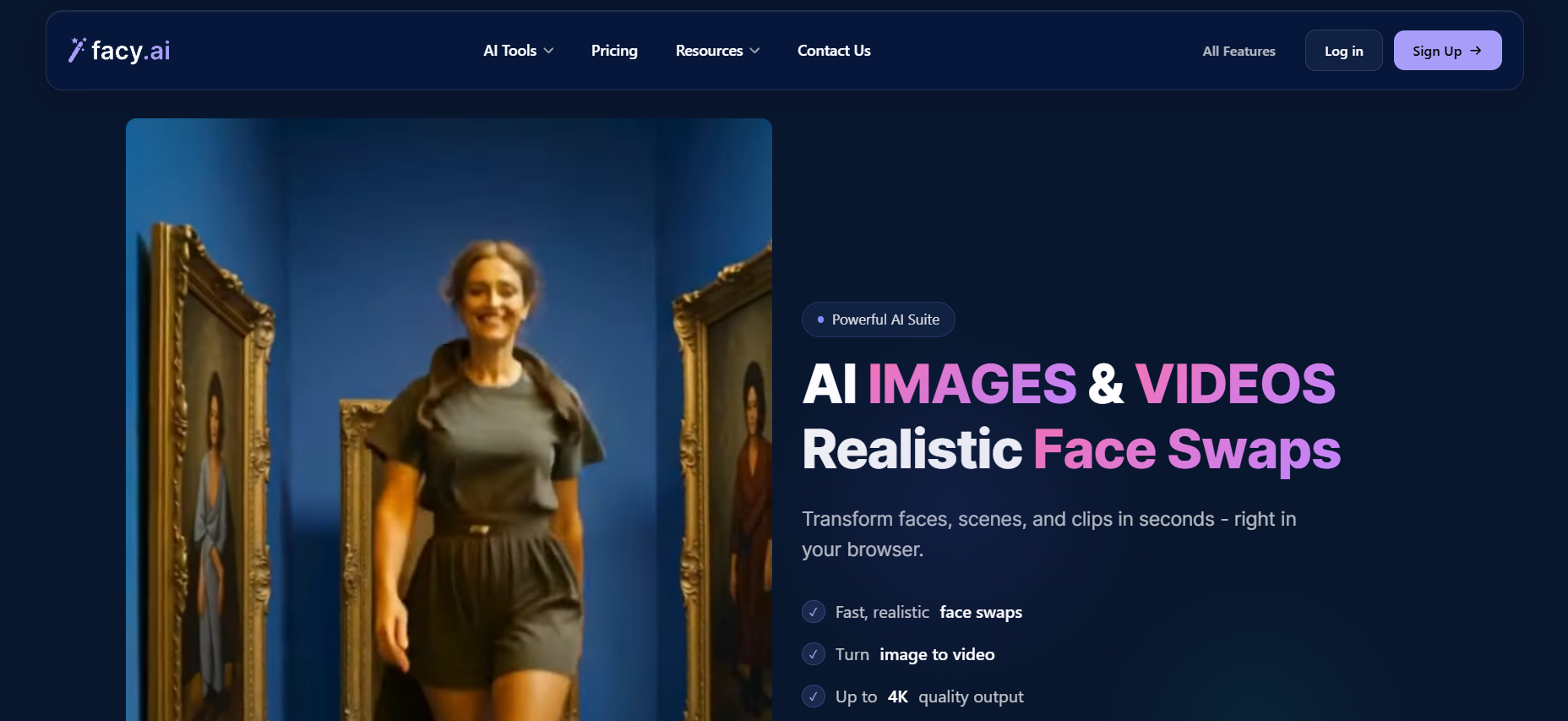
Facy AI (also written as facy.ai) is a browser-based AI tool that focuses mainly on face-related editing and visual manipulation. The core idea is simple: you upload a photo or video, choose an effect or tool, and let the AI process everything for you.
The platform covers things like face swapping, facial enhancement, image-to-video effects, background removal, and basic AI-powered image editing. You don’t need to install any software, and you don’t need a powerful computer. Everything happens online.
What really makes Facy AI appealing is that it removes friction. No complicated setup, no steep learning curve. You click, wait a little, and get a result that’s usually good enough to use right away.
Who Is Facy AI Designed For?
Facy AI isn’t trying to compete with professional VFX studios or advanced video editing software. It’s clearly designed for everyday users who want fast, decent-looking results without technical headaches.
That includes:
-
Content creators who need visuals quickly
-
Social media users who like experimenting with trends
-
Marketers testing creative concepts
-
Curious users who just want to see how far AI face tools have come
If you’re a hardcore editor who loves tweaking every tiny detail, this probably won’t replace your main tools. But if speed, ease, and convenience matter more than absolute perfection, Facy AI starts to make a lot of sense.
Supported Formats: Photos, Videos, and AI Enhancements
Facy AI supports multiple types of content, which is part of its appeal. You can work with:
-
Still images like portraits and selfies
-
Short video clips
-
AI-enhanced outputs such as animated faces or upscaled photos
Most users start with photos to test the quality, then move to videos once they feel confident about the results. That gradual learning curve feels natural and low-pressure.
7 Powerful Things Facy AI Can Do
1. AI Face Swap for Photos with Realistic Results
This is the feature that brings most people to facy ai in the first place.
The photo face swap tool lets you replace faces between images with surprisingly solid realism. The AI handles skin tone matching, lighting adjustments, and facial proportions better than many basic or free tools.
Is it flawless? No. But for casual use, profile pictures, creative experiments, or even quick mockups, it’s more than good enough. The better your source image, the better the final result, which is true for almost all AI tools.
2. Video Face Swap That Preserves Expressions and Motion
Video face swapping is where many tools completely fall apart. Facial expressions look stiff, mouth movements don’t sync properly, and the final output feels unnatural.
Facy AI actually does a respectable job here. It tracks facial movement and expressions frame by frame, which helps the swapped face move more naturally with the original video.
It works best with short clips, clear faces, and stable lighting. This isn’t Hollywood-level deepfake technology, but for social media videos, short promos, or experimental content, it delivers surprisingly usable results.
3. AI Image Enhancement and Upscaling
Got a blurry photo or a low-resolution image that looks outdated?
Facy AI includes basic image enhancement and upscaling tools that clean things up without going too far. Faces become sharper, details look clearer, and the image feels more polished overall.
This feature is especially helpful for old photos, compressed images, or visuals pulled from social platforms. It won’t magically invent details that don’t exist, but it definitely improves what’s already there.
4. Background Removal and Smart Image Editing
Background removal is one of those features you don’t realize you need until you use it.
With a single click, facy.ai can isolate a person and remove the background. This is useful for thumbnails, profile photos, ads, or quick designs where you just need a clean subject.
The cutout isn’t always perfect around fine edges like hair, but for non-designers or quick projects, it saves a lot of time compared to manual editing.
5. Face Animation and Image-to-Video Features
This is where Facy AI starts to feel genuinely fun and creative.
You can take a still image and animate it, adding subtle movements and expressions that make the photo feel alive. It’s not meant for serious storytelling or long videos, but it’s great for grabbing attention.
For ads, social posts, or experimental content, these small animations can make a big difference.
6. One-Click Editing with No Technical Skills Required
One of the biggest strengths of Facy AI is accessibility.
There are no complicated menus, no advanced sliders, and no confusing settings. If you can upload a file and click a button, you can use this tool.
That simplicity makes it appealing to a huge audience, especially people who want results without learning new software.
7. Cloud-Based Processing with Fast Output
Since everything runs in the cloud, you don’t need a powerful laptop, GPU, or special setup.
Processing times are generally reasonable, and you can use the tool from almost any device. That flexibility makes facy.ai convenient for quick edits, even when you’re not at your main workstation.
Is Facy AI Really Worth Using?
What Makes Facy AI Stand Out from Similar Tools

The real advantage of Facy AI is balance.
Many tools either overwhelm you with options or deliver disappointing results. Facy AI sits in the middle, offering simplicity without completely sacrificing quality.
It also combines multiple face-related features into one platform, which saves time and keeps things organized.
Real-World Use Cases for Facy AI
People use Facy AI in more situations than you might expect:
-
Social media posts and short videos
-
Creative experiments and concepts
-
Marketing visuals and ads
-
Entertainment and memes
-
Testing ideas before committing to bigger projects
If any of those sound familiar, the tool is already doing what it’s meant to do.
When Facy AI Is a Great Choice (and When It’s Not)
Facy AI is a great choice if:
-
You want fast results.
-
You don’t want to learn complex software.
-
You’re okay with “very good” instead of “perfect.”
It’s probably not ideal if:
-
You need ultra-realistic deepfakes.
-
You’re working on professional film projects.
-
You want full creative control over every tiny detail
Facy AI Pros and Cons
Key Advantages of Using Facy AI
-
Very easy to use
-
No software installation required
-
Solid face swap quality for casual use
-
Multiple tools in one place
-
Works with both photos and videos
Limitations and Drawbacks You Should Know
-
Results depend heavily on input quality.
-
Video features can feel limited for advanced users.
-
The free version comes with restrictions.
-
Not designed for high-end professional production
Common Issues Users Report
Some users mention confusion around credits, occasional processing errors, or inconsistent results with difficult faces. These issues aren’t unusual for AI tools, but they’re worth keeping in mind.
Is Facy AI Safe and Legit?
Data Privacy and Photo Upload Concerns
Any time you upload personal images to an online AI tool, caution is smart.
Facy AI processes files in the cloud, which means you should avoid uploading sensitive or private photos you wouldn’t want stored temporarily. This isn’t unique to facy.ai — it applies to most AI platforms.
Is Facy AI a Scam or a Trusted Platform?
From a legitimacy perspective, Facy AI is a real tool with real users and working features. It does what it claims to do.
That doesn’t mean it’s perfect, but it’s not a fake platform making empty promises either.
Ethical Use of AI Face Swap Tools
This part is important.
Face swapping should always be used responsibly. Avoid impersonation, deception, or harmful use. Tools like this are powerful, and how you use them matters just as much as the technology itself.
Facy AI Pricing and Free vs Paid Features
What You Can Do with the Free Version

The free version lets you test most features with limitations. For many users, this is enough to decide whether the tool fits their needs.
Paid Plans, Credits, and Limitations
Paid plans typically unlock better output quality, longer videos, and more credits. Pricing can change, so it’s always best to check facy.ai directly for the latest details.
Is Facy AI Worth Paying For?
If you use it once in a while, the free version might be enough. If you’re creating content regularly, paid access can save time and unlock better results.
Facy AI Alternatives and Comparisons
Best Facy AI Alternatives for Face Swapping
There are other tools available, but many focus on a single feature. Facy AI’s advantage is offering multiple face-related tools in one place.
Facy AI vs Other AI Face Swap Tools
Compared to simpler tools, facy.ai usually delivers more natural-looking results. Compared to advanced software, it offers less control but far greater ease of use.
Which Tool Is Best for Your Needs?
If speed, simplicity, and convenience matter most, Facy AI is a strong choice. If absolute control and perfection matter more, you may need a more advanced solution.
Conclusion: Final Verdict on Facy AI
So, is Facy AI really worth using?
If you’re looking for a simple, fast, and surprisingly capable AI face tool without technical headaches, the answer is yes. It’s not perfect, and it’s not meant for professional film production, but it does exactly what most people expect it to do.
If you’re curious, the best move is to try the free version first. Experiment with it. See where it fits into your workflow. That hands-on experience will tell you very quickly whether Facy AI deserves a permanent spot in your toolbox.
Find More: Boost Your Sales With SEO Services
FAQs
1. What is Facy AI used for?
Facy AI is used for face swapping, image enhancement, video face editing, and basic AI-powered visual content creation.
2. Is Facy AI free to use?
Yes, facy.ai offers a free version with limitations. Paid plans unlock more features and higher-quality outputs.
3. Can Facy AI swap faces in videos?
Yes, Facy AI supports video face swapping, especially for short clips with clear and well-lit faces.
4. Is Facy AI safe for personal photos?
It’s generally safe, but you should avoid uploading sensitive or private images, just like with any cloud-based AI tool.
5. Does Facy AI work on mobile devices?
Yes, because it’s browser-based, you can use Facy AI on mobile devices without installing an app.
