

5 Powerful Features That Make Unlucid AI Different (And 2 Hidden Limits)
Unlucid AI is one of those tools that suddenly starts popping up everywhere, and you find yourself asking: “Wait… what exactly does this do, and is it actually worth my time?” That reaction is completely normal. The AI space moves fast, and every week there’s a new platform promising to change everything. If you’re into AI visuals, image-to-video tools, or just experimenting with creative tech without wanting a steep learning curve, you’ve probably already seen unlucid.ai mentioned on social media, in Discord groups, or inside creator communities.
What makes this conversation interesting is that Unlucid AI doesn’t position itself as a heavy, professional-grade editing suite. Instead, it feels like a tool built for curiosity, speed, and creative play. In this article, we’ll break it down in a very human way — what Unlucid AI actually is, what it does surprisingly well, where it clearly falls short, and who should (and shouldn’t) spend time using it.
Find More: 7 Powerful Things Remaker AI Can Do (Before You Use It)
Introduction to Unlucid AI: What It Is and Why It’s Gaining Attention
What Is Unlucid AI and How Does It Work?
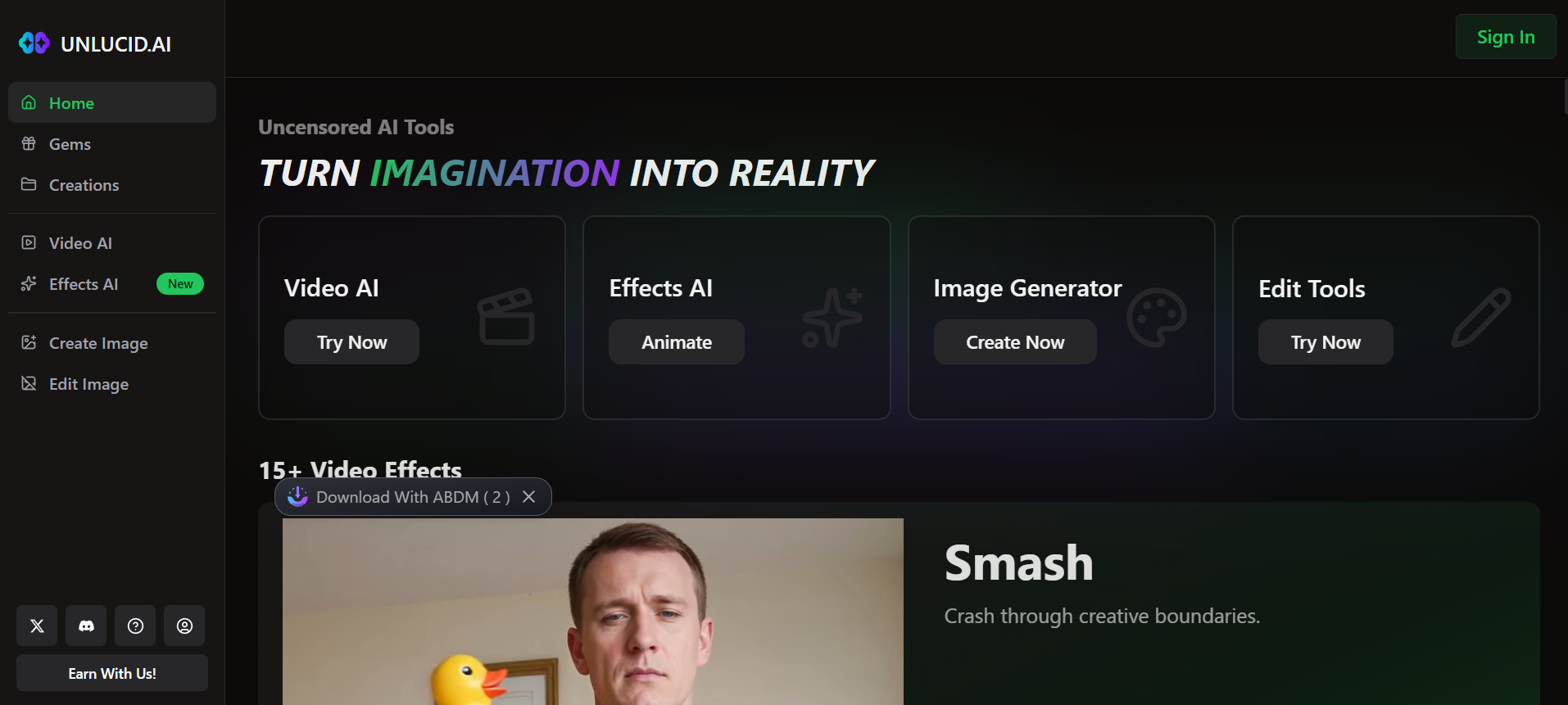
Unlucid AI is a web-based AI creative platform focused mainly on visual content. Its core promise is simple: help you turn static visuals into dynamic, animated content using AI, without requiring technical knowledge or professional editing experience. You upload an image or write a prompt, choose from a set of effects or animation styles, and the platform generates the result for you.
Behind the scenes, unlucid.ai relies on generative AI models that analyze the image or prompt and apply motion, depth, or stylistic transformations. From the user’s point of view, though, none of that complexity is visible — and that’s intentional. The platform is designed so you can get results without thinking too much about how they’re produced.
What really makes Unlucid AI appealing is that it doesn’t try to overwhelm you. There are no intimidating timelines, no layer panel, no endless menus. You don’t need to understand advanced editing concepts at all. The entire experience is built around speed, simplicity, and experimentation rather than pixel-perfect control.
Unlucid AI for Image-to-Video and Creative Content Generation
At its core, Unlucid AI shines when you want fast visual results. Social media clips, animated images, quick transitions, stylized motion effects, and eye-catching visuals are where it feels most at home. You’re not meant to sit there refining tiny details — you’re meant to generate, test, and move on.
This makes Unlucid AI especially attractive for creators who are constantly experimenting. Instead of spending hours editing a single video, you can generate multiple variations quickly and see what works. It’s not trying to replace professional video editors or cinematic tools. It’s trying to remove friction for everyday creative ideas.
Who Is Unlucid AI Best For? (Creators, Marketers, and Casual Users)
Unlucid AI works best for people who value speed over perfection. That includes social media creators chasing engagement, marketers testing visual concepts, meme creators, and casual users who simply enjoy playing with AI tools.
If you’re someone who needs deep customization, frame-by-frame control, or highly consistent outputs for client work, this tool may feel limiting. But if your mindset is “let’s try this and see what happens,” Unlucid AI fits surprisingly well.
Feature #1 – Advanced Image-to-Video Generation
Turning Static Images Into Dynamic AI Videos
One of the strongest features of Unlucid AI is how easily it converts still images into short animated videos. You upload an image, select an animation style, and within minutes, you get motion, depth, and visual energy added to something that was previously flat and static.
This is especially powerful in a digital world where movement naturally grabs attention. A still image might be ignored, but a moving version of that same image instantly feels more alive. Product photos, portraits, illustrations, and even simple graphics can all benefit from this transformation.
Popular Animation Styles and Visual Effects
Unlucid.ai offers a range of built-in animation styles designed to look modern and eye-catching. Zoom-ins, motion pushes, subtle distortions, and more playful effects are all available as presets. You don’t need to fine-tune parameters endlessly — the platform makes creative decisions for you.
This approach won’t satisfy perfectionists, but it’s perfect for users who want fast results without decision fatigue. You click an effect, wait a bit, and see what comes out.
How This Feature Sets Unlucid AI Apart
The real advantage here isn’t technical superiority — it’s accessibility. Plenty of tools can generate image-to-video content, but many of them feel complex or intimidating. Unlucid AI removes that barrier. Upload, choose, wait, download. That’s the entire loop, and for many users, that simplicity is exactly the point.
Feature #2 – One-Click AI Visual Effects Library
Built-In Effects Like Zoom, Squish, and Motion Boost
Unlucid AI includes a library of one-click effects that instantly change the feel of your content. These effects are clearly designed with modern social platforms in mind. They’re bold, noticeable, and sometimes exaggerated — which actually works well for short-form content.
Instead of subtle cinematic movements, you get effects that scream “scroll-stopper.” That makes sense when you think about where most users will publish the results.
Speed vs. Customization Trade-Off
Here’s the honest trade-off: you gain speed, but you lose fine control. You can’t adjust every tiny detail of an effect. For many users, that’s a feature, not a bug. It removes overthinking and encourages experimentation.
For users who enjoy tweaking and refining, this limitation can feel frustrating. But Unlucid AI clearly prioritizes momentum over precision.
Best Use Cases for Social Media Content
If your main goal is TikTok, Instagram Reels, YouTube Shorts, or fast ad creatives, this feature makes a lot of sense. You can generate multiple variations quickly, test them, and move on without investing serious time or money.
Feature #3 – AI-Powered Image Editing and Enhancement
Object Removal, Background Changes, and Style Tweaks

Unlucid AI also includes basic image editing features like object removal, background changes, and visual style adjustments. These tools are designed to solve common problems quickly rather than replace professional software.
You can clean up images, simplify backgrounds, or apply stylistic changes without opening heavy design tools.
Quality and Accuracy Compared to Other AI Editors
The results are generally decent, but not flawless. Sometimes the AI nails it perfectly. Other times, it struggles with edges, shadows, or fine details. For casual use, this is usually acceptable. For professional, high-stakes projects, it’s something to be aware of.
When Unlucid AI Image Editing Works Best
Unlucid AI performs best when the input is clean and clear. Simple images with well-defined subjects produce the strongest results. The more complex the image, the more likely you’ll notice imperfections.
Feature #4 – Simple, Beginner-Friendly Interface
No Learning Curve for Non-Technical Users
This is one of Unlucid AI’s biggest strengths. From the moment you open the platform, it feels approachable. Buttons are clear, options are limited, and you’re never left wondering what to do next.
Workflow From Prompt to Final Output
The workflow couldn’t be simpler: upload an image or enter a prompt, choose an effect, wait for processing, and download the result. No tutorials, no onboarding videos, no confusion.
Why Ease of Use Is a Competitive Advantage
Many AI tools fail not because they lack power, but because they’re confusing. Unlucid AI avoids that trap by focusing on clarity and ease of use, which makes it far more accessible to non-technical users.
Feature #5 – Creative Freedom and Fewer Content Restrictions
What “Unrestricted” Really Means in Unlucid AI
Unlucid.ai markets itself as offering fewer creative limitations compared to mainstream platforms. In practice, this means more freedom to experiment and fewer automated blocks during creation.
Pros and Cons of Creative Freedom
The upside is obvious: fewer interruptions and more creative exploration. The downside is that responsibility shifts entirely to the user. You’re expected to know where ethical and legal boundaries exist.
Responsible Use Considerations
Just because you can generate something doesn’t mean you always should. Like any powerful AI tool, Unlucid AI works best when used thoughtfully.
Hidden Limit #1 – Output Consistency and Quality Control
When Results Can Feel Random
One reality of using Unlucid AI is inconsistency. Some outputs look great, others feel slightly off. This unpredictability can be frustrating if you need consistent quality.
How to Improve Results With Better Prompts
Clear inputs, high-quality images, and realistic expectations make a noticeable difference. The AI responds best when it has good material to work with.
Scenarios Where Quality May Fall Short
Crowded scenes, complex visuals, or very specific creative demands are where limitations become more visible.
Hidden Limit #2 – Trust, Transparency, and Long-Term Reliability
Platform Transparency and Ownership Concerns
Some users question the platform’s transparency. Unlucid AI doesn’t publicly share much about its long-term roadmap or development team, which can create uncertainty.
Data Privacy and Account Safety
As with any online AI platform, it’s wise to avoid uploading sensitive, private, or confidential material.
Is Unlucid AI Safe for Professional Use?
For experimentation and content testing, yes. For client work involving sensitive assets, caution is recommended.
Unlucid AI vs Other AI Creative Tools
Unlucid AI vs Runway
Runway offers deeper control and professional-grade tools, but it also comes with a steeper learning curve. Unlucid AI wins when simplicity and speed matter more.
Unlucid AI vs Midjourney
Midjourney focuses on high-quality image generation. Unlucid AI focuses more on motion, animation, and quick visual effects.
When Unlucid AI Is the Better Choice
If your priority is fast results, easy workflows, and motion-based visuals, Unlucid AI is often the better fit.
Final Verdict – Is Unlucid AI Worth Using in 2026?
Who Should Use Unlucid AI
Creators, marketers, and curious users who want fast, engaging visual content without a learning curve.
Who Should Avoid It
Users who need precise control, predictable outputs, or professional-grade consistency.
Key Takeaways Before You Try Unlucid AI
Unlucid AI is built for experimentation, speed, and creative play. Treat it as a lightweight tool rather than a replacement for professional software, and you’ll get much more value from it.
Find More: Boost Your Sales With SEO Services
FAQs
1. Is Unlucid AI free to use?
Unlucid AI usually offers limited free usage through a credit-based system, with paid options for heavier use.
2. What makes Unlucid AI different from other AI tools?
Its focus on simplicity, speed, and motion-based visual effects sets it apart.
3. Can Unlucid AI be used for commercial projects?
In many cases, yes, but you should always check the platform’s terms before using outputs commercially.
4. Is Unlucid AI safe and legit?
The platform appears functional and widely used, but users should still be cautious with sensitive data.
5. What are the best alternatives to Unlucid AI?
Depending on your needs, Runway, Midjourney, and Canva AI are common alternatives.