

Snapchat Viewer: What It Really Means, What Works, and What to Avoid

A “Snapchat Viewer” usually means one of two things: (1) the built-in viewer list inside Snapchat that shows who watched your Story, or (2) a third-party “snapchat story viewer online” site that promises you can view Stories or profiles from a browser—often “anonymously.” The dependable route is still the official Snapchat app (and, for certain features, Snapchat’s web experience). Third-party “viewers” are inconsistent at best, frequently misleading, and sometimes outright dangerous—especially if they ask you to log in, install something, or complete “verification.” Snapchat also warns that unauthorized third-party apps or plugins violate its Terms and can put accounts at risk.
What “Snapchat Viewer” means (definitions you can trust)
This term gets thrown around like it’s one feature. It isn’t. People use it to describe different things, and that confusion is exactly what third-party “viewer” sites lean on.
Definition: Snapchat viewer (official meaning)
A Snapchat viewer is the person/account that watches your Story or other content, and Snapchat can show the content owner a list of those viewers inside the app.
Definition: Snapchat story viewer (common search meaning)
In search results, “snapchat story viewer” often means a method or tool to watch someone’s Story—sometimes with the goal of not showing up on the viewer list. That’s where reality and wishful thinking start colliding.
Definition: Snapchat story viewer online (what it usually implies)
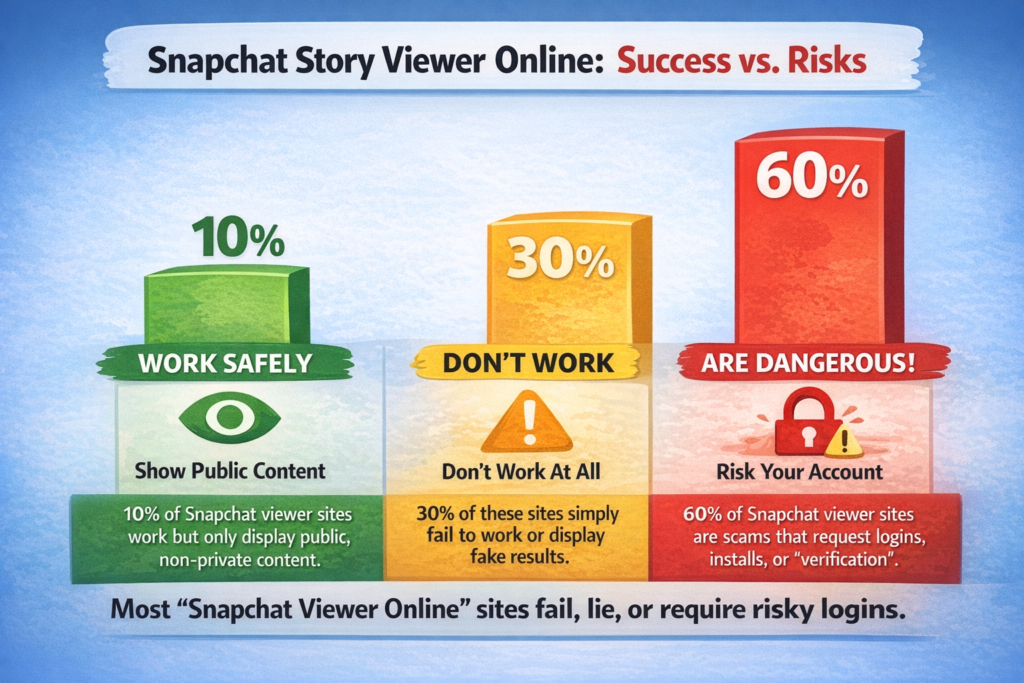
A “snapchat story viewer online” is typically a third-party website claiming you can watch Stories from a browser without an account, sometimes “anonymously.” Even in the best case, these tools tend to be limited to public content (if they work at all). And the moment they ask for login details or downloads, you’re in the danger zone. Snapchat explicitly warns against unauthorized third-party apps/plugins.
Definition: snap story viewers (plural)
“Snap story viewers” is usually shorthand for either “who viewed my Story?” or “how do I view someone else’s Story?” It’s not a separate feature—just a sloppy plural that stuck.
Bottom line: Snapchat already has viewer functionality built in. The rest is either a workaround, a misunderstanding, or a trap disguised as a shortcut.
How Snapchat Story views actually work?
Most “viewer” searches come from one of these questions:
-
Who can see my Story?
-
Can I see who viewed it?
-
Can I view someone else’s Story without them knowing?
-
Can I view a profile or Story without being friends?
Snapchat’s actual mechanics answer most of this—once you stop assuming there’s a magic mode hiding in a browser tool.
Who can see a Snapchat Story?
Snapchat lets you control who can view your Story, and the defaults matter. Many users are on friends-only settings unless they intentionally choose public sharing. Snapchat’s support explains you can change who can see your Story.
One detail people miss: “public” isn’t a vibe, it’s a setting. If you post publicly, you’re choosing reach over tight control. That can be smart. It just isn’t private.
Can you see who viewed your Story?
Yes. Snapchat allows you to check how many views your Story has and which friends watched it.
For public Stories, Snapchat also explains that viewers are listed under a “Viewers” section when you check your public Story insights.
If you’re hunting for a “viewer tool” because you think Snapchat doesn’t show this—Snapchat does. The data lives in the app where it belongs.
What Snapchat does not openly support
Snapchat does not present an official “anonymous mode” for watching private Stories. The product is built around attribution: if you can see a private Story, you’re part of the allowed audience, and your view is typically visible to the poster through the viewer list.
This matters because it sets the baseline. If a random website guarantees you can view private Stories anonymously, it’s not offering a hidden feature. It’s selling you a story.
Snapchat Viewer: the legit ways to view Stories and profiles
If your goal is simply “watch content,” you don’t need anything exotic. The official routes are not only safer—they’re also more reliable and less frustrating.
Viewing Stories in the Snapchat app
If the person is your friend (and has a Story visible to you):
You view it inside the app, and Snapchat supports that flow. Snapchat’s own guidance describes how to view a friend’s Story (tap through, swipe to skip, exit when you’re done).
If the person posts publicly:
You may be able to view public Stories or public profile content depending on what they’ve made public and what Snapchat surfaces in your region and age category. Public availability isn’t guaranteed, and it changes—sometimes because creators edit their settings, sometimes because Snapchat adjusts distribution.
A practical way to think about it: private Stories are access-controlled; public posts are distribution-controlled. Different rules, different expectations.
Viewing Snapchat on the web
Snapchat has a web experience, and Snapchat’s support content explains how watching and rewatching Stories works from the Chat screen (including tapping a Bitmoji to open a Friendship Profile and tapping the circular Story to watch).
A realistic limitation: web access can be feature-limited compared to the mobile app, and availability can shift. If a feature truly matters—Story privacy controls, viewer lists, creation tools—the mobile app is still the safest assumption.
Viewing profiles vs viewing Stories
People lump these together, but they behave differently.
-
Profile viewing is usually about identity (display name, Bitmoji, public-facing elements, sometimes public highlights if the user has a public profile setup).
-
Story viewing is about consuming content, and that’s where viewer attribution and lists come into play.
So when someone asks for a “snapchat profile viewer,” they might just want to confirm a username exists. Or they might be trying to watch Stories without being seen. Same phrase, very different intent.
Snapchat story viewer online: what those sites can and can’t do
If you search “snapchat story viewer online,” you’ll find sites that look confident. They often feel “tool-like,” which makes people assume they’re legitimate. The claims are the same; the outcomes usually aren’t.
What these sites claim to do
Most promise some mix of:
-
Watch Stories without logging in
-
Watch Stories anonymously
-
View private Stories
-
Download Stories
-
View someone’s Snapchat profile details online
It’s a neat list. It’s also the exact list that should make you pause.
What they can realistically do (best-case scenario)
Best case—when they’re not pure bait—these services can only show content that is already public or easily discoverable through public surfaces.
Even then, results are shaky:
-
Public content can be region-limited, age-limited, or not surfaced consistently.
-
Creators can change settings or remove posts quickly.
-
Snapchat can change how content is accessed and displayed, which breaks scraping workflows.
-
Some sites simply show cached media, unrelated content, or stale previews.
If you’ve ever watched one of these tools “work” and then suddenly stop, that’s not random bad luck. It’s the nature of third-party access on an app-first platform.
What they usually cannot do (and where the danger starts)
A tool that claims it can show private Stories or friends-only Stories without your account being in the audience is effectively claiming it can bypass access controls.
That’s where the risk jumps from “waste of time” to “you might lose your account.”
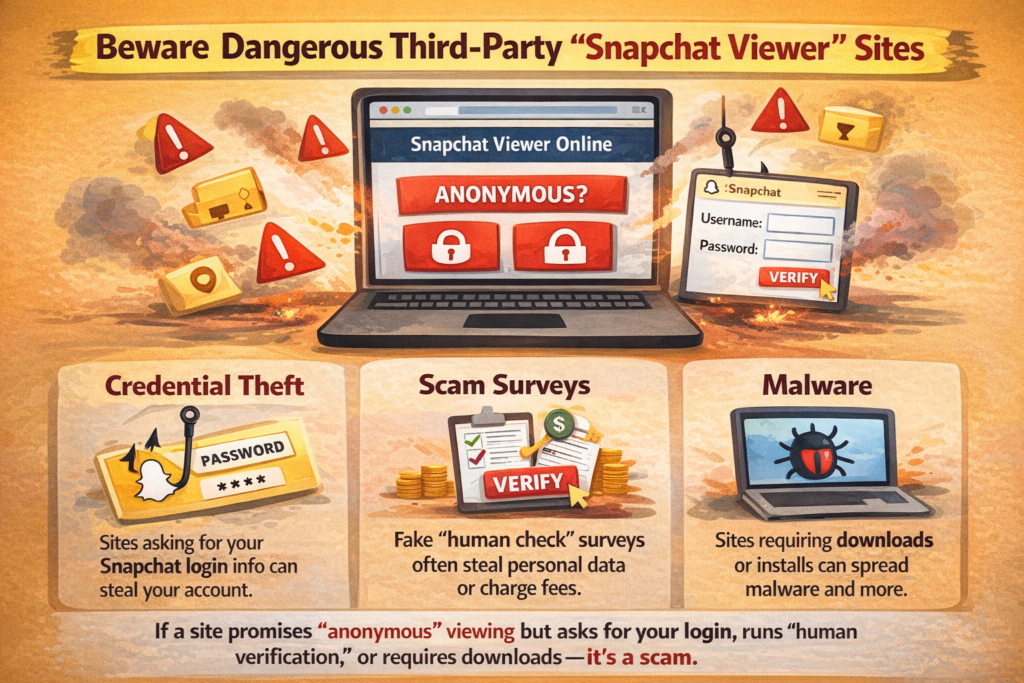
And to “make it work,” these sites often push you into one of these steps:
-
entering Snapchat credentials,
-
connecting your account,
-
completing fake “human verification,”
-
installing an extension,
-
granting permissions you can’t sensibly audit.
Snapchat explicitly warns that using unauthorized third-party apps or plugins is against their Terms and can put your account—and your friends’ accounts—at risk.
So the clean rule is simple:
If a site asks you to log in with Snapchat to view anonymously, it’s not a viewer. It’s a risk funnel.
A quick “trust test” you can do in under a minute
If you’re tempted to try a Snapchat story viewer online, run this quick check:
-
Does it ask for your Snapchat username and password?
Walk away. No exceptions. -
Does it force “verification” steps that have nothing to do with Snapchat (apps, surveys, notification prompts)?
That’s not security; it’s monetization. -
Does it promise guaranteed access to private Stories?
That’s an “impossible claim” smell. Treat it accordingly. -
Does it clearly state limitations (public content only, availability varies) and avoid asking for logins?
Still not automatically safe, but at least it’s not openly selling fantasy.
This is less about paranoia and more about pattern recognition. These pages repeat because the tactic works on enough people.
Anonymous viewing claims: reality vs marketing
This is the uncomfortable heart of the “viewer” topic. A lot of people aren’t searching because they love tools—they’re searching because they don’t want to be seen.
Here’s the truth without the sugar coating.
Can you view a private Snapchat Story anonymously?
Snapchat does not provide an official, supported way to anonymously watch private, friends-only Stories. If you can view a private Story, it’s because your account is allowed. And the product is designed to attribute views to accounts through viewer lists.
That’s why “guaranteed anonymous private Story viewing” should set off alarms. You’re being promised a clean outcome from a messy, high-risk method.
Can you view public Snapchat content anonymously?
Sometimes you can view public content without a mutual friend relationship, depending on how the creator posts and how Snapchat surfaces it. Snapchat also outlines privacy considerations when you post publicly and how public sharing differs from private sharing.
But “anonymous” is often oversold. Even if you’re not logged into Snapchat:
-
You’re still visible to the website you’re using, including device and network signals.
-
You’re still leaving a trail—just not necessarily inside Snapchat’s viewer list.
-
And once you log in, you’re back in attribution territory.
So yes, public content can be more accessible. No, “anonymous” is not a universal guarantee.
Why anonymity is harder than people think
Snapchat isn’t a simple public web gallery. It’s an app-first platform with account context, privacy rules, and viewer tracking built into the experience.
That doesn’t mean nothing outside the app can ever display public Snapchat content. It means: a random page promising full access with zero trade-offs isn’t describing how the system is built. It’s describing what you want to hear.
“Snapchat profile viewer” and “napchat profile viewer” searches
You’ll see these phrases constantly, including misspellings like “napchat profile viewer.” Usually, the intent falls into one of these buckets:
-
“I want to see someone’s Snapchat presence without adding them.”
-
“I want to see their Stories or public content.”
-
“I want to monitor a profile.”
-
“I’m trying to confirm identity or avoid impersonation.”
Each of these has different constraints, and mixing them is how people end up on shady sites.
What you can view without being friends
Depending on privacy and public settings, you may see limited elements that help confirm identity—display name, Bitmoji, and sometimes public content if the user posts publicly.
But you can’t assume every profile is viewable:
-
Many users stay friends-only.
-
Some limit discoverability and contact options.
-
Public content visibility varies by region, age, and distribution rules.
-
Creators can change public settings at any time.
And if someone doesn’t post publicly, there may simply be nothing meaningful to “view” without adding them. That’s not a bug; it’s privacy working.
The line between “profile viewer” and “stalking tool”
There’s a legitimate version of this search: “I want to check public content,” “I want to confirm a creator’s official username,” or “I want to avoid being fooled by an impersonator.”
Then there’s the other version: “I want to track someone’s activity without consent.”
Third-party “viewer” tools blur that line intentionally. They sell it as “privacy” or “anonymous browsing,” when what they’re really offering is a risky workaround that can harm both sides—your account security and the other person’s privacy.
If you’re dealing with harassment, impersonation, or suspicious behavior, the safer approach is to use Snapchat’s in-app reporting and privacy controls, not an external “viewer.”
Risks: scams, bans, and privacy damage
People don’t stumble into trouble because they searched a keyword. They stumble into trouble because the “viewer” ecosystem is designed to turn curiosity into clicks, and clicks into compromises.
Here’s what goes wrong most often.
1) Account compromise (credential theft)
Many “viewer” sites are built around one core goal: get you to enter your Snapchat login.
Snapchat warns that unauthorized third-party apps or plugins are against their Terms and can put your account—and your friends’ accounts—at risk.
Once credentials are harvested, attackers can lock you out, impersonate you, message your contacts with scams, or attempt password resets on other services. And because the initial action felt “low stakes,” people often realize too late.
2) Malware and browser-level risk
Some sites avoid asking for your password directly. Instead, they push a download or extension.
Even if they never touch Snapchat, an untrusted extension can:
-
inject ads or redirects,
-
harvest browsing data,
-
push notification spam,
-
degrade device performance,
-
quietly expand permissions over time.
If you’re trying to stay “anonymous,” installing unknown software is the opposite of anonymity.
3) Terms violations and account restrictions
Snapchat’s position is clear: unauthorized third-party apps/plugins are against their Terms.
Even if enforcement details aren’t spelled out in every case, the practical risk remains: suspicious access patterns and third-party integrations are not where you want your account to live.
4) Fake results and wasted time
A lot of “viewer” tools don’t fail honestly. They keep you scrolling.
Common tricks include:
-
endless loading screens,
-
“results” that never actually load,
-
unrelated media tied to similar usernames,
-
recycled screenshots and fake previews.
That’s why people keep searching new variations (“snap story viewers,” “snapchat viewer,” “napchat profile viewer”). They’re chasing an answer that was never really there.
5) Privacy blowback
Irony alert: people use these tools to avoid being seen, then hand over their data to a random site.
Even if you never enter Snapchat credentials, you may still expose:
-
device fingerprints,
-
browser identifiers,
-
IP-based location signals,
-
browsing behavior tied to the “viewer” activity.
So the “anonymous” promise becomes a privacy trade you didn’t intend to make.
How to protect your Snapchat privacy (practical checklist)
If you’re here because you’re worried about people using “Snapchat Viewer” tools on you, don’t focus on the tools. Focus on your settings and your posting choices—the stuff you actually control.
Control who can see your Story
Snapchat’s support explains how to change who can see your Story.
Practical approach:
-
Keep Stories limited to friends unless you truly want broad visibility.
-
Use custom audiences when you need separation (work, clients, personal circle).
-
If you’re posting something you’d hate to see shared, don’t put it in a public Story. Public is public.
Be deliberate with public posting
Snapchat provides guidance on privacy when you post publicly, including the trade-offs involved in public Stories and public distribution.
A good mental model: public posting is publishing. Treat it like publishing. If you wouldn’t be okay with strangers seeing it, it doesn’t belong in public.
Secure your account like it matters
Even if you never touch a third-party viewer site, someone else might try to pull you into one—through a link, a message, or a “check who viewed you” bait post.
Simple habits help:
-
Use a strong, unique password.
-
Avoid logging in on shared devices.
-
Be suspicious of anything that asks you to “verify” outside the Snapchat app.
-
Don’t reuse passwords across social accounts.
Security isn’t dramatic. It’s mostly refusing to do the one impulsive thing a scam needs you to do.
Watch for impersonation and misuse
If you’re a creator or brand, pay attention to:
-
accounts mimicking your username,
-
reposted public content without attribution,
-
messages pushing “viewer” links that mention your handle.
When you see it, document it and report through official channels inside the app. Trying to “investigate” through external viewers often makes the situation worse, not better.
Use cases that are actually legitimate (and safer alternatives)
Not everyone searching “snapchat viewer” is trying to be stealthy. Often, it’s a normal problem wrapped in a messy keyword.
Here are common intents and the safer way to handle them.
“I want to check who watched my Story”
Use Snapchat’s built-in viewer list. Snapchat explains how to see who viewed your Story and how many views it has.
If you’re asking this for performance reasons (creator, marketer, brand), focus less on obsessing over individual names and more on patterns:
-
which Stories get better completion,
-
which frames trigger drop-off,
-
which posting times lift views.
The built-in data is imperfect, but it’s real. Third-party “viewer” pages often aren’t.
“I need to view my own Story from another perspective”
If you want to verify how your Story appears publicly (campaigns, announcements, public releases), do it safely:
-
use another device you control,
-
use a separate account you own,
-
or ask a trusted colleague to confirm visibility.
Avoid logging into unknown sites “to test.” If you’re testing your own content, you’re already motivated. That’s exactly when scams work best.
“I’m doing brand monitoring”
If you’re monitoring a brand name, creator mentions, or UGC:
-
rely on official public surfaces and in-app discovery where applicable,
-
encourage tags and direct submissions (it’s more reliable than hunting),
-
use legitimate social listening workflows that don’t require violating platform access rules.
Trying to force “viewer” tools into a monitoring stack usually costs more time than it saves.
“I’m trying to find a public profile”
If your goal is discovery (finding someone’s public Snapchat presence):
-
confirm the exact username spelling,
-
check their other social profiles for official links,
-
compare profile imagery and cross-platform consistency.
A lot of “napchat profile viewer” searches come down to one thing: the username is slightly off. No tool fixes that. Careful verification does.
Expert insight
Most people don’t need a “Snapchat Viewer.” They need clarity about one of three things: access, attribution, or safety.
-
Access: Can you see the content at all? If it’s private and you’re not in the allowed audience, the honest answer is no.
-
Attribution: Will you show up as a viewer? If you view through Snapchat with your account, assume you’re visible via the viewer list.
-
Safety: Is the method worth the risk? If a tool asks for your login, pushes an install, or guarantees private access, it’s not a clever hack. It’s a liability—and Snapchat explicitly warns against unauthorized third-party apps/plugins.
The boring approach wins in 2026: use official surfaces, assume public content can travel, and treat your Snapchat login like a key you don’t hand to strangers.
FAQ
What is a Snapchat viewer?
A Snapchat viewer is an account that watches a Story or other content. Snapchat lets the content owner check how many views their Story has and which friends watched it.
Is there a real Snapchat story viewer online that works for private Stories?
No reliable tool can legitimately show private, friends-only Stories without being part of the allowed audience. Sites that promise guaranteed private access are high risk and often misleading.
Can someone view my Snapchat Story without showing up on the viewer list?
Snapchat is designed to attribute Story views to accounts when the viewer is watching through Snapchat as an allowed viewer. Snapchat provides viewer lists for Stories in the app.
Are third-party Snapchat viewer apps safe?
Snapchat warns that unauthorized third-party apps or plugins are against their Terms and can put your account—and your friends’ accounts—at risk.
If an app/site asks for your login, forces “verification,” or requires an install, treat it as unsafe.
Can I view Snapchat Stories on a computer?
Snapchat offers a web experience, and Snapchat’s guidance describes viewing (and rewatching) Stories via the Chat screen and Friendship Profile flows.
What can people see on my Snapchat public profile?
If you post publicly, some content can be viewable beyond your friends depending on what you share publicly and how Snapchat surfaces it. Snapchat provides privacy guidance for public posting and the trade-offs involved.
Conclusion: what to do next
If you searched for “Snapchat Viewer,” get specific about what you want—then pick the method that won’t backfire.
-
You want to see who watched your Story: use Snapchat’s built-in viewer list.
-
You want to view Stories safely: use the Snapchat app (or Snapchat’s web experience where supported).
-
You want an “anonymous” shortcut: understand that private Story anonymity isn’t an official feature, and third-party viewers often cost you security for the illusion of invisibility. Snapchat warns against unauthorized third-party apps/plugins.
-
You want stronger privacy: tighten Story visibility settings, think twice before posting publicly, and keep your account security clean.
The most useful “viewer” isn’t a tool. It’s a habit: treat public as public, and treat your login like it’s worth protecting—because it is.