
A reader spends hours choosing a book and about three seconds deciding if the cover feels right. I think about that gap a lot. The cover is doing real work in those three seconds. It signals the genre, sets the tone, and tells someone whether this book is for them, all before they have read a word.
For a long time that pressure pushed me toward playing it safe. Working through rounds of sketches with a designer is good work, but it is slow, and it is expensive enough that you stop experimenting. You pick the version that is fine and move on. You rarely get to ask, “what else could this cover have looked like?”
That is the part AI actually changed for me. Not the final polish. The cheap, low-stakes experimenting before the polish.
Trying directions instead of committing early
The old question was “what is the best cover?” The more useful one turned out to be “what are the three or four directions this book could go?” A dark, moody thriller treatment. A clean typographic one for nonfiction. Something illustrated and a little strange for fiction. A symbolic cover that leans on mood instead of a literal scene.
When you can put those next to each other, the decision gets easier, and it gets more honest. You stop defending the first idea you had just because it was first. You also learn something about the book. Seeing it rendered four ways tells you how it reads at a glance, which is exactly the judgment a browsing reader is about to make.
Where Pixlio’s book cover generator fits
Pixlio is a browser-based platform for creating and editing images, and its AI book cover generator is built for this kind of exploration. You describe the book, pick a mood or genre, and generate a few concepts to compare, all without installing anything or opening a design tool you half remember how to use.
The workflow is about as simple as it sounds. Enter a book idea or theme. Set the genre or mood. Generate a handful of covers. Compare them and refine the ones worth keeping. A prompt as loose as “a near-future detective story set in a flooded city” can come back as a neon skyline, a quiet character portrait, and a stark symbolic cover. None of them is the final answer yet. Each one tells you something different about who the book is for.
That is the real value for me. Not “one good cover,” but several plausible identities for the same book.
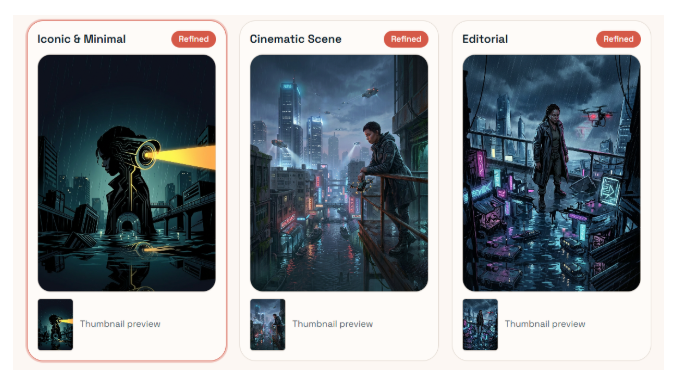
Refining once you have a direction
Picking a direction is where the rest of the platform quietly helps. Once a concept is close, I will often clean it up or push it a little further in the AI image editor, or use the image combiner when a cover needs two elements brought into one scene. These are not the main event. They are just there when a draft is almost right and needs one more pass before it earns the title text. The point is that the early exploring and the later tidying happen in the same place.
Why iterating beats perfecting
There is an honest tradeoff here. AI does not remove the need for design judgment. If anything it gives you more to judge, because now you have four covers instead of one and you still have to choose. What changes is the cost of looking. In a traditional workflow, every revision costs time and money, so ideas get filtered out before they are ever explored. When trying another direction is cheap, you explore more of them, and you usually land somewhere better than your first safe guess.
I would not send any of this straight to print without a careful human pass. But for the early stretch, where the cover is still an open question and you are figuring out what the book even wants to look like, generating and comparing covers in the browser has made me a lot less precious about getting it right on the first try. For a cover that has three seconds to do its job, that extra room to experiment matters more than it sounds.