UK: +44 2038074555 info@atamgo.com
How Businesses Can Create Lasting Employee Recognition Experiences

How Businesses Can Create Lasting Employee Recognition Experiences

Lasting Employee Recognition Experiences

There are millions of employees disengaging from their daily tasks every day according to Gallup’s global workplace research, quietly pulling back because their efforts go completely unnoticed. That generic email or automated gift card on a work anniversary rarely bridges this emotional gap. Modern professionals want genuine appreciation that reflects their actual contributions to the workplace.

So what can organisations do? Shifting from superficial praise to meaningful acknowledgement helps build a resilient culture where staff feel valued. Workers become motivated and genuinely inspired to stay for the long haul.

Moving Beyond Disposable Digital Acknowledgements

Digital badges and quick chat messages might offer a momentary dopamine hit, but they fade from memory within hours. A physical award sits on a desk for years, serving as an enduring anchor for professional pride and personal achievement.

Something tangible creates an emotional link that purely digital perks simply cannot replicate in a hybrid workforce. One guide on Trophy.com highlights how bespoke physical awards reinforce company values while giving team members a permanent symbol of their dedication. When an individual receives something crafted specifically for their milestone, the gesture elevates appreciation from a routine corporate process into a memorable life event.

Avoiding the Pitfalls of Purely Transactional Culture

Treating appreciation as a mere trade of performance for immediate perks creates a cold working environment. This dynamic stems from the transactional leadership principle, where management treats human effort as a basic economic exchange rather than a partnership.

Effective employee recognition relies on several core cultural shifts:

  • Recognition must happen close to the actual achievement rather than months later
  • Specific behaviors should be highlighted instead of vague general compliments
  • Peer involvement must supplement top down executive praise

When managers move away from rigid exchanges, recognition begins to feel human again.

Structuring Peer to Peer Recognition Frameworks

Top down praise from executives is vital, but daily recognition from colleagues creates the true backbone of company culture. Peer recognition acts like a mirror, reflecting the daily micro wins that executives often miss during busy quarter ends.

And as studies reveal that global employee engagement levels remain critically low across almost every major industry sector today. Empowering team members to nominate their peers breaks down departmental silos and fosters a shared sense of victory across entire teams.

Celebrating Personal Growth and Unsung Contributions

Most corporate reward schemes focus exclusively on high revenue generators or public facing sales teams. This narrow approach leaves crucial backend staff like IT support, operations, and administrative coordinators feeling overlooked.

Recognising personal development, project completions, and quiet problem solving ensures every role feels valued. When you reward the foundational work that keeps daily operations moving smoothly, overall staff loyalty improves dramatically.

Designing Bespoke Milestone Celebrations

Work anniversaries should never feel like an automated script triggered by an HR database. Celebrating five or ten years of service demands a thoughtful experience tailored to the individual’s journey within the company.

Modern workforce data proves that voluntary turnover drops by nearly a third when organisations implement structured appreciation strategies. Personalise celebrations, and you show employees that their years of effort have left a genuine mark on the organisation.

Key elements of a memorable milestone celebration include:

  • Storytelling that highlights the individual’s growth and key achievements over time
  • Team gatherings that focus on personal impact rather than corporate metrics
  • Customized keepsakes that represent the employee’s specific tenure

These structured moments transform simple work anniversaries into powerful retention drivers.

Incorporating Public and Private Praise Appropriately

Not every high performer wants to stand on a stage in front of hundreds of colleagues. Introverted team members often prefer quiet, sincere praise from their direct manager over loud public spectacles.

Understanding personal preferences ensures that your appreciation efforts build confidence rather than causing unnecessary anxiety. A thoughtful leader takes the time to discover how each individual prefers to receive praise.

Aligning Recognition with Organisational Values

Appreciation experiences are most effective when they directly reflect the core values of the business. Rewarding behaviours that embody innovation, empathy, or collaboration reinforces the exact culture you wish to build.

Think of company values as the operational compass for your recognition strategy. When employees see their peers honoured for living those values, corporate principles transform from slogans on a wall into lived daily behaviours.

Building a Culture of Continuous Gratitude

Creating memorable recognition experiences is an ongoing commitment rather than a one off annual event. Consistent genuine appreciation transforms daily work routines into meaningful professional journeys. Custom keepsakes, peer praise, and thoughtful celebrations combine to build an environment where talent thrives.

When staff feel seen and valued, business growth follows naturally. If you want to refine your internal culture, explore more articles on team management and good leadership from the blog section.

eCommerce Product Bundling: How to Increase AOV Without Cutting Prices

eCommerce Product Bundling: How to Increase AOV Without Cutting Prices

Product Bundling

Most Shopify merchants hit the same wall. Sales are steady, but margin keeps shrinking. The usual fix is a sitewide discount code. Twenty percent off, maybe more during a sale week. It moves volume for a few days, then traffic drops back and the store is left training customers to wait for the next markdown.

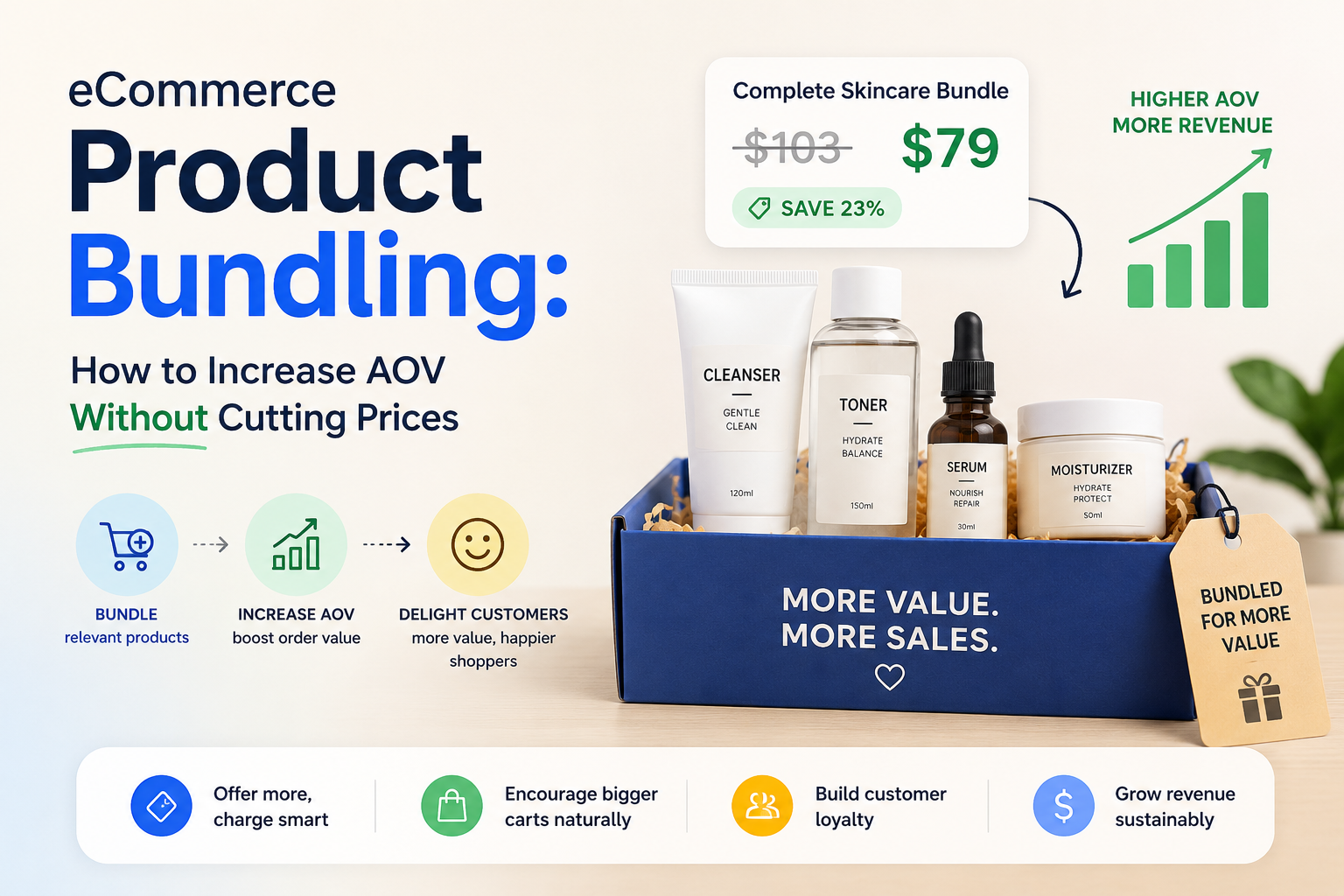
There’s a better lever, and it doesn’t touch your price tag. Product bundling lets you increase average order value by changing what a customer buys, not what they pay per item. Done right, it protects margin, gives you fresh content to rank for, and turns a single-item shopper into a multi-item one at the exact moment they’re already deciding to buy.

This post breaks down why bundling beats blanket discounting, the main bundle types that actually work on Shopify, how to pick the right one for your catalog, and what to look for in a bundling app if you’re evaluating one.

The problem with discounting your way to a bigger cart

A sitewide discount code is the easiest lever to pull and the most expensive one to keep pulling. Every order gets cheaper, not just the ones that needed a nudge. Full-price customers who would have bought anyway now buy at a markdown too.

Discount codes also condition behavior. Shoppers learn that if they wait, a code will show up in their inbox or on a coupon site. Email opens spike, then organic conversion outside the promo window quietly declines. The store ends up running near-permanent sales just to hit the same revenue it used to hit at full price.

There’s an SEO cost too. A 20% off code isn’t a page Google can index or rank. It disappears from search the moment the promotion ends. A bundle offer, on the other hand, can live on a permanent product or landing page, get indexed, and keep earning organic traffic long after the campaign that inspired it is over.

What margin erosion actually costs over a year

Take a Shopify store doing $50,000 a month with a 40% margin. Run a 20% sitewide discount for even one week a month, and margin on that week’s revenue drops to roughly 20%. Over a year, that’s not a one-time hit. It’s a structural discount baked into twelve months of P&L, and it compounds as customers start waiting for the next code before they’ll buy at all.

Bundling avoids this because the discount only applies when the customer does something that increases order value: buying more units, adding a second product, or hitting a spending threshold. The merchant isn’t giving away margin. They’re trading a small, targeted discount for a larger order.

Bundling is a cross-sell mechanism, not an upsell

This distinction matters more than most merchants realize. An upsell happens after a decision is made, usually as a popup or a post-purchase offer nudging the customer toward a pricier version of what they already chose. A cross-sell happens before the decision is final, at the point where the customer is still deciding how much to buy.

Product bundling lives in that second category. It shows up on the product page itself, while the customer is comparing quantities and options, not after they’ve already committed. That timing is why it converts better than most post-purchase upsell tactics. The customer hasn’t mentally closed the transaction yet.

The main bundle types, and which products they fit

Not every bundle type works for every store. Matching the offer to the product category is what separates a bundle that converts from one that gets ignored.

Quantity breaks (Buy More Save More) 

Tiered discounts that increase with quantity: buy 2, save 10%, buy 3, save 15%. This works best for consumables and anything bought in multiples: supplements, skincare, candles, socks, coffee. The customer already plans to repurchase, so the widget just accelerates a decision they were going to make anyway.

BOGO offers 

Buy X, get Y free or at a discount, either same product or cross-product. Strong for apparel and accessories, where pairing or gifting is a natural instinct. A BOGO on a second color or a complementary item feels like a bonus rather than a hard sell.

Free gift thresholds 

The customer unlocks a free product once they hit a spending or quantity level. This fits beauty and wellness brands especially well, where a “treat yourself” moment or a loyalty gesture drives repeat purchases more than a straight discount would.

Subscribe and save 

A recurring-purchase option shown alongside the one-time price, usually at a discount for committing to a delivery schedule. Built for anything with a repeat purchase cycle: supplements, skincare, pet products, anything a customer runs out of and reorders.

Mix-and-match bundles 

The customer builds their own bundle from a set of complementary products, with a combined discount applied. Best for stores with natural product pairings: starter kits, gift sets, or complete routines built from several SKUs.

How to build a bundling strategy, step by step

Start with your best-selling SKU, not your whole catalog. Pick one product where a second unit, a natural pair, or a subscription cycle makes obvious sense to the customer, and test one bundle type there before rolling it out sitewide.

Match the offer type to the buying pattern. Consumables want quantity breaks or subscriptions. Apparel wants BOGO. Anything with a gifting or loyalty angle wants free-gift thresholds. Guessing wrong here is the most common reason a bundle underperforms: the mechanic doesn’t match how the customer actually shops that category.

Place it where the decision happens. A bundle widget buried below the fold or hidden in the cart drawer gets ignored. It needs to sit on the product page, near the add-to-cart button, where the customer is actively choosing quantity.

Check for discount stacking conflicts before launch. If your store already runs automatic discounts or a loyalty program, make sure the bundle discount either stacks intentionally or is set to override, not silently double up and erode margin further.

What to look for in a Shopify product bundle app

eCommerce Product Bundling: How to Increase AOV Without Cutting Prices

If you’re evaluating a Shopify product bundle app rather than building this yourself, a few things separate a good one from a maintenance headache. 

No-code theme integration matters most 

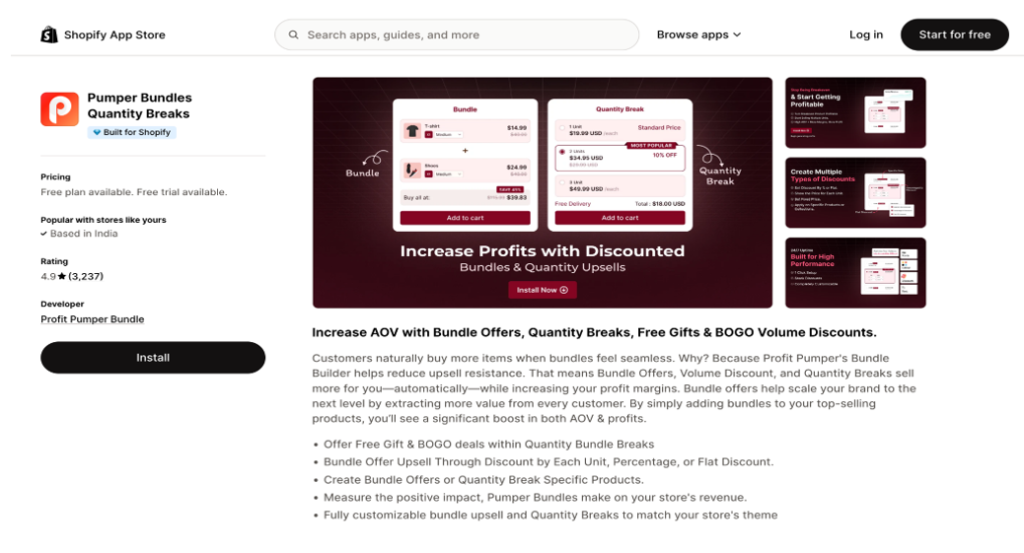
Some bundling apps require theme file edits, which means every update risks breaking your storefront and every change needs a developer. Look for apps built on Shopify’s native Theme App Extensions, which inject widgets into your theme without touching the underlying code. Pumper Bundles, for example, runs entirely through Theme App Extensions. Merchants turn on app blocks in the Shopify theme editor and the widgets appear on product pages automatically, with no developer and no risk of a broken theme file. And they have 4.9 stars on Shopify app store with more than 3200 reviews. 

One dashboard, not five separate apps 

Running quantity breaks through one app and BOGO through another means five different billing cycles, five different support queues, and five different places something can break. Pumper Bundles covers all five offer types (quantity breaks, BOGO, free gift thresholds, subscribe and save, and mix-and-match bundles) from a single dashboard, so a merchant testing multiple offer types isn’t managing multiple app subscriptions to do it.

Analytics that tie back to revenue, not just clicks 

A bundle app is only useful if you can see whether it’s actually paying for itself. Pumper Bundle’s analytics dashboard tracks impressions, add-to-cart rate, orders, extra revenue, conversion rate, and cart-to-order rate per offer, so a merchant can see exactly which bundle type is earning its keep and which one to turn off.

Pricing that scales with results, not with features 

Most bundling apps cap plans by number of offers or lock features behind higher tiers. Pumper Bundle’s plans are capped by extra revenue generated instead, from a free plan up to an uncapped top tier. A merchant pays more only once the app is generating more revenue for them, which is a fairer model than paying for headroom you haven’t grown into yet.

Every paid plan comes with a 14-day free trial, a money-back guarantee, and can be cancelled anytime, so testing whether bundling actually moves the needle for a specific store carries no real risk.

Where to start

Sitewide discounts feel easier, but they cost more the longer you run them. Bundling asks the customer to buy more, not pay less, which is a trade most shoppers are happy to make when the offer matches how they already shop.

Pick your best-selling product, choose the bundle type that fits how customers already buy it, and test it for two weeks before deciding whether to expand it. That’s a smaller bet than a sitewide sale, and it’s one that keeps paying off after the campaign ends.

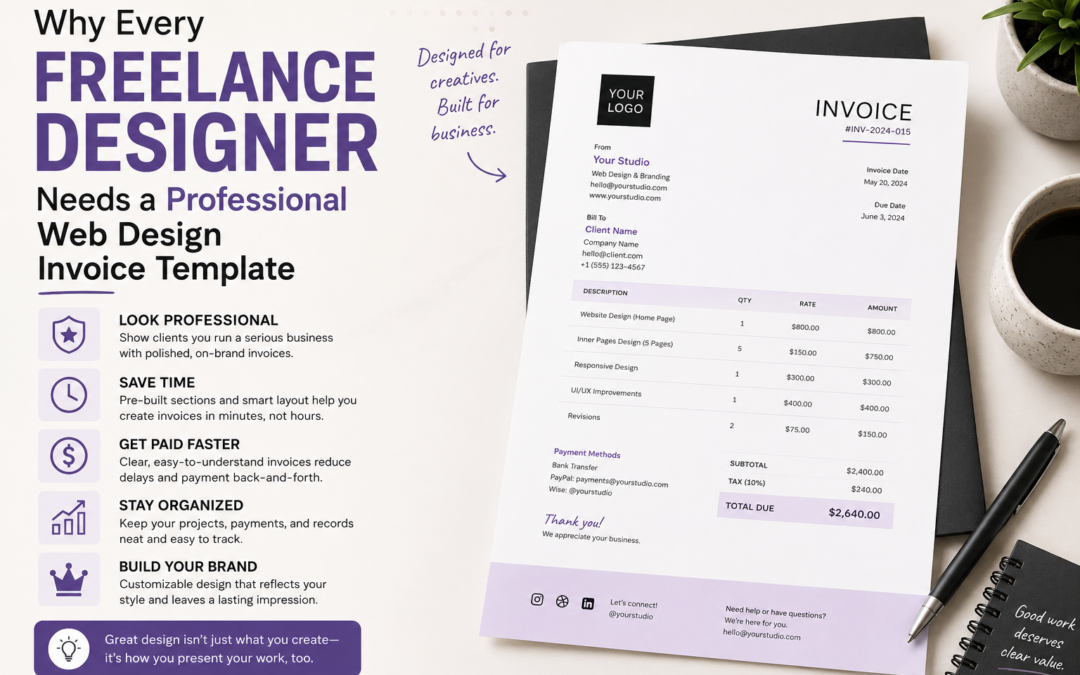
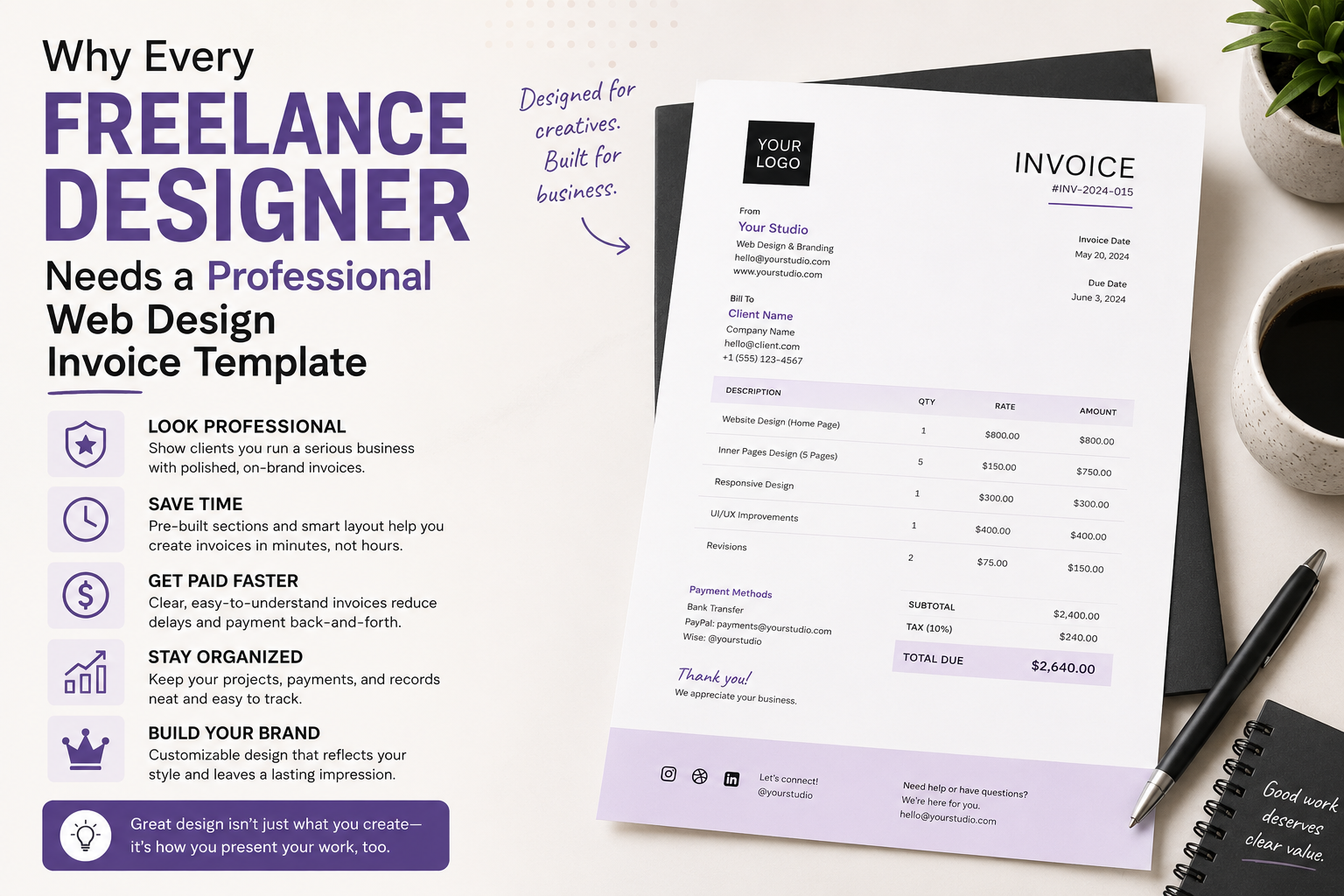
Why Every Freelance Designer Needs a Professional Web Design Invoice Template

Why Every Freelance Designer Needs a Professional Web Design Invoice Template

Professional Web Design Invoice Template

Introduction

Web design is one of the most in-demand creative services in today’s digital economy. Businesses of all sizes need professional websites to establish their online presence, attract customers, and promote their products and services. As a result, freelance web designers and design agencies continue to enjoy growing opportunities across multiple industries.

However, delivering outstanding websites is only part of running a successful web design business. Managing invoices efficiently is equally important for maintaining healthy cash flow, building trust with clients, and keeping accurate financial records. A professional web design invoice template simplifies the billing process while presenting your business in a polished and organized manner.

Whether you create landing pages, e-commerce stores, portfolio websites, or custom web applications, using a structured invoice template helps ensure every project is documented correctly and every payment request appears professional. This guide explores the benefits of web design invoice templates, essential invoice components, invoicing best practices, and tips for improving your overall billing process.

What Is a Web Design Invoice Template?

A web design invoice template is a pre-formatted document used to bill clients for web design services. Instead of creating invoices from scratch for every project, designers simply update the template with client information, project details, pricing, and payment terms.

Typical services included on a web design invoice include:

  • Website design
  • UI/UX design
  • Responsive design
  • Landing page creation
  • Website redesign
  • WordPress development
  • Website maintenance
  • Graphic design services

Using a standardized template saves time while maintaining consistency across every client invoice.

Why Professional Invoices Matter

An invoice is more than a payment request. It also serves as an official business document that records completed work and outlines payment expectations.

Professional invoices help:

  • Improve client confidence
  • Reduce payment confusion
  • Support accurate bookkeeping
  • Strengthen your business image
  • Create clear payment records
  • Simplify tax preparation

Clients are more likely to pay promptly when invoices are organized and easy to understand.

Essential Elements of a Web Design Invoice

Every professional invoice should include key information that allows clients to process payments without unnecessary delays.

Business Information

Include your:

  • Business name
  • Logo
  • Address
  • Email
  • Phone number
  • Website

Professional branding creates a positive first impression.

Client Details

Clearly identify the client by including:

  • Client name
  • Company name
  • Billing address
  • Contact information

Accurate details help prevent invoicing errors.

Invoice Number

Assign a unique invoice number to every invoice.

A consistent numbering system makes financial records easier to organize and track.

Project Description

Provide a detailed breakdown of completed work.

Examples include:

  • Homepage design
  • Mobile optimization
  • UI improvements
  • Custom graphics
  • Website maintenance
  • SEO-friendly layouts

Detailed descriptions minimize misunderstandings.

Pricing Information

Clearly list:

  • Hourly rate or project fee
  • Quantity of work
  • Additional charges
  • Discounts (if applicable)
  • Taxes (if required)
  • Total amount due

Transparent pricing helps maintain strong client relationships.

Payment Terms

Always specify:

  • Payment due date
  • Accepted payment methods
  • Late payment policy
  • Currency
  • Payment instructions

Clear expectations encourage faster payments.

Benefits of Using a Web Design Invoice Template

Saves Time

Creating invoices manually for every project can consume valuable working hours.

Templates allow designers to generate professional invoices quickly by updating only project-specific information.

Maintains Consistency

Using the same invoice format for every client creates a consistent and recognizable business identity.

Consistency also improves recordkeeping.

Reduces Errors

Templates reduce the chances of forgetting important billing details such as invoice numbers, due dates, or payment instructions.

Supports Business Growth

As client numbers increase, organized invoicing becomes increasingly important.

Templates make managing multiple projects much easier.

Best Practices for Web Design Invoicing

Successful freelancers follow several invoicing best practices.

Send Invoices Promptly

Issue invoices immediately after completing milestones or project delivery.

Timely invoicing improves cash flow.

Keep Accurate Records

Store copies of every invoice for accounting, budgeting, and tax purposes.

Digital recordkeeping simplifies future financial management.

Use Clear Language

Avoid vague descriptions.

Explain services in simple, professional language that clients easily understand.

Review Before Sending

Always verify:

  • Client information
  • Dates
  • Invoice number
  • Pricing
  • Payment details

Accuracy reduces delays and questions.

Freelancers, agencies, and creative professionals looking for professionally designed billing documents can explore additional invoice resources through Zintego.com to simplify invoicing, improve organization, and create polished invoices for web design projects.

Common Invoicing Mistakes to Avoid

Many freelancers experience delayed payments because of avoidable mistakes.

Missing Payment Terms

Clients should immediately know when payment is due and which payment methods are accepted.

Incomplete Project Descriptions

Clearly outline the services delivered to eliminate confusion.

Incorrect Client Information

Double-check names, email addresses, and billing details before sending invoices.

Forgetting Contact Information

Include your business contact information so clients can easily reach you with billing questions.

Digital Invoicing Advantages

Modern invoicing offers several benefits over traditional paper invoices.

Digital invoices are:

  • Easy to email
  • Faster to deliver
  • Simple to archive
  • Environmentally friendly
  • Easy to update
  • Convenient for remote businesses

Digital billing also supports faster communication between freelancers and clients.

Frequently Asked Questions (FAQs)

What is a web design invoice template?

A web design invoice template is a reusable document that helps designers bill clients professionally for website-related services.

Who should use a web design invoice template?

Freelance web designers, agencies, developers, UI/UX designers, and digital professionals can all benefit from using structured invoice templates.

What information should every invoice include?

Invoices should include business details, client information, invoice number, project description, pricing, payment terms, and total amount due.

Why are professional invoices important?

Professional invoices improve organization, strengthen client trust, reduce payment delays, and support accurate financial recordkeeping.

Can invoice templates be customized?

Yes. Most templates allow businesses to add logos, branding, colors, payment terms, and service descriptions to match their specific requirements.

Are digital invoices better than paper invoices?

Digital invoices offer faster delivery, easier storage, improved organization, and greater convenience for both businesses and clients.

Conclusion

Professional invoicing is an essential part of running a successful web design business. A well-designed web design invoice template not only helps freelancers request payment efficiently but also reinforces professionalism, improves financial organization, and builds stronger client relationships.

By using standardized invoice templates, providing detailed project descriptions, maintaining accurate records, and following consistent billing practices, web designers can spend less time on administrative tasks and more time delivering outstanding creative work. As businesses continue to embrace digital services, professional invoicing remains a valuable tool for ensuring smooth financial operations and long-term business success.

Why Fast-Growing Businesses Need White Label Services

Why Fast-Growing Businesses Need White Label Services

Fast-Growing Businesses

Growth is an exciting time for any company, but it also comes with its own set of unique challenges. Companies are often pressured to provide more services, respond to customers more quickly, maintain quality, and keep costs down as demand increases. 

For fast-growing businesses, the most obvious solution may be to hire more people and build every new capability in-house. But this approach can be costly, time-consuming, and difficult to scale. Finding skilled employees takes time. Training costs money. Growing your internal teams can create more management responsibilities. 

Another choice is white label services. White labelling enables a business to sell products or services that have been created by a specialist third-party provider, but are sold under their own brand. This can help companies grow more quickly than they would if they had to develop every capability themselves. 

White label partnerships can offer more flexibility and reduce operational strain, allowing companies to explore opportunities they might not otherwise be able to touch, spanning from digital marketing and software to design and technology solutions. 

What is a White Label Service? 

One company provides a white label service, but sells or delivers it under another company’s brand. From the customer’s perspective, the service appears to come directly from the business they know and trust. 

The white label service is bought by a company that usually manages the client relationship and branding, with the underlying provider managing some or all of the delivery. 

For example, a marketing agency might offer SEO, content creation, reporting, web design, and paid advertising. Instead of hiring an in-house specialist for each discipline, the agency can partner with white label companies that offer some of their services in the background. 

This model is also used in software, telecommunications, financial services, retail, and consulting industries. The principle is simple: businesses can access specialist capabilities without having to build and maintain the whole infrastructure themselves. 

And the arrangement can also be more convenient for the customers. Instead of having to deal with multiple providers, they can get more services from one business they already know. This can facilitate communication and help to strengthen the relationship between the company and its clients. 

Scaling Without Reinventing The Wheel 

One of the biggest challenges for a fast-growing business is figuring out what to spend resources on. 

When a company sees a new opportunity, the natural thing to do may be to build an in-house service. Setting up a new department could mean hiring employees, buying technology, creating processes, and implementing quality control procedures.

 A white label partnership can greatly shorten the time between identifying a need and delivering a solution to the customer. 

A business could potentially begin to provide a service via an existing provider much quicker than it would take months to develop an internal capability. This is especially useful in competitive markets where timing matters. 

Businesses can respond to customer demand, test new services and grow their offering without large upfront commitments. 

White label services can also add to existing teams. This allows companies to focus on the areas that make their brand unique, while outsourcing activities that require specialist knowledge or are resource-intensive to trusted partners. 

This can be particularly helpful in times of rapid change. A growing company may be unsure about what new services will become permanent parts of its offering. White labelling allows a business to experiment without necessarily having to build out a large internal structure too early. 

Deliver More Without Overloading Your Teams 

Growth usually presents opportunities too good to pass up. 

Existing customers will request additional services. New prospects may be looking for a bigger package. Competitors may increase their offers; we have to increase ours.

 The downside is that an internal team can be overstretched quickly by saying yes to every opportunity. Employees who are already occupied with core responsibilities can suddenly be expected to take on unfamiliar work. Deadlines can get tighter, and quality can suffer. 

White label services can help a business increase its capacity without adding to the burden on existing staff. 

For example, an agency may be very strong on strategy and client management, but they may not have the resources to handle a fast-growing volume of technical SEO work. Rather than turning away clients or overburdening employees, it could use a platform like ranktracking.io as part of a broader white-label strategy to boost its capabilities while maintaining a consistent branded experience. 

In many industries, this is true. External specialists can add capacity, enabling the internal team to focus on the activities where its knowledge and relationships generate the most value. 

Making Costs More Predictable 

Hiring costs money. 

The cost of an employee goes way beyond salary.  Businesses should also consider recruitment fees, benefits, equipment, software, training and management time. 

For companies that are growing quickly, hiring too quickly can be a financial risk. Today’s demand may be strong, but market conditions can change. 

White label services often have a more flexible cost structure. 

Depending on the provider, businesses may be able to pay on usage, projects, clients, or subscription levels. This can help to better match costs to actual demand. 

Rather, a company may be able to add or subtract the use of outside services as needed, instead of having a large permanent team around during busy and quiet times. 

This flexibility can be particularly valuable for companies with seasonal demand or unpredictable growth patterns. 

Also, financial planning can be easier with more predictable spending. If companies know how much a service costs relative to usage or client numbers, it may be easier to work out margins and determine if a new offering is commercially viable. 

Identifying Hard to Fill Skills 

Some skills are particularly hard to hire for. Technical specialists may be in demand and experienced professionals may be well paid. Smaller companies may find it hard to recruit candidates who are also being approached by bigger organisations. 

White label partnerships provide businesses with expertise they would otherwise have to take a significant amount of time and money to build in-house. 

A provider that specialises in one area may already have specialists, advanced technology and established processes to efficiently provide the service. 

A company may utilise an existing team rather than hiring several staff to develop a new capability. 

This can be particularly useful if the expertise required is very niche or if demand does not yet warrant a permanent internal role. 

It also allows companies to try out new services before committing to how much to invest in them. 

Faster Time to Market for New Services 

Businesses are increasingly expected to react quickly to changing needs from customers. If a company takes too long to develop a new service, competitors may have already captured a large part of the market demand. 

White-label services can cut down on the time to market for new offerings. 

The underlying service is already built so businesses can focus on positioning, branding, sales and customer communication without having to build from the ground up. The provider has the systems and expertise already in place. 

It also offers opportunities for rapid experimentation. 

A company can launch a new service, test customer interest and receive feedback before making large investments. 

If the service is successful, the business can scale it further. If demand is limited, it can change its strategy without having sunk a lot of money into permanent infrastructure. 

This speed of movement can be especially important for businesses in industries where customer expectations and technology change rapidly. 

Helping Companies Focus on Their Strengths 

A successful business always has places where it really delivers exceptional value. 

For some companies, it may be product innovation. For others, it might be customer service, strategic consulting, creative thinking, or industry knowledge. 

Growth creates problems when teams have to spend more and more time on activities that are necessary but not core activities that give the company a competitive advantage. 

White label services can help to re-prioritize these. 

By outsourcing some of the functions to specialist partners, internal teams can devote more time to activities that drive growth directly. 

A marketing agency, for instance, may choose to focus on its best strength: knowing clients, creating strategies and building long-term relationships. The white label partners can assist with the delivery while the agency focuses on the areas where its own team provides the most differentiation. 

Great growth is not simply a matter of doing more. This is about knowing what the business should do for itself and what can be done more efficiently somewhere else. 

Supporting Agencies That Want To Grow 

White label models are particularly popular with agencies, as clients tend to want to work with fewer suppliers. 

A business may hire an agency for one thing but then later ask for help with related areas like SEO, content marketing, analytics, email campaigns, affiliate or paid advertising. 

Should the agency be unable to provide these services, the client may seek other suppliers. 

White label partnerships allow agencies to expand their services without having to develop a large internal department for each discipline. 

It can help build deeper client relationships and create cross-selling opportunities. 

Clients are more likely to be receptive to other solutions from a provider if they are already buying one service from that provider. By combining internal capabilities with white label services, agencies can provide more complete packages while maintaining a consistent client relationship. 

It can also allow agencies to position themselves as more versatile partners. Rather than being regarded as a provider of one narrow service, they may be able to support clients across a wider range of needs. 

Dealing with Sudden Demand Spikes 

Growth isn’t necessarily slow. 

You can have a company win several big contracts in a few weeks. A successful campaign can bring in hundreds of new customers overnight. Demand may be seasonal, and workload can increase temporarily. 

Without enough resources, teams may not be able to meet deadlines and service levels. 

White label services can be a flexible extension to your team. 

Companies can scale capacity up for higher workloads and scale it down when demand falls off. 

This allows you to embrace new opportunities without making any hasty hiring decisions. It can also help prevent excessive workloads for existing staff.

That’s important because if employees are always overworked, rapid growth can quickly become toxic. White label support can be a useful time to consider how a company wants to structure its team for the long haul.

 Tips for Choosing a White Label Partner 

The benefits of white labelling largely depend on the right provider. 

Essentially, businesses are depending on another company to improve the experience of its customers. Poor quality work can harm the reputation of the client-facing brand. 

So you should make quality your priority. 

Companies should look at a potential partner’s expertise, experience, technology, communication, reliability and scalability. 

Transparency is critical too. A good provider should be able to explain clearly how its services work, what businesses can expect, and how performance is measured. 

Scalability should also be considered. A provider that works well on five projects may struggle when asked to manage fifty. 

If a company is growing fast, it should look for partners who can grow with it. 

It’s also important to think about responsiveness. When problems occur, companies want to know that their vendor will communicate well and respond quickly. Even if a partner has a technical strength, if communication is not good, it can be difficult to manage the relationship. 

Building a More Scalable Business Model 

Ultimately, one of the biggest benefits of white label services is the ability to scale. 

In the traditional growth model, companies are forced to increase costs before they can increase revenue. 

New employees have to be hired before they are fully productive. You have to buy the systems before you can use them at capacity. You need to create new departments before there is any certainty of demand. 

White label services can change this equation. 

They can tap into more capacity and skills as needed, and that means they can meet demand without having to pay the full cost of building everything in-house. 

This can lead to a more nimble organization. 

Rather than being constrained by their own headcount, companies can create networks of specialist partners to support different areas of their operation.

 The internal team continues to focus on strategy, customer relationships, innovation, and the capabilities that are unique to the business, whilst external experts bring additional skills and capacity for production where needed.

 For a growing business, that balance can be extremely valuable. It allows them to stay ambitious without unnecessary complexity.

 Closing Thoughts 

Fast growth means huge opportunities but also tough choices around resources. 

Trying to build all capabilities in-house can slow growth, increase costs, and put undue pressure on staff. Another choice is white label services. 

They enable businesses to provide a wider range of services and access specialist expertise, to respond to changes in demand and to retain greater financial flexibility.

 White labelling can be a way for companies such as agencies and other service-based businesses to provide clients with a more comprehensive set of services without having to hire a lot of permanent staff.

 The key is selecting the right partners. Businesses need vendors who offer consistent quality, straightforward communication, and the ability to grow with them.

When done right, white label services can play a critical role in a scalable business strategy, allowing companies to pursue growth while remaining true to the strengths that made them successful in the first place.

Modernising Enterprise Incident Response for a Dispersed Mobile Workforce

Modernising Enterprise Incident Response for a Dispersed Mobile Workforce

Dispersed Mobile Workforce

The shift to remote and flexible work has permanently transformed the corporate landscape in Australia. Employees now routinely access sensitive corporate networks from home offices, public transit, and interstate locations. The transition has undeniably brought agility to the forefront of business operations, but it has also rewritten the rules of network architecture. IT departments are now tasked with safeguarding data that routinely flows outside the safety of physical office buildings. While this mobility drives productivity, managing a massive, distributed fleet of mobile devices creates inherent and complex security challenges for IT leaders. The traditional corporate security perimeter has dissolved, replaced by thousands of individual endpoints that require continuous monitoring. 

A widely dispersed workforce naturally expands an organisation’s attack surface. Every smartphone, tablet, and laptop connected to a public or unsecured network serves as a potential gateway for malicious actors. Adopting strong access control and privileged account management is the critical first line of defence. These measures help secure vulnerable endpoints and prevent unauthorised users from exploiting shared passwords or poorly managed devices, ensuring that only authenticated personnel can access critical systems. 

However, preventative measures alone cannot guarantee absolute security against highly sophisticated threats. When a threat actor inevitably breaches a mobile endpoint, corporate and legal teams must act rapidly to contain the threat and meet strict regulatory deadlines. This is where investing in automated Data Breach Notifications Software becomes an essential technological priority. Such platforms help enterprises pinpoint exactly what compromised data has been exposed, streamlining the complex process of identifying and alerting affected parties before further damage occurs. 

The Growing Reality of Mobile Threats in Australia 

Threat actors are increasingly targeting mobile endpoints because they often lack the robust security protocols found on centralised corporate servers. Hackers exploit unpatched software, unsecured public networks, and sophisticated phishing campaigns that trick employees into handing over their credentials. The official Notifiable Data Breaches Report for July to December 2024 published by the Office of the Australian Information Commissioner illustrates this severity. The report revealed that 595 breaches were documented in that brief period alone, with 69 percent resulting directly from malicious or criminal attacks. 

The financial and operational consequences of these attacks are escalating rapidly across all sectors. Recent data highlights that the average global cost of a data breach has reached record highs, putting immense pressure on corporate budgets. Locally, the Australian Cyber Security Centre noted a significant year-over-year increase in calls to their hotline, responding to over 1,200 major incidents nationwide. The stakes are particularly high under the stringent new three-tiered civil penalty regime introduced by the Privacy and Other Legislation Amendment Act 2024. Administrative failures or delays in reporting eligible privacy breaches can now trigger immediate, non-litigated financial sanctions reaching into the millions, making rapid response capabilities non-negotiable for board members. 

Overcoming the Speed of Modern Cyber Attacks 

Modernising your incident response strategy is not just about fulfilling compliance obligations, but it is fundamentally about keeping pace with the incredible speed of modern cyber attacks. Cybercriminals employ automated scripts and machine learning tools of their own to scan for vulnerabilities, meaning defensive measures must match or exceed this technological sophistication. Recent global threat intelligence from 2026 indicates that the average breakout time, which is the critical window between an attacker compromising a primary host and pivoting to secondary corporate systems, has shrunk dramatically to just 29 minutes. 

This rapid lateral movement means manual intervention is simply no longer sufficient for enterprise-grade protection. When an attacker compromises an employee’s mobile device, they can bypass rudimentary network defences in minutes. Enterprises that heavily integrate security AI and automated incident response workflows are proven to save millions of dollars per data breach compared to those relying on legacy, manual investigation processes. Swift detection and automated quarantine procedures are vital to halting the spread of ransomware or data exfiltration scripts across a network. 

Key Steps to Secure a Mobile Workforce 

To protect a widely distributed network, IT leaders must transition from reactive protocols to proactive, automated security environments. Building a resilient mobile infrastructure requires several foundational shifts in strategy and technology deployment. 

  • Prioritise Endpoint Visibility: Organisations must monitor every mobile device connected to their network in real time. Continuous endpoint visibility allows security teams to detect behavioural anomalies (like unusual login locations or massive data downloads) before attackers can pivot to sensitive corporate databases.
  • Automate Threat Containment: With breakout times shrinking rapidly, automated systems must be configured to instantly isolate compromised mobile devices. Cutting off network access automatically prevents a localised endpoint infection from becoming a full-scale corporate network disaster.
  • Modernise Regulatory Reporting Workflows: The latest legislative shifts heavily emphasise the need for rapid administrative action. Integrating automated investigative analytics ensures your compliance and legal teams can quickly identify affected data, compile accurate impact reports, and meet strict regulatory notification deadlines seamlessly. 

As the modern workforce remains highly mobile and geographically dispersed, Australian businesses must acknowledge that mobile endpoints are the new frontline of cyber defence. By prioritising automated response mechanisms, enforcing strict access controls, and deploying modern compliance technologies, organisations can protect their highly sensitive corporate data and navigate the complexities of evolving cyber threats with absolute confidence.

WPZap Bundle Review: Is This the Death of Zapier Subscriptions?

WPZap Bundle Review: Is This the Death of Zapier Subscriptions?

Stop renting your business automation. For years, the “SaaS Tax” has been quietly bleeding WordPress site owners dry. You know the drill: you hit a successful month, your traffic spikes, and suddenly Zapier or Make hits you with a “task limit reached” notification and a massive bill. It feels like you’re being punished for growing. But what if the engine running your entire business didn’t cost a dime after today? Most “gurus” will tell you that reliable automation requires a monthly subscription to a third-party server. They’re wrong. The WPZap Bundle has arrived to challenge the status quo by moving the entire automation brain directly into your WordPress dashboard with a one-time price tag. Is it a legitimate “Zapier killer,” or just another overhyped plugin? In this deep-dive WPZap Bundle Review, we’re pulling back the curtain on the tech, the speed, and the actual ROI.

Quick Verdict: The Bottom Line

Rating: 4.8/5 ⭐ Who it’s for:
WordPress agency owners, WooCommerce power users, and digital marketers who are tired of monthly “per-task” fees and want 100% data ownership. The Verdict: If you run more than 500 tasks a month, the WPZap Bundle pays for itself in less than eight weeks. It is the most robust native WordPress automation tool we’ve tested in 2026, offering features like conditional logic and whitelabeling that usually cost thousands annually.

Secure the WPZap Bundle at the lowest one-time price here
before the launch ends.
START HERE

What is the WPZap Bundle?

The WPZap Bundle is a comprehensive automation ecosystem designed specifically for the WordPress environment. Unlike traditional middleware that acts as a “bridge” between two apps on an external server, WPZap lives inside your site. It is a “trigger-and-action” engine that monitors everything happening on your website—from a new comment or a form submission to a complex WooCommerce refund—and executes a sequence of events based on those triggers.

The “Bundle” version is the “God Mode” of this software. While the standard version handles basic tasks, the Bundle unlocks Unlimited everything: unlimited workflows, unlimited task executions, and the ability to rebrand the entire tool as your own. In an era where data privacy is a top priority, WPZap ensures your customer data never leaves your server to be processed by a third party. It’s not just a plugin; it’s a full-scale business asset that includes agency rights, reseller licenses, and a massive vault of premium themes and plugins to help you scale.

STOP paying monthly for your automations and grab the WPZap Bundle today. GRAB IT HERE

How WPZap Works: From Installation to Automation in 60 Seconds

The beauty of WPZap lies in its “No-Code” architecture. You don’t need to be a developer or understand API documentation to make it work. The workflow follows a simple three-step logic:

  1. Select Your Trigger: You choose what initiates the automation. This could be a “New User Registration,” a “Form Submitted” via Contact Form 7 or Elementor, or a “New Order” in WooCommerce.
  2. Define Your Action: You tell WPZap what to do next. Do you want to send that lead to a Google Sheet? Add the customer to a specific tag in Mailchimp? Send a notification to your Slack channel? Or perhaps trigger a Webhook to an external AI tool?
  3. Deploy and Monitor: Once you hit save, the automation is live. Because it’s native, it triggers the millisecond the event occurs. There is no “polling interval” (the 5-15 minute delay common in free Zapier tiers).

The interface uses a visual drag-and-drop builder, allowing you to see the “path” your data takes. If you want to get fancy, you can add Conditional Logic. For example: “If the customer spends more than $200, send them a VIP bonus email; if they spend less, send the standard thank you.”

Ready to see it in action? GET instant access to the WPZap Bundle here. INSTANT ACCESS

My Test Results: Speed, Reliability, and Server Load

As an SEO strategist, I’m obsessed with site speed. My biggest fear with “native” plugins is that they might bloat the database or slow down the admin dashboard. I put WPZap through a rigorous 48-hour stress test on a mid-range VPS.

  • Execution Speed: Native execution is noticeably faster than external bridges. When I tested a “Form-to-Lead” automation, the lead appeared in the CRM almost instantly. Zapier’s “instant” webhooks usually have a 1-2 second lag; WPZap felt instantaneous.

  • Server Impact: I monitored the CPU usage during 100 simultaneous task executions. The spike was negligible (less than 2%). Because WPZap only “wakes up” when a trigger is fired, it doesn’t sit in the background draining resources.

  • The “Fail-Safe” Test: I intentionally broke a webhook connection to see how the system handled it. The Automatic Retry feature kicked in perfectly, logging the error and attempting the task again once the connection was restored. This is a “pro” feature that saved me from losing lead data.

The most impressive part of the test was the Execution Logs. Having a transparent view of every piece of data moving through my site gave me a level of control I simply don’t have with cloud-based tools.

Top Features of the WPZap Bundle

The WPZap Bundle isn’t just a single tool; it’s a stack of high-value features that address every pain point of a growing digital business.

  • 100+ Native Integrations: It connects with all the heavy hitters—WooCommerce, Elementor, Learndash, MemberPress, Pabbly, Mailchimp, and even Google Drive.

  • Unlimited Everything: With the Bundle, you bypass all caps. No matter how many thousands of tasks you run per month, your price remains zero after the initial investment.

  • Advanced Webhooks: This is the “secret sauce.” If an app isn’t natively listed, you can use incoming and outgoing webhooks to connect to virtually any software on the planet (including 2026’s latest AI agents).

  • Whitelabel License: This is massive for agencies. You can strip the WPZap branding, put your own logo on it, and sell it to your clients as your proprietary “Automation Suite.”

  • Commercial & Agency Rights: Manage your clients’ automations from a central portal. This allows you to charge monthly retainers for “Automation as a Service” while you only paid for the tool once.

  • Bonus Growth Stack: The bundle includes 500+ premium themes and 100+ plugins. For a new site owner, this provides thousands of dollars in value right out of the gate.

Unlock the full Whitelabel and Agency features by grabbing the Bundle now. UNLOCK IT

Pros and Cons: An Honest Look

No product is perfect, and to be the “best answer on the internet,” we have to look at the trade-offs.

The Pros:

  • Cost Efficiency: You save thousands of dollars in recurring annual fees.

  • Data Privacy: Your customer data stays on your server, ensuring GDPR and CCPA compliance is easier to manage.

  • Speed: Instant triggers without the delay of cloud-based polling.

  • Ease of Use: If you can navigate the WordPress “Settings” page, you can use WPZap.

  • Reliability: The automatic retry and deep logging mean you rarely “lose” a task.

The Cons:

  • WordPress Centric: It only works if your “hub” is WordPress. If you are 100% on Shopify or Wix, this isn’t for you.

  • Server Responsibility: Since it runs on your server, if your hosting goes down, your automations go down. (Pro tip: Use quality hosting!).

  • Learning Curve for Logic: While basic tasks are easy, setting up complex multi-step conditional logic requires a bit of “if-this-then-that” thinking.

Pricing and OTOs (The Value Breakdown)

During the launch period, the WPZap Bundle is offered at a heavily discounted one-time price. Traditionally, buying these components separately would cost you:

  • Front End (Gold): $27

  • Unlimited Upgrade: $47

  • DFY Pack: $67

  • Agency License: $67

  • Whitelabel License: $197

  • Total Value: $400+

The Bundle brings this all down to a single payment of $247 (and you can often find a coupon like BUNDLE40 to drop it even lower). Considering that a mid-tier Zapier plan costs $600+ every single year, the ROI here is undeniable. You are essentially “buying out” your future subscription costs.

Check the current price and use a coupon for the WPZap Bundle here. BUNDLE HERE

FAQs

1. Will WPZap slow down my website?

No. WPZap is built on a “lightweight” architecture. It only executes code when a specific trigger is pulled. It does not run constant background processes that drain your RAM or CPU. In our tests, the impact on page load speed was 0.0s.

2. How is this different from Uncanny Automator?

While both are great, WPZap’s Bundle offers a more aggressive “One-Time” pricing model for high-end features like Whitelabeling and Agency rights, which are often expensive renewals in other plugins. WPZap is also built for 2026’s AI-heavy workflows, making webhook integration more seamless.

3. Do I need technical skills to set it up?

None. If you can click a mouse and fill in a text box, you can build an automation. The visual builder guides you through the process, and the “Done-For-You” (DFY) pack included in the bundle gives you templates you can deploy with one click.

4. Can I really replace Zapier with this?

For anything that involves your WordPress site (Forms, WooCommerce, Users, LMS), yes 100%. If you need to connect two non-WordPress apps (like linking Trello to Slack with no website involved), you would still use a cloud tool. But for 90% of site owners, WPZap handles every essential business workflow.

5. Is there a money-back guarantee?

Yes, there is a 30-day, no-questions-asked money-back guarantee. You can install it, run your automations, and if it doesn’t save you time or money, you can get a full refund.

6. Does it work with the latest version of WordPress?

Yes, WPZap is fully updated for WordPress 6.x and beyond, ensuring compatibility with the latest block editor and database structures.

Final Verdict: Should You Buy the WPZap Bundle?

In 2026, the successful digital entrepreneur isn’t the one who works the hardest; it’s the one who automates the best. Every minute you spend manually moving data or every dollar you spend on “task limits” is a resource taken away from your growth.

The WPZap Bundle is a rare opportunity to turn an ongoing expense into a permanent asset. Whether you’re an agency looking to add a new high-margin service, a store owner wanting to sync orders effortlessly, or a freelancer looking to look more professional with whitelabeled tools, this bundle delivers. The combination of native speed, data privacy, and the sheer volume of “Unlimited” features makes it the best automation investment you can make this year. Stop being a tenant to SaaS companies. Become a landlord of your own automation engine.

CLAIM YOUR LIFETIME ACCESS: Click here to secure the WPZap Bundle and all bonuses before the timer hits zero! LIFETIME ACCESS
Tags: