...
UK: +44 2038074555 info@atamgo.com
Big Mistakes to Avoid When Creating a Shopify Sales Funnel

Big Mistakes to Avoid When Creating a Shopify Sales Funnel
shopify sales funnel

Creating a sales funnel for your Shopify store can be a game-changer. A good funnel helps turn leads into customers, improves retention, and boosts revenue. However, the process isn’t always as simple as it seems, and there are common mistakes to avoid.

To help, we’ve created a guide on the key pitfalls to watch out for when building your Shopify sales funnel.    

Overlooking the Importance of Good Tools

Here’s the thing—your Shopify sales funnel can only be as good as the tools you use to power it. If you’re relying on outdated systems or manual processes to engage with customers, you’ll struggle to scale effectively.

This is where investing in a sales engagement platform like Yess can make all the difference. These platforms are designed to help you manage customer interactions, streamline communication, and even automate parts of the funnel-building process.

With tools like these, you’re not only saving time but also massively improving the customer experience. Don’t skimp on your tech stack—it can make or break your funnel.

Failing to Understand Your Target Audience

One of the most common mistakes when setting up a Shopify sales funnel is assuming you know what your customers want without confirming it.

Building a funnel without proper research is like throwing darts in the dark—you might hit the target, but most of the time, you won’t. Use analytics tools, surveys, and feedback mechanisms to dig deeper into your audience’s preferences and behaviors.

This research pays off, helping you craft messaging, offers, and strategies that actually resonate with your potential customers. If you skip this step, you’re leaving money on the table.

Neglecting Mobile Optimization

Shopify sales funnels often cater primarily to desktop users, which is a big mistake. Today, a large portion of online shopping happens on mobile devices, and a clunky, unoptimized experience is a surefire way to lose potential customers.

Your funnel should be fully optimized for mobile users, from your landing pages to checkout. Pay close attention to load times, page design, and ease of navigation on smartphones.

Remember, if your customer has to pinch and zoom their way through your site, they’re likely to bounce.

Ignoring the Value of Personalization

Your customers want to feel valued, not like just another number in your database. Ignoring personalization in your Shopify sales funnel is another major pitfall.

Personalization involves tailoring your messages, offers, and recommendations to meet the specific needs of individual customers. This doesn’t have to be overly complicated—a personalized email, a timely product recommendation, or a dynamic landing page can make all the difference.

Use customer data to segment your audience and target them with content that actually feels relevant to their needs.

Skipping Key Sales Engagement Activities

Building a Shopify sales funnel isn’t just about creating pages and hoping for conversions—it’s about actively engaging with your prospects at different stages.

This is where sales engagement activities, like follow-up emails, retargeted ads, or even live chat support, come into play.

These activities help keep your customers interested and nudge them toward making a purchase. Neglecting them often results in lost opportunities and lower conversion rates.

Remember, the more involved you stay in the customer’s decision-making process, the more likely they are to trust your brand and buy from you.


Making it Too Complicated

A common mistake that even experienced sellers make is overcomplicating their sales funnels.

Piling on too many upsells, cross-sells, or multiple pages in the buying process can overwhelm potential customers.

Simplicity is key. Your funnel should guide customers smoothly from point A to point B without unnecessary distractions.

Focus on one main goal for each stage of your funnel and cut out anything that isn’t essential. The easier it is for someone to make a purchase, the more likely they are to follow through.

Failing to Analyze and Adjust

Building a Shopify sales funnel isn’t a one-and-done task—it’s an ongoing process that requires regular tweaking.

One major mistake is failing to analyze your funnel’s performance or ignoring metrics like conversion rates, bounce rates, or cart abandonment rates.

These numbers tell you what’s working and what isn’t, giving you a clear roadmap for improvement. Use split-testing (also known as A/B testing) to try out new elements in your funnel, whether it’s different headlines, layouts, or call-to-action buttons.

Staying in a loop of analyzing and adjusting ensures that your funnel consistently performs at its best.

Forgetting About Post-Purchase Engagement

Many people focus solely on getting that first sale but forget that a sales funnel doesn’t end when a customer completes their purchase.

Post-purchase engagement is crucial for turning one-time buyers into loyal customers. Use thank-you emails, feedback requests, or even exclusive offers to continue the conversation after the sale.

This keeps your brand top of mind and increases the likelihood of repeat purchases. A satisfied customer is your best marketing tool, so don’t ignore this stage of the funnel.

Final Thoughts

A well-crafted Shopify sales funnel can significantly boost your online sales. By avoiding common mistakes and continuously analyzing and adjusting, you can create a smooth, effective process for converting leads into customers.

Remember to always prioritize the user experience, both in terms of design and ease of use. And don’t forget about post-purchase engagement—building relationships with your customers is just as important as making that first sale.

With these tips in mind, you can optimize your Shopify sales funnel for success.

How to Add Services to Shopify: A Step-by-Step Guide

How to Add Services to Shopify: A Step-by-Step Guide

sell services on shopify

Introduction

Shopify is widely recognized as an eCommerce powerhouse, but did you know you can also use it to sell services? Whether you’re a consultant, coach, designer, or service provider, Shopify offers a solid platform to market and manage your offerings. Even if you’re working with a web development company to build your online presence, Shopify’s user-friendly interface and customizable features make it easy to set up and scale your service-based business. In this guide, we’ll walk you through the process of setting up services on Shopify, discuss its benefits and challenges, and explore ways to optimize and market your service-based business.

Why Shopify is a Great Platform for Selling Services

Benefits of Using Shopify for Services

  • User-Friendly Interface – Even with little technical experience, you can create a professional service website effortlessly.
  • Scalability – Shopify grows with your business, allowing you to upgrade as needed.
  • Built-in Marketing & SEO Tools – Helps improve visibility and reach more potential customers.
  • Flexible Payment Options – Supports multiple payment gateways, making it easier to serve a global audience.
  • Third-Party App Support – Enables service customization, appointment booking, and client communication.

Challenges to Consider

  • E-commerce Focused – Some built-in features are optimized for physical goods, requiring workarounds for services.
  • Service Pricing Complexity – Advanced pricing structures may require additional customization.
  • Cost Considerations – Monthly fees and transaction charges should be factored into your business strategy.

Step-by-Step Guide to Adding Services to Shopify

Step 1: Setting Up a Service as a Product

  1. Go to Products in your Shopify admin panel.
  2. Click “Add Product” and enter your service details.
  1. Uncheck “This is a Physical Product” to remove shipping-related fields.
  1. Set pricing and create variations for different service tiers or durations.

Step 2: Customizing Your Service Listings

  • Use high-quality visuals to enhance your service page.
  • Craft a compelling, clear service description outlining benefits.
  • Specify service delivery methods (e.g., virtual, in-person, downloadable).
  • Utilize third-party booking apps like Sesami or BookThatApp for seamless scheduling.

Optimizing and Marketing Your Services on Shopify

Create Dedicated Service Pages

Develop service-specific landing pages to enhance discoverability and conversion rates.

SEO Optimization for Service Listings

  • Use relevant keywords in descriptions and headings.
  • Optimize images and metadata for search engines.

Leverage Digital Transformation Trends

As businesses shift towards online operations, the role of a Digital Transformation Company is becoming increasingly vital. Organizations seeking digital growth often look for specialized firms that help them transition to a more technology-driven model. By positioning your services effectively, you can attract clients looking for digital solutions.

Social Media & Email Marketing

  • Promote services via LinkedIn, Instagram, and Facebook.
  • Run email campaigns targeting potential clients with exclusive offers.

Best Shopify Apps for Selling Services

  • Appointment Scheduling Apps – Sesami, BookThatApp
  • Live Chat & Support Apps – Tidio, Gorgias
  • Marketing & Automation Tools – Klaviyo, Omnisend
  • Upselling & Cross-Selling Apps – Bold Upsell, ReConvert

Many businesses, including a Digital Transformation Firm, utilize Shopify’s diverse app ecosystem to enhance customer engagement and streamline service delivery. By integrating these tools, you can ensure a smooth booking experience for clients.

FAQs About Selling Services on Shopify

Can I Offer Free Services on Shopify?

Yes, you can list a service at no charge by setting the price to zero or using discount codes.

How Do I Manage Appointments?

Third-party scheduling apps help automate bookings and reduce manual intervention.

Can Customers Customize Services?

Yes, using product customization apps or form builders, clients can specify service preferences before checkout.

What Payment Methods Can I Use?

Shopify supports multiple payment options, including PayPal, Stripe, and credit cards, making it a great platform for global businesses.

Conclusion

Selling services on Shopify is entirely possible and can be a game-changer for businesses looking to expand their online reach. By leveraging Shopify’s intuitive platform, marketing tools, and third-party integrations, you can create a seamless experience for your clients while scaling your service offerings. Whether you’re a freelancer, a consultant, or a full-scale agency, Shopify provides everything you need to succeed in the digital economy.

Ready to take your service business to the next level? Start optimizing your Shopify store today and watch your bookings grow!

10 Best Shopify Marketing Strategies to Increase Your Sales

Shopify Marketing Strategies

As one of the most popular e-commerce platforms, Shopify offers businesses countless opportunities to grow their online sales. However, with so many Shopify stores competing for customer attention, having a solid marketing strategy is essential. In this detailed guide, we’ll delve into 10 of the best Shopify marketing strategies to help you increase your sales and take your store to the next level.

1. Optimize Your Shopify Store for SEO

Search engine optimization (SEO) ensures your store ranks higher in search engine results, driving organic traffic. SEO involves refining your Shopify store’s structure and content to make it more search-engine-friendly. Start by:

  • Using keywords relevant to your niche in product titles, descriptions, and meta tags.
  • Optimizing your website’s loading speed to enhance user experience.
  • Creating high-quality blog posts targeting popular search terms related to your products.
  • Building backlinks from reputable websites to boost authority.

SEO is a long-term strategy, so we recommend taking help from Shopify Agencies to attract more organic visitors and establish credibility in your niche.

2. Leverage Social Media Marketing

Social media platforms are excellent tools for engaging with your audience and showcasing your products. Effective social media marketing can increase brand awareness and drive traffic to your Shopify store. Here are key strategies:

  • Run paid ad campaigns on platforms like Facebook, Instagram, TikTok, and Pinterest.
  • Regularly post content that resonates with your target audience, such as product showcases, behind-the-scenes footage, and customer stories.
  • Collaborate with influencers in your niche to promote your products and reach new audiences.
  • Create shareable content, such as user-generated photos, interactive polls, and engaging videos.

Social media marketing requires creativity and consistency, so digital marketing agencies like Microters help you build a loyal customer base.

3. Implement Email Marketing

Email marketing is one of the most cost-effective ways to nurture customer relationships and drive sales. Key tactics include:

  • Sending personalized emails with product recommendations based on browsing history or purchase behavior.
  • Automating abandoned cart emails to recover lost sales and remind customers to complete their purchases.
  • Providing exclusive offers, early access to sales, and discounts to subscribers.
  • Creating engaging newsletters with store updates, new product launches, and curated collections.

With tools like Klaviyo or Mailchimp, you can create professional email campaigns that foster loyalty and encourage repeat purchases.

4. Offer Free Shipping

Shipping costs are one of the main reasons customers abandon their carts. To combat this and boost conversions:

  • Offer free shipping on all orders or set a minimum spend threshold to encourage larger purchases.
  • Highlight your free shipping policy prominently on your homepage, product pages, and during checkout.
  • Consider offering expedited shipping for free to VIP customers or during promotional events.

Free shipping is a powerful incentive that can significantly increase your store’s average order value.

5. Run Limited-Time Promotions

Creating a sense of urgency encourages customers to act quickly. Ideas for promotions include:

  • Hosting flash sales or offering limited-time discounts on popular items.
  • Running seasonal promotions, such as a  deals, Cyber Monday, or holiday sales.
  • Offering exclusive deals for loyal customers or email subscribers.
  • Adding countdown timers on product pages to create a sense of urgency.

Limited-time promotions not only drive sales but also help clear out inventory efficiently.

6. Utilize Google Shopping Ads

Google Shopping Ads allow your products to appear directly in search results, making it easier for customers to find and buy your products. Tips for a successful Google Shopping campaign include:

  • Syncing your Shopify store with Google Merchant Center to upload product data.
  • Using high-quality product images, detailed descriptions, and accurate pricing.
  • Optimizing your ad campaigns by targeting relevant keywords and adjusting bids based on performance.

Google Shopping Ads are highly effective in attracting high-intent customers who are actively searching for products like yours.

7. Retarget Visitors with Facebook and Google Ads

Retargeting ads remind customers who have visited your store but didn’t make a purchase. These ads help you re-engage potential buyers by:

  • Promoting products they’ve already shown interest in.
  • Offering exclusive discounts or promotions to incentivize purchases.
  • Using dynamic ads that showcase personalized product recommendations.

Retargeting is a cost-effective way to increase conversions by bringing back warm leads.

8. Build an Affiliate Marketing Program

Affiliate marketing incentivizes others to promote your products in exchange for a commission. Steps to get started:

  • Use apps like ReferralCandy, Refersion, UpPromote, or Affiliatly to create and manage your affiliate program.
    Link: Anchor “ReferralCandy” link here: https://www.referralcandy.com
  • Recruit affiliates such as bloggers, influencers, or even loyal customers who can authentically promote your brand.
  • Track affiliate performance and reward them for driving traffic and conversions.

An affiliate program expands your reach and creates additional sales channels without significant upfront costs.

9. Optimize Product Pages

Your product pages should be designed to convert visitors into customers. Focus on:

  • Using high-quality images and videos that showcase your products from multiple angles.
  • Writing compelling product descriptions that highlight the benefits and unique features.
  • Including customer reviews, ratings, and testimonials to build trust.
  • Adding clear and persuasive call-to-action buttons like “Add to Cart” or “Buy Now.”

Well-optimized product pages are essential for improving your store’s conversion rate.

10. Use Upselling and Cross-Selling Strategies

Upselling and cross-selling are powerful techniques to maximize revenue. Examples include:

  • Recommending complementary items, such as suggesting a camera bag for a camera purchase (cross-selling).
  • Offering premium versions of products, like an upgraded subscription plan or deluxe model (upselling).
  • Using pop-ups or widgets to display “frequently bought together” products during checkout.

These strategies enhance the shopping experience while increasing average order value.

Conclusion

Growing your Shopify store’s sales requires a combination of effective marketing strategies tailored to your audience. By leveraging these 10 techniques—from optimizing SEO and implementing email campaigns to running Google Ads and building an affiliate program—you can create a powerful marketing plan that drives traffic, engages customers, and boosts conversions. Remember, the key to success lies in consistently analyzing performance and refining your strategies based on data and customer feedback. Start applying these strategies today to see measurable results in your Shopify store’s performance and revenue.

How to Nail Multi-Channel Selling on Shopify

How to Nail Multi-Channel Selling on Shopify

Multi-Channel Selling

In business, the more channels you’re on, the more sales you’ll make. Well, usuallyYou need a strategic, intentional approach to multi-channeling selling if you want to create sustainable growth.

One of the greatest advantages to selling on Shopify is access to a huge range of sales channels, both on and offline.

Let’s break down how to use it to pursue effective multi-channel sales: 

What Is Multi-Channel Selling? 

Multi-channel selling is the business practice of offering your products and services for sale on a variety of different platforms and channels. Multi-channel selling can involve just two channels or hundreds of channels—it’s up to you.

Commerce channels for online businesses with Shopify stores might include: 

  • Your Shopify site: start here—this is your own branded website at your chosen domain name. With a tool like Bloggle, you can easily create and manage a professional blog to share product information, industry insights, and customer stories.
  • Marketplaces: Amazon, Etsy, eBay, etc. 
  • Social commerce: selling directly through social media channels like Facebook, Instagram, TikTok, etc.
  • Your own retail store: A brick-and-mortar store where you sell in person, the perfect complement to many digital strategies
  • Wholesale: to other online retailers or to physical retailers
  • Pop-up shops: a temporary retail activation

To succeed in multi-channel selling, it’s crucial to identify your customer base, understand their preferred shopping channels, and know their browsing preferences.  Strategically position your brand and products on these channels to target and engage with your specific audience effectively.

Each channel has different offerings, and customers shop for different products in different ways. Sometimes they’ll even use multiple channels in their purchasing journey—perhaps researching reviews on Amazon first, inspecting a product in store, and then making the purchase directly from the brand’s website. If you can offer a product at each of these touchpoints, you’ll have a greater chance at capturing the sale. 

Benefits of Selling Across Channels

There are many benefits to multi-channel selling, and they all essentially support one common goal: more sales!

In fact, multi-channel retail sales amounted to more than $575 billion in 2023. That’s a lot to go around!

Here are some benefits of multi-channel selling on Shopify

    • Reach more shoppers: Selling across multiple channels can help you reach a larger audience. More audience means more potential customers.
    • Diversified revenue streams: Minimize revenue loss by selling on various channels, reducing your dependency on any single platform. 
    • Increased brand visibility: Getting your brand seen in more places naturally boosts brand awareness and visibility, driving more traffic to your Shopify store.
    • Higher business value: Over time, your business will carve out its own little niche. If you ever decide to exit the business and sell it, multi-channel selling may help your website be worth a serious chunk of change

6 Tips for Pulling Off Multi-Channel Selling on Shopify

Multi-channel selling isn’t as simple as listing it and watching the sales roll in. It’s not exactly a “set it and forget it” strategy.

Here are some tips to help ensure success: 

Choose the Right Channels

Different shoppers use different channels—sometimes they even use different channels for different types of purchases.

For example, many customers purchase their routine or habitual products online, while new product discovery and exploration tends to happen in stores. You can also tap into niche channels where you can connect with smaller but more targeted and potentially engaged shoppers. 

So remember, not all channels are created equal. Take time to research and identify the platforms where your target audience spends their time. Then tailor your multi-channel selling approach accordingly. 

On that note, you’ll also want to start small. Rather than spreading yourself thin on too many channels, invest in expanding into one new channel at a time. Start by getting your Shopify store optimized, and then look to expansion. As you consider different channels, weigh them against your business goals. Each channel has specific benefits. 

So if you’re targeting a younger demographic, you might look at social commerce on a platform like TikTok. But your audience is Baby Boomer consumers, you might prioritize selling your products wholesale to brick-and-mortar retailers. 

Automate What You Can

Business automation is a great way to save time and increase accuracy in your business. It’s especially helpful as your business grows, and as you add more sales channels. Automating tasks like reordering can minimize stockouts, and marketing automation can help you target the right audience with the right offers on the right channels. 

Automation can also improve your business in ways you don’t necessarily notice directly. For example, you can use automation to protect your business. A third of retailers are looking into automating security activities in their business, for example. In fact, automation is so valuable for businesses that more than half are investing in it. Automation can also enhance your sales process by streamlining lead nurturing, follow-ups, and customer engagement. Implementing sales enablement tools into your automation strategy can further improve efficiency, ensuring that your sales team has the right content, insights, and resources to close deals more effectively.

There are tons of Shopify apps you can use to tap into the power of automation. Shopify also has its own native automation features like email marketing and ad retargeting.

Sync Inventory and Order Fulfillment

Multi-channel selling on Shopify comes with some operational challenges. Managing inventory data and fulfilling all orders in a timely manner gets more complicated as you expand the number of commerce channels you have. 

To avoid overselling and ensure seamless order management, use inventory management and order fulfillment tools or apps that sync your inventory and orders across all channels. This will streamline logistics and create a better customer experience.

Shopify makes it easy to sync data across different platforms, sales channels, and areas of the business. You can tap into its native features that allow for data synchronization, or you can add apps and third-party integrations that connect to your Shopify store for a full-picture look at the business. This is one of the things we love about Shopify!

Optimize Product Listings

Each platform has its own set of guidelines and best practices for product listings, so optimization might require different things. For example, if you’re selling on Amazon, you’ll need to ensure all product photos fulfill its plain white background requirements. And optimizing product descriptions for Amazon is different than for your Shopify site—shoppers on Amazon search differently than shoppers on Google.

So do your research to understand buyer behavior on each of the channels you’re selling, and then modify your listings accordingly. While each channel has its own quirks, you’ll want to optimize your listings with high-quality images, compelling descriptions, and relevant keywords to improve visibility and sales.

And while it’s important to tailor your approach for each channel, it’s equally important to remain consistent and true to your brand. You can adapt to different sales channels without sacrificing your brand identity. This reinforces brand recognition and trust, and it also helps to build expectations with your customers. Use product background app to customize your product photos for specific channel. It’s an easy solution that doesn’t require much extra work, but can make a real impact on sales.

Ensure branding elements like logos, colors, and messaging are consistent across your Shopify store and other channels. You’ll also want to ensure the customer experience is the same post-purchase—support teams should be briefed comprehensively. 

Develop a Multi-Channel Marketing Plan

Use marketing to promote your multi-channel business. In addition to multi-channel sales, you’ll want to use multi-channel marketing. This generally means a combination of online and offline efforts that are targeted to your specific audience and product. 

Social media is the top marketing channel for most businesses. According to a 2024 report, 27% of marketers use social selling tools, 23% use influencer marketing, and 22% use social media DMs for customer service. 

Other marketing channels could include: 

  • Email marketing
  • Search engine optimization (SEO)
  • Influencer marketing
  • Event sponsorships
  • Brand collaborations
  • Pop-up shops and events
  • Billboards
  • Flyers
  • Paid digital ads
  • Customer support channels
  • SMS/text messaging
  • Affiliate marketing

The best channel really depends on your audience and your product. Once you’ve chosen your marketing and advertising channels, publish your target content to reach more potential customers. Make sure to provide them with the information they need to purchase—or at least point them to the destination where they can buy your product. 

Track Your Efforts

Keep track of key performance indicators (KPIs) for each sales channel to assess performance over time. 

Keep an eye on metrics such as sales volume, conversion rates, customer acquisition costs, and return on investment (ROI) to identify trends, optimize campaigns, and make data-driven decisions to drive growth. Don’t forget to measure your promotional efforts against marketing KPIs, too. 

Eventually, you’ll be able to benchmark your performance so you can track progress over time. You can use this data to create business goals and targets to drive growth. 

Ready to Go Multi-Channel?

Shopify makes multi-channel selling accessible to merchants of all sizes in all different locations. All you need to do is start with some research, invest in the channels where your target audience is at, and then optimize accordingly. Over time, you’ll enjoy more brand awareness, more traffic to your Shopify site, and ultimately more sales.

The World of Dropshipping: Personalizing Items on Shopify

The World of Dropshipping: Personalizing Items on Shopify

product customization

In the paced realm of online commerce, dropshipping has become a favored business approach. This method allows entrepreneurs to establish web stores without the hassle of managing inventory or shipping logistics. Shopify stands out as a platform that offers support for dropshipping. With its user design and robust functionalities, Shopify simplifies the process for sellers to personalize products and elevate their brand identity. In this article, we will delve into the world of dropshipping on Shopify, focusing particularly on product customization.

Understanding Product Personalization

After you have figured out how to set up dropshipping on Shopify, the first thing that you need to focus on is personalization. Product personalization serves as a tool for sellers to set themselves apart in a market. By providing personalized items, you can attract customers seeking meaningful products. Product personalization can manifest in many ways, including incorporating custom text or images into existing designs or allowing buyers to customize their purchases based on color, size, or other preferences. The possibilities for creativity are limitless.

Customization Tools on Shopify

To streamline product personalization, Shopify offers an array of tools tailored for this purpose. These tools seamlessly integrate with your store and provide user interfaces for both you and your clientele. Some popular choices include Product Customizer, Infinite Options, and Personalized Recommendations.

Strategies for Implementing Product Customization

Now that we’ve covered the basics of product customization, it’s time to delve into some tactics you can apply to your Shopify store:

Know Your Audience 

Before offering personalized items, research your target market and understand their preferences. Tailoring your product offerings to suit their tastes is key.

Visual Appeal

Visual elements are essential for catching customers’ eyes. Create images that showcase the benefits and value of personalized products.

Simplify Customization Choices

While customization is valuable, avoid having too many options. Keep the customization process straightforward and user-friendly, helping customers make choices without feeling burdened.

Encourage User Contributions

Inspire customers to share photos and feedback on their customized purchases. This user-generated content serves as proof and can draw more prospective buyers to your online store.

Manage Expectations Effectively

Clearly communicate delivery timelines and product quality standards to your customers. Setting expectations is crucial for ensuring a good shopping experience.

Providing Samples or Design Examples 

Ease the concerns of buyers by offering them samples or realistic design examples that demonstrate how their personalized product will appear before they confirm their order.

Utilizing Social Media Platforms 

Marketing experts recognize the impact of social media in reaching audience segments. Make use of platforms such as Instagram, Facebook, and Pinterest to showcase your products with visuals and engaging narratives.

The Advantages of Offering customization

Enabling customization on your Shopify dropshipping store can bring benefits for both you as a seller and your clientele.

Enhanced Customer Engagement 

When customers participate in creating their products, they develop a bond with the brand, leading to increased interaction and loyalty.

Improved Conversion Rates 

Personalized items are perceived as valuable, prompting customers to be more inclined to complete their purchases.

Setting Yourself Apart Competitively 

Amidst competition, offering customization sets you apart from rivals by offering distinct options tailored to individual preferences.

Building a Positive Brand Image 

By tailoring products according to customer preferences, you position your brand as one that prioritizes its customers’ requirements, thus enhancing the perception of your business.

Leveraging Shopify’s Design Tools

One major advantage of utilizing dropshipping on Shopify is accessing design tools that can enhance your customization capabilities. Shopify offers a variety of product design tools that enable you to craft functional product pages. Here are some key design features:

Theme Personalization 

Discover and customize themes on Shopify to showcase your brand’s identity. Adjust colors, fonts, and layouts to create an attractive store.

Image Enhancement 

Elevate your product images using Shopify’s built-in editing tools. Fine-tune elements like brightness and contrast or apply enhancements to clearly highlight personalized options.

Conclusion

In today’s world of e-commerce, it’s crucial to differentiate yourself for success. Operating a dropshipping business on Shopify presents an opportunity to effortlessly establish a flourishing store. Customizing products enables you to forge connections with customers by offering options tailored specifically for them. By utilizing Shopify’s customization features and implementing strategies, you can elevate your dropshipping venture and reach new heights of sustainable prosperity.

Top 6 Reasons Your Shopify Store Isn’t Growing and Shopify Tips You Can’t Ignore!

Top 6 Reasons Your Shopify Store Isn’t Growing and Shopify Tips You Can’t Ignore!

Shopify store

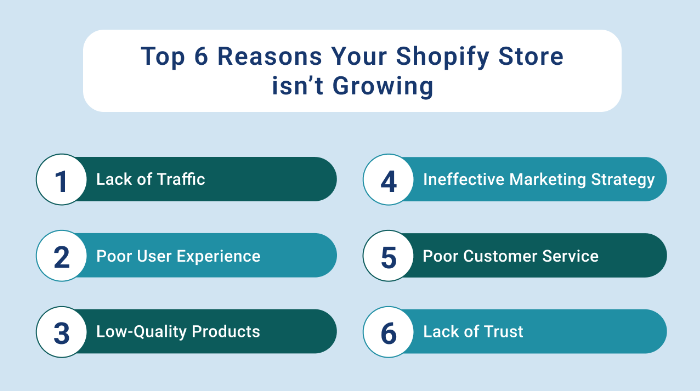
A Shopify store is a great way to start an online business, but it can be frustrating when your store isn’t growing as quickly as you had hoped. There are more than 800,000 Lakh merchants on the Shopify store and most of them are failing to attract sales. The huge competition in the market demands unique sales and marketing strategies to grow your Shopify store. With every passing day, the merchants have been hunting for answers to the question of How to grow the Shopify Store

This blog not only presents the reasons that you need to avoid boosting sales on Shopify but also gives Shopify tips to stay ahead of your competition. Working with Shopify development experts can also help streamline your growth with proven strategies and technical upgrades.

Let’s, not waste time and quickly scroll to the reasons why your Shopify store isn’t growing. Also, check out the hacks to increase your Shopify ranking and get more sales on Shopify. 

Top 6 Reasons Your Shopify Store isn’t Growing and Shopify Tips You Can’t Ignore! 

There are several reasons why your Shopify store may not be growing, let’s explore them one by one in detail. 

Shopify store

  • Lack of Traffic

One of the most common reasons why a Shopify store isn’t growing is due to a lack of traffic. If your store isn’t getting enough traffic, it won’t generate sales, no matter how great your products or customer service is. Here’s a Shopify tip, to fix this issue. 

You need to focus on driving traffic to your store through various marketing channels such as social media, email marketing, paid ads, SEO, and other tactics. 

Social media can be a great way to drive traffic to your Shopify store. You can use platforms like Facebook, Instagram, and Twitter to build an audience and promote your products. You can also use paid ads on these platforms to reach a larger audience.

Email marketing is another effective way to drive traffic to your Shopify store. You can create a list of subscribers and send them regular newsletters with updates about your products, promotions, and other relevant content. This can help keep your brand top of mind and drive traffic to your store.

SEO is also an essential component of driving traffic to your Shopify store. You should optimize your website for search engines by using relevant keywords in your product descriptions, meta tags, and other on-page elements. You should also focus on building backlinks to your website from other reputable websites in your niche.

  • Poor User Experience

If your Shopify store has a poor user experience, it can significantly impact your growth. Customers are more likely to abandon their shopping cart if the checkout process is complicated or the website loads slowly. Most of the Shopify merchants are still looking out for answers on How to grow their Shopify Stores. To provide a seamless user experience, you should ensure that your Shopify store is user-friendly, easy to navigate, and loads quickly.

To optimize your Shopify store for a better user experience, you should start by simplifying your checkout process. The fewer steps involved in the checkout process, the better. You should also ensure that your website is mobile-friendly, as more and more customers are shopping on their mobile devices.

You should also focus on improving the loading speed of your Shopify store. A slow website can turn customers away, so you should optimize your images, use a reliable hosting provider, and remove any unnecessary elements from your website.

  • Low-Quality Products

Another reason why your Shopify store may not be growing is that your products are low-quality or don’t meet the needs of your target audience. If your products aren’t of high quality or don’t solve your customer’s problems, they won’t generate sales. Take a look at the Shopify tips to boost sales on your Shopify store. Hurry up! Check out the solution and fix this issue now. You need to ensure that you are offering high-quality products that fulfill your customers’ needs.

To determine whether your products are meeting your customer’s needs, you should conduct market research. If you’re in the fitness space, check out high-end fitness solutions designed to meet market demand.

 This can involve surveying your customers, analyzing your competitors’ products, and conducting keyword research to determine what your target audience is searching for online.

You should also focus on providing excellent customer service to ensure that your customers are satisfied with their purchases, just like the support offered by Light in Fitness. This can include offering a refund policy, providing fast shipping, and responding to customer inquiries promptly.

  • Ineffective Marketing Strategy

If your marketing strategy isn’t effective, it won’t attract and convert customers. You should evaluate your marketing tactics to ensure that they are targeting the right audience, using the right messaging, and driving conversions. Are you wondering about How to grow your Shopify stores? Here’s a tip for you! 

To create an effective marketing strategy for your Shopify store, you should start by identifying your target audience. Who are your ideal customers, and what are their pain points? Once you have identified your target audience, you can create messaging that speaks to their needs and interests.

Are you looking out for the easiest way to boost sales on Shopify? Here’s a Shopify tip for you! Try iCart, it offers advanced features that will help you boost your Shopify sales.

You should also focus on creating compelling content that educates and entertains your audience. This will help you create brand awareness and develop your store’s credibility amongst the audience. 

  • Poor Customer Service

Your customers are the lifeblood of your Shopify store, and if you don’t treat them well, then they won’t return. Poor customer service can lead to negative reviews, decreased customer loyalty, and lost sales. You need to ensure that your customer service is responsive, helpful, and friendly.

You can offer multiple channels for customers to contact you, such as email, phone, and live chat. Additionally, you should have clear policies in place for returns, refunds, and exchanges.

  • Lack of Trust

Trust is a crucial factor in the success of any Shopify store. If your customers don’t trust you, then they won’t buy from you. Here’s a Shopify tip that will help you build your credibility. There are several ways to build trust with your customers, such as offering secure payment options, displaying customer reviews and ratings, and having a clear privacy policy.

Let’s Wrap Up!

Hopefully, the blog has helped you to identify why your Shopify store isn’t growing. Also, follow the Shopify tips given in every section to get more sales on Shopify. 

Hurry up! Leverage the strategies and grow your Shopify Store now! 

Author Bio

Priyanka Chaudhari is a technology writer with a zeal to learn and explore the trends in technology and e-commerce. She is a published author, and writer with a horizon of expertise across industries like IT, e-commerce, Tourism, BFSI, government, Manufacturing, and much more. Currently, she is employed with a Shopify expert agency. Check out her latest blogs now!