...
UK: +44 2038074555 info@atamgo.com
Shop Pay Reviews: What is Shop Pay and How Does It Work?

Shop Pay Reviews: What is Shop Pay and How Does It Work?

For many Shopify store owners, choosing a suitable payment option for online shopping is never a piece of cake. However, with the introduction of Shop Pay and Shopify Payments, e-merchants won’t be in dire straits when collecting revenue online.

Shop Pay is not just a simple “checkout button”. It greatly contributes to customers’ experience and might increase the sales volume of your store. But that’s not all. Shop Pay can do much more than that. In this Shop Pay review, will uncover the secret behind Shop Pay, including:

  • What is Shop Pay?
  • How does Shop Pay work?
  • What are Shop Pay payment pricing plans?
  • How to set up Shop Pay installments?
  • What are the differences between Shop Pay vs Shopify Payments?

If that’s what you are looking for, stay tuned for the detailed Shop Pap reviews.


What is Shop Pay?


What is Shop Pay


Shop Pay, previously known as Shopify Pay, is an accelerated checkout method for Shopify stores. This app was first introduced in 2017 and it quickly made its way to being one of the most used payment methods. Currently, there are nearly 1.3 million users that are operating Shop Pay stores. To further enhance your checkout process, consider integrating the Icart Upsell App to provide upsell offers directly within the cart, boosting your store’s sales potential with personalized product recommendations.

Shopify Payments and Shop Pay is powered by Stripe, a top payment gateway for eCommerce websites. This software also meets strict security requirements (PCI Compliance) for storing credit and debit card information. Therefore, everything you share with Shop Pay will be carefully protected and encrypted.

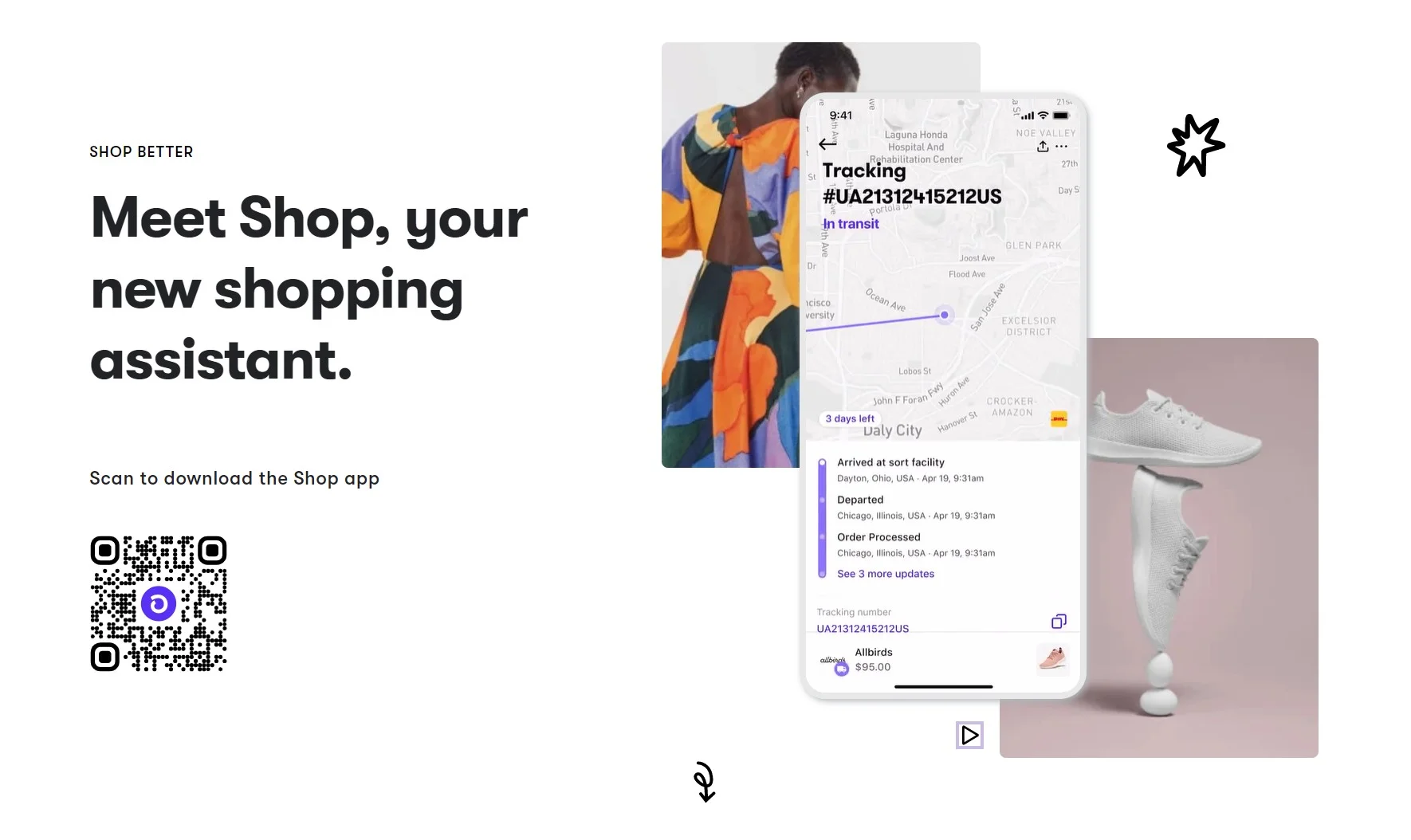
Shop Pay is a part of Shop – a virtue assistant that accompanies customers when shopping online. This solution guarantees to help online shoppers “pay quickly, track better, and shop much more better”. Let’s take a look at all the features that Shop offers:


  • One-click check out
  • Smart delivery tracking
  • Local store suggestions


Shop App


How does Shop Pay Work?

Now that we have a brief overview of what Shop Pay is, let’s see how does Shop Pay work and how to set up Shop Pay.

Please note that currently, Shop Pay is only compatible with Shopify and Shopify Plus. If you are new to this eCommerce platform, here’s how to set up a Shopify store in a few minutes.

The answer to “how does Shop Pay work question” is obliviously simple. When a customer enters their billing information and choose Shop Pay at the Express Checkout section, their personal details will be remembered for future purchases.
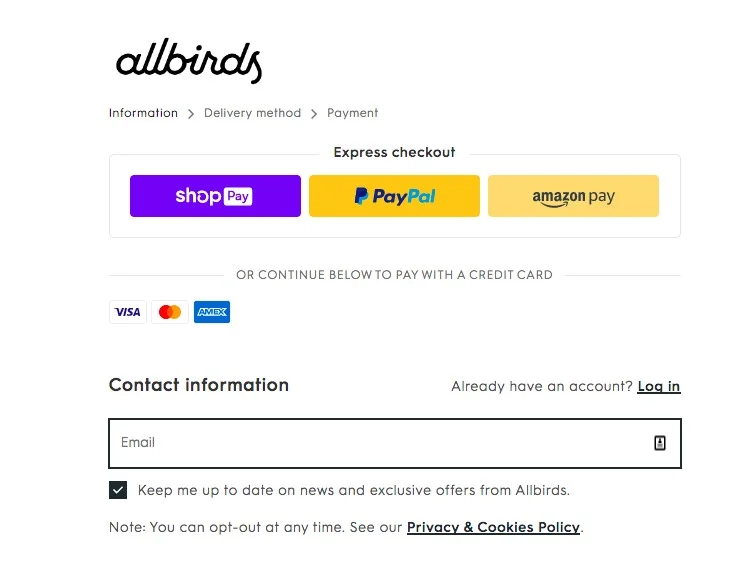
 

Shop-Pay-Express-Checkout


To use Shop Pay, customers need to enter their email addresses to log in. In case they don’t have a Shop Pay account, linking to Shop Pay through a mobile phone number is also acceptable. At this point, customers will receive a 6-digit Shop Pay code through SMS to confirm their account. After the confirmation process is completed, they can now check out faster on their next purchases.


Customers’ billing information, including shipping address and payment details, will be automatically pre-filled for the next purchase. Furthermore, these pieces of information will be stored across the platform. This means clients can get accelerated checkout when shopping in every web store powered by Shopify with their email address or phone number.


What are Shop Pay Benefits?

You might wonder what are some benefits of Shop Pay and why should you use Shop Pay for your business. The most outstanding benefit of Shop Pay is that it can boost your sales by speeding up the checkout process.

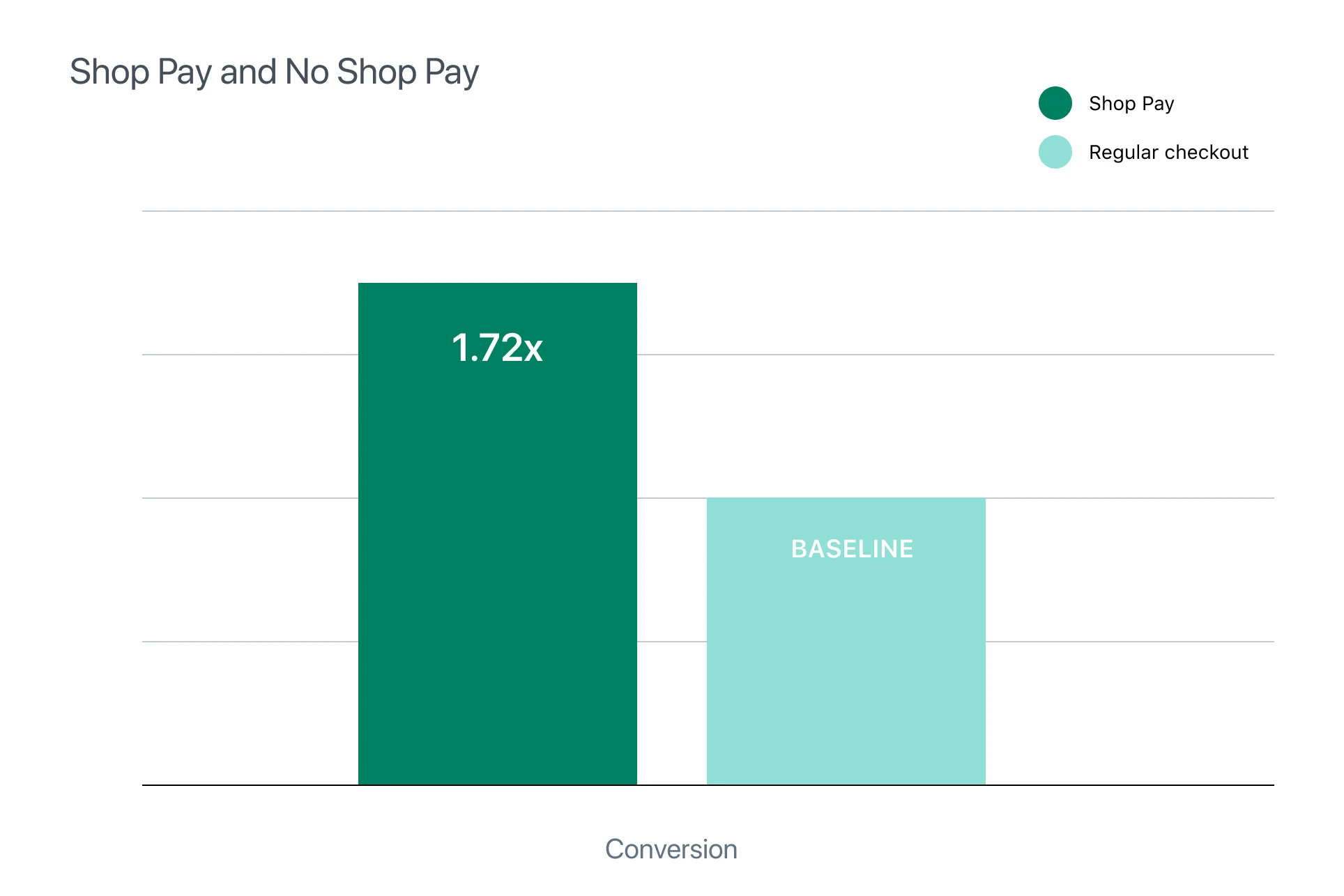
A smooth and seamless checkout process that Shop Pay offers is one of the keys to improve customers’ experience.  Shopify said that between using Shop Pay vs regular checkout, Shop Pay has  much higher order value-to-checkout rate. Consequently, by boosting conversion, Shop Pay also helps to reduce cart abandonment and thus increase sales volume.
 

Shop-Pay-vs-Non-Shop-Pay-Conversion


Furthermore, Shop Pay also allows sellers to sell on marketplaces and collect earnings easily. You can enable Shop Pay as an accelerated third-party payment gateway for your multi-channel retail. With Shop Pay, customers can now speedily purchase products from your Instagram or Facebook using the Buy Now button.


Shop Pay Reviews: A Hit or A Miss?


Noticeable Shop Pay features


Speed checkout

Shop Pay opens the door to a one-click checkout process. When customers purchase something from your store, they can immediately place an order without re-entering lengthy forms. Besides, customers can skip the Shop Pay code verification for their next visit when using the same device.

So, what type of information can Shop Pay store? Here is the list of info that this software can remember:

  • Shipping address
  • Billing address
  • Credit cards details
  • Mobile phone number

Users can save up to five shipping addresses and five credit cards details with Shop Pay. They can modify these pieces of information in the Shop app or during checkout.

What is Shop Pay Installments?

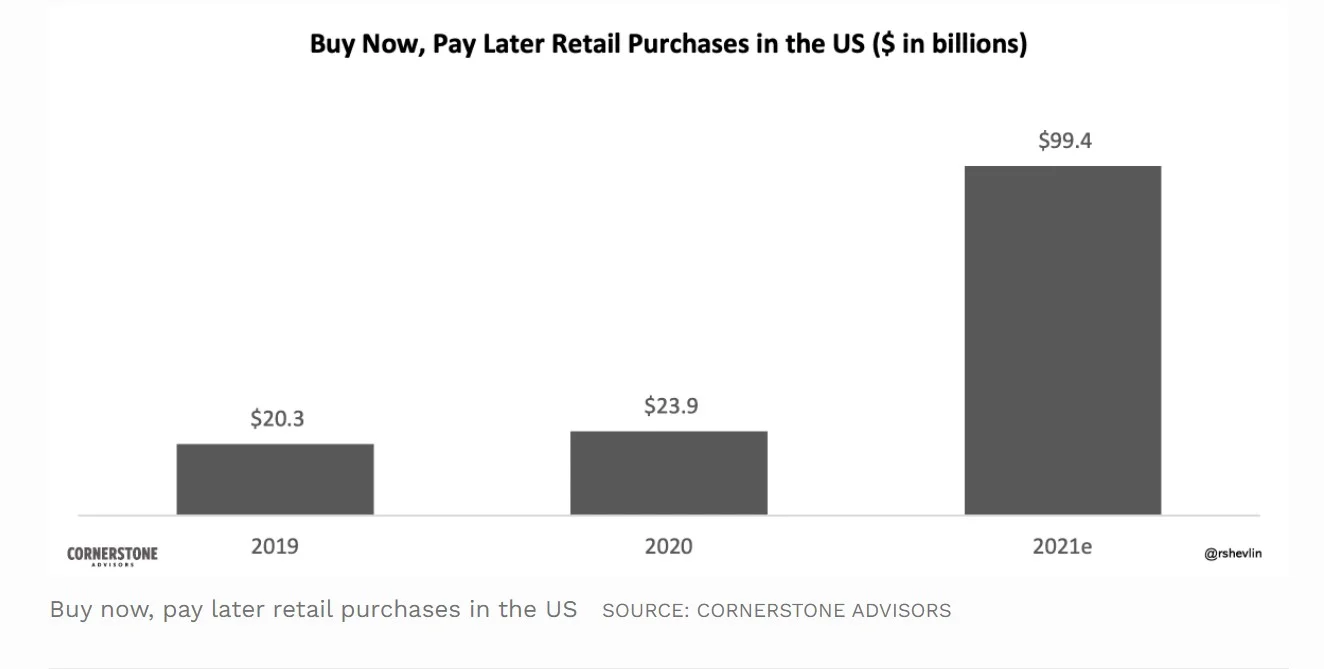
“Buy Now, Pay Later” has become a real trend in the retail industry. Forbes has reported that the total purchase using “Buy Now, Pay Later” will soon exceed $100 million in 2021, 4 times higher than the figure of 2020.


Buy-Now-Pay-Later


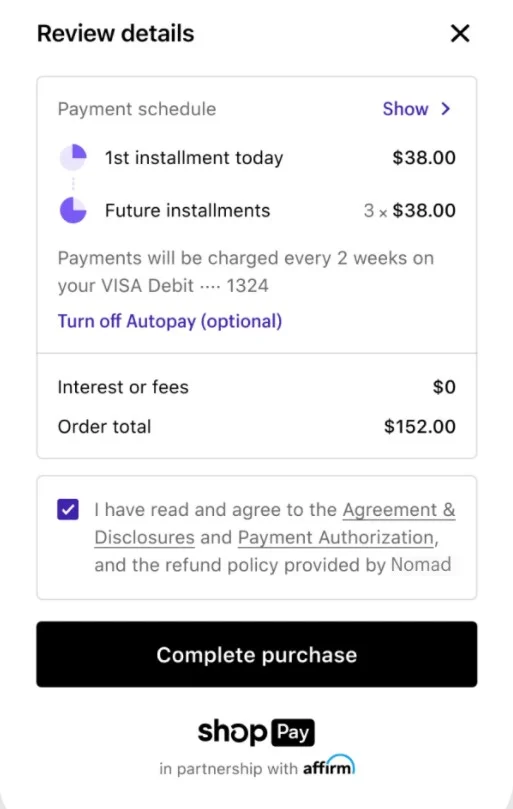
Several payment solutions for online shopping have adopted this “Buy Now, Pay Later” option, and Shop Pay is not an exception. For orders from $50 to $3000, Shop Pay installments allow customers to split their total expense into 4 equal parts. Shop Pay will automatically calculate the exact installment payment value and the billing period.

Shop Pay Installments offers an interest-free payment method. This means there will be no additional charges, no extra rates, and no late fees. Besides, opting for the “Buy Now, Pay Later” program with Shop Pay installments will have no impact on customers’ credit scores. However, a late payment will result in a temporary ban from using Shop Pay for their next purchases.
Shop-Pay-installment


Unfortunately, Shop Pay instalments are not available for every e-merchants. In order to enable Shop Pay instalments, your Shopify store must be based in the US, use English as your store’s language, and your primary currency is USD.

Sustainable Growth With Shop Pay

What is Shop Pay sustainability? Similar to other payment methods like PayPal or Apple Pay, Shop Pay also plays its part in protecting the environment. Every time a customer clicks the Shop Pay logo to proceed with their checkout, they are helping the community to reduce the impact of their delivery at no extra cost. They will calculate the carbon emission for each drive and estimate the number of trees needed to offset this amount of carbon dioxide.

Shop Pay users can track this information in the Sustainability section of their Shop app.


Shop-Pay-sustainaility


In partnership with WeForest, Shop Pay sustainability goal of this year is to plant 4.6 million trees by 2022, in an attempt to restore the Casamance Mangroves in Senegal, Africa. Last year, all Shop Pay stores have joined hands to save 123.6 million trees in the Peruvian rainforest from deforestation.


What is Shop Pay Pricing?


Is Shop Pay free? Yes, it is, but you need to install Shopify Payments.

Shop Pay is not a standalone app. To enable Shop Pay, you’ll need to be a member of Shopify Payments and Shopify. Once you purchase the Shopify Premium plan, you’ll get access to both Shopify Payments and Shop Pay.

There are three different tiers in the Shopify pricing plan, including Basic Shopify, Shopify, and Advanced Shopify. The price for this payment method ranges from $29 to $229 per month depending on your chosen plan.

To learn more about Shopify Payments and its pros and cons, don’t forget to check out our in-depth Shopify Payments review.

Long story short, though Shop Pay doesn’t require any additional expense, e-merchants need to purchase a Shopify pricing plan to set up their Shop Pay stores.


Ease Of Use

Shop Pay is extremely easy to use. The installation is designed to be smooth, straightforward, and easy to navigate. Similar to other payment gateways like PayPal and Google Pay, Shop Pay stores owners can activate this function through their Shopify dashboard. This feature can be operated across platforms, this means e-merchants can enable Shop Pay using both their desktop and mobile devices.


Shop Pay Security

Shop Pay is a part of Shopify Payments. Therefore, when it comes to Shop Pay security, users can rest assured that their information will be extremely secure.

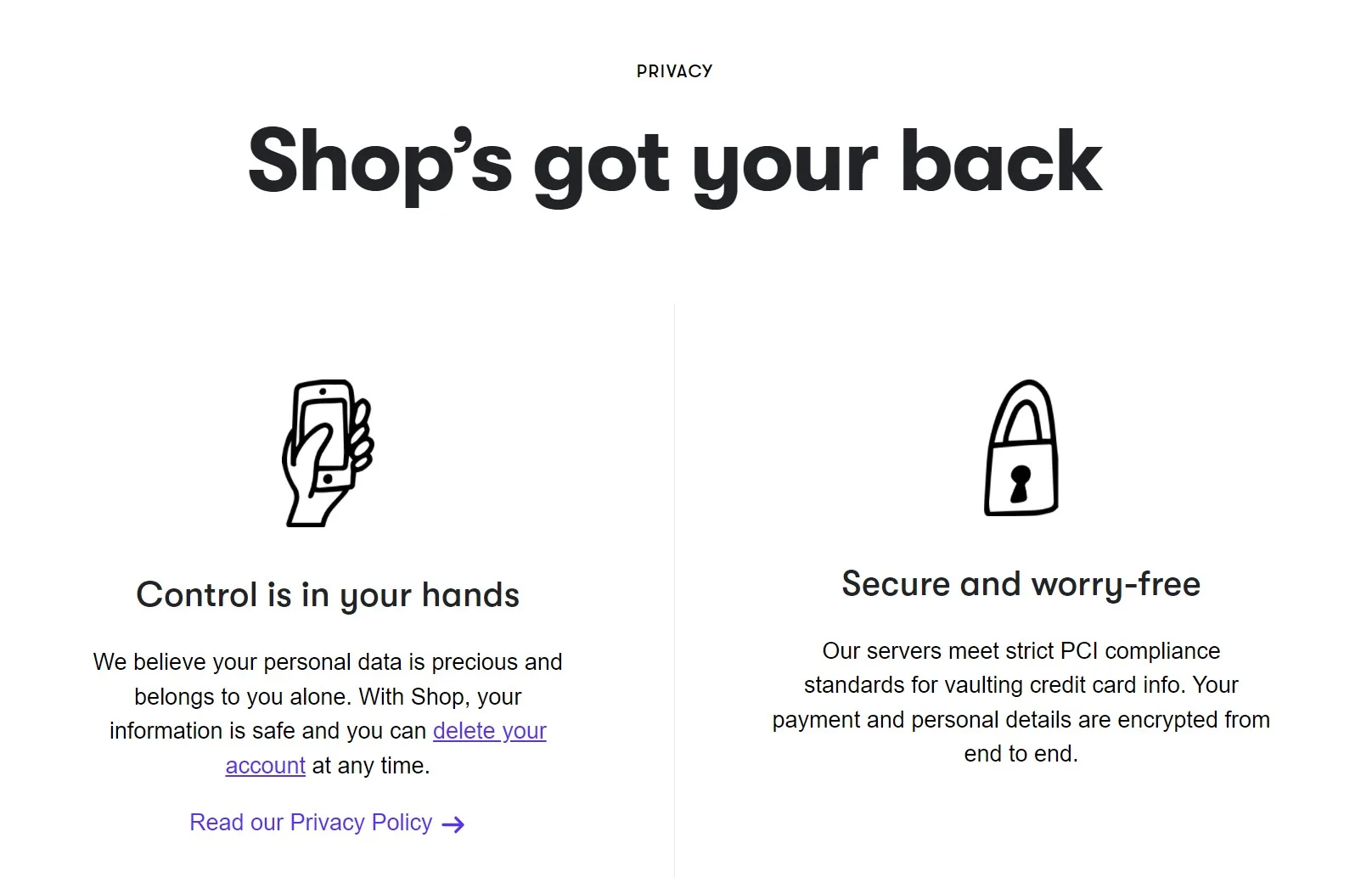
Shop Pay meets strict PCI Compliance Standards to vault credit cards info. Everything you share with Shop Pay will be thoroughly encrypted from end to end. Your personal details will be protected from illegal information extraction and data leakage. Besides, Shop Pay is compliant with Google API Services User Data Policy, which means your email will not be used for unlawful purposes.
 

Shop-Pay-security


On another note, to double the level of security, this payment method requires a Shop Pay code for verification. This code is a 6-digit number that is sent to the registered phone number via SMS. In order to proceed with the Shop Pay checkout, customers need to enter this Shop Pay code to confirm their payment. This Shop Pay security code might reduce the possibility of hackers interfering with your personal information.


Supported Cards

You might wonder what types of cards does Shop Pay support? The answer is that customers can use a Visa, Mastercard, American Express, or any cards that the stores support. However, there are some requirements users need to follow to integrate their cards with Shop Pay.

  • Their cards must be active. Customers might need to activate their cards beforehand.
  • Their billing information must match the bank account on file.
  • Their cards must be able to make online purchases.
  • Customers must use a supported debit or credit card.

To see if your card is eligible for a Shop Pay account, please refer to the list of supported payment methods on the checkout screen.


Shop Pay Customer Service

Customers can get support for Shop Pay through the Shop Help Center. They can find everything they need here, including what is Shop Pay, how to set up Shop Pay, and how to track the carbon offset.

However, this page is designed for the client-end only. If you are a Shop Pay store owner, please navigate to the Shop Pay section in the Shopify Help Center for more information

Unfortunately, Shop Pay doesn’t provide support via live chat or phone call. If customers cannot find answers in the Help Center, they’ll need to fill in a contact form to get help. After sending this form, a support agent will reach out to customers as soon as possible.


Shop Pay vs Shopify Payments: Are They The Same?

Until now, the question about what is Shop Pay has been answered. But have you ever wondered what are the differences between Shop Pay vs Shopify Payments? Are they the same application but with different names? Or is Shop Pay a part of Shopify Payments?

In this section, let’s see all the differences between Shop Pay vs Shopify Payments. We hope that with this comparison, there won’t be any confusion when it comes to Shop Pay vs Shopify Payments.


Shop Pay Shopify Payments
Accelerated checkout button Payment provider for online store
  • Save customers’ information for a faster checkout experience
  • Let customers buy now, pay later with Shop Pay Installments
  • Help store owners take payment from customers
  • Accept and process credit cards and other payment methods
Can only be used on Shopify online store Can be integrated with Shopify POS System on brick-and-mortar store


Crucially, the main difference between Shop Pay and Shopify Payments is that while Shopify Payments works as a standalone application, Shop Pay requires Shopify Payments to function.

How to Enable Shop Pay?

Now that we have learned about what is Shop Pay, Shop Pay pricing, and the differences between Shop Pay and Shopify Payments, let’s take a look at how to enable Shop Pay and set up your Shop Pay store.

  • Log in to your Shopify account
  • In your “Shopify Admin” dashboard, navigate to the “Shopify Payment” section and choose “Manage”
  • In the “Accelerated Checkouts”, tick the box with the “Shop Pay” logo


What is Shop Pay Alternative?

Shop Pay comes with a great wealth of features and a high level of security. However, if you are not interested in this payment method, here are some Shop Pay alternatives for you. Please note that all the suggestions below require Shopify Payments to enable.

Apple Pay

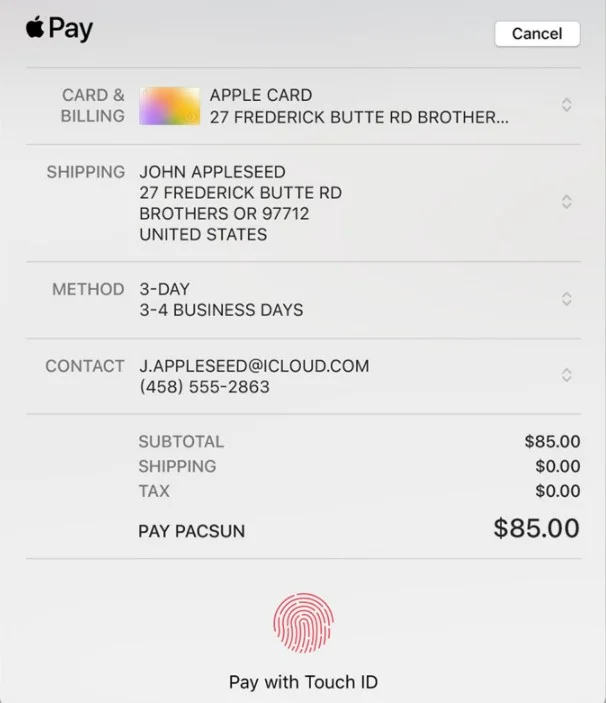
Apple Pay is a digital payment process by Apple Inc. Similar to Shop Pay, with Apple Pay, customers can skip the lengthy checkout form and proceed straight to the order review.

One difference between Shop Pay vs Apple Pay is that while Shop Pay requires a Shop Pay code to confirm payment, Apple Pay users can get verified using their TouchID.
 

Apple-Pay


With that being said, there are some limitations to using Apple Pay as a Shop Pay alternative. This payment method is only available on some particular devices using iOS or macOS. Besides, to enable Apple Pay for your online business, your store must meet several requirements.

Google Pay

With Google Pay, customers can smoothly navigate through the checkout process and place their orders with ease. There’s no need to manually enter personal information like shipping address or card info.

Google Pay offers a greater level of accessibility than Apple Pay. Customers can use Google Pay on various devices and operating systems, as long as they check out using Google Chrome, Mozilla Firefox, or UCWeb UC Browser.


Top Stores that Use Shopify

Shopify is no doubt the front runner in the eCommerce market. This hosted platform offers various elegant and responsive Shopify themes, a great wealth of Shopify apps and best free shopify apps , along outstanding features like Shopify POS System, Shopify CRM, or Shopify inventory management.

If you want to set up a Shopify store to kickstart your online business, here are some inspirations for you.

Food and Drink

 

Shopify Store - Heinz

Electronic


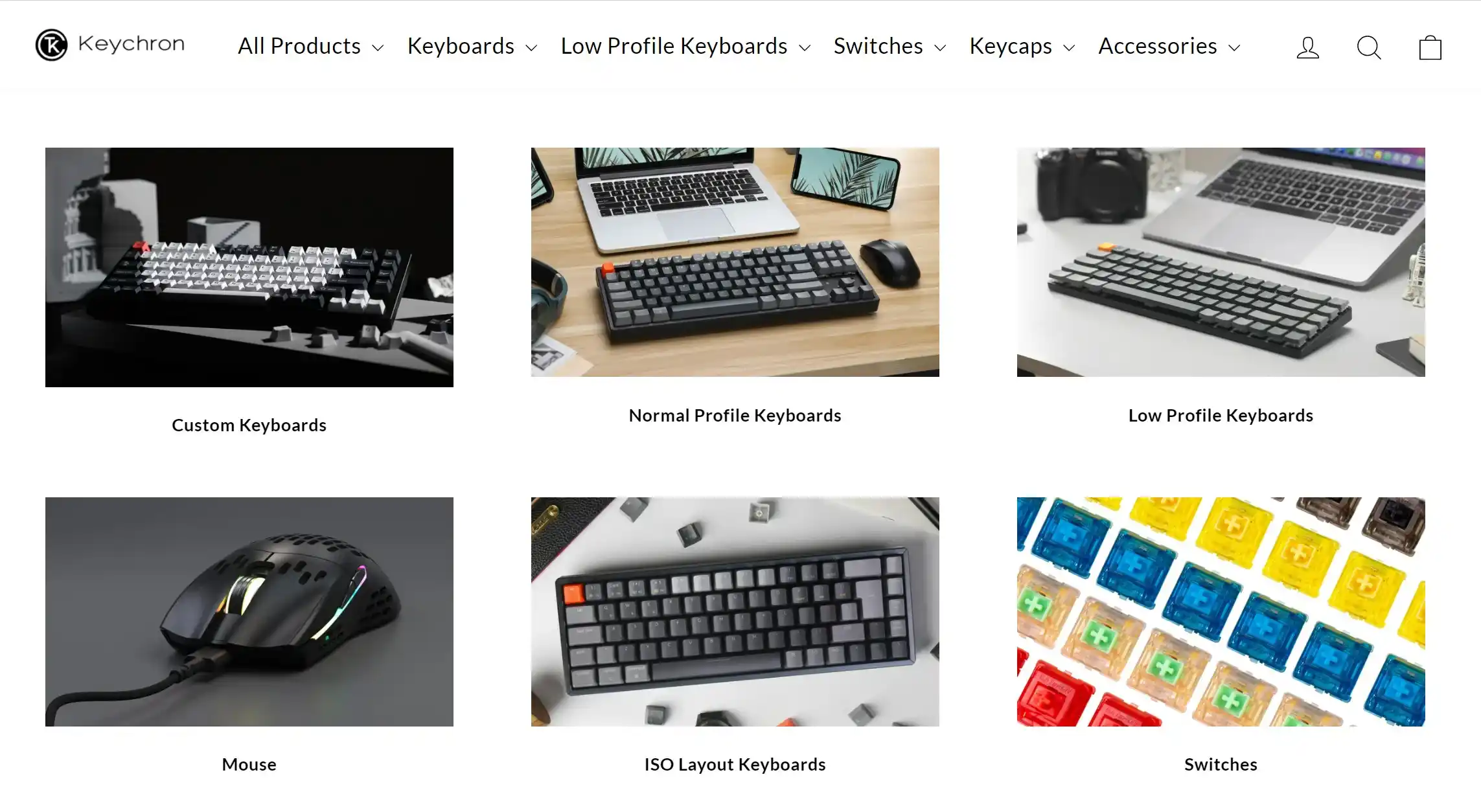
Shopify store - Keychron

Clothing and Accessories


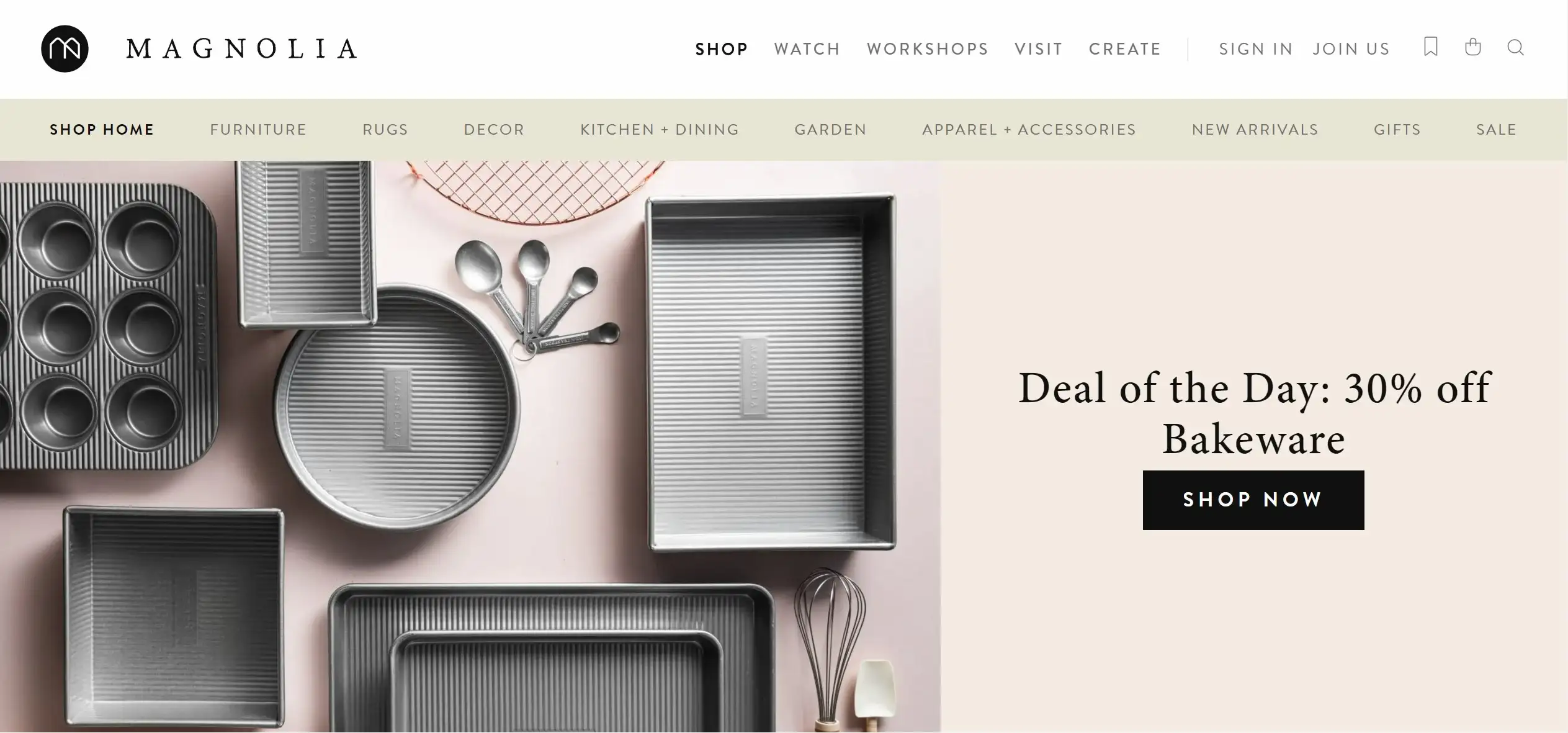
Shopify store - Magnolia

Footwear
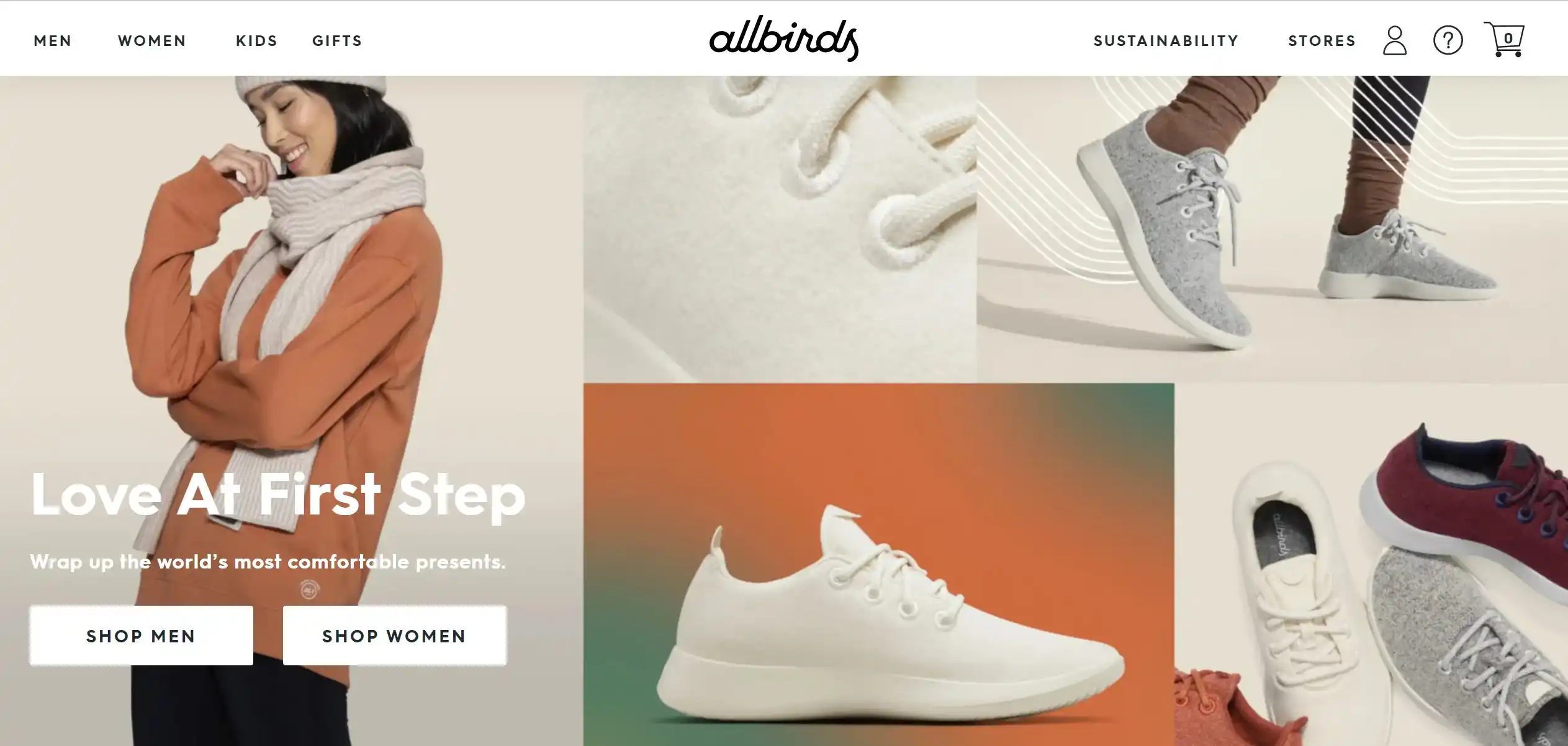
Shopify store - All Birds
Beauty


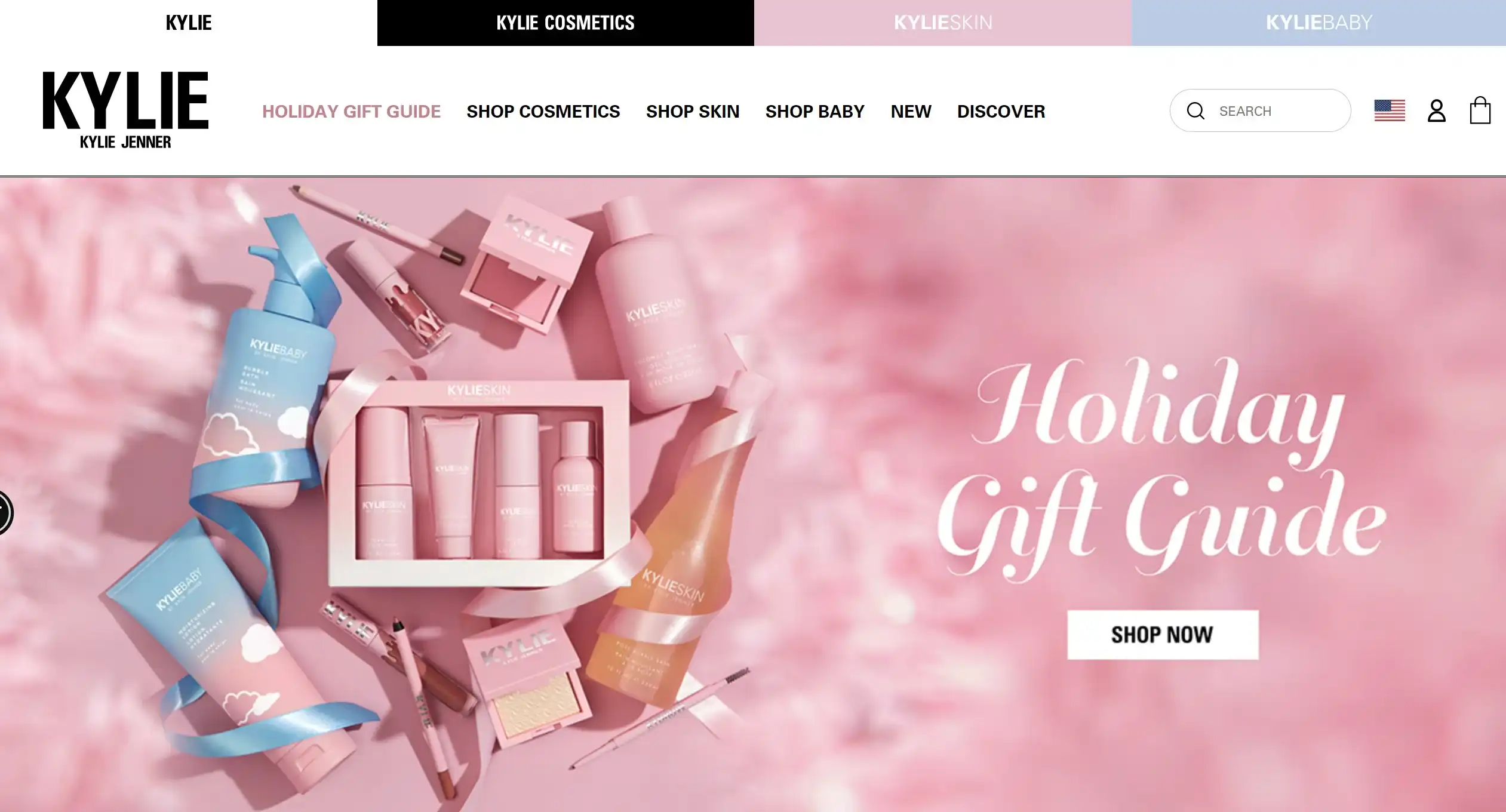
Shopify store - Kylie Cosmetics

What is Shop Pay – FAQ

What is a Shop Pay code?

Shop Pay code is a 6-digit code sent to your registered phone number. This code serves as a verification method before proceeding with your Shop Pay checkout.

Why did I get a Shop Pay security code text?

Customers will receive a Shop Pay code for security purposes. This 6-digit number will be sent to your registered phone to confirm the payment.

Is Shop Pay safe?

When it comes to security, Shop Pay guarantees to be a safe payment option for online shopping. This checkout method encrypts all customers’ personal data from end to end to prevent them from illegal data extraction.

Who owns Shop Pay?

Shop Pay is a fastest checkout process made by Shopify. It is a part of Shop, a virtue shopping assistant that helps customers track delivery and checkout quickly.

Is Shop Pay is still available for eCommerce stores on other marketplaces?

Unfortunately, Shop Pay is only available for Shopify stores. If you want to switch to Shopify to make full use of Shop Pay.

What is Shop Pay – Key Takeaways

That brings us to the end of this Shop Pay review. In this article, Atamgo has gathered everything you need to know about Shop Pay. What is Shop Pay, how does Shop Pay work, what are the differences between Shop Pay vs Shopify Payments? We hope that you have found the answers to all your questions.

In case you have any issue or inquiries, don’t hesitate to reach out 24/7 customer support team to get your problems resolved as soon as possible.

Last but least, please join our Facebook Community to discuss more about what is Shop Pay and stay up-to-date on all the eCommerce news.
Author: Wail Amrani

Wail is a Shopify Expert & eCommerce Growth Consultant. Former digital marketing manager at Shopify I’m helping brands & retailers build 8-figure eCommerce. I’ve been leading digital growth for both online and retail brands for over 7 years.


5 Best Ways For Improving Shopify Conversion Rate In 2022

5 Best Ways For Improving Shopify Conversion Rate In 2022

shopify conversion rate

After browsing your product page, the majority of your customers will either buy your products or leave your store. However, it is a part of the sales funnel that is typically disregarded.

Customers won’t get that far unless you create solid product pages that convert. While most store owners focus on improving their checkout page or landing page or tweaking what happens after a visitor adds a product to their cart, you won’t get that far unless you create solid product pages that convert.

Product pages exist to explain why your product is excellent, explain which demands or problems it answers, and provide the details a consumer needs to view to make a purchasing choice. Therefore, beautiful product images and well-written product descriptions are vital. Still, they’re also the minimum requirements—there’s a lot more to nail down to create a spectacular product page.

What Is the Importance of Shopify Conversion Rates?

Conversion rates are a good tool to compare and contrast the results of different advertising platforms. Conversion rates are especially significant when executing mobile user acquisition campaigns because they help measure the performance of each campaign, as shown in the example above. In addition, when scaling a campaign, they can also be utilized to set ROI expectations.

Conversion rates aren’t only limited to clicks; they can also apply to occurrences further down the funnel. For example, the percentage of users who moved on to install an app or complete an in-app action can be calculated.

This is beneficial to both advertisers and Shopify marketer because it aids in the identification of valuable users. This data can then be sent back into the funnel to help with targeting and campaign performance optimization.

In addition, when scaling a campaign, they can also be utilized to set ROI expectations.

How to improve Shopify conversion rate?

Your store’s product pages can make or ruin it. They may be attracting viewers, and those visitors may be staying for a while, but why aren’t they purchasing? Here are some pointers on how to efficiently convert them.

A well-designed product page is about connecting with visitors and gently guiding them through the sales funnel, not just having a nice look and easy navigation. It’s all about thinking outside the box, using an image to lead, providing options, and relying on social proof for support.

The top Shopify designers and developers will have the necessary know-how to make sure that your pages are optimized for conversions.

1. Know the ideal description of your product

You may be tempted to believe that no one reads product descriptions. Perhaps the eCommerce world’s quick pace and variety of options don’t leave enough time or space for shoppers to thoroughly research a product.

While it’s true that some things can be sold just on their appearance, 87 per cent of buyers consider product content such as product descriptions to be critical in their purchasing choice. So even while we may hear that product reviews are the finest asset for raising product page conversion rates, the truth is that product descriptions are viewed as more significant in several industries, such as clothes and online grocery shopping.

However, an overabundance of detail in lengthy product descriptions might turn a consumer off a product, just as it can with anything else. There’s a lot of good information out there, but there’s no hard and fast rule for what length you should aim for, so it’s best to look at your competitors’ product descriptions. In general, shorten descriptions for basic products and extend descriptions for things that require more explanation.

Also, keep in mind that you’re not writing solely for your intended audience. Google ranks product pages based on their SEO score, and product descriptions are an excellent method to incorporate keywords into your website. If you use them selectively and keep the buyer interested, you might find that your product sells.

2. Include large and original images

Two obvious truths characterize human nature: we want originality and judge others based on their looks. So the world’s trendsetters, like the shops that stick out from the crowd, attract all of our attention.

9 out of 10 individuals believe that a product’s appearance is its most important selling point. Therefore, you’ll want to focus on building a product page with large, clear, and appealing photographs, especially if you’re selling to a younger demographic. Have you ever wondered why Instagram and Pinterest are so popular among both consumers and marketers? It’s all about the visual appeal.

Here are a few examples of how photos can help increase conversion rates on product pages:

  • Images attract attention – Roughly 79 percent of your customers will be skimmers, which means they will scan your product page for helpful information for a limited period. Skimmers are forced to pause and pay attention to what matters when they see images.
  • Images are easily shareable – Images are far more easily shareable than descriptions on social media. For example, Instagram and Pinterest are image-centric and awash with product images, while Facebook isn’t far behind.
  • Images are excellent for SEO since Google adores them- With the increasing importance of visual searching, a well-written alt text for a picture could propel your goods to the top of the google search results.

3. Should be optimized for mobile

All of the data points to a mobile shift. It has a name: m-commerce, and by 2021, it is predicted to account for the bulk of internet sales. It’s more than a fad; it’s the present and future of purchasing, and if you want to boost conversion rates on your product pages, you’ll need to hop on board the e-commerce train.

Fortunately, optimizing for mobile isn’t as difficult as it may appear. Shopify has a lot of amazing page builders that can help you effortlessly set up your website for mobile use. For example, they can help with element realignment, text streamlining, and prioritizing different areas based on scrolling patterns.

Consider hiring a website designer or contacting the Shopify Experts to help you tie everything together for your site. Make sure your site is mobile-friendly, regardless of how you do it; with 73 percent of customers willing to abandon poorly designed mobile sites, you can’t afford to.

4. The use of white space is essential


shopify conversion rate 


Do you prefer a noisy, in-your-face shopping experience with irritating commercial signs and klaxons going off every 3 seconds, or do you prefer to take your time strolling through a store?

Uncluttered store aisles and soothing store music are the eCommerce equivalents of whitespace. It refers to the empty regions of a website that help bring attention to the page’s actual content.

According to studies, whitespace on your website might boost readability by up to 20%. But it also gives your leads a sense of independence, the freedom to buy as they choose, and the authority to make their own purchasing decisions.

5. Product with real photo/video reviews

Generating customer feedback with photos/videos from your existing customers is the first step in establishing social proof for your brand and business.

According to recent studies, people check social proof 87% of the time to see what other people say about a product. And, like any sensible customer, they prefer products with high ratings and a lot of negative reviews over those with low ratings and a lot of negative reviews.

Have you ever referred a friend to a product or service? Because you trusted them, you probably paid attention to what they said.

Photo/Video is becoming the new norm, just as image-centered product pages are. So it’s time to start rolling in a world where 54 percent of customers want to see more video content and leads are 85 percent more likely to buy after watching a product video.

Photo/Video reviews keep your visitors engaged and provide them with crucial product information that they would miss if they scan over the product description. For more intricate products, films can quickly explain what it is, what it does, and how to use it, all while putting a trustworthy face or voice in front of the camera. Aside from that, videos are fantastic for SEO.

Wrapping up

Your online store’s product pages are its lifeblood. You risk annoying your clients and losing a lot of money if they’re poorly displayed or unorganized.

Improving Shopify conversion rate and developing unique product pages will help your store’s brand and reputation, allowing you to stand out from the crowd. In addition, customers will be more interested in both your items and your organization as a whole if you put more effort into your product pages.

Even the tiniest or most basic modification can have a big influence on your business. So start with above mentioned solid ideas and iterate—you should notice that your product pages are stronger than ever at converting browsers into purchases.

Our Latest Articles

7 Proven Dental SEO Strategies Most Clinics Still Ignore

7 Proven Dental SEO Strategies Most Clinics Still Ignore

Introduction Dental SEO is becoming an essential tool for any dental practice that wants to get noticed online and attract a steady stream of new patients. In today’s digital age, relying solely on word-of-mouth or basic online listings isn’t enough. Patients are...

read more

How to change Shopify Store Name In 2022

How to change Shopify Store Name In 2022

how to change shopify store name

Introduction

In this article, I will show you how to change Shopify store name in just a few simple steps. 

The very initial step to creating a Shopify account is choosing your Shopify store name. Immediately, Shopify creates your shop URL in the layout https://yourstorename.myshopify.com. Nevertheless, you might feel disappointed with the given one and intend to relabel the Shopify store name. This write-up will reveal you a step-by-step overview of exactly how to change Shopify store name.

  1. Log into the Shopify administration account
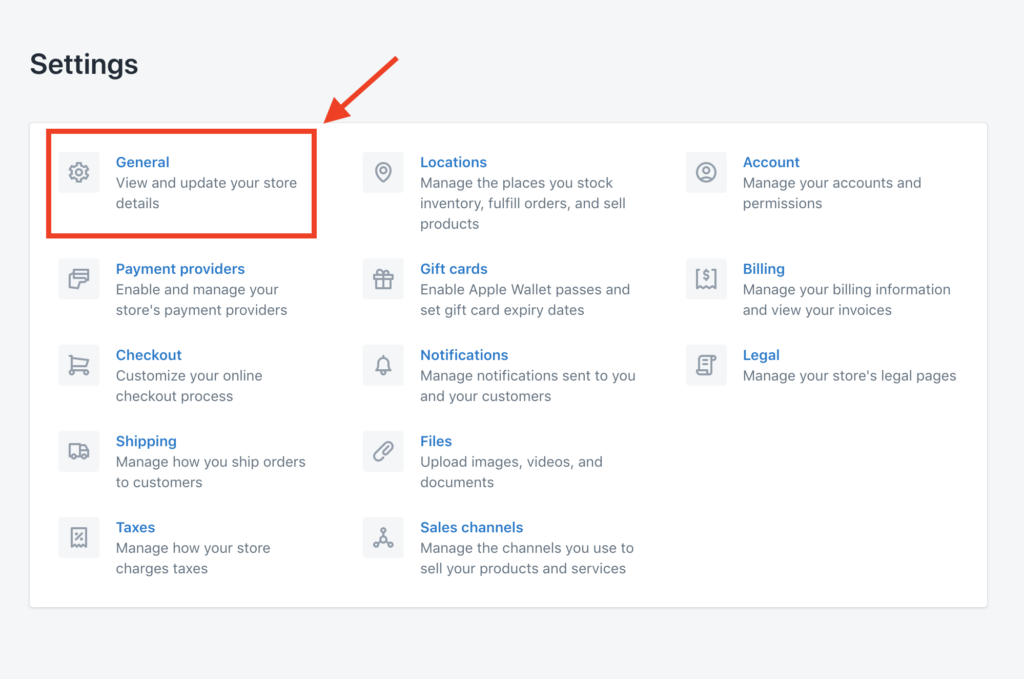
  2. Look for to “Setting”
  3. Just select “General”
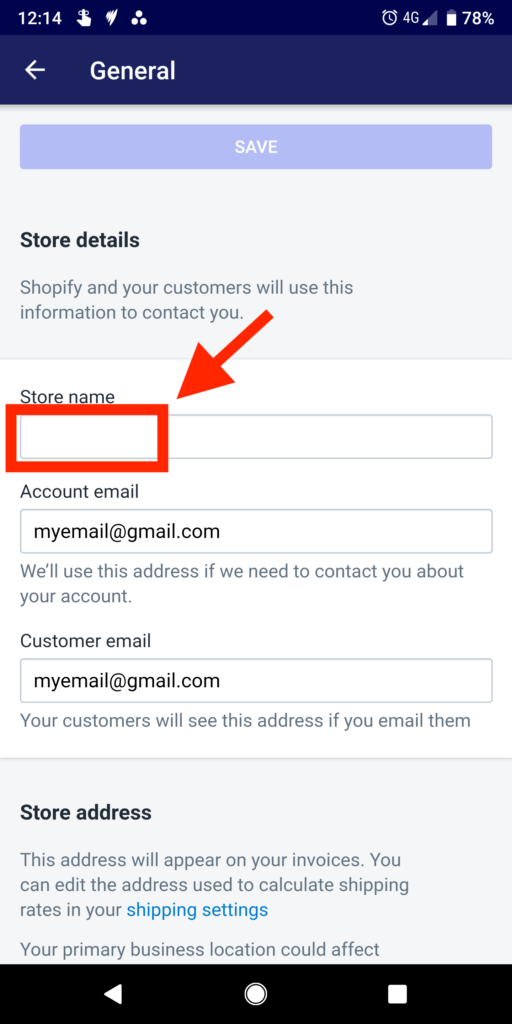
  4. Write your new name in the “Store detail” section
  5. Click “Save”

When should you change Shopify store name?


Besides utilizing the finest Shopify motif to create an appealing storefront, your shop name is an additional core element that contributes to the Shopify store growth.

A good name makes your store a special brand name among all the rivals. It likewise supplies a meaningful message of your brand name and acts as a bridge between you and also your customer.

So, how can you excite a purchaser just by the name? How can consumers remember your store name and intend ahead back following time?

If the name has a solid emotional or sense-related connection with an individual, the storage space course to their name will certainly be more powerful. If it had not been an emotional experience our brains slot it into our temporary memory and we tend to eliminate things that we do not come back to.

As a result, the secret to an excellent Shopify company name is to develop a strong emotional web link in between you as well as your client. Apparently, it is not an easy job. Below are 3 scenarios that you should search for how to transform Shopify shop name and consider selecting a new shop title. You can likewise use a business name generator.

1. Your name is vague, baffled, as well as difficult to articulate

One of the most usual troubles you can face is that your consumers just can not fully understand or spell the name properly. Therefore, it can bring an adverse effect on your brand acknowledgment.

As a result of the cultural and also language differences, your name could have weird punctuation as well as it’s likely to be difficult to pronounce for native clients of that language. This usually occurs when you remain in the worldwide market, specifically for an on the internet shop.

overwhelmed Shopify service name
Avoid using baffled Shopify organization name
Besides, your logo layout need to be very noticeable and simple to review. This generally works best when you make use of block letters as well as a horizontal style, adapted to site headers.

2. You’re adhering to a short-term trend

A pattern can affect your business. In fact, capturing the fad by your shop name can bring a big advantage to your business.

Nonetheless, temporary trends often create associations with certain groups or stereotypes which are swiftly changing. Eventually, you could find the pattern no longer overlaps your target client, you should rename Shopify shop.

3. Your Shopify shop name is similar to rivals

Another sign that you need to rename Shopify store is the resemblance in between your organization name and others’. Using a name that somebody currently owns or just similar to their principle can make your consumers confused. Furthermore, you could have problems when signing up for a business permit with an already-owned domain. As a result, you must ensure that your name is special as well as sets you aside from the pack.

Besides, utilizing a comparable Shopify name can have bad influence on your search engine optimization score on internet search engine. To avoid this scenario, you can utilize additional Shopify search engine optimization app to enhance your ranking outcome.

Why Shopify Store Name is Important?

The When you subscribe to Shopify you’re asked to choose a shop name when creating your account. The shop name you select is made use of to dynamically produce your Shopify sub-domain in the layout https://yourstorename.myshopify.com. This sub-domain is meant to be utilized for interior purposes like logging into your Shopify account and also establishing and handling your online store.

You may maintain this sub-domain as the general public facing URL for your on-line store however we do not suggest it. We suggest you to use your very own custom domain to build trustworthiness and also depend on, one that reflects your brand and also is unforgettable.

However, if you make a decision to ignore our recommendations and maintain your myshopify sub-domain as your customer facing URL, you can transform your shop name yet you won’t be allowed to transform your myshopify sub-domain. Instead, you’ll need to create a brand-new Shopify store.

If you use or are planning to utilize your very own customized domain you can alter your Shopify shop name for aesthetic reasons however it will not impact either your customized domain or myshopify sub-domain.

How to change Shopify Store Name

You have 2 fast as well as easy choices for changing your store name:

-Using the Shopify admin web site

-Using the Shopify mobile admin app


1. How to change Shopify store name via the Shopify admin website

Shopify instantly creates your shop link as one of its subdomains: https://yourstorename.myshopify.com.
As you can see, this URL includes two components: the personalized part “your store name” and also the original part “. myshopify.com”. Regrettably, you can not transform the initial Shopify username when still maintaining this sub-domain as the public-facing URL for your online shop.

If you require to get rid of the “. myshopify.com” as well as your URL entirely matches your actual shop name, you can pick between two choices:

Transfer your Shopify domain and establish it as your main domain. In this manner, the public-facing URL for your client will certainly be https://yourstorename.com.
Note: You will be the just one that sees your link with the “. myshopify.com” part

Produce a new account and register for a custom-made domain with your brand-new name. And also do not forget to execute a Shopify migration to the brand-new store to protect what you have actually done so far.
On the other hand, if you do not mind the “. myshopify.com” part as well as just require to alter your shop name, below’s the step-by-step guide.

1. Log into Your  Shopify admin dashboard on your desktop computer

2. on the bottom of the left navigation menu click Settings


how to change shopify store name

3. Click General

how to change shopify store name

4. Your current store name will be displayed in the Shop name field. Erase your current shop name and enter your brand-new store name.

how to change shopify store name

5. To save your changes, click the Save button on the leading right .
You’re done now. Your Shopify shop name has actually been altered effectively.

5. Just press the SAVE button at the top in order to save your changes.

2. Change Shopify Store Name Using The Shopify Mobile App

1. Just open the Shopify App admin on your mobile device and press the Store icon which is in the bottom right corner and press Setting:

shopify admin

3. In the settings section click on General

shopify store


4. In the Shop details area you’ll see your existing store name in the Shop name area. Remove your current shop name and also enter your new store name.

shopify

Final words 

Transforming your Shopify store name could be a key factor that contributes to the growth of your online organization. Ideally, this post can aid you effectively on how to change Shopify store name.

You might also be interested in reading:

Digital Maturity Model Value In Business Growth In 2022

Shopify Marketing Strategy

5 Best Ways For Improving Shopify Conversion Rate In 2022

Tags:

Author: Wail Amrani

Wail is a Shopify Expert & eCommerce Growth Consultant. Former digital marketing manager at Shopify I’m helping brands & retailers build 8-figure eCommerce. I’ve been leading digital growth for both online and retail brands for over 7 years.

Shopify Marketing Strategy To Reach 7 Figures In 2025

Shopify Marketing Strategy To Reach 7 Figures In 2025

shopify marketing strategy

 You will learn what is the Shopify marketing strategy, why it is important to have a good strategy that helps you scale your business, and we will reveal the best Shopify marketing strategies to reach a 7-figure store. 


What is Shopify Marketing Strategy? 

Selling online is big business right now, and also nowhere is the digital industry busier than Shopify, the web’s leading eCommerce marketing platform. If you’re new to the Shopify world, getting started can be intimidating– with many other brands competing for customers’ focus, trust, and also satisfaction. How can a brand-new stick out from the crowd as well as begin developing a target market? The solution is establishing the best Shopify marketing strategy. With thousands of plugins as well as add-ons at your disposal, Shopify is known for its straightforward setup procedure and general convenience of use. Those tools make it very easy to build a store that reflects your brand’s identity while giving a user-friendly consumer experience. The first goal will be getting the clients to your shop store. 

16 Shopify Marketing Strategies Secrets To build a 7-figure Store

Using the best Shopify marketing strategy is the ultimate way of marketing your eCommerce store, and there is no denying that Shopify stores can be a profitable revenue store. However, marketing is easier said than done. Sure, it’s easier to set up and doesn’t really need technical expertise but making profits is challenging, especially if you are new to the platform. For this reason, we are sharing result-oriented Shopify marketing strategies, so your store can reach a 7-figure. Are you ready to market your Shopify store then? Let’s find out! 

Autopilot Marketing 

Shopify has various features, integrations, and apps available for automating the tasks, and you can focus on business scaling. It can manage repetitive and operational tasks with ease. Some of the features include the following;

  • Cart Recovery 

Every online store has some shoppers who add products to the cart but don’t complete the order. In those cases, you can set automated reminders for SMS, email, and messenger. For instance, web push notifications can be set with Firepush, SMS recovery for TxtCart, and email reminders can be set with CareCart. 

  • Customer Engagement 

When it comes down to marketing, customer engagement plays an essential role. For this purpose, you can automate email communication, customer retargeting, and remarketing with Shopify apps. Implementing a contact center solution can also facilitate communication and enhance the quality and time efficiency of your activities.

  • Social Media Product Promotion 

The Shopify stores can be integrated with Facebook, Instagram, Pinterest, and Twitter, so product promotion will be enhanced. In fact, you will be able to market the products on all these platforms with one click. Not to forget, there are some apps available for setting up Instagram and Facebook, which are updated with inventory changes. 

  • Program Management & Communication 

Shopify stores can be integrated with Google products, Trello, and Slack for seamless management, internal collaboration, and real-time communication. As a result, it will be easy to keep track of sales and marketing projects, cross-functional activities, and overall customer management. 

Pinning The Latest Products

Do you use Pinterest? We are sure you are using one to take some inspiration and make mood boards. It’s needless to say that Pinterest has a volcano of ideas, and people often use it to discover new products. Truth be told, only a limited number of brands are leveraging this platform, but it can be a promising marketing strategy. For this purpose, you need to create captivating product images and how-to infographics and use them on Pinterest to drive traffic to the Shopify store. 

Also, while creating the pins, don’t forget to add a catchy product title and an alluring description (adding BTS details always works!). Secondly, use the relevant hashtags and link the pin to your Shopify store as it will increase sales. You can also use product tags and stores to reduce the purchase cycle and increase the reach, respectively. 

SEO 

SEO is an undeniable part of every online platform, and do you know 60% of online shopping enthusiasts start their shopping spree with search engines? This clearly means that you’ve to be visible in users’ search results. While we are at it, let us tell you that you don’t need to have a blog to start doing SEO. This is because you should optimize the product pages, landing pages, product catalog pages, and homepage. For this purpose, you can use the relative keywords (or just hire an SEO expert). In the section below, we are sharing some tips to remember while conducting SEO, such as;

  • Try to target the funnel keywords because the search volume is higher 
  • Always focus on the long-tail keywords since online shoppers tend to use them more
  • Enhance the Shopify store’s speed since a slow website can lower the ranking 
  • Don’t forget to optimize the images because you might catch a customer when they are scrolling through Google Images 
  • Use Shopify’s in-built SEO features
  • Make sure you are actually descriptive while writing down the product descriptions 
  • Focus on product interlinking & create backlinks through niche edits service

Content Marketing is important for your Shopify marketing strategy 

Community marketing is often considered the “synonym” for social media marketing, and very important for any shopify marketing strategy. It’s high time we understand the difference. This is because community marketing revolves around brands engaging with potential customers and existing customers in online communities. These communities can be built on blogs, Facebook groups, Quora, or Reddit. Once these communities are built, make it a point to post informative and valuable content (other than about the products) as it helps build a rapport. So, when people start trusting you, you will witness an influx in sales. 

Referral Marketing 

Every brand or a Shopify agency has customers, but transforming them into a sales force is the winning strategy, and it can only be done with word-of-mouth. According to research, more than 90% of customers believe in word-of-mouth. To illustrate, referrals are all about your customers helping you gain more customers. For this purpose, you can launch a referral program where customers will get store credits or reward points when someone makes a purchase through their referral. 

What’s best is that setting up the referral program for the Shopify store is pretty convenient since there are various apps available. For instance, you can opt for ReferralCandy as it helps track the referrals, conversions and check out the given rewards. So, if you go ahead with referral marketing, keep the following things in mind;

  • Identify the motivators that push the existing customers to refer your Shopify store to their folks 
  • Make sure the products are top-notch, and the shopping experience is seamless 
  • Create an easy referral program (don’t add too many steps and rules) 
  • Don’t forget to “tell” customers about the referral program and its perks 

User-Generated Content 

Long gone are the times when Shopify stores were only about products because adding content is another way of getting more traffic that will eventually translate into more sales. So, when users are going to consume the content, why not simply make user-generated content? With user-generated content, brand awareness will be heightened, and more customers will be reached. For this purpose, just motivate your customers to share their videos and pictures using your products and turn them into shoppable posts (shop the look is an apt example). 

Facebook Store

Sure, you already have a Shopify store, but connecting it with the Facebook page will only increase sales. In fact, you can sign up for the Shopify Lite plan and connect your Shopify platform with your Facebook page. With this, the entire product catalog will be available on Facebook with automatic inventory updates. In addition, you can share other content on Facebook to enhance customer engagement while following will be enhanced organically. 

Instagram 

In addition to the Facebook store, you can also create an Instagram business page and create a shoppable feed. For this purpose, just make a business page, add the business details, post some fine product pictures, and link it to the Shopify store. Then, connect Instagram with Facebook, upload the products, and switch on the shopping features, and you are good to go. After all, launch those product tags in the posts and get ready for the sales. What’s best about leveraging Instagram is that customers love visual content, and your product pictures will be an apt way of capturing attention and sales.

Text The Shoppers 

You might not have thought about SMS marketing, but it still remains an effective channel for business communication. With each passing day, the number of smartphone users is increasing, and they actually prefer receiving SMS rather than spamming emails. However, keep the SMS direct and short while conveying the actual message (don’t beat around the bush). SMS marketing is a promising choice because customers don’t have to use internet data or log in somewhere. Moreover, you can automate the cart recovery features as well. 

Content Marketing 

Content marketing is real, and more than 75% of the B2C advertisers are leveraging it to capture their target audience – it’s obviously for a reason. The customers are actually looking for content consumption before they invest their hard-earned money in some product. So, as a Shopify store owner, you must utilize content marketing. With this marketing technique, you need to add a competitive edge to your products rather than copy-pasting the same old product description.

Also, while you are curating the content, state how a specific product will add value to a customer’s life. For instance, you can create lookbooks if you are running a fashion brand as it helps build a trusting brand-customer relationship. To summarize, create different types of customer-centric content (experiment with videos, blogs, and lookbooks), and don’t forget to optimize it with keywords. 

Loyalty Program 

In various cases, businesses launch a loyalty program when they have a specific number of customers under their belt, but that’s the myth. Creating a loyalty program will actually help ensure that you are retaining customers and they keep coming back to you whenever they need to purchase something. If you don’t know how it works, a loyalty program allows customers to receive rewards whenever they purchase something (it will make sure customers come back to you and will enhance traffic). You can provide rewards on their first purchase, when they leave a review, when they sign up for a newsletter, or when they give you a shout-out on social media. 

Brand Collaboration 

Haven’t you always thought that another business or brand is your competition? If you are nodding, it’s time to change the perception because brand collaboration is an apt way to market your Shopify store and capture more sales. To illustrate, if you are selling footwear, your models will wear clothes for the lookbook, right? So, why don’t you collaborate with a clothing brand and create a collaborative marketing campaign? It will help both brands increase the customer count, and sales conversions will be higher. 

Giveaways 

Nothing works better than a giveaway when you are trying to expand your store and gain more customers. With giveaways, customers are excited about getting free products just by tagging a few friends. Also, when you are planning a giveaway, try to market it because taking people in a loop will ensure more people participate, and your brand gets more reach.

Influencer Marketing 

Influencers are growing big, and their audience really trusts them. They generally work on social media platforms, and collaborating with them will help capture their following. Honestly, one shout-out from a well-followed influencer will get you an amazing response. So, the right way is to collaborate with them (you might have to pay them, but it’s worth it as you will be getting more sales in return). Generally, influencers make stories and posts revolving around your products, so their followers get to know about you! 

Summary

When it comes down to online marketing, there is no thumb rule, and one approach doesn’t fit every brand. So, take time to understand your audience, determine their expectations from you, and implement the right Shopify marketing strategy that actually entice them. Not to forget, you can always test different strategies to see which one works the best!

Shopify marketing strategy

Our Latest Articles

7 Proven Dental SEO Strategies Most Clinics Still Ignore

7 Proven Dental SEO Strategies Most Clinics Still Ignore

Introduction Dental SEO is becoming an essential tool for any dental practice that wants to get noticed online and attract a steady stream of new patients. In today’s digital age, relying solely on word-of-mouth or basic online listings isn’t enough. Patients are...

read more
Best Shopify Subscription Apps – Key Selection Criteria In 2025

Best Shopify Subscription Apps – Key Selection Criteria In 2025

Shopify subscription apps

Running an eCommerce business sounds appealing and convenient but also takes immense time to grow the store. So, if you are shifting left and right to grow that eCommerce store, signing up for the Shopify subscription apps could work (yup, we handled all the legwork). 

When you choose the best subscription app for Shopify, it shall generate more revenue for any seller or Shopify agency while ensuring a valuable experience for the customers since it helps with on-time delivery. Now, if you want to sign up for one, we are reviewing multiple in this article, so you can enjoy the best experience!

Shopify Subscription Apps – Key Selection Criteria


Score

One of the leading criteria for picking an app is ranking. There is nothing even more precise from the consumer testimonials that have actually used the application. We have actually collected all our consumer evaluations for the best Shopify subscription apps listed below. Obviously, no app is perfect, but all of these apps have a 4 celebrity or higher rating with greater than 100 client reviews. We advise these as the most effective as well as most preferred ones.

Ranking

In addition to consumer reviews, we additionally price these applications based on the search page’s ranking. As a matter of fact, to obtain high rankings on the Shopify Apps store, the application must merge lots of various other factors, not only the high score but likewise the attributes, web content, and also instalment amount of the applications. As a result, this is likewise an element worth thinking about when we select the top 4 applications listed below.

Attribute & Price

You will probably have an interest in exactly how the application can aid your Shopify store. That is why we particularly carefully picked the applications with one of the most detailed and also powerful registration features. The most famous functions of the applications such as:

-Increase the variety of enrollments.
-Develop consumer trust.
-Effective customization.
Other advanced functions like e-mail and consumer notifications; develop A/ B examination campaigns; other automation and synchronization features; and so on.
Besides, you should consider your budget plan prior to choosing to use any kind of paid application. We have actually reviewed and also discovered the applications below have cost-free trials which the monthly cost is well worth the attribute it uses. So, depending upon the purpose of use, you need to select your on the internet store’s best application.

Company’s Reputation

Actually, this is also an important variable in addition to the above three factors. Lots of people typically do not care about the service provider when selecting applications. However, to lessen the dangers throughout usage, the distributor’s track record is additionally worth thinking about. Besides, you can know if the application’s consumer support solution is good thanks to finding out the supplier.

Related article: 10 Best Shopify Marketing Strategies to Increase Your Sales 

What Are The Best Shopify Subscription Apps?

With each passing day, the Shopify app store keeps piling up with new apps, and it can be challenging to choose one. So, after analyzing the features, benefits, pricing, and ratings, we have added the best Shopify Subscription Apps that provide ultimate value to the eCommerce stores.

Ordergroove

Ordergroove was one of the first subscription solutions to hit the market more than a decade ago, and they’ve made a name for themselves as the go-to subscription platform for fast-growing and established brands. Designed for companies that want to scale, Ordergroove offers battle-tested technology, a proven record with big-name brands, and a deep understanding of the subscription space. 

Top Features 

What sets Ordergroove apart is its robustness and flexibility. The platform makes it easy for brands to personalize their subscription experience to fit their customers’ needs.   

Unique promotions: Ordergroove makes it easy to offer incentives at every stage of a subscriber’s buying journey. You can show promotions on product pages, quick views, and at checkout to give shoppers every opportunity to enroll. Subscribers can also add an item to their order, either for one-time delivery or as a new subscription, all within their account page. The platform also offers “subscribe more, save more” promotions, a proven way to drive brand loyalty and grow customer lifetime value. 

Focus on convenience: The smallest amount of friction can cause customers to abandon their cart. Ordergroove mitigates friction by fully integrating with Shopify. When customers checkout, they aren’t taken offsite, which can harm conversion. On the merchant side, this means you only have to manage a single product catalog, saving time. 

Powerful analytics: The subscription platform offers a 360 ° view of performance. You can easily track retention KPIs, customer churn rate, product performance, enrollment growth, and more. Ordergroove also offers inventory insights, enabling improved forecasting.  

Prepaid subscriptions: In addition to pay-as-you-go subscriptions, aka monthly subscriptions, Ordergroove offers prepaid subscriptions. Prepaid subscriptions allow consumers to subscribe to your product for a longer term in exchange for a steeper discount. 

Benefits: 

  • Flexible incentive framework that boosts enrollment, retention, and AOV
  • Seamless subscriber dashboard that extends customer lifetime value
  • Analytics that delivers a 360 view of performance
  • Credit card refresh and retries that maximize revenue capture
  • Flexible APIs that unlock innovative subscriber experiences
  • Best-in-class customer support and subscription expertise

Pricing 

Ordergroove offers custom pricing that scales with your subscription program. That means you’re not stuck with a one-size-fits-all plan. As your business grows, your pricing plan adapts to fit your needs. 

Our Take

If you’re serious about scaling your Shopify store and want a subscription app that grows with you, Ordergroove is the way to go. With its robust features and seamless Shopify integration, it’s a game-changer. 

1. PayWhirl

shopify subscription app


Used by hundreds of Shopify stores, this is one of the best Shopify subscription apps you can find for streamlining the payment system and subscriptions. It can be integrated with the Shopify store that supports more than one hundred payment gateways.

In addition to Shopify, it is also integrated with other order management platforms. That being said, it will be easy to handle the subscription business since you can sell and manage multiple subscriptions at once. 

The best thing about PayWhirl Subscription Payments is that it allows the customers to manage and purchase their own subscriptions through the online store. To illustrate, the customers can sign in to their accounts and make changes to the subscriptions.

It has a customizable app design, so you can align the theme with your Shopify store, creating a uniform appearance. Not to forget, the infrastructure database is cloud-based and scalable.  

Top Features 

To begin with, it has a custom subscription feature that allows the customers to create and manage their subscriptions without any technical details.

In addition, PayWhirl Subscription Payments has the build-a-box feature, which saves time while providing efficient subscription management. 

Secondly, it supports multiple payment options to ensure a wide range of customers is catered to. For instance, it supports PayPal, credit cards, and debit cards. What we love about PayWhirl Shopify subscription app is that you can call their customer service and get more details about supported payment systems. 

Thirdly, it allows the customers to use the saved cards. This is a promising feature for people who place recurring orders.

In addition, it automatically creates the invoices for the orders. Not to forget, it can manage the invoices and subscription of pre-orders as well.  

Benefits 

  • Convenient subscription development/creation and management 
  • Helps secure the customer information and payment details 
  • Automates the recurring payments
  • Ensures quick payment checks 
  • Customers can delete, update, and add the information through their account 
  • Integrates with carts, reports, checkouts, analytics, product pages, and other themes 

Pricing 

It comes with a free trial for 14 days, along with four plans. The first plan is the starter one which is free to install and has a 3% transaction fee. The pro plan costs $9 for a month with a 2% transaction fee; the plus plan costs $49 for a month with a 1% transaction fee. Lastly, the ultimate plan will cost $249 for a month, and a 0.5% transaction fee is something that will interest a lot of store owners. 

Our Take 

Honestly, this app is a promising choice for customers and businesses alike since it has convenient features available. It helps with easy and quick subscription management for businesses while customers can easily track the subscriptions and make swift payments with the payment gateways while updating personal information.

2. Bold Subscriptions


best subscription app for shopify


No customer wants to work with complicated payment systems, and your business needs to understand this. For this reason, you can depend on Bold Subscriptions to streamline the payment options and ensure a satisfactory checkout experience.

Bold Subscription has won hundreds and thousands of users given these effective features, such as a fast checkout page and the freedom customers get to choose their desired payment gateway. In addition, the customers can make accounts and manage the purchase history and information. 

Top Features 

First of all, Bold Subscriptions has amazing checkout features, including bold casher and multi-currency billing. With multi-currency billing, it supports over 150 currencies. In addition to these multiple currencies, it also supports 54 languages without an additional conversion fee for different credit cards. 

The second feature is the conversion. There is an extensive range of tools available that will empower you to increase revenue with machine learning and upselling.

This is because it shows automatic suggestions, and the built-in analytics will help determine critical data. Also, the sales management in Bold Subscriptions helps make store-wide sales during special occasions. 

The third and most important feature is customization, and it’s a great feature since modern customers are all up for self-service options and personalized deals.

The customers can create customized subscriptions and edit them. Not to forget, the global option set is suitable for bulk orders.   

Benefits 

  • Supports complicated as well as simple subscriptions 
  • Top-notch customer experience with custom features 
  • Customized subscriptions 
  • Flexible store customization 
  • Multiple currencies and languages are supported 
  • Automated notifications

Pricing 

When it comes down to Bold Subscriptions, it offers a free trial for 60 days, and after that, you can choose from two paid plans. First of all, there is a core plan that costs $49.99 a month. Secondly, the premium plan’s cost can only be checked by calling customer support but offers advanced customization features. 

Our Take 

The Shopify store owners looking for a simpler Shopify subscription app with promising features can opt for this one without a second thought. With two payment plans available, you can simply choose one that best suits your needs and customize the subscription. All in all, we are their fan of the flexible features and automated notifications. 

3. Rebuy

shopify recurring payments app


Rebuy is a well-known platform, mainly for the personalization engine that supports repetitive purchases, cross-selling, and upselling. It wouldn’t be wrong to say that Rebuy has become a leading choice. Rebuy has a widget feature that induces well-targeted and timed actions from the user base, such as checkouts and adding to cart. The widgets can be added to the home page, shopping cart, product page, recharge checkout, and Shopify checkout. 

It also has a reorder campaign option that can be executed to enhance repetitive orders and for retaining customers. To illustrate, it can help increase the returns on investment. The best thing about Rebuy is the discounting and rules section that allows the Shopify store owners to add gifts with purchase or offer an automated discount based on the shopping bill (if customers purchase something over $xxx, they can get free shipping or other discounts).  

Top Features

To begin with, Rebuy offers intelligent personalization to the users. Among all Shopify Subscription Apps, Rebuy has an integration of AI, the store’s functions will be optimized, resulting in higher conversions. In addition, it will improve the average order value and store engagement. Not to forget, it can help you create new features and campaigns on the Shopify store that creates a personalized shopping experience for the customers.

Secondly, it supports cross-selling and upselling. To illustrate, when the Shopify store is integrated with Rebuy, it will recommend promising and relevant products to the customers, increasing their chances of adding more products to the cart. In addition, you can always set up customized recommendations for different customer groups. Also, these upsell and cross-selling features are designed according to the brand/store, so everything looks uniform and personalized. 

Thirdly, Rebuy can lead to repetitive sales since it uses top-notch retention tools. In addition to these tools, there are automated reordering flows, including checkout upsells and prefilled checkout, which motivates the customers to buy more and keep coming back for more products. 

Another feature of Rebuy is that it’s a fully customizable platform. For instance, the users can change the promotional details according to the business strategies or change customer behavior. In addition, plug-and-play is available with pre-built recommendations. That being said, you won’t have to hire any development agency since no technical expertise or coding knowledge is important. 

Rebuy also provides conversion tracking features. To illustrate, the users can check out the real-time reports to check out how Rebuy is improving your store’s performance. Besides, you can also outline the well-performing widgets since there is a sales attribution feature available. 

Benefits

  • Effective yet immediate results 
  • AI and ML features ensure automated data analysis and predict customer’s purchasing patterns to increase sales 
  • One-click subscription emails result in repetitive sales 
  • Allows sharing the marketing links on social media platforms and email 
  • Fastens up the checkout process with improved UX design 

Pricing 

Rebuy comes with three plans to meet the different needs of the Shopify stores. First of all, the starter plan is available for free and supports over fifty orders in a month, and provides merchandising features, retention features, offsite store engagement, product recommendations, AI engine, and personalization. Secondly, there is a professional plan that costs $4.49 for a month and charges a $0.09 transaction fee for every order. Lastly, the enterprise plan costs $949 for a month and is suitable for a large-scale Shopify store. 

Our Take 

To summarize, Rebuy seems like a reliable option, especially when you are struggling to retain customers and get more sales. The availability of retention tools will enhance the repetitive customer count, and the monthly plans are pretty reasonable as well. So, it’s got a thumbs-up from us! 


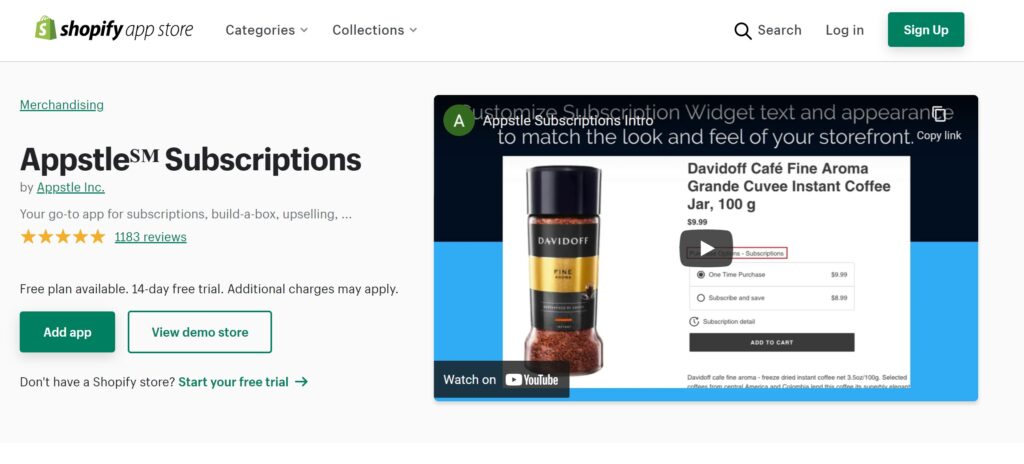
5. Appstle Subscriptions

Shopify subscription apps

Appstle Subscriptions iIS A THOROUGH SHOPIFY REGISTRATIONS APP that enables you to use product or services to your clients, on a persisting basis. As well as this means persisting earnings to you! Appstle Subscriptions offers both CONVENTIONAL SUBSCRIPTIONS along with BUILD-A-BOX!

Top Features

-Self-managed subscription
Offer your consumers, the alternatives to pause or skip shipments, recharge or reconfigure memberships (swap/add/delete items), include products one-time, as well as readjust all shipment days
-Blended cart check out
Decrease checkout redirections and rubbings, by making it possible for unified/mixed carts.
-Smooth Shopify check out link
Experience easy and also secure checkout by incorporating with Shopify checkout
Car billing for subscription items – normal recharge and also pre-paid/bulk billing
Automatically costs your clients in a hassle-free way, utilizing saved client repayment approaches saved in Shopify.
-Customized e-mail notices
Send your buyers personalized as well as automated e-mails, to keep them engaged
-Custom shipping
Create and also manage several shipping profiles for membership plans, based on vital variables (order worth, weight, …).
-Supply projecting.
Always remain on top of supply requires for upcoming orders with our thorough tracker.
Dunning administration to decrease churn.
Regain fell short transactions as a result of expired/declined cards, with in-built mechanisms, to immediately notify clients and also retry settlements.
Termination administration to recognize your consumers’ pulse.
Instantly set off questionnaires when a membership is canceled, to comprehend your clients’ inspirations.
-Real-time item performance tracker.
Accessibility detailed records of your customers, income, and also registrations, as well as track your item efficiency in real-time.
-Custom-made CSS and subscription widget choice.
Gain access to extremely adjustable CSS and also subscription widget performances from the Control panel.

Pricing 

Appstle Subscriptions is available with free plan, and has three paid plans. The Starter plan costs $10 for a month, the Business plan costs $30 for a month and the Entreprise plan costs $150 for a month.  

More information about the Appstle  Subscriptions plans here.

Our Take 

Appstle ℠ Subscriptions is an extensive persisting orders & settlements soln. that enables you to use products/services to your clients, on a reoccuring basis. Started by an Apple-Siri engineer, Appstle ℠ makes use of cutting edge innovation, to supply compelling functions at engaging prices. 

4. Recharge


shopify subscription app


ReCharge Subscriptions is one of the most used apps available on Shopify given the wide range of features and its ability to offer multiple subscription plans to meet your needs. As an entrepreneur, you would know that customers are always looking for flexible payment systems and look for transparency when they are paying for something – in such cases, ReCharge Shopify subscription app will help. This is because it offers multiple payment methods, including PayPal, ACH, credit cards, and debit cards. 

Due to multiple payment methods, this app is more popular than other Shopify Subscription Apps.

All these payment methods are added to the payment tab, so your customers will remain happy. With the purchase history accounts and order management, the customers will be able to check the order status. On top of everything, it will help handle multiple customers and subscriptions at one time. It allows the users to send notifications to their customers whenever they need to provide the information. Not to forget, it integrated with various third-party apps to expand the eCommerce store’s functionality.  

Top Features

To begin with, it has a customer portal available which allows the customers to control the subscriptions for enhancing the average order value of the store. The users can add the one-time purchases into repetitive orders and allow product swapping. Moreover, it allows the users to edit the payment information and address for recurring billing as well as the delivery frequency of the product. 

Secondly, the merchant portal is an ultimate feature that will help create loyal customer relationships by managing customer information. For instance, the eCommerce store owners can create a special subscription for a user and manage the subscriptions. Moreover, it helps create discounts for some subscriptions or simply pause/cancel one’s subscription. 

Thirdly, ReCharge Subscriptions offer an event history feature. With this feature, the store owners can identify the trends and why some customers are changing subscriptions. It will help improve the business strategy to provide the best experience to customers and grow the business. 

One promising feature of ReCharge Subscriptions is the frictionless payment. With this payment feature, the recurring payments will be streamlined. In addition, it can be integrated with checkout, so customers don’t need to work on a separate page for checkout.  

Benefits 

  • Easy subscriptions development 
  • Allows customers to track the orders 
  • Automated customer data collection 
  • Reduction in churn rate 
  • Stores the payment information 
  • Order management and API system 
  • Mobile-friendly 
  • Allows third-party integrations 

Pricing 

ReCharge Subscriptions is available with a 60-days free trial and has two paid plans. The standard plan costs $60 for a month and offers merchant tools, order management, and payment features. Secondly, the pro plan costs $300 for a month and includes a client portal, advanced analytics, and other features mentioned in the stand plan.  

Our Take 

Designed with the API and order management, it provides ultimate freedom to the customers while freeing up some time for the business owners. As a business owner, you will reap benefits through a reduction in churn rate and automated data collection. Not to forget, the pricing plan is economical and provides value. 

Wrapping It Up 

With numerous Shopify subscription apps available made by several Shopify Website Developers , it’s needless to say that your eCommerce store will have various options to scale the business appearance. The four apps mentioned in this article are the cream of the crowded Shopify recurring payments app market which any Shopify seller or Shopify agency can use, so which one of these Shopify Subscription Apps are you going to use for your Shopify store?

Tags:

Author: Wail Amrani

Wail is a Shopify Expert & eCommerce Growth Consultant. Former digital marketing manager at Shopify I’m helping brands & retailers build 8-figure eCommerce. I’ve been leading digital growth for both online and retail brands for over 7 years.
How to Backup Shopify Store In 2025? Secure Your Store

How to Backup Shopify Store In 2025? Secure Your Store

How to Backup Shopify Store

How to Backup Shopify Store? Having a backup for your Shopify store is a recommended ideal practice to make sure the protection of your business-critical information. It is similar to an e-commerce insurance coverage for your online shop. There’s no even worse feeling than deleting something and understanding that it’s gone permanently.

Luckily, there are numerous methods you can protect and also secure your Shopify store from any kind of error or catastrophe and also protect against expensive downtime. We’ll share the best methods that will show you how to backup Shopify store and you can go about supporting and restoring your data. Which one will you follow for your Shopify store?

Why a Shopify Store  Backup Is Important?

A back-up of your Shopify store is necessary most importantly for security factors. Mean your website obtains hacked. Without a duplicate of your store, you would not have the ability to recover it to its original version.

A back-up is additionally very beneficial to change back accidentally-deleted files or products pages. It can additionally be made use of as a method to deal with an important mistake produced by an app or custom-made coding. 

Install Rewind Shopify App & Forget It

Doing manual backups or creating your very own backup solution isn’t a horrible idea. However, if you do not know exactly how or you don’t have time to do it, let Rewind Backups for Shopify take care of it!

Rewind Backups by Rewind is the most used backup app on Shopify. This lifesaving solution automates daily backups of your Shopify shop. Rewind protects the information that drives your service by tracking and also recording adjustments as they take place, enabling you to return as well as recover any kind of little errors or disasters. Rewind utilize all of Shopify’s public APIs to guarantee the delivery of the most holistic as well as accurate backup for your store.

Rewind is the only backup and also recovery service that is certified for all merchants, consisting of those on Shopify Plus also.


Rewind Features:

Fast, Automatic Copies

Rewind copy instantly duplicates products, product pictures, collections, web pages, blog sites, as well as themes. There are no limitations or restrictions on the number of products being copied, as well as you don’t have to bother with time-consuming exports.
Run several stores? Rewind Copy can copy information from one shop to multiple stores, simultaneously.

Rewind Update

Rewind Copy will certainly update a thing in the location store if the product has the same handle as the one it’s duplicating from.

Copy  Meta fields From One Store to One More

Rewind Copy can copy product meta fields from one Shopify store to one more.

Leave Out Certain Product Details

Eager to duplicate some, but not all, product details? You can omit some item information, like costs and images, so you can keep products up-to-date throughout several stores without overwriting shop-specific details.

What Rewind Replicate Can Copy From One Shop to One More

Products, product photos, as well as item metadata (currently in beta).
Collections, both smart collections as well as personalized collections.
Themes as well as theme assets.
Your blog site as well as post.
Pages.

It’s also important to consider the costs involved in hiring professional services. If you’re a SAP developer looking for a new job, you may be interested in knowing the average SAP developer salary in your area to negotiate a fair compensation package. On the other hand, if you’re a business owner who needs technical expertise, you may want to explore the benefits of Java consultancy services or embedded consultancy to ensure your online store is secure and efficient. By investing in the right talent and resources, you can safeguard your data and minimize the risks of data loss or system failure.

How to Restore Shopify Store Manually

Step 1– Export data to CSV documents

Shopify recommends that vendors can utilize CSV data to perform a manual backup of their shop. It is important to note that you can not export your entire store– simply parts of it. The adhering to information can be exported from your Shopify store making use of CSV data:

Products
Clients
Orders
Present cards
Discount rate codes
Style

For each of the items provided, go into your Shopify Admin, go to Products or Customers (etc), after that click Export. Since you have a CSV data of your data, it is necessary to be knowledgeable about the issues that include this method.

how to restore shopify

Step 2– Copy and paste item properties info


Shopify exports careful data– it only includes what Shopify considers to be relevant. However, this does not consist of custom-made groups for items, does not capture images, or exactly how your shop has archived and also indexed items. This detail has to be copied as well as pasted right into a document or spreadsheet program.

If this step is not finished and you were to restore an item from your CSV files, besides the item catalog, you would certainly require to recreate items properties as needed from the CSV data. For example, if an item was removed you would certainly somehow need to archive as well as index it. If you removed a picture for an item, it is gone forever. The use of CSV documents is incredibly restricted for the factors pointed out above.

Step 3–Copy & paste the rest store information that Shopify might not export

To back up the information in your store that Shopify can not export, by hand copy and also paste the remainder of your shop right into a spreadsheet or word file. For instance, an article will need to copy as well as paste the content, category, and also any kind of photos consisted of.

Step 4– Arrange backed up information

Now that all your Shopify store data is backed up, organize it in such a way that is simple to gain access to and also obtain when needed.

Step 5– Safeguard your back-up

Cyberpunks, malware, as well as annoyed workers, can threaten the security of your Shopify backup store. Below are three things you can do to ensure that your store data is secure.

Use file encryption– Your information will certainly be secured by code that can just be opened by a set number of keys that are provided to authorized individuals. The keys need to be kept in a safeguarded area to make sure unapproved users don’t decrypt the documents.
Follow the 3-2-1 rule– keep three backup copies, throughout two different mediums, as well as one off-site.
Examination on a regular basis– this will recognize any kind of susceptibilities of your backup before catastrophe strikes

Step 6– Repeat actions 1-5 frequently, to record new changes made to your Shopify store

Due to the fact that this is a hands-on procedure, actions 1-5 should be repeated whenever an adjustment is made to have the most precise and also up-to-date backup. Developing a backup routine or appointing a staff member to this job can ensure that your manual backup is constantly up-to-date.

Step 7– When a tiny error is made or disaster occurs in your shop, import CSV data

This procedure looks vary depending on the sort of data restoration you are trying to achieve. Let’s state we are taking care of CSV documents including items.

If you are wanting to back up all of your products– from your Shopify dashboard import the item CSV file and the changes will be shown in your store.

If you are wanting to restore a single item or part of items– if you are to make a tiny mistake, you require to arrange through the CSV (which contains every one of your items) to import specific changes to the impacted subset of data. This is a timely job, which is one more reason we do not recommend CSV data as a backup option.

Step 8– Paste continuing to be store information from your backup

Items such as posts and also product pictures have to be by hand entered to restore your store. If any type of info is missing from your CSV data, or various other documents, you would require to recreate the properties as required from the raw information.

how to backup shopify store

How Secure & Safe is Shopify Against Hacking?

Shopify is known as among the top eCommerce platforms around the planet today. Each month, countless customers and also stores exchange items or solutions for financial transactions, and a lot of those are done with Shopify-made shops.

This suggests that Shopify online stores are very safe versus hacking, but accidents do happen.

There is never a guarantee that on the internet information can not get dripped, hacked, or eliminated due to computer mistakes or on the internet thieving.

Conclusion

Losing data from your Shopify store could have a damaging influence on your business and also you might shed your consumers’ orders so you can not satisfy them, leading to a loss in sales. You commonly likewise have to hang around as well as resources trying to recover your shop.

The very best solution is to backup your Shopify store to have access to every one of the crucial documents you need. When you have the backup files, getting a new Shopify store up and running will certainly be much quicker.

If you’re looking for the fastest and also most secured method to backup as well as restore your Shopify store, look no further than an application backup that instantly restores your Shopify store every day and also makes it easy to backup data when required. This is the best choice for any Shopify agency or merchant.

Tags:

Author: Wail Amrani

Wail is a Shopify Expert & eCommerce Growth Consultant. Former digital marketing manager at Shopify I’m helping brands & retailers build 8-figure eCommerce. I’ve been leading digital growth for both online and retail brands for over 7 years.
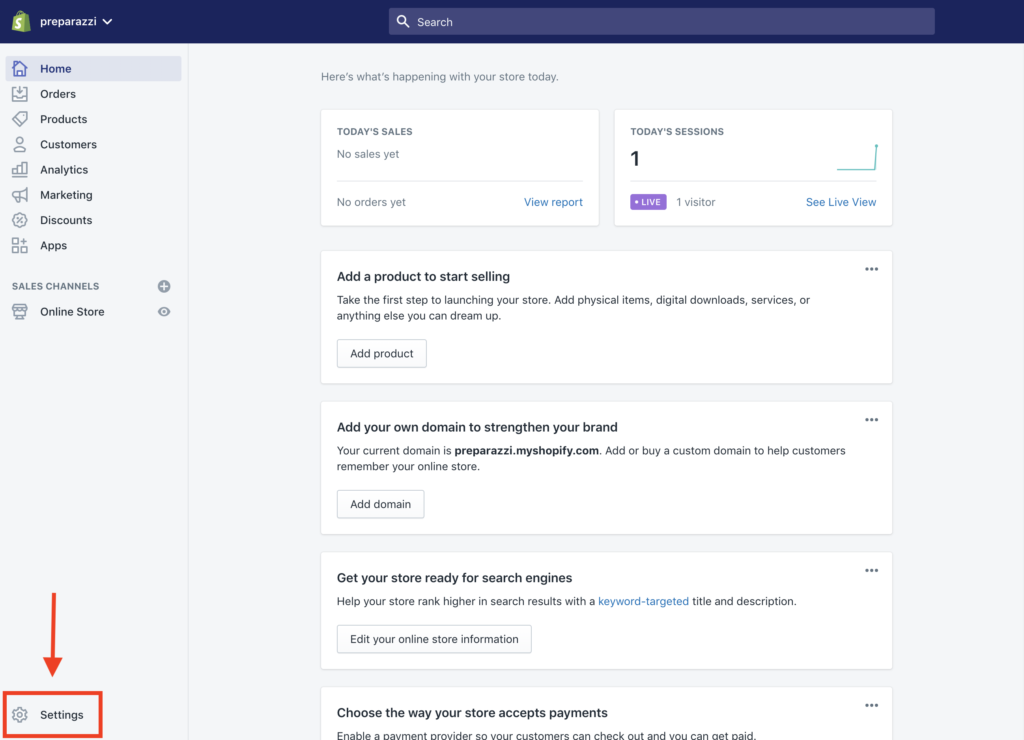
Our Latest Articles

9 Powerful Ways a Shopify Marketing Agency Can 3× Your Store Revenue

9 Powerful Ways a Shopify Marketing Agency Can 3× Your Store Revenue

Shopify Marketing Agency — if you’re running a Shopify store and growth feels harder than it should be, this phrase probably already crossed your mind more than once. Maybe ads are getting more expensive every month, traffic is coming in, but sales aren’t moving in...

7 Powerful Tools to Download From Instagram Without Losing Quality

7 Powerful Tools to Download From Instagram Without Losing Quality

Download From Instagram — if you’ve ever tried to save a photo or video and ended up with blurry quality, weird cropping, strange colors, or even a watermark you didn’t ask for, you already know how annoying this process can be. Instagram is fantastic for discovering...